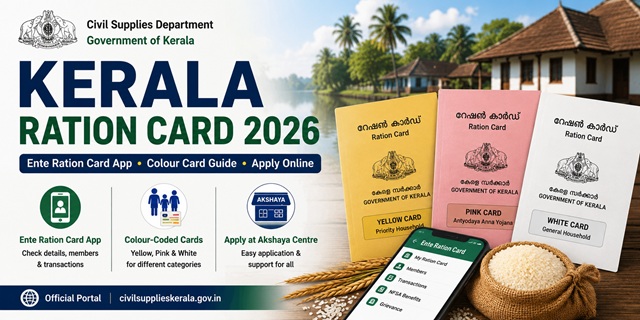
Kerala uses a colour-coded Ration Card system that is distinct from most other states. The state issues three types of cards - Yellow (AAY) for the poorest families, Pink (Priority) for BPL families with annual income below Rs. 24,200, and White (Non-Priority) for APL families. Kerala is also the only state with a dedicated app called “Ente Ration Card” (meaning “My Ration Card” in Malayalam) on Android and iOS, and uses a separate Sandes mobile app to send application status updates and print passwords. Applications can be submitted online, through Akshaya centres, or at TSO/DSO offices. All services are managed by the Civil Supplies Department, Government of Kerala.
- Civil Supplies Portal: civilsupplieskerala.gov.in
- Citizen Login (Apply Online): ecitizen.civilsupplieskerala.gov.in
- RC Details Check: etso.civilsupplieskerala.gov.in/RC-Details
- Application Status: etso.civilsupplieskerala.gov.in/Application-Status
- AePDS Portal: epos.kerala.gov.in
- Grievance Portal: pg.civilsupplieskerala.gov.in
Key Details at a Glance
| Detail | Information |
|---|---|
| Issuing Authority | Civil Supplies Department, Govt. of Kerala |
| Civil Supplies Portal | civilsupplieskerala.gov.in |
| Online Application | ecitizen.civilsupplieskerala.gov.in |
| Grievance Portal | pg.civilsupplieskerala.gov.in |
| Mobile App | Ente Ration Card (Android + iOS) |
| Status App | Sandes Mobile App (application status + print password) |
| Yellow Card (AAY) Entitlement | 35 kg per family per month at highly subsidised rates |
| Pink Card (Priority/BPL) Entitlement | 5 kg per person per month - free of cost |
| White Card (Non-Priority/APL) Entitlement | 2 kg rice per person per month at subsidised rate |
| Processing Time | 15 days after submission |
| PDS Helpline | 1967 (Toll Free) |
Types of Ration Card in the State
| Card Type | Colour | Who Gets It | Monthly Entitlement |
|---|---|---|---|
| AAY (Antyodaya Anna Yojana) | Yellow | Poorest of the poor - daily wage earners, primitive tribal groups, destitute individuals, no stable income | 35 kg per family per month at highly subsidised rates |
| Priority Card (PHH/BPL) | Pink | BPL families with annual income below Rs. 24,200 | 5 kg per person per month - free of cost |
| Non-Priority Card (APL) | White | APL families above poverty line with annual income above Rs. 1 lakh. Card serves as identity/address proof. | 2 kg rice per person per month at subsidised rate |
Who Can Apply
- Must be a permanent resident of Kerala with valid address proof
- Must not already hold a valid ration card in Kerala or any other state
- For Pink Card: annual family income must be below Rs. 24,200
- Newly married couples who do not have a ration card can apply
- Families with a newborn can add the child to the existing card
- Persons shifted from another state must first surrender their previous ration card
Documents You Need to Apply
- Aadhaar cards of all family members (mandatory)
- Ward Councillor’s Certificate confirming your residency in the ward (mandatory for new applications)
- Identity proof - Aadhaar, Voter ID, or Driving Licence
- Address proof - electricity bill, water bill, or rent agreement showing Kerala address
- Income certificate (for Pink/BPL and Yellow/AAY categories)
- Passport-size photographs of all adult family members
- Mobile number linked to Aadhaar for OTP verification
- For newly married spouse: marriage certificate
- For newborn: birth certificate
Download application forms from civilsupplieskerala.gov.in/application-forms.
How to Apply Online
- Go to ecitizen.civilsupplieskerala.gov.in.
- Click Sign Up to register as a new citizen user. Enter your name, Aadhaar number, mobile number, and set a password. Verify via OTP.
- After registration, log in and select New Ration Card Application from the dashboard.
- Fill the application form with complete family details, all Aadhaar numbers, income details, and address.
- Upload all required documents including Ward Councillor’s Certificate, income certificate, and address proof.
- Submit the application. An Application Number is generated. Note it for tracking.
Important: Download the Sandes Mobile App from Google Play Store to receive your application status updates and the print password for your ration card. Without the print password you cannot print your approved ration card.
How to Apply via Akshaya Centre
Kerala’s Akshaya centres are government-supported digital service centres available across all districts. This is the easiest option for those who are not comfortable with online applications:
- Visit your nearest Akshaya centre with all required documents.
- Ask the operator to fill and submit the ration card application on your behalf.
- The operator will photograph you and verify your documents.
- Pay the applicable service fee at the Akshaya centre.
- Collect the application acknowledgement with your Application Number.
Akshaya centres are listed at akshaya.kerala.gov.in.
How to Apply at TSO or DSO Office (Offline)
- Visit your nearest Taluk Supply Office (TSO) or District Supply Office (DSO).
- Collect and fill the application form. Attach all required documents.
- Submit to the concerned officer and collect the acknowledgement receipt.
How to Check Application Status
- Go to etso.civilsupplieskerala.gov.in/Application-Status.
- Enter your Application Number and submit.
- Your current application status is displayed.
You can also check status on the Sandes Mobile App which sends push notifications when your application status changes.
How to Check Ration Card Details
- Go to etso.civilsupplieskerala.gov.in/RC-Details.
- Enter your Ration Card Number and submit.
- Your complete ration card details including all member names, card type, and linked FPS are displayed.
How to Check the Ration Card List
- Go to civilsupplieskerala.gov.in.
- Click on Total Cards from the available options on the homepage.
- Select your District, then TSO Name, and then the ARD Number (your ration dealer number).
- The complete ration card list for your area is displayed.
How to Download Your Ration Card
Via Ente Ration Card App
- Download the Ente Ration Card app from Google Play Store or iOS App Store.
- Log in with your registered mobile number and OTP.
- Your ration card details and digital card are available on the dashboard.
- Download or show the digital card at your Fair Price Shop.
Via Civil Supplies e-Services
- Log in at ecitizen.civilsupplieskerala.gov.in with your credentials.
- On your dashboard, your ration card details and download option are available.
- You need the print password received via Sandes app to print the ration card.
Via DigiLocker
- Go to digilocker.gov.in or open the DigiLocker app.
- Log in with your Aadhaar-linked mobile number.
- Search for Ration Card and select issuer as Civil Supplies Department, Kerala.
- Enter your ration card number and district details.
- Click Get Document. Your Kerala ration card is saved in DigiLocker.
How to Add or Remove a Family Member
All member-level changes are done through the e-citizen portal:
- Log in to ecitizen.civilsupplieskerala.gov.in.
- Select the relevant service - Addition of Member or Deletion of Member.
- For adding: enter the new member’s Aadhaar number, name, date of birth, and relationship. Upload supporting documents (birth certificate for newborn, marriage certificate for spouse).
- For removing: select the member, choose the reason, and upload supporting documents (death certificate, etc.).
- Submit and note the acknowledgement number.
You can also do this at any Akshaya centre or TSO office with assistance.
How to Surrender Your Ration Card
Families moving permanently out of Kerala or no longer requiring ration benefits can surrender their card online:
- Go to etso.civilsupplieskerala.gov.in/Surrender-Card.
- Log in with your credentials and submit the surrender request.
How to Link Aadhaar
Kerala’s ration card system is fully integrated with Aadhaar. Aadhaar seeding is mandatory for all members for biometric distribution at FPS. Kerala has a significant population of Non-Resident Keralites (NRKs) returning from Gulf countries - for them, Aadhaar must be linked and mobile number updated before they can access FPS benefits.
- Visit your nearest Fair Price Shop with Aadhaar cards of all family members
- Each member provides fingerprint biometric on the ePoS device
- If fingerprint fails, OTP on Aadhaar-linked mobile is used
- Check Aadhaar seeding status via epos.kerala.gov.in
For the complete guide: How to Link Aadhaar with Ration Card.
Using Your Card in Another State (ONORC)
Kerala sends one of the largest working populations to Gulf countries - but within India too, lakhs of Keralites work in Bengaluru, Chennai, Mumbai, and Delhi. Under the ONORC scheme, Kerala NFSA ration card holders can collect their entitled food grains from any Fair Price Shop in any state. Conversely, migrant workers from other states who come to Kerala for construction, plantation, and domestic work can collect their home state ration at Kerala FPS shops using just their Aadhaar. No transfer or paperwork required.
For complete details: One Nation One Ration Card (ONORC) Complete Guide.
How to File a Grievance
- Online Grievance Portal: pg.civilsupplieskerala.gov.in - submit complaint with evidence (audio, video clips accepted). Track complaint status on the same portal.
- PDS Helpline: 1967 (Toll Free)
- Toll Free Helpline Numbers: Available at civilsupplieskerala.gov.in/toll-free-helpline-numbers
- TSO / DSO Office: Visit your Taluk or District Supply Office in person
- Akshaya Centre: Lodge complaints at any Akshaya centre for assisted grievance submission
Official Portals and Useful Links
- Civil Supplies Kerala - civilsupplieskerala.gov.in
- Apply Online - ecitizen.civilsupplieskerala.gov.in
- Check RC Details - etso.civilsupplieskerala.gov.in
- Check Application Status - etso.civilsupplieskerala.gov.in
- Surrender Ration Card - etso.civilsupplieskerala.gov.in
- AePDS Kerala - epos.kerala.gov.in
- Grievance Portal - pg.civilsupplieskerala.gov.in
- Download Application Forms - civilsupplieskerala.gov.in
- Toll Free Helpline Numbers - civilsupplieskerala.gov.in
- Find Nearest Akshaya Centre - akshaya.kerala.gov.in
- Download e-Ration Card - DigiLocker
- Check Aadhaar Seeding Status - nfsa.gov.in
PDS Helpline: 1967 (Toll Free)
Disclaimer: This article is for informational purposes only. Processes are subject to change by the Kerala Government. Always refer to civilsupplieskerala.gov.in for the latest official information.
Add new comment