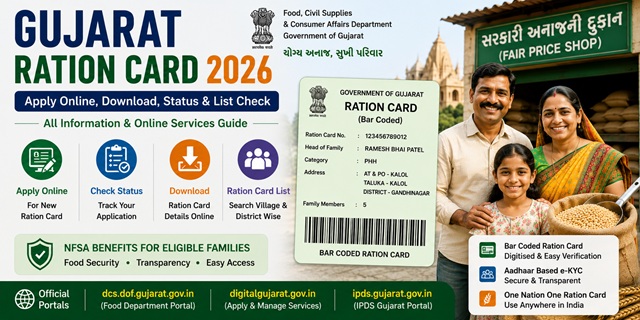
Gujarat issues Bar Coded Ration Cards - a digitised system where each card has a unique barcode for electronic verification at Fair Price Shops. The state has four ration card categories including the Annapurna Yojana card exclusively for senior citizens aged 65 and above with no income - providing 10 kg free food grains monthly. For BPL eligibility, Gujarat uses specific income limits: below Rs. 501 per capita per month in urban areas and Rs. 324 per capita per month in rural areas. All services are managed by the Directorate of Food and Civil Supplies, Government of Gujarat through dcs-dof.gujarat.gov.in, digitalgujarat.gov.in, and ipds.gujarat.gov.in.
Gujarat issues Bar Coded Ration Cards - a digitised system with unique barcodes for each card that enables electronic verification at Fair Price Shops. All ration card services are available through:
- DCS-DOF Portal: dcs-dof.gujarat.gov.in - official food department portal, ration card details and list
- Digital Gujarat Portal: digitalgujarat.gov.in - online application for new card, additions, modifications
- IPDS Portal: ipds.gujarat.gov.in - Integrated PDS for ration card list and transaction data
Key Details at a Glance
| Detail | Information |
|---|---|
| Issuing Authority | Directorate of Food and Civil Supplies, Govt. of Gujarat |
| DCS-DOF Portal | dcs-dof.gujarat.gov.in |
| Online Application Portal | digitalgujarat.gov.in |
| IPDS Portal | ipds.gujarat.gov.in |
| Card Type | Bar Coded Ration Card (digitised) |
| Monthly Entitlement (PHH) | 5 kg per person per month |
| Monthly Entitlement (AAY) | 35 kg per family per month (free) |
| APL-1 Entitlement | 4 kg rice at Rs. 3/kg + 2 kg wheat at Rs. 2/kg per person |
| Food Helpline | 1800-233-5500 (Toll-free) |
| PDS Helpline | 1967 |
Types of Ration Card in the State
Gujarat issues ration cards in four main categories under NFSA and state PDS schemes. All cards are bar coded for electronic verification:
| Type | Card Colour | Who Gets It | Monthly Entitlement |
|---|---|---|---|
| AAY | Pink | Poorest of the poor - no stable income, landless labourers, widows, elderly with no support | 35 kg per family per month - free of cost |
| BPL (PHH) | Yellow | Below poverty line families - average per capita monthly income below Rs. 501 (urban) or Rs. 324 (rural) | 5 kg per person per month |
| APL-1 | Green | Above poverty line families with annual income below Rs. 1.2 lakh (rural) or Rs. 1.5 lakh (urban) | 4 kg rice at Rs. 3/kg + 2 kg wheat at Rs. 2/kg per person |
| Annapurna Yojana | - | Senior citizens aged 65 or above who are not covered under the National Old Age Pension Scheme and have no regular income | 10 kg food grains per month - free |
Who Can Apply
- Must be a permanent resident of Gujarat with valid address proof in the state
- Must be at least 18 years old to apply as head of family
- The family must not already hold a valid ration card anywhere in India
- For BPL category: average per capita monthly income must be below Rs. 501 for urban and Rs. 324 for rural areas
- For APL-1: annual family income must not exceed Rs. 1.2 lakh in rural areas or Rs. 1.5 lakh in urban areas
- Newly married couples without a ration card can apply for a new family card
- Families with a newborn can add the new member to their existing card
- Families owning four-wheelers, paying income tax, or having members in high-income government jobs may be excluded from subsidised categories
Documents You Need to Apply
- Aadhaar card of the head of household and all family members
- Proof of residence in Gujarat - electricity bill, water bill, or passport showing Gujarat address
- Identity proof - Aadhaar card, Voter ID, or driving licence
- Income certificate issued by Mamlatdar (for BPL and AAY categories)
- Passport-size photograph of the head of household
- Bank passbook copy of the head of household
- Mobile number linked to Aadhaar
- For newly married spouse: marriage certificate
- For newborn: birth certificate
Official application forms can be downloaded from dcs-dof.gujarat.gov.in/application-forms.htm.
How to Apply Online
- Go to digitalgujarat.gov.in.
- Click on Services in the top menu and select Citizen Services.
- Search for Application for New Ration Card and click on it.
- Read the instructions and the list of documents required. Click Apply Online.
- Register as a new user if you do not have an account, or log in with your existing credentials.
- Fill in the application form with all required details including family member information and Aadhaar numbers.
- Upload scanned copies of all required documents.
- Click Submit. Note the Application Number for status tracking.
How to Apply Offline
- Download the application form from dcs-dof.gujarat.gov.in/application-forms.htm or collect it from your nearest Taluka Mamlatdar Office or Jan Seva Kendra.
- Fill the form in block letters and attach self-attested copies of all required documents.
- Submit at the Taluka Mamlatdar Office (rural/taluka areas) or Jan Seva Kendra (urban areas).
- Collect the acknowledgement receipt with your application number.
- After field verification by a food officer, your bar coded ration card is issued.
How to Check Application Status
- Go to dcs-dof.gujarat.gov.in.
- Under the Ration Card section, click Check / Verify Your Ration Card Details Online.
- Enter your Ration Card Number and click Submit.
- Your ration card details and current status are displayed.
You can also check your application status on digitalgujarat.gov.in by logging in and checking your submitted service requests.
How to Check the Ration Card List
- Go to ipds.gujarat.gov.in.
- Select the Year and Month, enter the captcha and click Go.
- Click on your District.
- Click on your Taluka and Town or Village.
- Click on the number shown below the relevant ration card category.
- The complete ration card list for your area is displayed.
You can also verify individual ration card details online at dcs-dof.gujarat.gov.in by entering your ration card number.
How to Download Your Ration Card
Via DigiLocker
- Go to digilocker.gov.in or open the DigiLocker app.
- Log in with your Aadhaar-linked mobile number.
- Search for Ration Card and select the issuer as Food and Civil Supplies Department, Gujarat.
- Enter your ration card number and required details.
- Click Get Document. Your Gujarat ration card is fetched and saved in DigiLocker.
Via DCS-DOF Portal
- Go to dcs-dof.gujarat.gov.in.
- Under Ration Card, click Check / Verify Your Ration Card Details Online.
- Enter your ration card number and submit.
- Your ration card details are displayed. Print or save as PDF.
How to Add or Remove a Family Member
Member addition and removal is done through the Digital Gujarat portal:
- Go to digitalgujarat.gov.in and log in.
- Go to Services > Citizen Services.
- For adding a member: select Add Name in Ration Card Online. Fill in the new member’s details and upload supporting documents (birth certificate for newborn, marriage certificate for spouse).
- For removing a member: select Removal of Name from Ration Card and follow the process.
- Submit and note the acknowledgement number.
You can also apply for a Separate Ration Card or Duplicate Ration Card through the same portal.
How to Link Aadhaar with Ration Card
Aadhaar seeding is mandatory for all members to continue receiving ration under Gujarat’s PDS. Two methods are available:
- Via Digital Gujarat portal: Log in to digitalgujarat.gov.in, go to Citizen Services, and select the Aadhaar linking or ration card update service. Enter your ration card number and Aadhaar details and verify via OTP.
- Via Fair Price Shop: Visit your designated FPS with Aadhaar cards of all family members. Ask the dealer to complete Aadhaar seeding on the ePoS device through biometric fingerprint authentication.
For the complete guide: How to Link Aadhaar with Ration Card.
Using Your Card in Another State (ONORC)
Gujarat NFSA ration card holders (AAY and PHH/BPL categories) can collect their food grain entitlement from any Fair Price Shop anywhere in India under the One Nation One Ration Card (ONORC) scheme. Only your Aadhaar number is needed at the FPS in the other state.
For complete details: One Nation One Ration Card (ONORC) Complete Guide.
How to Find Your Nearest Fair Price Shop
Gujarat provides an online FPS locator on the official portal:
- Go to dcs-dof.gujarat.gov.in.
- Click on Know Your FPS and Know Your Godown on the homepage.
- Click the FPS link. A map is displayed showing nearby FPS locations.
- Click on the nearest FPS location on the map to see its full details.
How to File a Grievance
- Food Helpline: 1800-233-5500 (toll-free)
- PDS Helpline: 1967
- Online Complaint: Available through the Digital Gujarat portal at digitalgujarat.gov.in
- Taluka Mamlatdar Office: Visit your nearest Mamlatdar Office with ration card and complaint details
- District Food Officer: Contact details available at dcs-dof.gujarat.gov.in
Official Portals and Useful Links
- DCS-DOF Gujarat - dcs-dof.gujarat.gov.in (RC details, FAQ, forms)
- Digital Gujarat - digitalgujarat.gov.in (Apply online, add/remove member)
- IPDS Gujarat - ipds.gujarat.gov.in (Ration card list)
- Download Application Forms - dcs-dof.gujarat.gov.in
- Download e-Ration Card - DigiLocker
- Check Aadhaar Seeding Status - nfsa.gov.in
Food Helpline: 1800-233-5500 (Toll-free)
PDS Helpline: 1967
Disclaimer: This article is for informational purposes only. Eligibility criteria and processes are subject to change by the Gujarat Government. Always refer to dcs-dof.gujarat.gov.in for the latest official information.
Add new comment