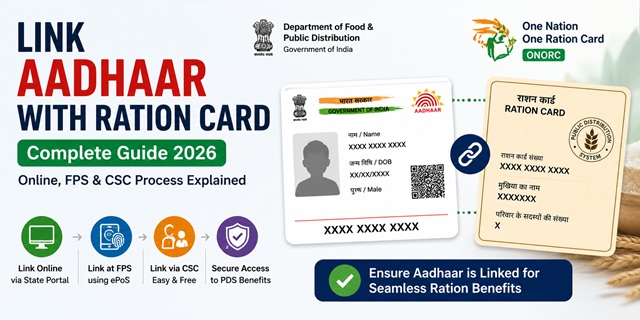
Linking your Aadhaar Card with your Ration Card is mandatory for all members of a household to continue receiving subsidised food grains under the National Food Security Act (NFSA). The Central Government has made this linking compulsory to eliminate duplicate beneficiaries, prevent fraud in the Public Distribution System, and enable the One Nation One Ration Card (ONORC) scheme that allows you to collect your ration from any Fair Price Shop across India.
Every member listed on your ration card must have their Aadhaar linked individually. The process is free and can be done through multiple official channels.
Why is Aadhaar-Ration Card Linking Mandatory?
The Department of Food and Public Distribution under the Central Government has mandated Aadhaar seeding with ration cards for the following reasons:
- To enable biometric authentication at ePoS (electronic Point of Sale) machines at Fair Price Shops so that only genuine beneficiaries receive ration
- To power the One Nation One Ration Card (ONORC) system which requires Aadhaar-based identity verification at any FPS in India
- To remove ghost and duplicate ration cards from the PDS system
- To ensure Direct Benefit Transfer (DBT) of food subsidies reaches the right families
If Aadhaar is not linked for a member, they may not be able to collect their monthly ration entitlement as biometric authentication will fail at the Fair Price Shop.
Who Needs to Link Aadhaar?
- Every individual member listed on the ration card must link their own Aadhaar Card
- The head of the family as well as all other members including children must be linked
- For children who do not yet have an Aadhaar, their enrolment for Aadhaar should be done first at the nearest Aadhaar Seva Kendra, and then linking done
Three Official Methods to Link Aadhaar with Ration Card
| Method | Where | Best For |
|---|---|---|
| Online via State Food Department Portal | Your state's food department website | Those with internet access and ration card number ready |
| Offline via Fair Price Shop (ePoS machine) | Your nearest ration dealer / FPS | Everyone — most common and easiest method |
| Via Common Service Centre (CSC) | Nearest CSC or Jan Seva Kendra | Those needing assisted help with the process |
Method 1 - Link Aadhaar Online via State Food Department Portal
Each state has its own portal for ration card services. The general online linking process is as follows:
- Visit your state's food department portal. All state portal links are available on the central NFSA portal at nfsa.gov.in.
- Look for the option labelled Aadhaar Seeding, Link Aadhaar with Ration Card, or Aadhaar Update in the ration card services section.
- Enter your Ration Card Number and the member's Aadhaar number you want to link.
- Enter the captcha and submit.
- An OTP may be sent to the mobile number registered with the Aadhaar for verification.
- After successful submission, an acknowledgement is generated. Save the reference number.
- The linking is processed and reflected in the system within a few working days.
Some states may require you to log in with your ration card number or registered mobile number before accessing the Aadhaar linking service. The exact steps differ slightly by state.
Method 2 - Link Aadhaar at Your Fair Price Shop (ePoS Machine)
This is the most widely used method and the one recommended for all Ration Card holders. Every Fair Price Shop (ration dealer) has an ePoS machine issued by the state government.
- Visit your designated Fair Price Shop (the ration shop from which you normally collect your ration).
- Carry the Aadhaar cards of all family members whose Aadhaar needs to be linked, along with your ration card.
- Ask the ration dealer to do Aadhaar seeding on the ePoS machine.
- The dealer enters your ration card number and each member's Aadhaar number into the ePoS device.
- Each member provides their fingerprint biometric on the ePoS machine for authentication.
- The system verifies the Aadhaar details and links each member's Aadhaar to the ration card.
- A confirmation is generated on the ePoS device. You may also receive an SMS on your registered mobile number.
This method also simultaneously completes the e-KYC for each member as the biometric authentication serves as identity verification. For the full e-KYC process: Ration Card e-KYC Guide.
Method 3 - Link via Common Service Centre (CSC)
- Visit your nearest Common Service Centre (CSC) or Jan Seva Kendra.
- Carry your ration card and Aadhaar cards of all members to be linked.
- Request the CSC operator to assist with Aadhaar seeding for your ration card.
- The operator accesses the state food department portal or the designated system and enters the required details.
- Biometric or OTP authentication is completed for each member.
- A receipt or acknowledgement is provided. Save it for your records.
CSCs are located across India including in rural areas. You can find your nearest CSC at locator.csccloud.in.
How to Check Aadhaar-Ration Card Link Status
After linking, you can verify whether your Aadhaar has been successfully seeded with your ration card:
- Go to the NFSA portal at nfsa.gov.in and enter your ration card number to view member details and Aadhaar seeding status.
- Alternatively, visit your state food department portal and use the Aadhaar seeding status check option.
- You can also check by visiting your Fair Price Shop and asking the dealer to verify the linking status on the ePoS machine.
What to Do If Your Aadhaar Name Does Not Match Ration Card Name
A common reason Aadhaar linking fails or creates problems is a name mismatch between the ration card and the Aadhaar. For example, a different spelling or a missing middle name.
- If the mismatch is minor (spelling variation), the system may still accept it. Try the linking first.
- If the mismatch is significant, you have two options:
- Update the name in your Aadhaar to match the ration card at myaadhaar.uidai.gov.in or an Aadhaar Seva Kendra.
- Or request a name correction in your ration card through your state food department portal.
- In either case, after both documents have matching names, retry the linking process.
What Happens If Aadhaar Is Not Linked?
- Members whose Aadhaar Card is not linked may be unable to collect their monthly ration entitlement as biometric authentication at the ePoS machine will fail
- Unlinked members may be removed from the active beneficiary list during e-KYC verification drives
- The family will not be able to use the One Nation One Ration Card (ONORC) facility to collect ration in a different state
- In some states, households with incomplete Aadhaar seeding may have their ration card marked as inactive
Official Portals and Useful Links
- National Food Security Act Portal - nfsa.gov.in
- Check Ration Card and Aadhaar Seeding Status - nfsa.gov.in
- All State Ration Card Portals - nfsa.gov.in
- Update Aadhaar Details - myaadhaar.uidai.gov.in
- Locate Aadhaar Seva Kendra - uidai.gov.in
- Department of Food and Public Distribution - dfpd.gov.in
- Locate Nearest CSC - locator.csccloud.in
Central PDS Helpline: 1967 (Toll-free)
UIDAI Helpline: 1947 (Toll-free, Monday to Saturday)
Also read: Ration Card in India - Complete Guide (2026)
Disclaimer: This article is for informational purposes only. Processes vary by state and are subject to change by the Central and State Governments. Always refer to nfsa.gov.in and your state food department portal for the latest official information.
Add new comment