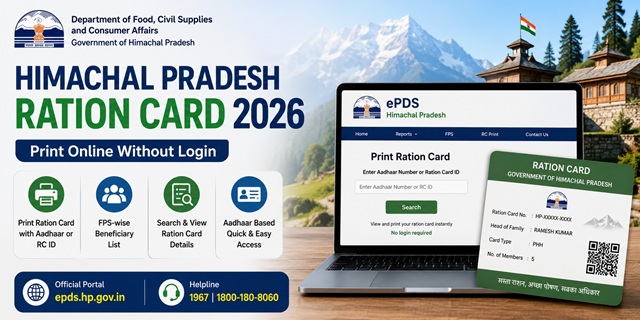
Himachal Pradesh has one of the most transparent PDS systems in India. The state allows any citizen to print their Ration Card directly from the portal by simply entering their Aadhaar number or Ration Card ID - no login required. The ePDS portal also lets citizens apply for a new ration card online, update their mobile number, and check their FPS-wise beneficiary list. Ration cards in HP carry a unique format: HP-XXXXX-XXXX. The state covers 12 districts and 117 tehsils through its PDS network. All services are managed by the Department of Food, Civil Supplies and Consumer Affairs, Government of Himachal Pradesh.
- ePDS Portal: epds.hp.gov.in - apply, check list, update mobile, beneficiary details
- Print Ration Card: epds.co.in/RC_TEST.aspx - print using Aadhaar or RC ID
- Food Department: food.hp.nic.in - forms and department information
- Forms: epds.hp.gov.in/FormsCenter1.aspx
Key Details at a Glance
| Detail | Information |
|---|---|
| Issuing Authority | Dept. of Food, Civil Supplies and Consumer Affairs, Govt. of Himachal Pradesh |
| ePDS Portal | epds.hp.gov.in |
| Print Ration Card | epds.co.in/RC_TEST.aspx |
| Food Department | food.hp.nic.in |
| Ration Card ID Format | HP-XXXXX-XXXX |
| Monthly Entitlement (BPL/PHH) | 5 kg per person per month |
| Monthly Entitlement (AAY) | 35 kg per family per month |
| Application Fee | Rs. 5 per copy at collection |
| Processing Time | 15 days after submission |
| CM Helpline | 0177-2625400 |
| PDS Helpline | 1967 (Toll Free) |
Types of Ration Card in the State
| Type | Who Gets It | Monthly Entitlement |
|---|---|---|
| AAY (Antyodaya Anna Yojana) | Poorest of the poor - daily wage earners, landless labourers, widows, elderly with no support | 35 kg per family per month at highly subsidised rates |
| BPL (Below Poverty Line) | Families classified below the poverty threshold - income and asset criteria as determined by HP government | 5 kg per person per month at subsidised rates |
| APL (Above Poverty Line) | Families above the poverty line who need a ration card as identity or address proof | Essential commodities at near-market rates or limited subsidy |
Who Can Apply
- Must be a permanent resident of Himachal Pradesh - proof of normal residence required
- Must not already hold a ration card anywhere in India
- Applicants who have changed their residential address can apply for a fresh card
- Those with a temporary ration card (valid for 3 months) can apply for a permanent one
- Those whose ration card was lost, defaced, or mutilated can apply for a duplicate
- Students in government educational institutions (schools, colleges, ITIs) can provide their student identity card as proof of normal residence
Documents You Need to Apply
- Form-II (Application for Ration Card) - download from epds.hp.gov.in/FormsCenter1.aspx in Hindi or English
- Deletion Certificate - certificate from Panchayat Secretary or Food & Supplies Officer confirming you do not already hold a ration card
- Proof of normal residence in HP - electricity bill, water bill, or rent agreement. Students can use their institutional identity card.
- Aadhaar cards of all family members
- Passport-size photograph of the head of household
- Mobile number for OTP verification
- For newly married spouse: marriage certificate
- For newborn: birth certificate
How to Apply Online
- Go to epds.hp.gov.in.
- Click on Apply Ration Card from the left menu on the homepage.
- On the next screen, click on Citizen User.
- Enter your mobile number and captcha code. Click Submit.
- Enter the OTP received on your mobile number to log in.
- On the dashboard, click Ration Card Registration.
- Fill in the registration form with all required details - family head name, all member details, Aadhaar numbers, address, district, block, and panchayat.
- Upload the required documents.
- Click Submit. A unique Reference Number is generated. Save this for tracking.
After submission, the application goes to the Inspector or Panchayat Secretary who reviews and approves it. Your new ration card is typically issued within 15 days. The Rs. 5 fee is collected at the time of physically collecting the card.
How to Apply Offline
HP has a clear offline route depending on where you live - rural and urban areas have different submission points:
- Rural areas: Submit Form-II to your Panchayat Secretary or Panchayat Sahayak along with all required documents. The form must be attested by the concerned authority.
- Urban areas: Submit to the Food and Supplies Officer or Inspector, FCS&CA at your nearest Food and Civil Supplies office.
After submission you receive a receipt mentioning the expected date of ration card collection. Collect the ration card on or after that date by paying Rs. 5 per copy.
How to Print Your Ration Card Online
This is one of HP’s most useful features - you can print your ration card anytime without visiting any office. Just your Aadhaar number is enough:
- Go to epds.co.in/RC_TEST.aspx.
- In the left menu, click FPS Ration Card.
- Select Print Ration Card from the sub-menu.
- Click on Select Input Type and choose either Aadhaar or Ration Card ID (in HP-XXXXX-XXXX format).
- Enter your Aadhaar number or Ration Card ID in the field provided.
- Click Search. Your ration card details are displayed.
- Click the Print icon at the bottom of the page to download or print your ration card.
This printed or downloaded copy is a valid e-ration card and can be shown at any Fair Price Shop.
How to Check Application Status
- Go to epds.hp.gov.in.
- Click on Apply Ration Card from the left menu.
- Click Citizen User, enter your mobile number and OTP to log in.
- Select Ration Card Registration Status from the dashboard.
- Enter your Reference Number received at the time of submission.
- Your current application status is displayed.
How to Check the Ration Card List
- Go to epds.hp.gov.in.
- Click on Beneficiaries Drilldown from the left navigation menu.
- Click on your District from the list of all 12 districts of HP.
- Click on your Block.
- A list of Fair Price Shops (FPS) in your block is displayed. Click on your FPS ID to see all beneficiaries under that shop.
- Click on any ID to see the complete family member details for that ration card.
You can also search by Aadhaar number by using the Find Ration Cards Data option under FPS Ration Card on epds.co.in/RC_TEST.aspx.
How to Add or Remove a Family Member
Himachal Pradesh processes member additions and deletions through the Panchayat Secretary (rural) or Food and Supplies Officer (urban) - the same offices that handle new applications.
- Adding a newborn: Submit Form-II with the birth certificate at your Panchayat Secretary or FSO office. The child is added within 15 days.
- Adding a newly married spouse: Submit Form-II with the marriage certificate. The spouse must first be deleted from their parents’ ration card and a Deletion Certificate must be attached.
- Removing a deceased member: Submit the death certificate at the same office for deletion from the ration card.
- Removing a migrated member: The member must get a Deletion Certificate from the current Panchayat and submit it at the new area for inclusion there.
How to Update Mobile Number on HP Ration Card
HP has a dedicated page to update your registered mobile number online without visiting any office:
- Go to epds.hp.gov.in/Update_Mobile_Number.aspx.
- Enter your Ration Card ID (HP-XXXXX-XXXX format) or Aadhaar number.
- Enter your new mobile number and submit.
- Verify via OTP sent to the new number.
Keeping your mobile number updated is important as OTP-based login and application tracking depend on it.
How to Link Aadhaar
HP has a large tribal and rural population spread across remote hills and valleys. Aadhaar seeding at the FPS is the primary method but the portal also provides an online option. For HP residents living in remote areas where connectivity is poor, the FSO office or Panchayat Secretary can assist with Aadhaar seeding.
- Online: On epds.hp.gov.in, use the Link to UID option to link your Aadhaar number to your ration card
- At FPS: Visit your designated Fair Price Shop with Aadhaar cards of all members. Each member completes fingerprint biometric authentication on the ePoS device.
- At FSO Office: For remote areas, the Panchayat Secretary or Food and Supplies Officer can assist with Aadhaar seeding
For the complete guide: How to Link Aadhaar with Ration Card.
Using Your Card in Another State (ONORC)
Himachal Pradesh has a significant population of seasonal workers, labourers, and students who move to cities like Delhi, Chandigarh, and Dehradun for work or study. Under the One Nation One Ration Card (ONORC) Scheme, HP ration card holders can collect their entitled food grains from any Fair Price Shop across India. Similarly, migrant workers who come to HP for seasonal work in construction, orchards, or tourism can collect ration at HP FPS shops using their home state cards. Only Aadhaar authentication is needed - no paperwork or card transfer required.
For complete details: One Nation One Ration Card (ONORC) Complete Guide.
How to File a Grievance
- Online Complaint: Go to epds.hp.gov.in and click Add Complaint from the left menu. View complaint status by clicking View Complaints.
- CM Helpline: 0177-2625400
- PDS Helpline: 1967 (Toll Free)
- Panchayat Secretary or FSO: For rural residents - approach your Panchayat Secretary or Food and Supplies Officer directly
Official Portals and Useful Links
- ePDS HP Portal - epds.hp.gov.in (Apply, beneficiary list, complaints)
- Print Ration Card - epds.co.in/RC_TEST.aspx
- Download Forms - epds.hp.gov.in
- Update Mobile Number - epds.hp.gov.in
- Food Department HP - food.hp.nic.in
- Check Aadhaar Seeding Status - nfsa.gov.in
- DigiLocker - digilocker.gov.in
CM Helpline: 0177-2625400
PDS Helpline: 1967
Disclaimer: This article is for informational purposes only. Processes are subject to change by the HP Government. Always refer to epds.hp.gov.in for the latest official information.
Add new comment