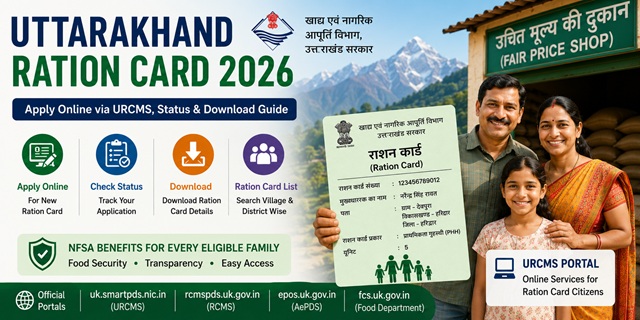
Uttarakhand recently launched the URCMS (Unified Ration Card Management System) portal at uk.smartpds.nic.in - citizens can now apply for new Ration Card, add or remove members, and make corrections entirely online without visiting any office. Before this, all applications required a visit to the DSO or BDO office. The application fee is just Rs. 5 - one of the lowest in India. The state also has a unique provision for students and government employees who can register at their current city address using an institutional head certificate - not just their permanent address.
All official portals for Uttarakhand ration card services:
- URCMS Portal (New): uk.smartpds.nic.in - apply online, add/remove members, corrections
- Food Department Portal: fcs.uk.gov.in - official information and downloads
- RCMS Portal: rcmspds.uk.gov.in - ration card details and list
- AePDS Portal: epos.uk.gov.in - biometric transactions
- FPS Automation Status: uk.dhaanyapurti.nic.in
Key Details at a Glance
| Detail | Information |
|---|---|
| Issuing Authority | Directorate of Food, Civil Supplies and Consumer Affairs, Govt. of Uttarakhand |
| New Online Portal (URCMS) | uk.smartpds.nic.in |
| Food Department Portal | fcs.uk.gov.in |
| RCMS Portal | rcmspds.uk.gov.in |
| AePDS Portal | epos.uk.gov.in |
| Application Fee | Rs. 5 |
| Monthly Entitlement (PHH) | 5 kg per person per month |
| Monthly Entitlement (AAY) | 35 kg per family per month |
| Commissioner Office Phone | 0135-2780765 |
| Commissioner Email | comm-fcs-uk@nic.in |
| PDS Toll Free Helpline | 1967 |
What is the URCMS Portal (uk.smartpds.nic.in)?
The Uttarakhand government has launched the Unified Ration Card Management System (URCMS) portal at uk.smartpds.nic.in - a major upgrade over the old system. This NIC-developed portal makes ration card services fully digital and accessible from home.
Through URCMS, citizens can:
- Apply for a new ration card online
- Add family members to existing ration card
- Remove family members from ration card
- Make corrections in ration card details
- Upload documents digitally
- Track application status
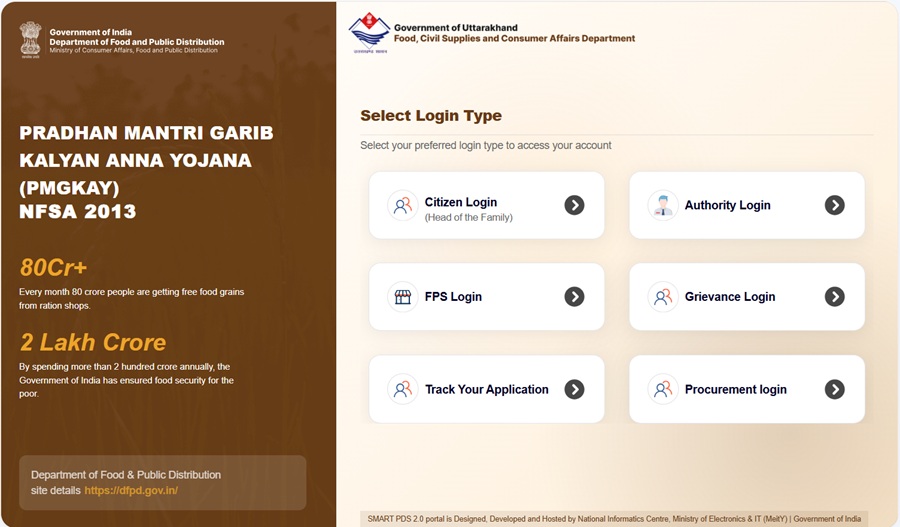
How to login:
- New applicants: Use Citizen Login with Aadhaar-based OTP verification
- Existing ration card holders: Login using the registered mobile number of the head of the family
Offline help is still available at your nearest Tehsil Office or District Supply Office (DSO) for those who need assistance with the online process.
Types of Ration Card in the State
| Type | Full Name | Who Gets It | Monthly Entitlement |
|---|---|---|---|
| AAY | Antyodaya Anna Yojana | Poorest of the poor - landless labourers, rural artisans, widows, elderly with no income | 35 kg per family per month |
| PHH | Priority Household | Low-income families identified under NFSA through state eligibility criteria | 5 kg per person per month |
| APL/SFY | Above Poverty Line / State Food Yojana | Families above the poverty line who need ration card as identity/address proof | Limited or no food subsidy |
Who Can Apply
- Must be a permanent resident of Uttarakhand with valid address proof
- Must be at least 18 years old to apply as head of family
- The family must not already hold a valid ration card anywhere in India
- Holders of expired or temporary ration cards can apply for a fresh card
- Newly married couples without a ration card can apply
- Students studying in urban areas can apply with a certificate from their institutional head confirming their educational institution and residential address
- Government and semi-government employees can apply with an institutional head certificate confirming their residential address and number of family members
Documents You Need to Apply
These documents are required for both online (URCMS) and offline applications:
- Aadhaar cards of all family members - mandatory for Aadhaar OTP verification on URCMS
- Address proof: water bill, electricity bill, or telephone bill
- Rent receipt (if you live in a rented house)
- Surrender certificate from previous FPS (if transferring from another town or Gram Panchayat)
- Previous ration card (if transferring from another area)
- Certificate from Institutional Head for government/semi-government employees confirming residence address and number of members
- Certificate from Institutional Head for students in urban areas confirming educational institution and residential address
- Passport-size photograph of the head of household
- Mobile number linked to Aadhaar for OTP verification
Download application forms from fcs.uk.gov.in/downloads.
How to Apply Online via URCMS (uk.smartpds.nic.in)
This is the new and fastest way to apply for a ration card in Uttarakhand. No office visit required for most applicants.
- Go to uk.smartpds.nic.in.
- Click on Citizen Login on the homepage.
- For new applicants: enter your Aadhaar number and complete OTP verification sent to your Aadhaar-linked mobile number.
- After login, select New Ration Card Application.
- Fill in your personal details - name, address, district, block, gram panchayat or ward.
- Add all family members with their individual Aadhaar numbers and details.
- Upload scanned copies or clear photos of all required documents.
- Review all details carefully and submit the application.
- An Acknowledgement Number is generated. Save it for status tracking.
A Supply Inspector may still visit your address for field verification. After verification and approval, your ration card is issued and linked to your nearest Fair Price Shop.
How to Apply Offline (DSO/BDO Office)
If you need help with the online process or prefer to apply in person:
- Urban areas: Visit your District Supply Office (DSO) with the completed application form and all documents
- Rural areas: Visit your Block Development Office (BDO) and submit to the Gram Panchayat Officer (GPO)
- Tehsil offices also provide assistance for URCMS online applications
- Download the form free of cost from fcs.uk.gov.in/downloads or collect at the DSO/BDO counter
Application fee: Rs. 5
How to Add or Remove a Family Member Online
Existing ration card holders can now add or remove family members directly online through URCMS without visiting any office:
- Go to uk.smartpds.nic.in.
- Click Citizen Login and enter the registered mobile number of the family head. Complete OTP verification.
- Your existing ration card details are displayed on the dashboard.
- For adding a member: click Add Member, enter their Aadhaar number, name, date of birth, and relationship. Upload supporting document (birth certificate for newborn, marriage certificate for spouse).
- For removing a member: select the member, choose the reason (deceased, migrated, etc.), and upload the supporting document (death certificate, etc.).
- Submit and save the Acknowledgement Number.
How to Make Corrections in Ration Card Online
Name corrections, address changes, and other detail corrections are also now possible online through URCMS:
- Go to uk.smartpds.nic.in and log in using the family head’s registered mobile number and OTP.
- Select Correction / Modification from the services menu.
- Select the field you want to correct (name, address, date of birth, etc.).
- Enter the corrected information and upload the supporting document.
- Submit and note the Acknowledgement Number.
How to Check Application Status
- Go to rcmspds.uk.gov.in.
- Look for Know Your Ration Card or Application Status on the dashboard.
- Enter your Acknowledgement Number or Ration Card Number.
- Enter the captcha and click Verify.
- Your application status is displayed - pending, field verification, approved, or dispatched.
How to Check the Ration Card List
- Go to rcmspds.uk.gov.in.
- Click Ration Card Details or PDS Stake Holders from the menu.
- Select your District from the 13 districts of Uttarakhand.
- Select your Block or Town.
- Select your Gram Panchayat or Ward.
- Select your Fair Price Shop (FPS).
- The complete beneficiary list under that FPS is displayed with ration card numbers and family details.
You can also check FPS-wise automation and distribution status at uk.dhaanyapurti.nic.in.
How to Download e-Ration Card
Via RCMS Portal
- Go to rcmspds.uk.gov.in.
- Click Know Your Ration Card.
- Enter your Ration Card Number (SRC ID) and captcha.
- Click View Report. Your ration card details are displayed.
- Click Print or Download PDF to save your e-ration card.
Via DigiLocker
- Go to digilocker.gov.in or open the DigiLocker app.
- Log in with your Aadhaar-linked mobile number.
- Search for Ration Card and select Food and Civil Supplies Department, Uttarakhand.
- Enter your ration card number and district.
- Click Get Document. Your e-ration card is saved in DigiLocker Issued Documents.
- Download the PDF. This is legally valid and equivalent to the physical card.
How to Link Aadhaar and Complete e-KYC
Aadhaar seeding is mandatory for all family members. The Uttarakhand government has also issued a deadline to complete e-KYC through the Mera e-KYC app.
- Visit your designated Fair Price Shop with Aadhaar cards of all family members
- Ask the FPS dealer to complete Aadhaar seeding on the ePoS device
- Each member provides their fingerprint biometric for authentication
- e-KYC is simultaneously completed through the IMPDS eKYC system at epos.uk.gov.in
- You can also complete e-KYC using the Mera e-KYC app available on mobile
For the complete guide: How to Link Ration Card with Aadhaar Card.
Using Your Card in Another State (ONORC)
Uttarakhand ration card holders covered under NFSA can collect their food grain entitlement from any Fair Price Shop anywhere in India under the One Nation One Ration Card (ONORC) scheme. This is especially useful for people from Uttarakhand working in Delhi, Mumbai, and other cities. Only your Aadhaar number is needed at the FPS.
For complete details: One Nation One Ration Card (ONORC) Complete Guide.
How to File a Grievance
- Online Grievance: fcs.uk.gov.in/grievance-redressal/
- Commissioner Office: 0135-2780765
- Address: Khadya Bhawan, Mussoorie Bypass Ring Road (Ladpur), Dehradun
- Commissioner Email: comm-fcs-uk@nic.in
- Secretary Email: secy-fcs-ua@nic.in
- PDS Toll Free: 1967
- State Consumer Disputes Redressal Commission: 0135-2669719
Official Portals and Useful Links
- URCMS Portal - uk.smartpds.nic.in (Apply online, add/remove members, corrections)
- Food Department Uttarakhand - fcs.uk.gov.in
- New Ration Card Procedure - fcs.uk.gov.in
- Download Application Form - fcs.uk.gov.in
- RCMS Portal - rcmspds.uk.gov.in (Status, list, ration card details)
- AePDS Portal - epos.uk.gov.in
- IMPDS e-KYC - epos.uk.gov.in
- FPS Automation Status - uk.dhaanyapurti.nic.in
- Download e-Ration Card - DigiLocker
- Modification in Ration Card - fcs.uk.gov.in
- Transfer or Surrender - fcs.uk.gov.in
- Grievance Redressal - fcs.uk.gov.in
- Check Aadhaar Seeding Status - nfsa.gov.in
Commissioner Food and Civil Supply: 0135-2780765
Email: comm-fcs-uk@nic.in
PDS Toll Free: 1967
Also read:
Ration Card in India - Complete Guide (2026)
How to Link Ration Card with Aadhaar Card
One Nation One Ration Card (ONORC) - Complete Guide
Disclaimer: This article is for informational purposes only. The URCMS portal (uk.smartpds.nic.in) was recently launched and processes may evolve. Always refer to fcs.uk.gov.in and uk.smartpds.nic.in for the latest official information.
Add new comment