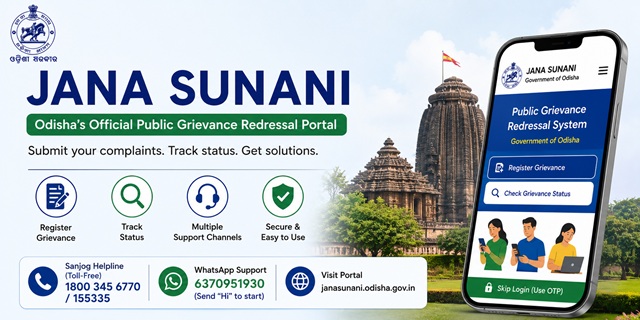
Jana Sunani is the official public grievance redressal portal of the Government of Odisha. Citizens can use this platform to submit grievances relating to State Government departments, track the progress of their complaints, and receive updates through a centralized online system.
The service is available through the official portal janasunani.odisha.gov.in. The portal is administered by the Department of General Administration & Public Grievance, Government of Odisha.
One of the most useful features of Jana Sunani is its Skip Login facility. Citizens can register a grievance using their mobile number and OTP without creating an account. Those who prefer can also create an account to manage and track their grievances from a single dashboard.
Jana Sunani Odisha: Quick Facts
| Particular | Details |
|---|---|
| Official Portal Name | Jana Sunani (Public Grievance Redressal Portal) |
| Official Website | janasunani.odisha.gov.in |
| Administered By | Department of General Administration & Public Grievance, Government of Odisha |
| Complaint Status | Available through the official Jana Sunani Portal |
| Sanjog Helpline (Toll-Free) | 1800 345 6770 / 155335 |
| Sanjog Helpline Portal | sanjoghelpline.odisha.gov.in |
| WhatsApp Grievance Service | 6370951930 (Send "Hi" to get started) |
| Chief Minister's Office | 0674-2390902 / 0674-2535100 |
| CMO Address | Lok Seva Bhawan, Sachivalaya Marg, Bhubaneswar, Odisha – 751001 |
| Supporting Documents | PDF, JPG and PNG (Maximum 5 MB) |
| Maximum Grievance Description | 2000 characters |
| Languages | Odia and English |
| Application Fee | No Fee |
What Types of Complaints Can You File on Jana Sunani?
Jana Sunani allows citizens to submit grievances relating to various departments and offices of the Government of Odisha. While registering a complaint, you can select the appropriate authority or department based on the nature of your grievance.
The portal provides grievance registration for several government offices, including:
- Office of the Hon'ble Governor
- Chief Minister's Grievance Cell
- Office of the Chief Secretary
- Director General of Police
- Government Departments
- District Collectors
- Superintendents of Police
Depending on your issue, you can submit grievances related to:
- Revenue and land administration matters
- Government hospitals and public health services
- Rural development, drinking water and Panchayati Raj services
- Roads, public infrastructure and civic amenities
- School, higher education and scholarship-related issues
- Delay in receiving benefits under State Government welfare schemes
- Administrative issues relating to State Government departments
- Complaints regarding misconduct or deficiency in public services provided by State Government offices
What Complaints Are Not Accepted?
Jana Sunani is meant for grievances relating to the Government of Odisha. The following matters should generally not be submitted through the portal:
- Cases that are pending before any court of law.
- Applications or requests under the Right to Information (RTI) Act.
- Grievances relating to Central Government departments or organisations.
- Service matters that are handled through dedicated grievance mechanisms for Government employees.
If your grievance relates to a Central Government department such as Income Tax, EPFO, Railways, India Post or UIDAI, you should use the Centralized Public Grievance Redress and Monitoring System (CPGRAMS) instead.
What to Keep Ready Before Filing
- Your mobile number (OTP verification required)
- Your name and complete address including district and block
- Name of the department or office your complaint is against
- A description of the issue in up to 1000 characters (be clear and factual)
- Supporting documents in PDF, JPG, or PNG format, maximum 5 MB total
How to File a Complaint Without Creating an Account (Skip Login)
Jana Sunani offers a Skip Login facility for citizens who want to register a grievance quickly without creating an account. You only need a mobile number to verify your identity through an OTP.
- Visit the official Jana Sunani Portal.
- Click Register Grievance on the homepage.
- Select the Skip Login option.
- Enter your mobile number and complete OTP verification.
- Fill in the grievance form by providing:
- Your personal and location details.
- The department or authority concerned.
- A clear description of your grievance (up to 2000 characters).
- If required, upload supporting documents in PDF, JPG or PNG format. The maximum file size allowed is 5 MB.
- Review the information and click Yes, Post This to submit your grievance.
- After successful submission, the portal generates a unique Grievance ID. Keep this number safely, as you will need it to check your complaint status and for future correspondence.
How to File a Complaint After Creating an Account
If you expect to submit grievances regularly or want to maintain a record of your complaints, you can create a Jana Sunani account.
- Visit the official Jana Sunani Portal.
- Click Sign Up and enter the required details.
- Verify your mobile number using the OTP and create your password.
- Sign in using your registered mobile number and password.
- Select Register Grievance.
- Fill in the grievance form, choose the appropriate department, upload supporting documents if required, and submit your application.
- Note your Grievance ID after successful submission.
Registered users can log in at any time to view their grievance history and track the progress of complaints from a single dashboard.
How to Register a Complaint Through the Sanjog Helpline
If you are unable to submit your grievance online, you can also use the official Sanjog Helpline.
- Call the toll-free numbers 1800 345 6770 or 155335.
- Provide your personal details and explain your grievance clearly to the customer support executive.
- The executive will register your grievance in the official system.
- After registration, note the reference or grievance number shared with you. You can use it to track the status of your complaint.
- You can also submit grievances through the official Sanjog Helpline Portal, which works alongside Odisha's public grievance redressal system.
How to Register a Complaint Through WhatsApp
The Government of Odisha also provides an official Jana Sunani WhatsApp service, allowing citizens to register grievances and check complaint status directly from their mobile phones. This option is useful if you want to access grievance services without visiting the website.
- Open WhatsApp on your smartphone.
- Start a new chat with the official Jana Sunani WhatsApp number 6370951930.
- Send "Hi" to begin the conversation.
- The automated WhatsApp assistant will display a menu of available services.
- Select the appropriate option to either:
- Register a new grievance, or
- Check the status of an existing grievance.
- If you are registering a new complaint, follow the on-screen instructions and provide the required details.
- If you are checking the status of an existing complaint, enter your Grievance ID when prompted.
- Complete the process by following the instructions provided in the WhatsApp chat.
The WhatsApp service offers a convenient way to access Jana Sunani without opening the web portal, making it especially helpful for users who prefer mobile-based communication.
How to File a Complaint Using the Jana Sunani Mobile App
Citizens can also submit and manage grievances through the official Jana Sunani Odisha mobile application, available for both Android and iPhone users. The app offers the same core grievance services as the web portal in a mobile-friendly interface.
- Download and install the official Jana Sunani app:
- Open the app and choose whether you want to Sign In or continue using the Skip Login option.
- If you select Skip Login, verify your mobile number using the OTP sent to your phone.
- Tap Register Grievance and fill in the required details, including your personal information, location, department, and grievance description.
- If necessary, upload supporting documents in the permitted file formats before submitting the grievance.
- Review all the information and submit your application.
- After successful submission, the app generates a unique Grievance ID. Save this number carefully, as it will be required to track your complaint in the future.
The Jana Sunani mobile app also enables registered users to sign in later, view previously submitted grievances, and monitor the latest status of their complaints from a single place.
How to Check Jana Sunani Complaint Status
After submitting your grievance, you can track its progress online using your Grievance ID. Keeping this reference number safe will help you check updates whenever required.
- Visit the official Jana Sunani Portal.
- Open the Complaint Status or Track Grievance section available on the homepage.
- Enter your Grievance ID in the required field.
- Submit the details to view the latest status of your grievance.
You can also check your grievance status through the official Jana Sunani WhatsApp service by sending "Hi" to 6370951930 and selecting the status enquiry option.
If you registered your grievance through the Sanjog Helpline, you may also contact 1800 345 6770 or 155335 and provide your Grievance ID to enquire about the current status.
Citizens who created a Jana Sunani account can simply sign in to their dashboard to view all previously submitted grievances and their latest status.
What to Do if Your Complaint Is Still Pending or You Are Not Satisfied
If your grievance is still pending or you are not satisfied with the action taken, first review the latest status and remarks available on the Jana Sunani portal. In many cases, departments update the complaint before it is finally closed.
If additional information or supporting documents are required, provide them through the appropriate channel wherever applicable.
If your issue remains unresolved, you may submit a fresh grievance with complete details and mention the earlier Grievance ID as a reference. Including the previous reference number helps the concerned authority understand the background of your case.
You may also contact the Sanjog Helpline on 18003456770 or 155335 for assistance regarding your grievance or for guidance on the next available course of action.
टिप्पणियाँ
Officially Harassment&Workplace Harassment
CMO 20251194***.Dt. 18/06/2025.Disposed.Action taken Details. The grievance has been Disposed with appropriate action. I. am. UNsuccessful.
नई टिप्पणी जोड़ें