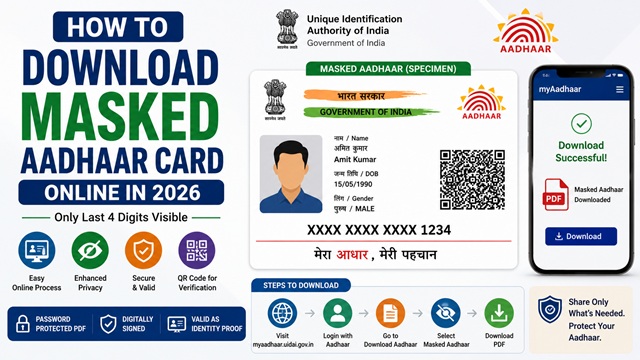
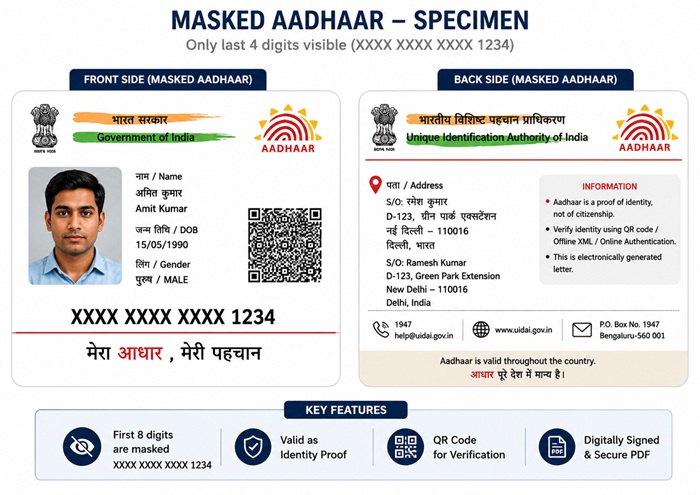
A masked Aadhaar Card is a privacy-protected version of your regular Aadhaar. Instead of showing all 12 digits of your Aadhaar number, only the last 4 digits are visible - the first 8 digits are replaced with XXXX-XXXX. All other details like your name, photograph, address, date of birth, gender, and QR code remain fully visible.
It is issued by UIDAI and is equally valid as the regular Aadhaar for identity verification. You can download it free of cost from myaadhaar.uidai.gov.in in seconds.
Masked Aadhaar vs Regular Aadhaar - Key Difference
| Feature | Regular Aadhaar | Masked Aadhaar |
|---|---|---|
| Aadhaar number visible | All 12 digits visible | Only last 4 digits visible (XXXX-XXXX-1234) |
| Name, photo, address | Fully visible | Fully visible |
| QR code | Present | Present |
| Digitally signed by UIDAI | Yes | Yes |
| Legal validity | Valid | Equally valid |
| Best for | Authentication requiring full Aadhaar number | Sharing with third parties for identity proof without exposing full number |
The masked Aadhaar is selected as an option during the regular Aadhaar download process. There is no separate form or portal for it.
When Should You Use Masked Aadhaar?
UIDAI recommends using masked Aadhaar Card in situations where you need to prove your identity but do not want to expose your full 12-digit Aadhaar number. Common use cases include:
- Submitting identity proof to private companies, shops, or service providers
- KYC verification at banks, telecom companies, or insurance firms when submitting a physical copy
- Registering on digital platforms and mobile apps that require identity proof
- Hotel check-ins, gym memberships, and other commercial purposes
- Any situation where you are not fully confident about how the receiver will store or use your Aadhaar
UIDAI has clarified that you should not share your Aadhaar on public platforms like social media. For such situations or any third-party submission where only identity verification is needed - not authentication - a masked Aadhaar is the right choice.
When Should You NOT Use Masked Aadhaar?
Masked Aadhaar works for identity proof purposes only. There are situations where the full 12-digit Aadhaar number is mandatory and masked Aadhaar will not be accepted:
- PAN-Aadhaar linking - requires entering the full 12-digit Aadhaar number on the Income Tax portal
- Bank account linking or full KYC - banks require the full Aadhaar number for OTP-based authentication
- Government subsidy authentication - DBT (Direct Benefit Transfer) and LPG subsidy linking require full Aadhaar
- SIM card biometric verification - telecom companies use Aadhaar-based OTP or biometric authentication which needs the full number
For any process that involves OTP sent to your Aadhaar-linked mobile or biometric authentication, always use your full Aadhaar number. Masked Aadhaar is for physical identity proof submission only, not for digital authentication.
How to Download Masked Aadhaar from myAadhaar Portal
Masked Aadhaar Card is downloaded during the regular Aadhaar download process. The option to select masked Aadhaar appears as a checkbox before the final download. Follow these steps on the official myAadhaar portal:
- Go to myaadhaar.uidai.gov.in.
- Click Download Aadhaar from the home page under the Get Aadhaar section.
- Select how you want to identify yourself:
- Aadhaar Number - enter your 12-digit Aadhaar number, or
- Virtual ID (VID) - enter your 16-digit Virtual ID, or
- Enrolment ID - enter your 28-digit Enrolment ID
- Enter the security captcha shown on screen.
- Click Send OTP. An OTP is sent to your Aadhaar-registered mobile number.
- Before entering the OTP, you will see a checkbox: “I want a Masked Aadhaar”. Tick this checkbox. This is the key step - if you do not tick it, a regular Aadhaar with all 12 digits visible will be downloaded.
- Enter the OTP received on your registered mobile number.
- Click Verify and Download.
- A password-protected PDF is downloaded to your device. This is your masked Aadhaar.
The download is completely free. No charges apply for downloading masked or regular Aadhaar from the myAadhaar portal.
How to Open the Masked Aadhaar PDF - Password
The downloaded masked Aadhaar PDF is password protected. The password format is confirmed by UIDAI at uidai.gov.in:
Password = First 4 letters of your name in CAPITAL LETTERS + Year of birth (YYYY)
| Name as per Aadhaar | Year of Birth | Password |
|---|---|---|
| RAHUL SHARMA | 1995 | RAHU1995 |
| PRIYA SINGH | 2000 | PRIY2000 |
| P. KUMAR | 1990 | P.KU1990 |
| RIA MEHTA | 1988 | RIA 1988 (only 3 letters as name has 3) |
Important password rules:
- Use your name exactly as registered in Aadhaar - not your nickname or short form
- If your name has an initial (like P. Kumar), include the dot in the password
- If your name has fewer than 4 letters (like RIA), use all letters of the name
- Year of birth is always in 4-digit YYYY format
- No spaces between name letters and year
How to Download Masked Aadhaar via mAadhaar App
You can also Download Masked Aadhaar Card directly on your phone using the official mAadhaar app by UIDAI:
- Download the mAadhaar app from Google Play Store or Apple App Store. Verify the publisher is UIDAI before downloading.
- Register your Aadhaar profile in the app using your Aadhaar number and OTP from your registered mobile.
- After logging in, tap on Download Aadhaar.
- Select Masked Aadhaar from the options shown.
- Select your identification type (Aadhaar Number, VID, or Enrolment ID).
- Enter the details and captcha, then tap Request OTP.
- Enter the OTP and tap Verify.
- Your masked Aadhaar PDF is downloaded to your device.
Is Masked Aadhaar Legally Valid?
Yes. Masked Aadhaar is a digitally signed document issued by UIDAI and is equally valid as the regular Aadhaar card. It carries the same legal weight for identity verification purposes under the Aadhaar Act, 2016.
The QR code on the masked Aadhaar contains the full digitally signed data and can be scanned by any authorised verifier to confirm the holder’s identity - even though the full number is not printed on the face of the document.
For services that require the full Aadhaar number for OTP-based authentication (like linking bank accounts, filing taxes, or verifying at government services), you will need to provide the actual 12-digit number. Masked Aadhaar is for identity proof purposes, not OTP authentication.
What If Your Mobile Number is Not Registered with Aadhaar?
Downloading masked Aadhaar from the myAadhaar portal requires an OTP sent to your registered mobile number. If your mobile is not registered, you cannot download it online.
To register or update your mobile number with Aadhaar, visit your nearest Aadhaar Seva Kendra (ASK). Once the mobile number is registered, you can download masked Aadhaar online. You can find the nearest Aadhaar Seva Kendra using the UIDAI ASK locator.
Official Portals and Useful Links
- myAadhaar Portal - myaadhaar.uidai.gov.in (Download Masked Aadhaar)
- What is Masked Aadhaar - uidai.gov.in
- e-Aadhaar Password Format - uidai.gov.in
- Locate Aadhaar Seva Kendra - uidai.gov.in
- UIDAI Official Website - uidai.gov.in
UIDAI Helpline: 1947 (Toll-free, Monday to Saturday)
Disclaimer: This article is for informational purposes only. Always refer to uidai.gov.in for the latest official information.
Add new comment