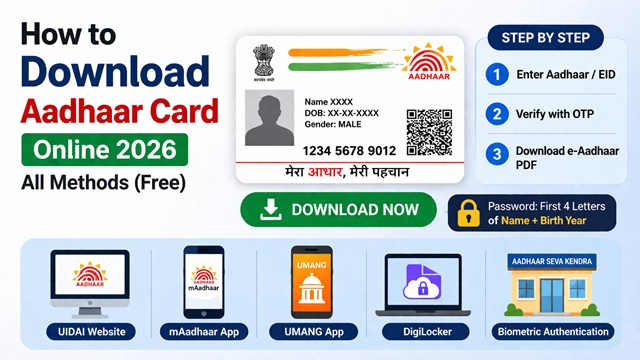
UIDAI lets you download your Aadhaar Card online in minutes, no need to wait for the physical card by post. Whether you use the UIDAI portal, mAadhaar app, UMANG app, DigiLocker, or need to download without a mobile OTP via biometric authentication at an enrollment centre, this guide covers every method clearly, step by step.
According to the official UIDAI website uidai.gov.in, Aadhaar can be downloaded online using Aadhaar number, Virtual ID (VID), or Enrollment ID (EID) through OTP authentication or biometric verification.
What You Need Before You Download
- 12-digit Aadhaar number or VID or EID
- Registered mobile number for OTP
- Internet-enabled device
Note: If the mobile number is not registered, use the biometric method.
Types of Aadhaar You Can Download
| Type | What It Is | When to Use | Cost |
|---|---|---|---|
| e-Aadhaar | Digitally signed, password-protected PDF downloaded from UIDAI portal. Legally valid as original. | Everyday use, KYC, ID proof, travel | Free |
| Masked Aadhaar | Same PDF but first 8 digits are hidden, shows only last 4 digits as XXXX-XXXX-1234. | Share with third parties when the full number is not needed | Free |
| Aadhaar PVC Card | Credit-card-sized durable plastic card with hologram, delivered by India Post. | Long-term use, wallet carry, replacing lost physical card | ₹50 |
Method 1: Download via UIDAI Portal (Recommended)
This is the fastest and most direct method. It works on any browser on mobile or desktop and does not require any app installation.
- Go to the download page - Visit myaadhaar.uidai.gov.in/genricDownloadAadhaar. You do not need to log in to download.
- Select your identifier - Choose whether you want to enter your 12-digit Aadhaar number, your Virtual ID (VID), or your Enrollment ID (EID). Most users choose their Aadhaar number.
- Enter your details and complete the captcha - Type your Aadhaar number carefully. Then enter the characters shown in the captcha image. If unclear, click the refresh icon to get a new one.
- Request OTP - Click "Send OTP." A 6-digit OTP is sent to your registered mobile number. It is valid for 10 minutes.
- Enter OTP and download - Enter the OTP in the field provided and click Submit. Your e-Aadhaar PDF downloads immediately.
- Open the PDF - Open the downloaded PDF using Adobe Reader. When prompted for a password, enter the first 4 letters of your name in capitals, followed by your birth year (example: RAJE1990).
Want Masked Aadhaar instead? On the same download page, tick the "Masked Aadhaar" checkbox before clicking Submit. The downloaded PDF will show only the last 4 digits of your Aadhaar number. UIDAI recommends using Masked Aadhaar when sharing your identity with third parties.
Method 2: Download via mAadhaar App
The official mAadhaar app by UIDAI lets you download and store your Aadhaar directly on your smartphone. A registered mobile number is required to create a profile in the app.
- Install the app - Download mAadhaar from Google Play Store (Android) or Apple App Store (iOS).
- Register your Aadhaar profile - Open the app, tap "Register Aadhaar" on the home screen, create a 4-digit passcode, enter your Aadhaar number and captcha, then enter the OTP sent to your registered mobile number.
- Download Aadhaar - Once your profile is registered, tap "My Aadhaar" from the bottom menu, enter your 4-digit passcode, and tap "Download Aadhaar." The PDF saves to your device.
The mAadhaar profile itself acts as a valid digital ID. You can show the QR code in the app directly to service providers for verification without sharing the actual PDF.
Method 3: Download via UMANG App
UMANG (Unified Mobile Application for New-age Governance) is the Government of India's multi-service app. You can access the Aadhaar download through it if you already use UMANG for other government services.
- Install UMANG - Download the UMANG app from Google Play Store or Apple App Store, or visit web.umang.gov.in on a browser.
- Search for Aadhaar - On the UMANG home screen, search "Aadhaar" in the search bar and select the Aadhaar service from the results.
- Select Download Aadhaar - Tap the "Download Aadhaar" option from the Aadhaar service menu.
- Enter Aadhaar number and OTP - Enter your 12-digit Aadhaar number, complete the captcha, and enter the OTP sent to your registered mobile number.
- Download the PDF - After OTP verification, your e-Aadhaar PDF downloads to your device.
Method 4: Access Aadhaar via DigiLocker
DigiLocker is the Government of India's digital document wallet. Your Aadhaar is automatically available in DigiLocker once you link it. The document stored here is digitally signed and legally valid.
- Visit DigiLocker - Go to digilocker.gov.in or open the DigiLocker app.
- Sign up or log in - If you are new, create an account using your mobile number. If you already have an account, log in.
- Link Aadhaar - Go to your DigiLocker profile settings and link your Aadhaar number using OTP verification on your registered mobile number.
- Find your Aadhaar - Once linked, go to the "Issued Documents" section. Your Aadhaar document from UIDAI appears here automatically.
- Download or share - Tap the document to view, download the PDF, or share it directly with any service provider that accepts DigiLocker documents.
DigiLocker is especially useful because many banks, universities, and government offices accept documents directly from DigiLocker without requiring a separate printout.
Method 5: Download Using Enrollment ID (EID)
If your Aadhaar has been generated but you do not remember your 12-digit Aadhaar number, you can use your Enrollment ID to download it. The EID is printed on the acknowledgement slip you received at the enrolment centre.
- Locate your EID slip - Find the acknowledgement slip from your enrolment centre. It contains a 14-digit Enrollment ID and the date and time of enrolment in the format yyyy/mm/dd/hh/mm/ss. Together, these form the 28-digit EID used on the portal.
- Go to the download page - Visit myaadhaar.uidai.gov.in/genricDownloadAadhaar.
- Select EID option - On the download page, choose "Enrollment ID" as your identifier instead of Aadhaar number.
- Enter the 28-digit EID - Type the 14-digit enrollment number followed by the date-time stamp exactly as printed on your slip.
- Verify OTP and download - Enter the captcha, request the OTP, enter it, and download your e-Aadhaar PDF.
Method 6: Download Without OTP (Biometric)
If your mobile number is not registered with Aadhaar, you cannot use any of the above online methods. In this case, visit any Aadhaar Enrolment Centre or Aadhaar Seva Kendra. As per UIDAI, this service is available at all centres, including those in banks, post offices, and BSNL offices.
- Locate your nearest centre - Find the nearest centre using the Bhuvan portal at bhuvan-app3.nrsc.gov.in/aadhaar.
- Visit the centre in person - Physical presence of the Aadhaar holder is mandatory since biometric verification is required.
- Provide your Aadhaar number - Give your 12-digit Aadhaar number or 28-digit EID to the operator at the centre.
- Complete biometric verification - The operator uses an RD (Registered Device) to capture your single fingerprint or iris scan to confirm your identity.
- Collect your printout - Once your biometrics match, the operator downloads your e-Aadhaar and gives you a coloured printout. A charge of ₹30 applies for this service.
Note: This method also allows you to register your mobile number at the same centre so you can use online services in future.
Method 7: Order Aadhaar PVC Card
- Visit UIDAI portal
- Select Order PVC Card
- Verify OTP
- Pay ₹50
- Track delivery via India Post
All Methods at a Glance
| Method | What You Need | Mobile Number Required | Cost |
|---|---|---|---|
| UIDAI Portal | Aadhaar number / VID / EID + OTP | Yes | Free |
| mAadhaar App | Aadhaar number + OTP + smartphone | Yes | Free |
| UMANG App | Aadhaar number + OTP | Yes | Free |
| DigiLocker | DigiLocker account + Aadhaar linking | Yes | Free |
| EID-based download | 28-digit EID + OTP | Yes | Free |
| Biometric at Centre | Aadhaar number + fingerprint/iris | No | ₹30 |
| PVC Card order | Aadhaar number + OTP or EID | Optional | ₹50 |
What to Do If Download Is Not Working
OTP not received on mobile
Check that your mobile number is registered with Aadhaar. If you recently changed your number or never registered one, OTP will not arrive - use the biometric method at an enrolment centre instead. Also, check that your mobile has a network signal and is not in DND mode, blocking transactional SMS.
PDF not opening after download
The e-Aadhaar PDF requires Adobe Reader to open correctly. Standard PDF viewers on phones and computers often fail to open password-protected UIDAI PDFs. Download Adobe Reader free from adobe.com/reader and open the file through it.
Password not working
The password is case-sensitive and must be in CAPITAL letters. The format is the first 4 letters of your name as it appears in Aadhaar, followed by your 4-digit birth year. If your name has fewer than 4 letters, use all letters. Examples: Name RIA, Year 1990 - Password is RIA1990. Name P. KUMAR, Year 1990 - Password is P.KU1990. Note that the dot and space are included.
Portal showing "No record found"
This usually means your Aadhaar has not been generated yet, or you have entered the wrong number. Double-check your Aadhaar number on your EID slip or existing Aadhaar card. If your enrolment was recent, wait and check your status at myaadhaar.uidai.gov.in using your Enrollment ID.
Invalid captcha error
Captcha characters on the UIDAI portal are case-sensitive. Type them exactly as shown. If the image is unclear, click the refresh icon to get a new captcha. Try on a desktop browser if the mobile browser's captcha is hard to read.
How to Retrieve Lost Aadhaar Number or EID
If your mobile number is registered with Aadhaar
- Visit myaadhaar.uidai.gov.in/retrieve-eid-uid
- Enter your full name and registered mobile number
- Verify the OTP sent to your mobile
- Your Aadhaar number or EID is sent to your registered mobile as an SMS
If your mobile number is NOT registered with Aadhaar
- Call UIDAI toll-free helpline 1947 from any phone
- Provide your demographic details to the executive (name, date of birth, address)
- If details match, the executive provides your EID on the call, this service is free
- Use the EID to download your Aadhaar at any enrolment centre via biometric authentication
Can You Download Aadhaar Without a Registered Mobile Number?
No. As per UIDAI guidelines, OTP-based download requires a registered mobile number. If your mobile number is not linked, you must visit Aadhaar Seva Kendra and use biometric authentication to get your Aadhaar.
Things to Keep in Mind
- Always download Aadhaar only from the official UIDAI portal, myaadhaar.uidai.gov.in. Never use third-party websites claiming to provide Aadhaar download services.
- Use Masked Aadhaar when sharing your identity for non-critical purposes. Share your full Aadhaar only where legally required.
- Keep your registered mobile number active. If the number is deactivated, you lose access to all OTP-based UIDAI services until you update it at an enrolment centre.
- Store the downloaded PDF securely. Do not share it on public platforms, social media, or unsecured email threads.
- You need Adobe Reader to open the e-Aadhaar PDF. Save this app on your phone so you can open it anytime without hassle.
- The e-Aadhaar you download always reflects your most current details. If you updated your address or name recently, download a fresh copy after the update is processed.
Add new comment