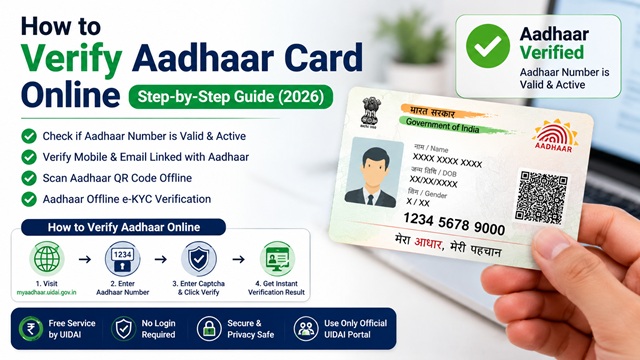
Verifying an Aadhaar number online lets you confirm whether a given 12-digit Aadhaar number is valid and active in the UIDAI database. This is useful when:
- You want to check if your own Aadhaar is active and not deactivated
- A business or service provider wants to confirm the Aadhaar submitted by a customer is genuine
- You have found a misplaced Aadhaar card and want to check if the number is real
- You suspect a forged or fake Aadhaar has been presented to you
UIDAI has specifically urged service providers and institutions to always verify Aadhaar before accepting it as a proof of identity. The official UIDAI verification tool is free, instant, and requires no login.
Also read: What is an Aadhaar Card?
What Does Verifying Aadhaar Tell You?
As per UIDAI, the Verify Aadhaar Number service confirms only one thing: whether the Aadhaar number is valid and not deactivated in the UIDAI database.
It does NOT reveal the name, address, photo, or any other personal details of the Aadhaar holder. This is intentional, it protects the privacy of the Aadhaar holder while still allowing you to confirm the number is genuine.
The result is a simple Yes or No, the number either exists and is active, or it does not exist or has been deactivated.
Official Portal for Aadhaar Verification
There is only one official UIDAI portal for Aadhaar verification:
Official portal: myaadhaar.uidai.gov.in
Direct verification URL: myaadhaar.uidai.gov.in/verifyAadhaar
This service is completely free. No login or registration is required. The UIDAI verification tool allows Aadhaar validity checks without requiring login or registration.
Do not use third-party websites that claim to verify Aadhaar numbers and ask you to enter your 12-digit Aadhaar number. Only use the official UIDAI portal. Sharing your Aadhaar number on unofficial sites is a privacy risk.
Method 1 Verify Aadhaar Number (Check if Valid or Deactivated)
This is the primary method to check whether an Aadhaar number is genuine and currently active.
- Go to myaadhaar.uidai.gov.in/verifyAadhaar.
- Enter the 12-digit Aadhaar number you want to verify.
- Enter the security captcha shown on screen.
- Click Verify.
- The result is displayed immediately:
- If valid and active: The portal confirms the Aadhaar number exists in the UIDAI database and is not deactivated. It will show the age band (example: 2030 years) and the state of residence, but not the full name or address.
- If invalid or deactivated: The portal shows that the Aadhaar number is not valid or has been deactivated.
What you see in the result (as per UIDAI):
- Confirmation that the Aadhaar exists and is active
- Age band (example: 3040 years), not the exact date of birth
- Gender
- State of the registered address
- Mobile number status: whether a mobile number is registered (Yes or No), but not the number itself
No OTP or login is required for this basic verification.
Method 2 Verify Email or Mobile Number Linked with Aadhaar
This service allows an Aadhaar holder to check whether a specific email address or mobile number is the one linked to their Aadhaar. It is useful when you want to confirm your current contact details are correctly registered.
Direct URL: myaadhaar.uidai.gov.in/verify-email-mobile/en
- Go to the Verify Email/Mobile Number page on the myAadhaar portal.
- Enter your 12-digit Aadhaar number.
- Enter the mobile number or email address you want to verify against your Aadhaar.
- Enter the captcha and click Send OTP.
- Enter the OTP received on the number or email you entered.
- The system confirms whether the mobile number or email matches the one registered in your Aadhaar record.
Note: This service only confirms a match, it does not reveal the actual registered mobile or email to you. You simply find out whether what you entered matches what is in the UIDAI database.
If your mobile number is not registered or you need to update it, read: How to Add or Update Mobile Number in Aadhaar Card UIDAI Official Process
Method 3 Scan Aadhaar QR Code (Offline Verification)
Every form of Aadhaar, paper letter, e-Aadhaar, and PVC card has a QR code printed on it. This QR code contains digitally signed data from UIDAI and is the easiest way for service providers to verify a physical Aadhaar without connecting to the internet.
How to scan the Aadhaar QR code:
- Use the mAadhaar app: Open the app and use the QR scan feature to scan the Aadhaar QR code. The app decodes and verifies the digital signature.
- Use a UIDAI-certified QR code reader: As per the UIDAI ecosystem page, UIDAI has certified specific QR code reading devices and software for businesses and institutions.
What the QR code contains:
- Last 4 digits of Aadhaar number
- Name of the Aadhaar holder
- Address
- Gender
- Date of birth
- Photograph
- Masked mobile number and email
- UIDAI's digital signature (ensures authenticity)
The QR code data is digitally signed by UIDAI. Any QR reader can decode the data, but only a UIDAI-compatible reader can verify the digital signature and confirm authenticity.
If the QR code is damaged or unreadable (common on old paper Aadhaar letters), the holder should get a fresh e-Aadhaar download or order a new PVC card. Read: How to Order Aadhaar PVC Card Online.
Method 4 Aadhaar Paperless Offline e-KYC Verification
As per UIDAI, Aadhaar Paperless Offline e-KYC is a secure sharable document that any Aadhaar holder can generate and share with service providers for offline identity verification without revealing the Aadhaar number.
Direct URL: myaadhaar.uidai.gov.in/offline-ekyc
What it contains: The Offline XML file contains your name, address, photo, gender, date of birth, hash of registered mobile and email, and a reference ID (last 4 digits of Aadhaar + timestamp). It does NOT contain the full Aadhaar number, it uses a Reference ID instead.
How it works:
- The Aadhaar holder generates a digitally signed XML file from the myAadhaar portal.
- The file is downloaded as a ZIP protected by a Share Code (4-digit password) chosen by the holder.
- The holder shares the ZIP file and Share Code with the service provider.
- The service provider extracts the XML using the Share Code, verifies the UIDAI digital signature, and confirms the holder's identity.
Important: As per UIDAI regulations, service providers must not share, publish, or display the XML file or Share Code or its contents with anyone else. Non-compliance attracts action under the Aadhaar Act, 2016.
Method 5 Check Aadhaar Validity via mAadhaar App
The official mAadhaar app (available on Google Play Store and Apple App Store) also offers an Aadhaar validity check feature.
Direct URL on portal: myaadhaar.uidai.gov.in/check-aadhaar-validity/en
- Open the mAadhaar app or go to the Check Aadhaar Validity page on myaadhaar.uidai.gov.in.
- Enter the 12-digit Aadhaar number.
- Enter the captcha.
- The system confirms whether the Aadhaar is active or deactivated.
Without a registered mobile number, you can still use this feature as it does not require OTP, only a captcha.
What Aadhaar Verification Shows and What It Does Not Show
| Information | Shown in Verification? | Notes |
|---|---|---|
| Whether Aadhaar number is valid | Yes | Confirms existence in UIDAI database |
| Whether Aadhaar is active or deactivated | Yes | Clearly stated in result |
| Age band of holder | Yes | Example: 3040 years, not exact DOB |
| Gender | Yes | Male / Female / Transgender |
| State of registered address | Yes | Only state name, not full address |
| Whether mobile number is registered | Yes (Yes or No only) | Mobile number itself is not revealed |
| Full name of holder | No | Privacy protection |
| Full address | No | Privacy protection |
| Photo | No | Not available in basic number verification |
| Actual mobile number or email | No | Privacy protection |
| Bank accounts linked to Aadhaar | No | UIDAI does not have visibility of such linkages |
Aadhaar Verification for Service Providers and Businesses
As per UIDAI, identity verification using traditional documents like PAN card, passport, or driving licence has a key limitation: the verifier has no technological means to confirm the document is authentic or not forged.
Aadhaar-based verification solves this because the data is signed and verified by UIDAI's central system. UIDAI has specifically urged service providers to always verify Aadhaar before accepting it as proof of identity.
Three official modes for businesses and institutions to verify Aadhaar:
- Basic Number Verification (free, no login): Use the Verify Aadhaar Number tool at myaadhaar.uidai.gov.in/verifyAadhaar to instantly confirm the number is valid and active.
- QR Code Scan: Use a UIDAI-compatible QR reader to scan the Aadhaar QR code for offline demographic verification without needing internet after the first setup.
- Aadhaar Offline e-KYC: Ask the holder to share their Paperless Offline e-KYC XML with you. This provides demographic data with UIDAI's digital signature, without the holder needing to reveal their Aadhaar number.
Important legal note: Businesses must not ask holders to submit photocopies of Aadhaar for verification unless mandated by law. As per MeitY Office Memorandum no 10(22)/2017-EG-II(VOL-1) dated 19.06.2023, detailed instructions have been issued to all Government Ministries and Departments regarding proper Aadhaar usage. Service providers shall not share, publish, or display the Aadhaar number or any Aadhaar-related data obtained during verification.
Official Sources and Useful Links
- Verify Aadhaar Number (myaadhaar.uidai.gov.in)
- Verify Email / Mobile Number (myaadhaar.uidai.gov.in)
- Check Aadhaar Validity (myaadhaar.uidai.gov.in)
- Aadhaar Paperless Offline e-KYC (myaadhaar.uidai.gov.in)
- Aadhaar Services UIDAI (uidai.gov.in)
- UIDAI Official Website uidai.gov.in
UIDAI Helpline: 1947 (Toll-free, Monday to Saturday)
UIDAI Email: help@uidai.gov.in
Disclaimer: This article is for informational purposes only. All UIDAI processes and portal URLs are subject to change. Always verify the latest information at uidai.gov.in or myaadhaar.uidai.gov.in.
Add new comment