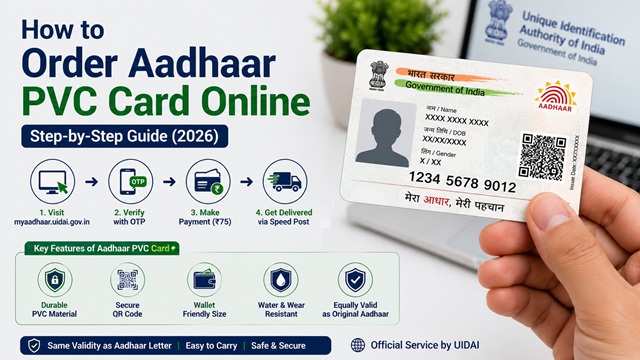
The Aadhaar PVC card is a durable, credit-card-sized version of your Aadhaar that you can order online directly from UIDAI. It is the most portable and long-lasting form of Aadhaar - easy to carry in a wallet, resistant to wear and tear, and loaded with security features.
As per the official UIDAI FAQ, the Aadhaar PVC card holds the same validity as your e-Aadhaar and original Aadhaar letter. It is equally accepted as valid proof of identity across all government and private services.
What is Aadhaar PVC Card?
As per UIDAI, the Aadhaar PVC (Polyvinyl Chloride) Card is a durable, compact card containing your complete Aadhaar details. It is the size of a standard credit card or debit card, making it easy to carry in your wallet at all times.
The "Order Aadhaar PVC Card" service is an online service launched by UIDAI that allows any Aadhaar Card holder to get their Aadhaar details printed on a PVC card by paying a nominal fee. The card is delivered to your registered address via India Post Speed Post.
It is important to note: the Aadhaar PVC card is not a new Aadhaar. It is simply a more durable physical form of your existing Aadhaar. Your Aadhaar number remains the same.
Why Many People Prefer Aadhaar PVC Card
- Easy to carry in wallet
- More durable than paper Aadhaar letter
- Resistant to water and wear
- Includes enhanced security features
How Aadhaar PVC Card is Different from Aadhaar Letter
| Feature | Aadhaar PVC Card | Aadhaar Letter |
|---|---|---|
| Material | PVC plastic (durable) | Laminated paper |
| Size | Credit card size (wallet-friendly) | A4 paper folded |
| Issued when | Ordered online by Aadhaar holder for Rs. 75 | Sent by post at time of enrolment or update |
| Security features | Secure QR code, digitally signed, Aadhaar logo, photo, masked Aadhaar number, ghost image | QR code, photo, digitally signed |
| Hologram | No hologram (discontinued by UIDAI circular) | No |
| Validity | Same as original Aadhaar - no expiry | Same as original Aadhaar - no expiry |
| Accepted as proof of identity | Yes, equally valid | Yes, equally valid |
Note on hologram: According to a UIDAI circular, the Aadhaar hologram has been discontinued on PVC cards. PVC cards issued now do not have a hologram. This is an official change - the absence of a hologram does not make the card invalid.
Charges for Aadhaar PVC Card
As per the UIDAI FAQ page and the UIDAI Office Memorandum regarding revision of PVC card rate:
Current charge: Rs. 75 (inclusive of GST and Speed Post delivery charges)
This fee was revised from Rs. 50 to Rs. 75 by UIDAI. There are no additional or hidden charges. The Rs. 75 covers printing, packaging, and delivery via India Post Speed Post to your Aadhaar-registered address.
Payment is accepted through:
- Debit card
- Credit card
- Net banking
- UPI
Who Can Order the Aadhaar PVC Card?
Any Aadhaar Card holder in India can order the PVC card. You do not need your mobile number to be registered with Aadhaar to order a PVC card. As per UIDAI, ordering a PVC card is one of the few Aadhaar services available even without a registered mobile number.
However, the process differs slightly based on whether your mobile number is registered with Aadhaar or not:
- With registered mobile number: Full self-service online via OTP. Faster and simpler.
- Without registered mobile number: You can still order using a non-registered mobile number, but you must use your Aadhaar's existing security data (name, year of birth, etc.) for verification instead of OTP.
Method 1 - Order with Registered Mobile Number (Online)
This is the recommended and fastest method. It uses OTP verification sent to your Aadhaar-linked mobile number.
Direct URL: myaadhaar.uidai.gov.in → Order Aadhaar PVC Card
- Go to myaadhaar.uidai.gov.in.
- Click on Order Aadhaar PVC Card from the services listed on the portal.
- Enter your 12-digit Aadhaar number or your 16-digit Virtual ID (VID). You can use either.
- Enter the security captcha displayed on screen.
- Click Send OTP. An OTP is sent to your Aadhaar-registered mobile number.
- Enter the OTP received on your mobile number and click Verify and Proceed.
- Your Aadhaar details, including name, photo, address, and masked Aadhaar number, are displayed. Review the details for accuracy.
- If the details are incorrect or outdated, update your Aadhaar details first before ordering. Read: How to Update Address in Aadhaar Card.
- Click Make Payment to proceed to the payment gateway.
- Pay Rs. 75 using debit card, credit card, net banking, or UPI.
- On successful payment, a Service Request Number (SRN) is generated. Save this number for tracking.
- You will also receive an SMS confirmation on your registered mobile number.
Tip: The Aadhaar PVC card is printed with the details as they exist in the UIDAI database at the time of ordering. If your address, name, or photo needs updating, do that first or the outdated details will be printed on the card.
Method 2 - Order Without Registered Mobile Number
If your mobile number is not registered with Aadhaar, you can still order the PVC card using your non-registered mobile number for receiving the OTP, but you need to verify your identity using your Aadhaar data.
- Go to myaadhaar.uidai.gov.in.
- Click on Order Aadhaar PVC Card.
- Enter your 12-digit Aadhaar number.
- Enter the captcha and click Send OTP.
- On the next screen, since your mobile is not registered, you will be prompted to enter a non-registered mobile number along with identity verification data such as your full name and year of birth as per Aadhaar records.
- Enter the OTP received on the non-registered mobile number.
- Verify and proceed to review your details.
- Make payment of Rs. 75 and save the SRN.
Important: To access all other Aadhaar services like downloading e-Aadhaar, locking biometrics, or generating VID, your mobile number must be registered with Aadhaar. It is strongly advised to register your mobile number at an Aadhaar Seva Kendra. Read: How to Add or Update Mobile Number in Aadhaar Card.
Method 3 – Order via mAadhaar App
You can also order the Aadhaar PVC card through the official mAadhaar app. As per UIDAI, ordering a PVC card is available even without a registered mobile number on the app.
- Download the mAadhaar app from Google Play Store (Android) or Apple App Store (iOS). The app is published by UIDAI - verify the publisher before downloading.
- Open the app. You can use it without creating a profile if your mobile is not registered.
- Tap on Order PVC Aadhaar Card from the home screen services list.
- Enter your Aadhaar number and proceed with OTP verification.
- Review your details and make payment of Rs. 75.
- Save the SRN for tracking.
How to Check Aadhaar PVC Card Delivery Status
After ordering, you can check the status of your PVC card request in two ways:
Method A – UIDAI Portal Status Check
- Go to myaadhaar.uidai.gov.in/checkStatus/en.
- Enter your 12-digit Aadhaar number or VID and the Service Request Number (SRN) you received at the time of payment.
- Enter the captcha and click Check Status.
- The current status of your order is displayed.
Method B – India Post Tracking
Once your card is dispatched by India Post, you can track the delivery using the consignment number:
- Go to the India Post tracking portal at indiapost.gov.in.
- Enter your consignment number (available once the card is dispatched - check via UIDAI status check above).
- Track the Speed Post delivery status to your registered address.
Delivery Timeline and Process
As per the official UIDAI FAQ at uidai.gov.in:
- After receiving the order, UIDAI hands over the printed Aadhaar PVC card to the Department of Posts (DoP) within 5 working days (excluding the date of the request).
- The card is delivered via Speed Post Service of India Post to the address registered in your Aadhaar database.
- India Post delivers as per its standard Speed Post delivery norms. Delivery typically takes 5-10 additional working days, depending on your location.
- Total expected time: 10-15 working days from the date of ordering.
Important: The card is delivered to the address registered in your Aadhaar, not a separately entered address. If your current address is different from your Aadhaar address, update your address in Aadhaar first before ordering. Read: How to Update Address in Aadhaar Card.
Security Features of Aadhaar PVC Card
As per UIDAI, the Aadhaar PVC card includes multiple security features to prevent duplication and fraud:
- Secure QR Code: Contains digitally signed data that can be scanned and verified using any QR code reader. The QR code contains your last 4 digits of Aadhaar number, name, address, gender, date of birth, and masked mobile and email.
- Ghost Image: A small semi-transparent secondary photo of the Aadhaar holder printed on the card as an anti-tamper feature.
- Aadhaar Number: Printed in masked format showing only the last 4 digits (xxxx-xxxx-1234) for privacy.
- Microtext: Tiny text printed at a microscopic level to prevent easy duplication.
- Guilloché Pattern: Complex background pattern used in official identity documents.
- Digitally signed: The card data is digitally signed by UIDAI and verifiable through the official QR scanner.
- Aadhaar branding and logo: Official Aadhaar logo and UIDAI branding.
UIDAI Helpline: 1947 (Toll-free, available Monday to Saturday)
UIDAI Email: help@uidai.gov.in
Disclaimer: This article is for informational purposes only. Charges, processes, and policies are subject to change by UIDAI. Always verify the latest information at uidai.gov.in or myaadhaar.uidai.gov.in.
Add new comment