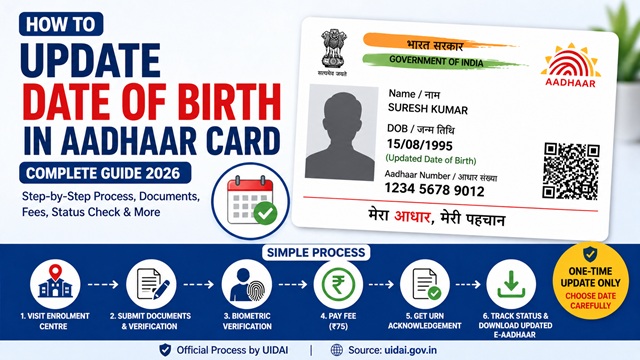
You can update your date of birth (DOB) in Aadhaar Card by visiting any authorised Aadhaar Enrolment Centre with a valid Proof of Date of Birth document. Date of birth update is a demographic update and cannot be done online. UIDAI does not allow DOB updates through the myAadhaar portal or the mAadhaar app. You must visit a centre in person.
As per the official UIDAI website uidai.gov.in, date of birth can be updated in Aadhaar only once in your entire lifetime. There are no exceptions to this rule. The current fee for a demographic update at an enrolment centre is Rs 75.
Important: Since you get only one chance to update your DOB in Aadhaar, verify the correct date carefully before submitting the request. Any error after this will not be correctable through the standard process.
Source: All information in this article is based on official UIDAI guidelines at uidai.gov.in.
What is Declared, Approximate, and Verified DOB in Aadhaar?
Before updating your DOB, it helps to understand how UIDAI records date of birth in Aadhaar. There are three types of DOB status in the Aadhaar database:
- Verified DOB: Your exact date of birth is recorded and confirmed with a valid Proof of Date of Birth document. The full date in DD/MM/YYYY format appears on your Aadhaar card.
- Declared DOB: You stated your date of birth at the time of enrolment, but did not provide a document to prove it. UIDAI records it as declared. Only the year of birth is printed on your Aadhaar card, not the full date.
- Approximate DOB: If you did not know your exact date of birth and had no document, the enrolment operator recorded an approximate year. Only the year appears on your Aadhaar card.
If your Aadhaar card shows only a year of birth and not a full date, it means your DOB was recorded as declared or approximate. You can convert it to verified by submitting a valid Proof of Date of Birth document at any enrolment centre. This still counts as your one lifetime DOB update.
Who Can Update DOB in Aadhaar?
You can request a DOB update in Aadhaar if any of the following apply to your situation:
- Your date of birth was entered incorrectly by the operator during original enrolment
- You enrolled without a document and want to convert your declared or approximate DOB to a verified DOB with a full date
- There is a genuine difference between the date in Aadhaar and the date in your official documents
- You are a parent or guardian updating the DOB for a child's Aadhaar
The DOB update is meant only for genuine corrections. UIDAI does not allow DOB changes for obtaining age-related benefits or for any other purpose other than correcting an enrolment error.
Documents Required for DOB Update in Aadhaar
You must submit one valid Proof of Date of Birth document. The document must clearly show your full name and date of birth. Carry the original document to the centre. The operator scans it and returns the original to you.
| Document | Issuing Authority |
|---|---|
| Birth Certificate | Municipal Authority or Gram Panchayat |
| SSLC or Class 10 Marksheet or Certificate | State Board, CBSE, ICSE, or any recognised Board |
| Passport | Government of India |
| PAN Card | Income Tax Department |
| Central or State Government Photo ID with DOB | Central or State Government |
| Photo ID Card from Recognised Educational Institution with DOB | School or University |
| PSU Issued Photo ID with DOB | Public Sector Undertaking |
| Marriage Certificate with DOB | Registrar of Marriages |
| Disability ID Card or Certificate with DOB | State Government |
| Ex-Servicemen Contributory Health Scheme Card | Ministry of Defence |
The complete and updated list of accepted documents is available at uidai.gov.in under "List of Supporting Documents." If you do not have any of the above documents, you cannot update your DOB through the standard process. In such a case, contact the UIDAI helpline 1947 for guidance.
Current Fee for DOB Update in Aadhaar (2026)
| Service | Current Fee | Notes |
|---|---|---|
| Demographic update only (DOB, name, address, gender, mobile, email or any combination) | Rs 75 | Per request at enrolment centre when done separately |
| Demographic update done along with biometric update in the same visit | Free | Demographic charge is waived when a biometric update is done in the same request |
| Aadhaar PVC Card order after update | Rs 50 | Optional, ordered online at myaadhaar.uidai.gov.in after update is processed |
The charges are displayed at the enrolment centre notice board and printed at the bottom of the acknowledgement slip you receive after submission. Always collect your payment receipt. If any operator charges more than the official fee, report it to the UIDAI helpline 1947 immediately.
How to Book an Appointment Before Visiting
Walk-in visits are accepted at most enrolment centres. Booking an appointment in advance is recommended to avoid long queues and get a fixed time slot. To book an appointment, follow these steps:
- Visit appointments.uidai.gov.in/bookappointment.aspx
- Select your state and city to find Aadhaar Seva Kendras near you
- Choose the service type as Update Demographic Data
- Select your preferred date and time slot
- Enter your Aadhaar number and registered mobile number
- Verify with the OTP sent to your mobile
- Save or print your appointment confirmation slip and carry it to the centre
The last token at most centres is issued at 5:30 PM. If you are going as a walk-in without an appointment, arrive early to avoid missing the last token for the day.
Step-by-Step Process to Update DOB in Aadhaar
Step 1: Find the Nearest Aadhaar Enrolment Centre
Use the Bhuvan Aadhaar portal at bhuvan-app3.nrsc.gov.in/aadhaar to locate authorised centres near you. Search by state, district, or pincode. The portal shows each centre's address, type, and working hours. Choose a centre that offers a demographic update service.
Step 2: Visit the Centre with Your Documents
Carry your Aadhaar card (physical or printed e-Aadhaar) and your original Proof of Date of Birth document. You do not need to carry photocopies separately. The operator scans your original document and returns it to you before you leave.
Step 3: Fill the Aadhaar Enrolment and Update Form
At the centre, ask for the Aadhaar Enrolment and Update Form. You can also download and pre-fill it from uidai.gov.in before visiting to save time. Write your 12-digit Aadhaar number and fill in the correct date of birth in DD/MM/YYYY format exactly as it appears on your supporting document. In the update section, tick the DOB field.
Step 4: Submit the Form and Document
Hand the completed form along with your original Proof of Date of Birth to the operator. The operator verifies your document, checks the requested DOB change, and enters the details into the UIDAI system. All original documents are returned to you at this stage.
Step 5: Complete Biometric Verification
The operator captures your fingerprints or iris scan to authenticate your identity. This biometric check is mandatory for all demographic updates at an enrolment centre. It confirms that the person requesting the update is the actual Aadhaar holder.
Step 6: Pay the Update Fee
Pay Rs 75 at the counter for the demographic update. If you are updating any biometric details, such as photo, fingerprints, or iris, during the same visit, the Rs 75 demographic update charge is waived, and you pay only Rs 125 for the biometric update. Always collect a payment receipt before leaving.
Step 7: Collect Your Acknowledgement Slip with URN
After successful submission, the operator gives you an acknowledgement slip containing your Update Request Number (URN). Keep this slip carefully. You need the URN to track the status of your DOB update request online. The fee paid and the type of update requested are also printed on this slip.
How to Track DOB Update Status
After submitting your request, you can track its progress at any time using your URN or Aadhaar number.
- Visit myaadhaar.uidai.gov.in
- Click on Check Aadhaar Update Status
- Enter your 14-digit URN from the acknowledgement slip or your Aadhaar number
- Enter the captcha and click Check Status
- The portal shows whether your update is under review, in process, or completed
As per UIDAI, 90% of update requests are completed within 30 days. Once your DOB update is processed, you will receive an SMS on your registered mobile number. After that, download your updated e-Aadhaar from myaadhaar.uidai.gov.in. The updated e-Aadhaar will show your corrected full date of birth.
You can also call the UIDAI toll-free helpline 1947 to check your update status over the phone if you do not have internet access.
Common Reasons for DOB Update Rejection
UIDAI may reject your DOB update request for any of the following reasons:
- The document submitted is not in UIDAI's accepted list of Proof of Date of Birth
- The name on the document does not match the name recorded in your Aadhaar
- The document is blurry, incomplete, torn, or appears tampered
- You have already updated your DOB once before on the same Aadhaar number
- The form was incomplete or incorrectly filled
- The requested DOB change is significantly different from the existing recorded DOB, and additional verification is required
If your request is rejected, UIDAI mentions a reason in the status update. Revisit the centre with a stronger or more appropriate document. Re-submission attracts a fresh Rs 75 fee.
What to Do If DOB Update Limit is Exceeded
If you have already updated your DOB once in Aadhaar and need to correct it again, the standard process will reject your request as the lifetime limit is one. In such cases, UIDAI provides a special exception process. You need to contact the UIDAI Regional Office for your state or raise a grievance through the UIDAI Grievance Redressal Portal at myaadhaar.uidai.gov.in. You may also call 1947 or email help@uidai.gov.in explaining your situation. UIDAI may consider your request on a case-by-case basis with additional supporting documents such as a court order, gazette notification, or a certificate from a government authority.
How to Download Updated Aadhaar After DOB Change
Once UIDAI sends you the SMS confirmation that your DOB update is complete, download the updated e-Aadhaar from the UIDAI portal. The e-Aadhaar is legally valid for all purposes, including identity proof, banking, and KYC.
- Visit myaadhaar.uidai.gov.in/genricDownloadAadhaar
- Enter your 12-digit Aadhaar number or VID or EID
- Complete the captcha and click Send OTP
- Enter the OTP received on your registered mobile number
- Click Download, and your updated e-Aadhaar PDF downloads immediately
The downloaded PDF is password-protected. The password is the first four letters of your name in CAPITAL letters followed by your 4-digit birth year. Example: Name RAJESH, Year 1985, password is RAJE1985. You need Adobe Reader to open the file correctly.
If you want a physical card with the updated DOB, order an Aadhaar PVC Card for Rs 75 from myaadhaar.uidai.gov.in. India Post delivers it to your registered address.
Things to Keep in Mind
- DOB can be updated in Aadhaar only once in your lifetime. Verify the correct date very carefully before submitting. Any mistake after this will require a special UIDAI exception process.
- DOB update cannot be done online or through the mAadhaar app. You must visit an Aadhaar Enrolment Centre in person.
- Carry your original document to the centre. The operator scans and returns it to you. You do not lose your original.
- If your Aadhaar shows only a year of birth and not a full date, it means your DOB was recorded as declared or approximate. You can correct this by submitting a Proof of Date of Birth document. This counts as your one lifetime update.
- When the operator records your DOB as verified, ensure the DOB status field is marked as verified on the form. Ask the operator to confirm this before submitting.
- The Aadhaar physical letter with updated DOB is dispatched to your registered address after the update is processed. The e-Aadhaar is available for download much sooner.
- Your Aadhaar number never changes regardless of any demographic update you make.
- 90% of DOB update requests are completed within 30 days as per UIDAI. Track your status using the URN at myaadhaar.uidai.gov.in.
- Never share your Aadhaar number or URN on unofficial websites or apps claiming to help with updates. Use only uidai.gov.in and myaadhaar.uidai.gov.in.
Conclusion
Updating your date of birth in Aadhaar is a straightforward offline process. Visit any authorised Aadhaar Enrolment Centre, carry your original Proof of Date of Birth document, fill the update form with the correct date, complete biometric verification, pay Rs 75, and collect your URN acknowledgement slip. Track the status at myaadhaar.uidai.gov.in and download the updated e-Aadhaar once the SMS confirmation arrives.
Since you only get one lifetime chance to update your DOB, be sure of the correct date before submitting. Always use only official UIDAI channels, uidai.gov.in and myaadhaar.uidai.gov.in. Never pay more than the official fee of Rs 75 for a demographic update.
Add new comment