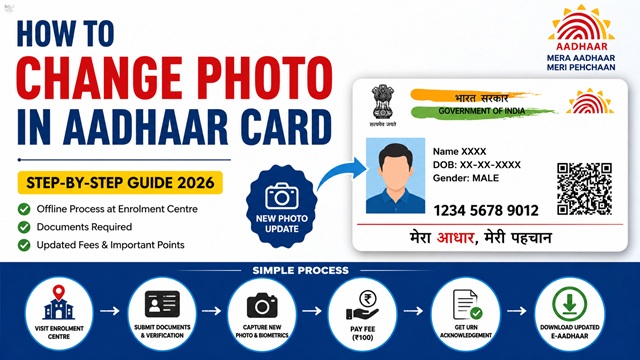
You can change the photograph on your Aadhaar card by visiting any authorised Aadhaar Enrolment Centre and requesting a biometric update. There is no online method to change your Aadhaar photo. UIDAI does not allow you to upload a photo from your phone or computer. Your new photograph was captured live at the centre using the operator's camera equipment.
As per the official UIDAI website, uidai.gov.in, there is no limit on the number of times you can update your Aadhaar photo. A fee of ₹125 applies for each biometric update at an enrolment centre.
Source: All information in this article is based on official UIDAI guidelines at uidai.gov.in.
Can You Change Aadhaar Photo Online?
No. Photo update in Aadhaar is a biometric update. As per UIDAI, biometric updates - which include photograph, fingerprints, and iris scans- can only be done by visiting the nearest Aadhaar Enrolment Centre in person. The operator captures your new photograph on the spot using the centre's equipment.
Unlike address updates, which are available online through the myAadhaar portal, photo updates have no online mode. Any website or agent claiming to update your Aadhaar photo online is unofficial and should not be trusted.
Why Would You Need to Change Your Aadhaar Photo?
UIDAI allows residents to update their Aadhaar photo for any of the following reasons:
- The current photo is blurry or of poor quality due to a problem during original enrolment
- Your appearance has changed significantly and the existing photo no longer looks like you
- You enrolled as a child and your photo needs to be updated as an adult
- The photo was captured incorrectly during the original enrolment process
- You want to update your biometrics voluntarily after several years, as UIDAI recommends biometric updates every 10 years for adults
What You Need Before You Visit
| Item | Required? | Notes |
|---|---|---|
| 12-digit Aadhaar number | Yes | Carry your physical Aadhaar card or a printed e-Aadhaar |
| Valid Proof of Identity (PoI) | Yes | PAN Card, Passport, Voter ID, Driving Licence, or any government photo ID |
| Original documents | Yes | Carry originals - the operator scans them and returns them to you after enrolment |
| Registered mobile number | Recommended | You receive SMS updates and can track your URN after submission |
| Update fee (cash) | Yes | ₹125 for biometric update at the centre |
Note: Proof of Address is not required for a photo-only biometric update. It is needed only if you are updating your address at the same time.
Updated Fee Chart for Aadhaar Photo and Biometric Update (2026)
UIDAI has revised its update charges. The current charges as per the official UIDAI charge document at uidai.gov.in are:
| Service | Current Fee | Notes |
|---|---|---|
| Biometric update - fingerprints, iris, and photo (adults and others) | ₹125 | Standard fee for biometric update at enrolment centre |
| Biometric update - first time between the ages of 5 to 7 years | Free | Mandatory biometric update for children who enrolled below age 5 |
| Biometric update - between the ages of 7 to 15 years | Free (until 30 September 2026) | Special provision currently in effect as per UIDAI |
| Biometric update - first or second time between age 15 to 17 years | Free | Mandatory biometric update at age 15 |
| Demographic update done at the same time as biometric update | Free | If you update photo and address or name together in one visit, demographic charge is waived |
| Demographic update done separately (name, address, DOB, gender, mobile, email) | ₹75 | Per request at enrolment centre |
| Aadhaar PVC Card order | ₹70 | Optional, ordered online at myaadhaar.uidai.gov.in after update is processed |
Tip: If you also want to update any demographic detail, such as your address or mobile number, do it in the same visit as your photo update. The demographic update charge of ₹75 is waived when done together with a biometric update. You only pay ₹125 for both.
Step-by-Step Process to Change Photo in Aadhaar Card
Step 1: Find the Nearest Aadhaar Enrolment Centre
Visit the Bhuvan Aadhaar portal at bhuvan-app3.nrsc.gov.in/aadhaar and search by your state, district, or pincode to find authorised centres near you. Over 66,000 centres operate across India through banks, post offices, BSNL offices, and dedicated Aadhaar Seva Kendras. The portal shows each centre's address, type, and working hours. Choose a centre that offers a biometric update service.
Step 2: Book an Appointment (Recommended)
Walk-ins are accepted at most centres but booking an appointment in advance saves waiting time. To book an appointment, visit appointments.uidai.gov.in/bookappointment.aspx, select your city and centre, choose the service type as "Biometric Update," pick your preferred date and time slot, enter your details, verify with OTP, and save the confirmation slip. Carry this slip to the centre on your appointment day. You can also call the UIDAI helpline 1947 to book an appointment.
Step 3: Visit the Centre with Your Documents
On the day of your appointment, go to the centre with your Aadhaar Card and original Proof of Identity document. The operator will scan your documents and return them to you after the process. Wear neat clothing and make sure your face is clean and clearly visible, the photo taken at this centre will appear on your Aadhaar card. Remove glasses if possible as they can affect iris scan quality.
Step 4: Fill the Aadhaar Enrolment and Update Form
At the counter, ask for the Aadhaar Enrolment and Update Form. You can also download and pre-fill it from uidai.gov.in before visiting to save time. Write your 12-digit Aadhaar number clearly. In the biometric update section of the form, tick the checkbox next to "Photograph." If you are also updating fingerprints or iris in the same visit, tick those boxes too. Fill in your name and other details exactly as they appear in your existing Aadhaar.
Step 5: Submit the Form and Documents
Hand the completed form along with your original Proof of Identity to the operator. The operator will verify your documents, enter your details into the system, and confirm the type of update you are requesting. They will return all your original documents to you before you leave.
Step 6: Get Your New Photograph Captured
The operator uses the centre's camera to capture your new photograph. You cannot provide your own photograph or upload one from a phone. Sit straight, face the camera directly, and ensure your face is fully visible. The operator may ask you to remove glasses, hats, or face coverings before taking the photo. If you are not satisfied with the photo taken, you can ask the operator to retake it before the form is finalised.
Step 7: Provide Biometric Verification
As part of the update process, you also need to provide your fingerprints and iris scan. This biometric authentication confirms that the person requesting the update is the actual Aadhaar holder. The operator uses UIDAI-certified biometric devices for this step. Persons with biometric exceptions, such as injured or missing fingers, can inform the operator, who will use exception handling with supervisor authentication.
Step 8: Pay the Update Fee
Pay ₹125 for the biometric update at the counter. Always collect a receipt for your payment. The applicable charges are also printed at the enrolment centre notice board and at the bottom of the acknowledgement slip you receive after submission. If any operator demands more than the official fee, report it to UIDAI on helpline 1947.
Step 9: Collect Your Acknowledgement Slip with URN
After successful submission, the operator gives you an acknowledgement slip containing your Update Request Number (URN). Keep this slip carefully. You use the URN to track the status of your update request online. The slip also shows the fee paid and the type of update requested.
How to Track Your Aadhaar Photo Update Status
After submitting your request, you can track the progress of your update online at any time using your URN or Aadhaar number.
- Visit myaadhaar.uidai.gov.in
- Scroll to the Check Aadhaar Update Status section on the portal
- Enter your 14-digit URN from the acknowledgement slip or your Aadhaar number
- Enter the captcha and click Check Status
- The portal shows the current status, whether your update is under review, in process, or completed
You will also receive an SMS on your registered mobile number once your photo update is successfully processed and the new photo is live in UIDAI's database.
You can also call UIDAI's toll-free helpline 1947 to check your update status over the phone if you do not have internet access.
What Happens After Your Photo Update is Processed
Once UIDAI successfully processes your photo update request, the following happens:
- You receive an SMS on your registered mobile number confirming the update is complete
- You can download the updated e-Aadhaar PDF immediately from myaadhaar.uidai.gov.in, the downloaded PDF will carry your new photograph
- Your old physical Aadhaar card continues to carry the old photo. Download and use the updated e-Aadhaar until you receive a new physical card
- If you want a physical card with the new photo, order an Aadhaar PVC Card for ₹75 from the myAadhaar portal - India Post delivers it to your registered address
- The updated e-Aadhaar is legally valid for all purposes, KYC, identity proof, banking, and government services
Special Case: Updating Photo for Children (Baal Aadhaar)
Children enrolled below age 5 receive a blue Baal Aadhaar. At this age, only a photograph is captured, no fingerprints or iris scans. As per UIDAI, biometric updates are mandatory at two stages for such children:
- At age 5 (between 5 and 7 years): The child must visit an enrolment centre to provide all biometrics - fingerprints, iris, and updated photo, for the first time. This update is free of charge. The same Aadhaar number is retained.
- At age 15 (between 15 and 17 years): The child must again visit to update all biometrics as the biometric data changes significantly between childhood and adolescence. The first or second biometric update in this age range is free.
Currently, biometric updates for children between the ages of 7 and 15 are also free until 30 September 2026 as per a special UIDAI provision. If your child is in this age range, take advantage of this free update window before it closes.
Things to Keep in Mind
- There is no limit on how many times you can update your Aadhaar photo as per UIDAI. Update whenever you genuinely need to.
- Your Aadhaar number never changes regardless of how many times you update your photo or other details.
- You do not need to go to the same centre where you originally enrolled. You can visit any authorised Aadhaar Enrolment Centre anywhere in India.
- Carry original documents; photocopies are not accepted. The operator returns all originals to you after scanning.
- If you are updating a photo along with a demographic detail like address or mobile number, you save ₹75 since demographic update is free when done in the same visit as a biometric update.
- Always collect a receipt and the URN acknowledgement slip before leaving the centre. Without the URN, tracking your update online is not possible.
- Never use unauthorised agents or third-party shops offering to update Aadhaar for extra money. Aadhaar updates must be done only at UIDAI-authorised centres found through uidai.gov.in.
- UIDAI recommends adults update their biometric data every 10 years, even without any visible change, as fingerprint and iris quality can change over time.
Conclusion
Changing your Aadhaar photo is a simple offline process. Visit any authorised Aadhaar Enrolment Centre, fill the update form, get your new photo captured live by the operator, pay ₹125, and collect your URN acknowledgement slip. Once the update is processed, download your updated e-Aadhaar from myaadhaar.uidai.gov.in, it will carry your new photo and is legally valid for all purposes.
There is no online method for photo updates. Always use only official UIDAI centres found through uidai.gov.in and never pay more than the official fee of ₹125 for a biometric update.
Add new comment