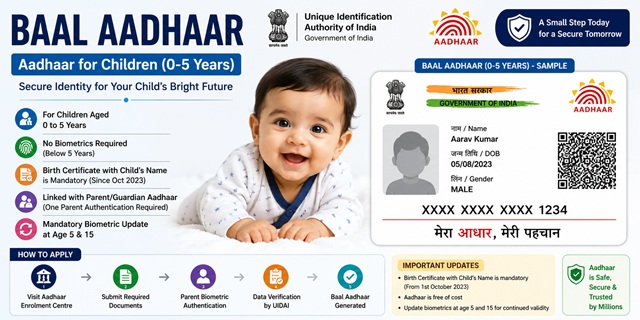
Baal Aadhaar is the Aadhaar Card issued to children below 5 years of age. It works exactly like an adult Aadhaar with one key difference - no fingerprints or iris scan are collected for children under 5 because biometrics are not mature enough at this age. Only the child’s photograph and demographic details (name, date of birth, gender, address) are captured.
Baal Aadhaar is required for school admissions, government schemes, health services, and various other purposes. Enrolment is free of charge and is done at any Aadhaar Enrolment Centre near you.
Key Facts About Baal Aadhaar
| Feature | Details |
|---|---|
| Age group | 0 to 5 years |
| Biometrics captured | Photograph only (no fingerprints, no iris scan) |
| Enrolment fee | Free of charge |
| Who must be present | Child and at least one parent or guardian with Aadhaar |
| Mandatory biometric update at age 5 | Yes - free if done between age 5 and 7 |
| Mandatory biometric update at age 15 | Yes - free if done between age 15 and 17 |
| Birth certificate mandatory | Yes - for children born on or after 01 October 2023 |
Documents Required for Baal Aadhaar
The following documents are needed. All requirements are based on the official UIDAI Child Enrolment Form (0-5 years) available at uidai.gov.in:
For the Child
- Birth Certificate with the child’s name: Mandatory for children born on or after 01 October 2023. The birth certificate must have the child’s name clearly printed. A certificate showing only "Baby of [parent name]" is NOT accepted.
- For children born before 01 October 2023, a birth certificate is not mandatory but any valid age proof document works.
For the Parent or Guardian
- Aadhaar number of at least one parent (mother or father) is mandatory for Head of Family (HOF) based enrolment
- Biometric authentication of one parent at the enrolment centre is compulsory
- If only one parent is available, the reason for the other parent’s absence must be mentioned on the form
- If both parents are not available, a legal guardian can authenticate but must provide the Aadhaar numbers of both parents wherever available
Proof of Address
- The child’s address is linked to the parent’s address. A Proof of Address document for the parent is required.
- Accepted documents include: Aadhaar card of parent, passport, voter ID, ration card, utility bill (electricity, water, gas not older than 3 months), bank passbook, or any other document from the UIDAI approved list
Step-by-Step Process to Enrol Child for Baal Aadhaar
- Locate the nearest Aadhaar Enrolment Centre: Use the UIDAI locator at appointments.uidai.gov.in/easearch.aspx to find the nearest Aadhaar Seva Kendra or enrolment centre. Alternatively, many banks, post offices, and government offices also have enrolment facilities.
- Download or collect the enrolment form: Download the official Child Aadhaar Enrolment/Update Form (0-5 years) from uidai.gov.in or collect it at the enrolment centre. Fill it in capital letters.
- Fill in the form with the following details:
- Child’s full name (as in birth certificate)
- Date of birth and gender
- Complete address
- Birth Registration Number from the birth certificate
- Father’s name and Aadhaar number
- Mother’s name and Aadhaar number
- Mobile number (optional but recommended)
- Visit the enrolment centre with the filled form, the child, and at least one parent carrying their original Aadhaar card.
- At the centre, the enrolment operator captures the child’s photograph. No fingerprints or iris scan are taken for children below 5 years.
- One parent undergoes biometric authentication on behalf of the child at the centre. The parent places their fingerprint on the biometric device.
- The operator scans and records all supporting documents.
- After enrolment, you receive an Acknowledgement Slip with the Enrolment ID and date and time of enrolment. Keep this safely.
- The child’s Aadhaar is generated within a few days and can be downloaded from myaadhaar.uidai.gov.in or received by post.
Enrolment is completely free. No charges are applicable for a new Aadhaar enrolment for children.
Mandatory Biometric Update at Age 5 (First MBU)
This is the most important thing parents must remember after getting Baal Aadhaar. When the child turns 5 years old, they must visit an Aadhaar Enrolment Centre to give their biometrics for the first time. This is called the First Mandatory Biometric Update (MBU).
At this update:
- All biometrics are recorded for the first time: photograph, all 10 fingerprints, and both iris scans
- A de-duplication check is done to ensure the child’s identity is unique in the UIDAI database
- The original Aadhaar number remains the same - it is not changed
- This update is treated similar to a new enrolment request but the same Aadhaar number is retained
Fee for First MBU: Free of charge if done between the age of 5 and 7 years. If done after age 7, a fee of Rs. 125 applies.
Mandatory Biometric Update at Age 15 (Second MBU)
When the child turns 15, a second mandatory biometric update is required. Biometrics change significantly between age 5 and age 15, so a fresh update ensures the Aadhaar remains accurate for authentication.
- All biometrics are updated again: photograph, fingerprints, and iris
- The same Aadhaar number continues
- Fee: Free of charge if done between age 15 and 17. After age 17, a fee of Rs. 125 applies.
Both Mandatory Biometric Updates (at age 5 and age 15) are effectively free for all children if done within the prescribed age window of 5-7 years and 15-17 years respectively.
What Happens If You Miss the Mandatory Biometric Update?
If the First MBU at age 5 is not done, the child’s Aadhaar may face authentication failures. Since no fingerprints or iris are on record, any service requiring biometric authentication using the child’s Aadhaar will fail. The Aadhaar number remains valid but biometric authentication will not work until the MBU is completed.
It is strongly recommended to complete the biometric update as soon as the child turns 5. You can locate the nearest Aadhaar Seva Kendra at appointments.uidai.gov.in/easearch.aspx.
How to Download Baal Aadhaar After Enrolment
After the child’s Aadhaar is generated, it can be downloaded online if a mobile number was provided during enrolment:
- Go to myaadhaar.uidai.gov.in.
- Click Download Aadhaar.
- Enter the child’s Aadhaar number or Enrolment ID from the acknowledgement slip.
- Enter the captcha and click Send OTP. OTP is sent to the mobile number registered during enrolment.
- Enter the OTP and click Verify and Download.
- The Aadhaar PDF is downloaded. Open it with the password: first 4 letters of the child’s name in CAPITAL letters followed by year of birth (YYYY).
Baal Aadhaar vs Adult Aadhaar
| Feature | Baal Aadhaar (0-5 years) | Adult Aadhaar (5+ years) |
|---|---|---|
| Biometrics captured | Photograph only | Photograph, fingerprints, iris |
| Biometric authentication | Not available (no fingerprint/iris on record) | Available |
| OTP authentication | Available if mobile registered | Available |
| Parent authentication required at enrolment | Yes | No |
| Mandatory biometric update | Yes at age 5 and age 15 | Recommended every 10 years |
| Enrolment fee | Free | Free |
Official Portals and Useful Links
- Aadhaar Enrolment Information - uidai.gov.in
- Download Child Aadhaar Enrolment Form (0-5 years) - uidai.gov.in
- Locate Aadhaar Enrolment Centre - uidai.gov.in
- Download Aadhaar - myaadhaar.uidai.gov.in
- FAQ - Enrolling Children - uidai.gov.in
- FAQ - Mandatory Biometric Update - uidai.gov.in
UIDAI Helpline: 1947 (Toll-free, Monday to Saturday)
Disclaimer: This article is for informational purposes only. Always refer to uidai.gov.in for the latest official information.
Add new comment