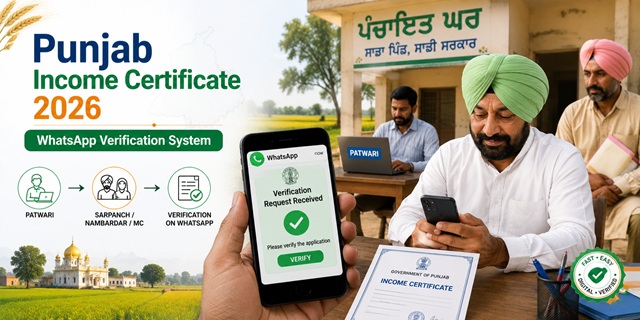
Punjab processes income certificates through the Digital Punjab portal at connect.punjab.gov.in. The certificate is issued by the Sub-Divisional Magistrate (SDM) or Tehsildar under the Revenue, Rehabilitation and Disaster Management Department. The application/processing fee is Rs. 75 with no separate government fee. The standard timeline is 15 days. One of the most important documents in Punjab's income certificate process is the verification report from Nambardar, Sarpanch, Municipal Councillor (MC), or Patwari. Punjab has made this digitally easier: after you apply online, the Patwari sends your application online to the concerned Sarpanch, Nambardar, or MC, who receive the information via WhatsApp and can provide their verification through WhatsApp itself - confirmed from the official DIPR Punjab press release at ipr.punjab.gov.in. This ended the previous system where citizens had to physically visit multiple offices to collect manual signatures. Besides the standard income certificate, Punjab has three unique area-specific certificates also issued through the same portal: Backward Area, Kandi Area, and Border Area certificates.
- Digital Punjab Portal: connect.punjab.gov.in
- Punjab State Portal: punjab.gov.in
- eServices Punjab: eservices.punjab.gov.in
- eSewa Punjab: esewa.punjab.gov.in
- Download Forms: punjab.gov.in/forms
- Helpline: 1076
Key Details
| Detail | Information |
|---|---|
| Online Application Portal | connect.punjab.gov.in (Digital Punjab) |
| Department | Revenue, Rehabilitation and Disaster Management |
| Issuing Authority | Sub-Divisional Magistrate (SDM) or Tehsildar |
| Application/Processing Fee | Rs. 75 |
| Government Fee | NA (no separate government fee) |
| Timeline | 15 days |
| Verification | Nambardar / Sarpanch / MC / Patwari (now via WhatsApp) |
| Validity | 1 year from date of issue |
| Area Certificates | Backward Area, Kandi Area, Border Area (Punjab-unique) |
| Governing Act | Punjab Right to Services Act 2011 |
| Helpline | 1076 |
WhatsApp Verification - How Punjab Modernised Nambardar/Sarpanch Sign-Off
This is confirmed directly from the official DIPR Punjab press release at ipr.punjab.gov.in:
- Earlier process: Citizens had to physically visit Patwari, then collect handwritten verification from Sarpanch/Nambardar/MC separately - multiple visits, time-consuming
- New process: After you submit your application online at connect.punjab.gov.in, the Patwari sends it digitally to the concerned Sarpanch, Nambardar, or MC
- Sarpanchs, Nambardars, and MCs receive the verification request via WhatsApp and can provide their recommendation through WhatsApp itself
- Rural areas: Sarpanchs and Nambardars verify
- Urban areas: Municipal Councillors (MCs) verify
- This covers: Residence certificate, Caste certificate, Income certificate, EWS certificate, Old Age Pension, and Dogra certificate
Documents Required
- Identity Proof (any one): Voter ID Card, Aadhaar Card, or PAN Card
- Residence Proof: Ration Card, Electricity Bill, Water Bill, or any document confirming Punjab address
- Income Proof - whichever applies:
- Salary certificate or recent pay slips (salaried employees)
- Employer's certificate on letterhead
- Self-declaration affidavit stating total annual family income from all sources
- For agricultural income: Jamabandi (land records showing land holdings and agricultural income)
- Bank account statements showing income credits
- Ration Card (family composition verification)
- Passport-size photographs
Punjab-Unique Area Certificates
Punjab has three Revenue Department certificates found nowhere else in India - confirmed from the official eservices.punjab.gov.in portal homepage:
| Certificate | Who Needs It |
|---|---|
| Backward Area Certificate | Residents of areas notified as backward by Punjab government. Required for certain Punjab government scheme benefits and reservations. |
| Kandi Area Certificate | Residents of the Kandi belt (hilly terrain transition zone between plains and Shivalik foothills). Required for agricultural subsidies and development scheme benefits available specifically to Kandi area residents. |
| Border Area Certificate | Residents of districts along the international border with Pakistan. Required for Border Area Development Programme (BADP) scheme benefits. |
Who Can Apply
- Must be a permanent resident of Punjab
- Must create a profile on connect.punjab.gov.in before applying
- All categories of residents - salaried, farmer, self-employed, daily wage worker
- For EWS reservation in central government jobs and IIT/NIT admissions: family income must be below Rs. 8 lakh per annum from all sources
- Students applying for Punjab state scholarships or central government scholarships (NSP) need income certificate from Tehsildar/SDM
How to Apply Online at Digital Punjab Portal
Confirmed from the official connect.punjab.gov.in portal and official process shared by the Punjab Revenue Department:
- Go to connect.punjab.gov.in.
- Create your profile - click Citizen Corner or Register. Fill in your name, mobile number, email, and other required details. Complete the profile creation.
- After registration, log in to the portal.
- Click Apply Services under Citizen Corner on the left-hand side of the page.
- In the Filter Service box under Citizen Services, type "Income Certificate".
- Click on Income Certificate from the results.
- Click Apply Online.
- Fill the online application form completely with all personal details, family composition, occupation, and income from every source separately.
- Upload required documents - self-declaration, identity and address proof, photo, and income proof (ITR/Fard/J-Form/salary slip).
- Pay the fee of Rs. 75 online through the payment gateway.
- Submit. Your application is generated and forwarded. Note your Application/Tracking Number.
- The Patwari processes the application online and sends it to the concerned Sarpanch/Nambardar/MC for WhatsApp-based verification.
- After verification, the Tehsildar or SDM approves and digitally signs the income certificate.
- Download from connect.punjab.gov.in once the status shows approved.
How to Apply at Sewa Kendra
For those without internet access, every district in Punjab has Sewa Kendras. The process under Punjab Right to Services Act 2011:
- Download the income certificate application form from punjab.gov.in/forms under Revenue Department. Or collect it from the Sewa Kendra.
- Fill the form. Attach all required documents with originals.
- Visit your nearest Sewa Kendra with your filled form and documents.
- The Suwidha employee at the Sewa Kendra scans your documents and submits the application through the system to the Tehsildar.
- Pay Rs. 75 at the counter.
- Collect the acknowledgement slip with your Application Reference Number.
- Track status on connect.punjab.gov.in or eservices.punjab.gov.in using the Reference Number.
How to Track Application Status
- Log in to connect.punjab.gov.in with your registered credentials.
- Go to your application list or Track Application section.
- Enter your Application/Tracking Reference Number.
- Current status is displayed.
Alternatively, track on eservices.punjab.gov.in by clicking Check Your Application Status on the homepage and entering your Reference Number.
How to Download the Certificate
- Log in to connect.punjab.gov.in.
- Go to your completed applications.
- Find the approved income certificate and click Download.
- The digitally signed certificate is valid for all official purposes.
Official Links
- Digital Punjab Portal - connect.punjab.gov.in
- Punjab State Portal - punjab.gov.in
- Download Forms - punjab.gov.in
- eServices Punjab - eservices.punjab.gov.in
- eSewa Punjab - esewa.punjab.gov.in
- DIPR Punjab - WhatsApp Verification Announcement
Helpline: 1076
Related articles:
Income Certificate in India - Complete Guide
Punjab Ration Card - ERCMS Guide
Disclaimer: This article is for informational purposes only. Always verify the latest process at connect.punjab.gov.in before applying.
Add new comment