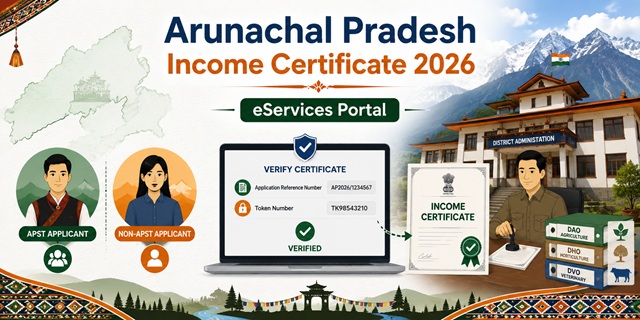
Arunachal Pradesh issues income certificates through the Arunachal eServices portal at eservice.arunachal.gov.in - running on the NIC ServicePlus platform, the same infrastructure used by several other northeastern states. The portal covers services from all districts of Arunachal Pradesh and three application methods are available: Online at the portal, at a Kiosk (CSC), or In Person at the Jansuvidha Centre/Jan Suvidha Kendra at the DC Office of your district. The fee is Rs. 25. Once submitted, an automatic SMS is sent with the Application Reference Number. A unique feature: income certificate verification requires both the Application Reference Number AND a Token Number - both are printed at the bottom of the certificate. A critical distinction in AP: income proof requirements differ between APST (Arunachal Pradesh Scheduled Tribe) and Non-APST applicants - particularly for those with income from agriculture, horticulture, and veterinary sources.
- Arunachal eServices Portal: eservice.arunachal.gov.in
- Income Certificate Service: eservice.arunachal.gov.in/Income-Certificate
- Changlang District (Jansuvidha Centre): changlang.nic.in/income-certificate
- West Kameng District (Jan Suvidha Kendra): westkameng.nic.in/income-certificate
- Arunachal Pradesh State Portal: arunachal.gov.in
Key Details
| Detail | Information |
|---|---|
| Portal | eservice.arunachal.gov.in (NIC ServicePlus) |
| Fee | Rs. 25 |
| Application Methods | Online / Kiosk (CSC) / In Person at Jansuvidha Centre (DC Office) |
| Notification | Automatic SMS with Application Reference Number on successful submission |
| Certificate Verification | Application Reference Number + Token Number at eservice.arunachal.gov.in |
| APST Income Proof (Agriculture/Horticulture/Veterinary) | Certificate from DAO/DHO/DVO respectively |
| Non-APST Non-Govt Income Proof | Income Tax Return or Form 16 |
| Rural Applicants (all categories) | Certificate from Block Development Officer (BDO) |
| Govt Employees Income Proof | Salary statement for last 12 months from DDO |
| Payment Mode | Net banking during online application |
| Validity | 1 year from date of issue |
APST vs Non-APST - Which Documents Do You Need
This is the most important distinction in Arunachal Pradesh's income certificate process:
| Applicant Category | Income Source | Required Income Proof |
|---|---|---|
| Government Employees (APST and Non-APST both) | Salary/service income | Salary statement for last 12 months from Drawing and Disbursing Office (DDO) |
| Rural Applicants (all categories) | Any income in rural area | Certificate from Block Development Officer (BDO) of the concerned block |
| APST Non-Government Employees with Agriculture income | Income from agricultural land/crops | Certificate from DAO (District Agriculture Officer) |
| APST Non-Government Employees with Horticulture income | Income from fruits, vegetables, flowers | Certificate from DHO (District Horticulture Officer) |
| APST Non-Government Employees with Veterinary/Animal Husbandry income | Income from livestock, poultry, dairy | Certificate from DVO (District Veterinary Officer) |
| Non-APST Non-Government Employees | Any income outside government service | Income Tax Return (ITR) or Form 16 |
What is APST
APST stands for Arunachal Pradesh Scheduled Tribe - the indigenous tribal communities of Arunachal Pradesh who are listed as Scheduled Tribes under the Constitution. The distinction matters for income certificate because APST applicants with rural/agricultural livelihoods do not file Income Tax Returns, so their income is certified by the respective government department officer (DAO/DHO/DVO) instead. Non-APST applicants (non-tribal residents of AP) are expected to have formal income documentation like ITR or Form 16.
What Are DAO, DHO, and DVO
Three district-level officers who certify income for APST applicants in Arunachal Pradesh:
- DAO (District Agriculture Officer): Certifies income from agricultural activities - paddy cultivation, crop farming, jhum (shifting cultivation).
- DHO (District Horticulture Officer): Certifies income from horticulture - fruits (kiwi, orange, pineapple), vegetables, flowers.
- DVO (District Veterinary Officer): Certifies income from animal husbandry - livestock, poultry, dairy farming, pig rearing.
These certificates confirm the applicant's livelihood activity and estimated annual income. Visit the concerned officer's office in your district headquarters to obtain the relevant certificate before applying for the income certificate.
What is Jansuvidha Centre / Jan Suvidha Kendra
The Jansuvidha Centre (also called Jan Suvidha Kendra in some districts) is the government-run facilitation centre at each DC Office in Arunachal Pradesh. These centres help citizens apply for eServices including income certificates. DC Office hours (typically 09:30 AM to 05:00 PM on working days) apply for these centres.
Who Can Apply
- Must be a resident of Arunachal Pradesh
- APST and Non-APST residents are both eligible - different income proof requirements apply
- Students needing income certificate for scholarships, NERIST (NIT Arunachal Pradesh) or RGU admissions, central NSP scholarships
- Families applying for welfare schemes and government benefits
- For EWS reservation in central government jobs: family income must be below Rs. 8 lakh per annum from all sources
Documents Required
- Address Proof (any one - attested copy): Voter's ID card, Aadhaar Card, LPC (Land Possession Certificate), Land Allotment Passbook, Ration Card, LPG Card, or Driving Licence
- Income Proof (based on category - see table above):
- Salary statement for last 12 months from DDO (government employees)
- Certificate from BDO (rural applicants)
- Certificate from DAO/DHO/DVO (APST with agricultural/horticulture/veterinary income)
- ITR or Form 16 (Non-APST non-government employees)
- Completed online application form
How to Register on Arunachal eServices Portal
- Go to eservice.arunachal.gov.in.
- Click Citizen Registration under Citizen Section, or click Register Yourself on the Login popup.
- Fill in your address, mobile number, and email ID to complete registration.
- An activation link is sent to your registered email ID. Click the link to activate your account.
- After activation, log in with your credentials.
How to Apply Online
- Log in to eservice.arunachal.gov.in with your registered credentials.
- Navigate to services and select Application for Issuing of Income Certificate (serviceId=5820007). Or check your entitlement under Citizen Section to see services you are eligible for.
- Fill the online application form with all required details - personal information, income from all sources, purpose of certificate.
- Upload all scanned supporting documents in the required format.
- Make payment of Rs. 25 through net banking.
- Submit the application. The ServicePlus platform generates an Acknowledgement Receipt with the unique Application Reference Number. Print or save this receipt.
- An automatic SMS is sent to your registered mobile with the Reference Number confirming successful submission.
- The application is routed to the Dealing Assistant (DA)/Clerk of the concerned DC Office. The Branch Officer reviews and the appropriate authority approves.
- Track status at any time through the portal under Track Application Status in Citizen Section.
- Download the digitally signed certificate after approval.
How to Apply via Kiosk (CSC)
- Visit your nearest Kiosk (CSC centre) in your district. Kiosk details are available for each service when you click on it in the portal.
- Carry all required documents - address proof and income proof relevant to your category (APST/Non-APST).
- The Kiosk operator applies on eservice.arunachal.gov.in on your behalf.
- Pay Rs. 25 plus nominal Kiosk service charge.
- Collect the acknowledgement receipt with your Application Reference Number.
How to Apply In Person at Jansuvidha Centre
- Visit the Jansuvidha Centre / Jan Suvidha Kendra at the DC Office of your district during office hours.
- For Changlang district: Jansuvidha Centre, DC Office Changlang - Phone: +91-3808-222221, Email: [email protected]. Check Your Entitlement on the portal under Citizen Section to confirm which services apply to you.
- For West Kameng district: Jan Suvidha Kendra, Sadar Branch, DC's Office, Bomdila.
- Carry your application form (download from eservice.arunachal.gov.in or collect from DC Office) and all required documents.
- The Jansuvidha staff assists in submitting the application on the eServices portal.
- Pay Rs. 25 at the counter.
- Collect the acknowledgement receipt.
How to Verify a Certificate
- Go to eservice.arunachal.gov.in and click Verify Certificate.
- Enter both:
- Application Reference Number - from your acknowledgement receipt
- Token Number - printed at the bottom of the issued certificate
- Click Download Certificate. The certificate downloads only if both numbers are correct.
Official Links
- Arunachal eServices - eservice.arunachal.gov.in
- Income Certificate Service - eservice.arunachal.gov.in
- Changlang District - changlang.nic.in
- West Kameng District - westkameng.nic.in
- Arunachal Pradesh State Portal - arunachal.gov.in
Related articles:
Income Certificate in India - Complete Guide
Arunachal Pradesh Ration Card Guide
Disclaimer: This article is for informational purposes only. Always verify the latest process at eservice.arunachal.gov.in before applying.
Add new comment