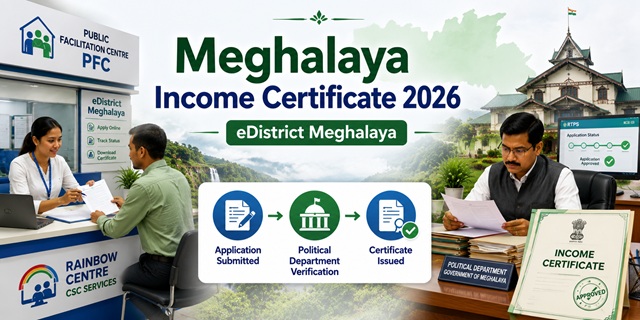
Meghalaya processes income certificates through the eDistrict Meghalaya portal at megedistrict.gov.in. The e-District Project was launched on 21 January 2016 with East Khasi Hills as the pilot district - now active across 11 districts and sub-divisions. Two important facts that make Meghalaya unique: First, the income certificate is issued under the Political Department - not the Revenue Department as in most states. Second, the income certificate has a validity of only 6 months from the date of issue (same as Rajasthan and HP). The mandated timeline under the Meghalaya Right to Public Services Act 2020 is 30 days. Three official methods exist: applying online at megedistrict.gov.in, visiting a PFC (Public Facilitation Centre) at the DC or SDO office, or through a Rainbow Centre (CSC). The court fee is Rs. 25. If the certificate is not issued within 30 days, appeal at mspsdc.meghalaya.gov.in - the official RTPS appeal portal for Meghalaya.
- eDistrict Meghalaya Portal: megedistrict.gov.in
- Apply Income Certificate: megedistrict.gov.in/Income-Certificate
- Income Certificate Service Description: megedistrict.gov.in/Income-Certificate-Info
- All eDistrict Services: megedistrict.gov.in (homepage services table)
- RTPS Appeal: mspsdc.meghalaya.gov.in
- Application Form PDF: meghalaya.gov.in/Income-Certificate-Form
- East Garo Hills PFC: Room No. 24, Ground Floor, DC's Office, Williamnagar
Key Details
| Detail | Information |
|---|---|
| Portal | megedistrict.gov.in (eDistrict Meghalaya) |
| Issuing Department | Political Department (not Revenue Department) |
| RTPS Timeline | 30 Days (notified under Meghalaya RTPS Act 2020) |
| Court Fee | Rs. 25 |
| Validity | 6 months from date of issue |
| e-District Launched | 21 January 2016 (Pilot: East Khasi Hills) |
| Districts Active | 11 districts and sub-divisions |
| Application Methods | Online / PFC at DC/SDO Office / Rainbow Centre (CSC) |
| Income Proof | Affidavit of annual income from all sources OR Salary Statement/Pension Order |
| Document Size Limit | Max 1 MB per PDF |
| Scanning DPI | 75 or 100 DPI recommended |
| Governing Act | Meghalaya Right to Public Services Act 2020 |
| RTPS Appeal Portal | mspsdc.meghalaya.gov.in |
Political Department Issues Income Certificate - Why This Is Different
In most Indian states, income certificates are issued by the Revenue Department through the Tehsildar or Collector. In Meghalaya, the income certificate is issued by the Political Department - confirmed directly from the official income certificate service description page on megedistrict.gov.in. The Political Department in Meghalaya handles citizenship, residence, and community identity certifications for the state's tribal and non-tribal population. The submission address for offline applications is the Political Department office at East Khasi Hills (Pin: 793001).
6-Month Validity in Meghalaya
The Meghalaya income certificate is valid for only 6 months from date of issue - confirmed from indiafilings.com (August 2025 updated) citing official Meghalaya government process. This is the same short validity as Rajasthan and Himachal Pradesh. Practical implications:
- Students applying for scholarship or college admissions must check the date on the certificate before submitting
- For annual scholarship renewals, apply for a fresh income certificate every 6 months
- For NEHU (North Eastern Hill University) admissions or Shillong-based college fee concessions, ensure the certificate issued date is within 6 months of your submission
- Apply at least 35 days before your deadline to account for the 30-day processing time
The Three Application Channels
Confirmed directly from the official megedistrict.gov.in homepage (fetched):
| Channel | Where | Best For |
|---|---|---|
| Online | megedistrict.gov.in - register and apply yourself | Citizens comfortable with online process - fastest tracking |
| PFC (Public Facilitation Centre) | Set up at the DC's Office or SDO Office in each district | Those who prefer government-staffed assistance |
| Rainbow Centre (CSC) | Common Service Centres (branded Rainbow Centres in Meghalaya) across the state | Those in remote areas or who need operator assistance |
Who Can Apply
- Any resident of Meghalaya - any of the 11 districts and sub-divisions
- Individual applicants (confirmed from service description - "Individual" is the eligible applicant type)
- Students requiring income certificate for scholarship, NEHU admissions, college fee concession
- Residents needing income proof for government welfare schemes
- For EWS reservation in central government jobs and IIT/NIT admissions: family income must be below Rs. 8 lakh per annum from all sources
Documents Required
Confirmed directly from the official income certificate service description on megedistrict.gov.in:
| Document | Type | Attestation | Accepted Forms |
|---|---|---|---|
| Annual Income Proof from all Sources | Original | Not Required | Affidavit of annual income from all sources OR Salary Statement OR Pension Payment Order OR Certificate from Treasury |
| EPIC (Voter ID) | Photocopy | Self-attested | Self/Parent/Guardian EPIC Card |
| Residential Proof | Photocopy | Self-attested | Telephone Bill, SC/ST Certificate, Any other Residential Proof, Ration Card, Electricity Bill, Voting Card |
| IT Return | Photocopy | Self-attested | IT Return (Income Tax Return) of previous 2 years |
| Other | Original | Not Required | Any other supporting document |
Document Upload Guidelines
Confirmed directly from the official megedistrict.gov.in portal homepage:
- Maximum file size: 1 MB per PDF document. If your scanned file is larger, scan at a lower DPI.
- Recommended scanning DPI: 75 or 100 DPI to keep file size within 1 MB.
- When scanning EPIC (Voter ID), scan both front and back sides and combine into one PDF file before uploading.
- If you have multiple additional enclosures not covered by the document categories, upload them under "Other."
How to Register on eDistrict Meghalaya
Confirmed from the official eastgarohills.gov.in district website and indiafilings.com citing official process:
- Go to megedistrict.gov.in.
- Click Login on the top right. If you are a new user, click Register.
- Fill in your full name, a valid email ID, and mobile number. An activation link is sent to your email.
- Click the activation link in your email to verify and activate your account.
- Log in with your registered credentials.
How to Apply Online
- Log in to megedistrict.gov.in.
- On the homepage services table, find Income Certificate and click Apply. Or go directly to megedistrict.gov.in/Income-Certificate.
- Select the correct office you are applying to - for example, "Office of the Deputy Commissioner, Shillong" for East Khasi Hills residents. Enter the office name correctly.
- Fill in the application form: personal details, income from all sources (salary, business, agriculture, pension, other), and purpose.
- Upload all required documents in PDF format within 1 MB each. Scan at 75-100 DPI.
- Pay the court fee of Rs. 25 through the payment gateway.
- Submit. An Application ID is generated. Note it down. You will also receive an email/SMS notification.
- Track status by logging in and entering your Application ID.
- Once approved within 30 days, download the digitally signed certificate.
How to Apply at PFC (Public Facilitation Centre)
PFCs are set up at DC (Deputy Commissioner) or SDO (Sub-Divisional Officer) offices across all districts. Confirmed from eastgarohills.gov.in:
- Visit the PFC at your district's DC or SDO office. For East Garo Hills: Room No. 24, Ground Floor, DC's Office, Williamnagar.
- Carry all required documents - EPIC, residential proof, income affidavit or salary statement, IT returns.
- The PFC operator submits the application on megedistrict.gov.in on your behalf.
- Pay the Rs. 25 court fee at the counter.
- Collect the acknowledgement with your Application ID.
- Track status online or receive SMS/email updates. Download certificate once approved.
How to Apply at Rainbow Centre (CSC)
- Locate the nearest Rainbow Centre (Common Service Centre) in your area.
- Carry all required documents with you.
- The CSC operator applies at megedistrict.gov.in on your behalf.
- Pay the Rs. 25 court fee plus any nominal CSC service charge.
- Collect the acknowledgement with your Application ID.
How to Track Application Status
- Log in to megedistrict.gov.in.
- Click Track Application Status in the top menu.
- Enter your Application ID from the acknowledgement.
- Click Track. Current status is displayed.
- Email and SMS notifications are sent automatically when the status changes.
How to Appeal if Certificate is Delayed
If the income certificate is not issued within 30 days (under the Meghalaya Right to Public Services Act 2020), you can appeal at the official RTPS appeal portal:
- Go to mspsdc.meghalaya.gov.in - the Meghalaya State Public Services Delivery Commission portal.
- File an appeal with your Application ID and details of the delay.
- The Commission has authority to investigate delays and impose penalties on officers who fail to deliver within the SLA.
Official Links
- eDistrict Meghalaya - megedistrict.gov.in
- Apply Income Certificate - megedistrict.gov.in
- Income Certificate Service Info - megedistrict.gov.in
- RTPS Appeal - mspsdc.meghalaya.gov.in
- Application Form PDF - meghalaya.gov.in
- East Garo Hills District Guide - eastgarohills.gov.in
Related articles:
Income Certificate in India - Complete Guide
Meghalaya Ration Card Guide
Disclaimer: This article is for informational purposes only. Always verify the latest process at megedistrict.gov.in before applying.
नई टिप्पणी जोड़ें