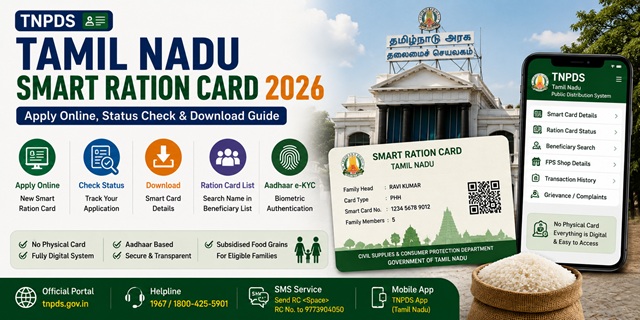
Tamil Nadu was one of the first states in India to fully digitise its ration card system. The state replaced traditional paper ration cards with Smart Ration Cards - digital cards that allow beneficiaries to collect food grains from Fair Price Shops using Aadhaar-based biometric authentication. There is no physical card to carry. Everything is managed digitally through the official TNPDS portal at tnpds.gov.in, managed by the Civil Supplies and Consumer Protection Department, Government of Tamil Nadu.
- TNPDS Portal: tnpds.gov.in - all ration card services
- Apply New Smart Card: tnpds.gov.in/pages/newsmartcard
- Check Application Status: tnpds.gov.in/pages/smartcard-status
Key Details at a Glance
| Detail | Information |
|---|---|
| Issuing Authority | Civil Supplies and Consumer Protection Department, Govt. of Tamil Nadu |
| Official Portal | tnpds.gov.in |
| Card Type | Smart Ration Card (fully digital) |
| Monthly Entitlement (PHH) | Rice, wheat, sugar, kerosene, palm oil, tur dal, urad dal at subsidised rates |
| Monthly Entitlement (PHH-AAY) | 35 kg rice + all commodities at subsidised rates |
| Toll Free Helpline 1 | 1967 |
| Toll Free Helpline 2 | 1800-425-5901 |
| SMS Helpline | Send PDS to 9773904050 |
Types of Smart Ration Card in the State
Tamil Nadu issues six types of Smart Ration Cards based on family income, category, and eligibility:
| Card Type | Card Colour | Who Gets It | Entitlement |
|---|---|---|---|
| PHH Rice Card | Light Green | Priority Household - BPL families identified under NFSA | Rice and all commodities (sugar, wheat, kerosene, palm oil, tur dal, urad dal) at subsidised rates |
| PHH-AAY Card | Light Green | Antyodaya Anna Yojana - poorest of the poor families | 35 kg rice per family per month plus all commodities at subsidised rates |
| NPHH Card | White | Non-Priority Household - APL families above NFSA income limit | Additional 3 kg rice over prescribed amount. Serves as identity/address proof. |
| NPHH-S Card | White | Non-Priority Household (Sugar) - APL families eligible for sugar only | Sugar at subsidised rate only |
| No Commodity Card | - | Families not eligible to draw any commodity from ration shops | No food grains. Card serves as identity proof only. |
| Khaki Card | Khaki | Police personnel up to the rank of Inspector | Subsidised commodities as applicable |
Who Can Apply
- Must be a permanent resident of Tamil Nadu
- Must be at least 18 years old to apply as head of family
- The family must not already hold a valid ration card anywhere in India
- Newly married couples can apply after their names are removed from their parents’ cards
- Families with newborns can add the child to their existing Smart Card
- For PHH (BPL) category: annual family income must be below the poverty line as determined by the Tamil Nadu government
Documents You Need to Apply
- Aadhaar card of all family members (mandatory - mobile number linked to Aadhaar required)
- Address proof - electricity bill, water bill, or rent agreement showing Tamil Nadu address
- PAN card (if available)
- Bank passbook (first page)
- Income certificate (for PHH/BPL and AAY categories)
- Caste or category certificate (if applicable)
- Passport-size photograph of the head of the family
- Old PDS book (if converting from old ration card to Smart Card)
How to Apply for a Tamil Nadu Smart Ration Card Online
You can submit a new Smart Ration Card application online through the official TNPDS portal. Before starting, keep your Aadhaar-linked mobile number and all supporting documents ready for a smooth application process.
- Visit the official TNPDS Smart Card application page at tnpds.gov.in/pages/newsmartcard.
- Select your preferred language (Tamil or English) and begin the application.
- Enter the Aadhaar number of the head of the family along with the mobile number linked to that Aadhaar. Complete the OTP verification and enter the captcha displayed on the screen.
- Fill in the online application form carefully by providing the family's address, details of all family members, and the appropriate ration card category (such as PHH or NPHH).
- Upload the required supporting documents, including Aadhaar cards, address proof, income certificate (where applicable), and a recent photograph of the head of the family. Ensure that the uploaded files meet the prescribed format and size requirements.
- Review all the information entered in the application. If everything is correct, submit the application online.
- After successful submission, the portal generates a unique Application Reference Number. Save this number carefully, as it is required to track the application status and for any future correspondence.
Once the application is submitted, the Civil Supplies and Consumer Protection Department carries out the necessary verification. If the application is approved, the Smart Ration Card is issued digitally and linked to the applicant's designated Fair Price Shop (FPS).
How to Check Tamil Nadu Smart Ration Card Application Status
After submitting your application, you can track its progress online through the official TNPDS portal using your Application Reference Number or Aadhaar number.
- Visit the official application status page at tnpds.gov.in/pages/smartcard-status.
- Enter your Application Reference Number or the Aadhaar number linked to your Smart Ration Card application.
- Complete the verification, if prompted, and click Submit.
- The portal will display the latest status of your application, such as Under Process, Pending Verification, Approved, Rejected, or any other current stage of processing.
You can also sign in to the TNPDS portal using your registered mobile number and OTP to view your application details and monitor its progress from your dashboard.
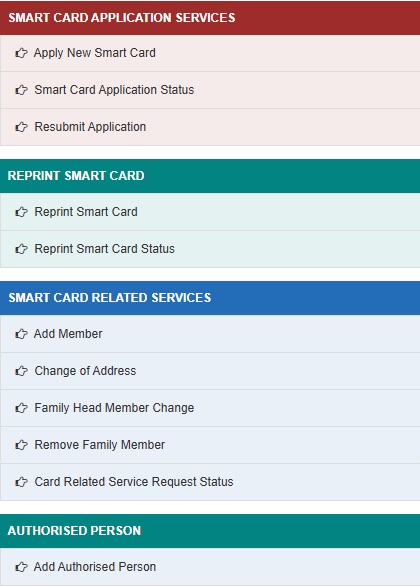
Important: If your application is returned because of missing documents or incorrect information, you do not need to submit a fresh application. Simply use the Resubmit Application service available under Smart Card Application Services, make the required corrections, and submit it again for verification.
How to Resubmit a Smart Card Application
If your Smart Card application is returned due to missing documents, incorrect information, or any other deficiency, you can resubmit it through the official TNPDS portal without creating a fresh application.
- Visit tnpds.gov.in.
- Open Resubmit Application under Smart Card Application Services.
- Enter your Application Reference Number and the required details.
- Correct the information or upload the additional documents requested by the department.
- Review the application and submit it again for verification.
How to Download Smart Ration Card
- Go to tnpds.gov.in/login.xhtml.
- Enter your registered mobile number and request an OTP.
- Enter the OTP and log in.
- On your dashboard, your Smart Ration Card details are displayed including your ration card number and linked FPS shop number.
- Click Download Smart Card or use the print option to save as PDF.
The downloaded Smart Ration Card can be shown at the Fair Price Shop on your phone. No physical card is required.
How to Reprint a TN Smart Ration Card
If your Smart Card details need to be printed again or you require another copy for reference, use the Reprint Smart Card service available on the official TNPDS portal.
- Visit tnpds.gov.in.
- Select Reprint Smart Card.
- Complete the required authentication.
- Submit the request.
- You can check the request progress through Reprint Smart Card Status available on the same portal.
How to Check Beneficiary and Transaction Details
After logging in at tnpds.gov.in with your registered mobile number:
- View your ration card number and linked FPS shop number
- Check your monthly entitlement and commodities available
- View your transaction history showing past ration collections
Tamil Nadu Smart Ration Card Related Services
The Tamil Nadu Public Distribution System (TNPDS) portal allows Smart Card holders to manage their ration card online without visiting the Taluk office. After logging in with your registered mobile number and OTP, you can access the following services:
- Add Member: Add a newborn child, newly married spouse, or any other eligible family member to the Smart Card.
- Remove Family Member: Remove the name of a deceased member, a person who has shifted permanently, or any member who is no longer part of the household.
- Change of Address: Update your residential address after shifting to another location within Tamil Nadu.
- Family Head Member Change: Change the head of the family due to death, marriage, or any other valid reason.
- Card Related Service Request Status: Track the progress of any Smart Card modification request submitted through the portal.
To access these services, visit tnpds.gov.in, log in using your registered mobile number, complete OTP verification, choose the required service, upload the supporting documents (where applicable), and submit the request.
How to Add an Authorised Person
If the head of the family is unable to collect ration personally because of old age, illness, disability, or any other valid reason, an authorised person can be added through the official TNPDS portal.
- Log in to tnpds.gov.in.
- Select Add Authorised Person.
- Enter the details of the authorised person.
- Upload the required supporting documents, if requested.
- Submit the request for approval.
How to Correct Details in Smart Ration Card of Tamil Nadu
- Go to tnpds.gov.in and select the language.
- Under Correct Your Smart Card, click Correction of Details.
- Enter your registered mobile number and verify via OTP.
- Make the required changes to name, age, or other fields.
- Upload a passport-size photograph of the head of the family if required (PNG, GIF, JPEG, JPG format, under 10 KB).
- Click Submit. A reference number is generated for tracking.
How to Link Aadhaar
Aadhaar is already integrated into the TNPDS Smart Card system. Aadhaar-based OTP verification is part of the application and all service requests. For biometric seeding at the FPS:
- Visit your designated Fair Price Shop with Aadhaar cards of all family members
- Each member provides fingerprint biometric authentication on the ePoS device
- This completes the Aadhaar seeding for ration collection
For the complete guide: How to Link Aadhaar with Ration Card.
How to File a Grievance
- Toll Free Helpline 1: 1967
- Toll Free Helpline 2: 1800-425-5901
- SMS Helpline: Send PDS to 9773904050
- SMS for FPS Item Specifications: PDS 101 to 9773904050
- SMS for FPS Open/Closed Status: PDS 102 to 9773904050
- Online: Log in at tnpds.gov.in and use the complaint/grievance option on the dashboard
- District Manager: Contact details in the official district manager list at tnpds.gov.in/downloads/district-manager-details.pdf
Official Portals and Useful Links
- TNPDS Portal - tnpds.gov.in
- Apply New Smart Card - tnpds.gov.in
- Check Application Status - tnpds.gov.in
- Login / Download Smart Card - tnpds.gov.in
- District Manager Contact List - tnpds.gov.in
- DigiLocker - digilocker.gov.in
- Check Aadhaar Seeding Status - nfsa.gov.in
Helpline: 1967 / 1800-425-5901 (Toll-free)
SMS: PDS to 9773904050
Also read:
Ration Card in India - Complete Guide (2026)
How to Link Aadhaar with Ration Card
One Nation One Ration Card (ONORC) - Complete Guide
Disclaimer: This article is for informational purposes only. Processes are subject to change by the Tamil Nadu Government. Always refer to tnpds.gov.in for the latest official information.
टिप्पणियाँ
\\
10/181 சங்குமுத்து அம்மன்புரம்
இராமையன்பட்டி
Keerthana
Cell phone number chenge
नई टिप्पणी जोड़ें