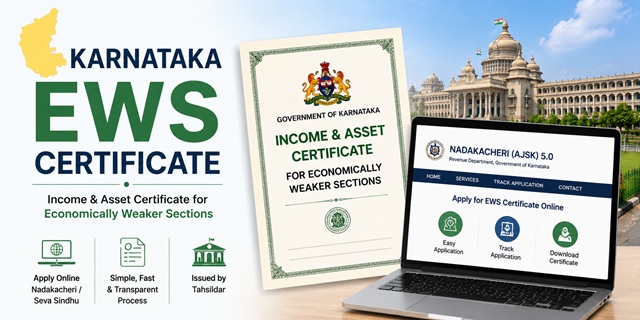
The EWS Certificate in Karnataka is officially called the Income and Asset Certificate for Economically Weaker Sections. It is issued by the Revenue Department through the Tahsildar to general category residents of Karnataka who meet the income and asset limits set by the Government of India. The certificate entitles eligible residents to 10% reservation in central and state government jobs, IITs, NITs, central universities, NEET All India Quota seats, Karnataka state government jobs, and admissions through Karnataka Examinations Authority (KEA) processes.
Karnataka offers two official online channels to apply for this certificate. The primary route is through the Nadakacheri (AJSK) 5.0 portal at nadakacheri.karnataka.gov.in, which is the Revenue Department's dedicated certificate portal managed under the Atalji Janasnehi Kendra (AJSK) project. Alternatively, it can be applied through the Seva Sindhu portal at sevasindhuservices.karnataka.gov.in, which is Karnataka's unified government services platform. You can also apply offline at the Nadakacheri office (Atalji Janasnehi Kendra) at your nearest taluk, or at any authorised Common Service Centre (CSC).
Eligibility Criteria
To be eligible for an EWS certificate in Karnataka, all of the following conditions must be satisfied:
- You must be a permanent resident of Karnataka and belong to the general (unreserved) category. You must not belong to SC, ST, OBC, or Backward Class categories as recognised by the Karnataka government
- Your family's gross annual income from all sources must be below Rs. 8 lakh for the financial year preceding the year of application. Income includes salary, agriculture, business, profession, rent, and any other source
- Your family must not own 5 acres of agricultural land or more
- Your family must not own a residential flat of 1,000 sq ft or more
- Your family must not own a residential plot of 100 sq yards or more in a notified municipality
- Your family must not own a residential plot of 200 sq yards or more outside notified municipalities
All four asset conditions must be satisfied alongside the income condition. Income is always calculated on a gross basis. "Family" includes the applicant, parents, spouse, children below 18 years, and unmarried siblings below 18 years. Income and assets of all these members are counted together.
Two Portals Explained
Karnataka has two government portals where the EWS certificate can be applied for. Understanding the difference helps you choose the right one:
- Nadakacheri (AJSK) 5.0 at nadakacheri.karnataka.gov.in: This is the Revenue Department's dedicated portal for certificates including EWS, income, caste, residence, and domicile certificates. No account registration is needed. You log in directly using your mobile number and OTP. This is the most commonly used and fastest route for revenue certificates in Karnataka
- Seva Sindhu at sevasindhuservices.karnataka.gov.in: This is Karnataka's unified government services portal covering services from multiple departments. For Seva Sindhu, you register using your Aadhaar-linked mobile number. It covers a broader range of services beyond certificates. For EWS certificates specifically, Nadakacheri is the primary and more commonly used portal
Documents Required
Keep the following documents ready before starting the application:
- Aadhaar Card of the applicant. Your mobile number must be linked to your Aadhaar as the portal uses Aadhaar OTP for e-sign at the time of submission
- Ration Card showing family members and Karnataka address
- Income proof: Salary slips or Form 16 for salaried persons; Income Tax Return; or a self-declaration for farmers and self-employed persons
- RTC or Pahani (Record of Rights, Tenancy and Crops): This is Karnataka's primary land record maintained through the Bhoomi system. It shows the name of the land owner, survey number, and area of agricultural land. Obtain your RTC from the Bhoomi portal at landrecords.karnataka.gov.in. If your family owns no agricultural land, submit a self-declaration to that effect
- Property documents: Property tax receipt or sale deed showing area of residential property owned by family members. If no property is owned, include this in the self-declaration
- Residence proof: Domicile certificate, ration card, or Aadhaar Card showing Karnataka address
- PAN Card of the applicant and earning family members
- Passport-size photograph of the applicant in JPG or PDF format, under 200 KB
- Self-declaration affidavit stating total family income is below Rs. 8 lakh and that asset limits are not exceeded
All uploaded documents must be in PDF format and under 200 KB each. Files larger than this limit cause upload failures on the Nadakacheri portal.
How to Apply Online Through Nadakacheri (AJSK) 5.0
The Nadakacheri portal does not require account creation. You log in directly using your mobile number and OTP, making it the quickest route for most applicants.
- Go to nadakacheri.karnataka.gov.in and click on the public login option
- Enter your Aadhaar-linked mobile number and click Get OTP. Enter the OTP received. You are now logged in without needing a username or password
- Select your preferred language: Kannada or English
- Under the New Request menu, select EWS Certificate or search for it in the service list
- Fill in the application form with personal details, family income from all sources separately, and asset details including agricultural land and residential property held by all family members
- Upload all required documents (RTC or Pahani for land, income proof, Aadhaar, residence proof, and photograph) in PDF format, each under 200 KB
- Complete Aadhaar e-sign: Enter your Aadhaar number and the OTP sent to your Aadhaar-linked mobile to digitally sign the application. This is mandatory for submission. Keep the e-sign pop-up open and enter the OTP before it times out
- Pay the application fee using UPI or any available payment option. Pay the exact amount shown. Paying even Rs. 1 extra or less causes payment failure and the application is not submitted
- Submit the application. An RD Number (Acknowledgement Number) is generated. Save this number immediately. You also receive it as an SMS on your registered mobile. Without the RD number, you cannot track status or download the certificate
- Once approved, go to the Print Certificate section, enter your RD number, and download the digitally signed certificate
How to Apply Through Seva Sindhu
As an alternative to Nadakacheri, the EWS certificate can also be applied through the Seva Sindhu portal.
- Go to sevasindhuservices.karnataka.gov.in
- Click New User? Register Here. Enter your 12-digit Aadhaar number and complete the captcha. Click Next. An OTP is sent to your Aadhaar-linked mobile. Enter the OTP and click Allow to grant consent for DigiLocker-based KYC
- After verification, enter your mobile number and email ID to complete registration
- Log in using your registered mobile or email and password
- Click Apply for Services and then View All Available Services
- Search for EWS Certificate or navigate to Revenue Department services
- Fill in the application form, upload documents, and submit
- A unique acknowledgement or token number is generated. Save this for tracking
How to Apply Offline at Nadakacheri (Atalji Janasnehi Kendra)
If you prefer to apply in person or face issues with the online process:
- Visit the Nadakacheri (Atalji Janasnehi Kendra) at your nearest taluk office. These Kendras are present at every taluk headquarters in Karnataka
- Obtain the EWS certificate application form from the counter
- Fill in all details including complete family income from all sources and land or property details of all family members
- Attach photocopies of all required documents. Carry originals for verification at the counter
- Submit the completed application and collect the acknowledgement receipt with your RD number
- The Nadakacheri staff submits the application through the portal on your behalf. Verification and certificate issuance follow the same process as online applications
Apply Through CSC (Common Service Centre)
Authorised CSC centres in Karnataka can submit the Nadakacheri application on your behalf. Carry all original documents. The CSC operator uses their centre login to submit the application. Pay the government fee plus the operator's service charge. Collect your RD number from the operator after submission.
Verification Process in Karnataka
After submission, the following verification process takes place:
- The application is assigned to the Village Accountant (VA) for the first-level check against existing records and land details
- The Revenue Inspector (RI) conducts field verification, visiting the applicant's address and verifying income sources and land records in the RTC. If the application status shows "Pending at VAO" or "Pending for RI Inspection" for more than 15 working days, visit the Nadakacheri taluk office with your RD number to follow up
- The Shirastedar at the Nadakacheri office conducts a supervisory check
- The Tahsildar is the final approving authority who digitally signs the certificate
- After approval, the certificate is available for download on the Nadakacheri portal and is also pushed to your DigiLocker if you opted for it at the time of application
Sakala: Karnataka's Service Guarantee
Karnataka's Sakala programme guarantees timely delivery of government services. The EWS certificate falls under the Sakala framework. If your certificate is not issued within the stipulated timeframe, you can file a Sakala appeal online. Every application gets a GSC (Government Service Centre) number under Sakala. Use this GSC number to file your appeal at sakala.kar.nic.in if the certificate is delayed beyond the prescribed period. Most delayed applications resolve within 7 to 15 days of filing a Sakala appeal.
Application Fee
The application fee for the EWS certificate on the Nadakacheri portal is in the range of Rs. 15 to Rs. 25. Pay the exact amount shown during the application. Even a difference of Rs. 1 causes payment failure. If applying through a CSC or Seva Sindhu service centre, an additional service charge applies over the government fee. For helpline support, call 080-4455-4455 or the toll-free number 1800-425-1243.
Processing Time
The EWS certificate in Karnataka is typically issued within 7 to 21 working days of application submission under the Sakala framework. When your Aadhaar mobile number is updated, your village records are current, and all documents are in order, the certificate can be issued significantly faster. If the Revenue Inspector's field inspection is completed quickly, many applicants receive the certificate within 7 to 10 working days.
Validity of the EWS Certificate in Karnataka
The EWS certificate is valid for one financial year (April 1 to March 31). It must be renewed every year by applying fresh with updated income documents for the previous financial year. For Karnataka state admissions through KEA and other processes in June or July, apply for a fresh certificate after April 1 of that year. For NEET All India Quota counselling, the certificate must be valid at the time of document verification.
How to Track Application Status
To check the status of your EWS certificate application on Nadakacheri:
- Go to nadakacheri.karnataka.gov.in
- Click on Get Application Status or Application Status
- Enter your RD Number and click Search
- The current stage of your application is displayed: pending at VA, pending at RI, approved, or rejected
For Seva Sindhu applications, go to sevasindhu.karnataka.gov.in/Track_your_application.html, select Revenue Department, enter your application reference number, and click Check Status Now.
How to Download the Certificate
Once approved on Nadakacheri:
- Go to nadakacheri.karnataka.gov.in
- Click on Print Certificate under the Print menu
- Enter your RD Number. The approved certificate is available for download and print in PDF format
- If you opted for DigiLocker at the time of application, the approved certificate is also available directly in your DigiLocker under Issued Documents
নতুন কমেন্ট যুক্ত করুন