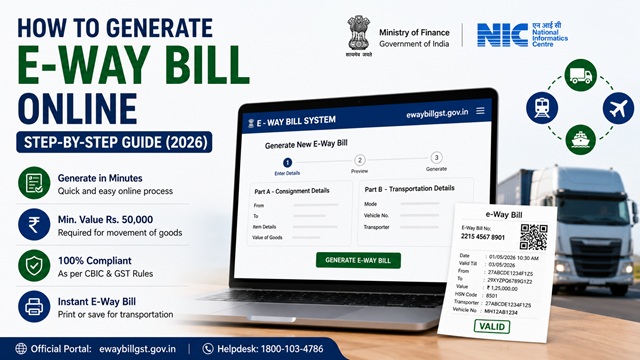
An e-way bill is an electronic document that must accompany any goods being moved by road, rail, air, or ship within India when the value of the consignment exceeds Rs. 50,000. It is generated online through the official E-Way Bill portal managed by the National Informatics Centre (NIC) under the Ministry of Finance.
The official portal for e-way bill is: ewaybillgst.gov.in
E-way bills can be generated in three ways - on the web portal (covered in this guide), via SMS, and through e-Invoice integration. This guide covers the step-by-step web-based method, which is the most commonly used method.
What is an E-Way Bill?
As confirmed on ewaybillgst.gov.in, an e-way bill is a document that must be carried by the person in charge of a vehicle or conveyance whenever goods worth more than Rs. 50,000 are being transported. It is generated electronically on the e-way bill portal before the movement of goods starts.
In simple terms: if you are a business owner sending goods worth more than Rs. 50,000 to a buyer, your transporter must carry an e-way bill during the journey. Without it, the goods can be stopped by tax authorities and penalties can be imposed.
Who Needs to Generate an E-Way Bill?
As per Rule 138 of the CGST Rules at taxinformation.cbic.gov.in, any of the following persons can generate an e-way bill:
- Supplier (registered): If you are sending goods from your business, you generate the e-way bill before the goods leave your premises.
- Recipient (registered): If the supplier is not registered but you are, you generate the e-way bill as the recipient.
- Transporter: If neither the supplier nor the recipient has generated the e-way bill, the transporter must generate it before moving the goods.
- Unregistered person/citizen: Even individuals who are not registered under GST can generate an e-way bill as a citizen by enrolling on the e-way bill portal. As confirmed in the official FAQ at docs.ewaybillgst.gov.in: "The consumer can also enrol as a citizen and generate the e-way bill himself."
When is an E-Way Bill Required?
An e-way bill is required when:
- Goods worth more than Rs. 50,000 are being transported
- The movement is in relation to supply (sale, transfer, barter, exchange)
- The movement is for reasons other than supply (like sending goods for job work or exhibition)
- The movement is due to inward supply from an unregistered person
Special cases where e-way bill is required even if value is below Rs. 50,000:
- Goods sent from one state to another for job work purposes
- Handicraft goods transported from one state to another by a person exempt from GST registration
Source: Rule 138, CGST Rules at taxinformation.cbic.gov.in.
When is an E-Way Bill NOT Required?
As per the official FAQ at docs.ewaybillgst.gov.in, e-way bill is not required for:
- Goods transported by non-motorised conveyance (hand cart, cycle, etc.)
- Goods transported from customs port, airport, air cargo complex, or land customs station to an Inland Container Depot (ICD) or Container Freight Station (CFS) under customs bond
- Goods transported under customs supervision or seal
- Transit cargo from or to Nepal or Bhutan
- Defence formation goods under the Ministry of Defence as consignor or consignee
- Empty cargo containers
- Consignments where the value does not exceed Rs. 50,000 (except special cases above)
- Goods specifically exempted by notification - such as liquefied petroleum gas for supply to household and non-domestic exempted category customers, kerosene oil under PDS, postal baggage, currency, jewellery, and several others as listed in the EWB Rules
Note on railways: For goods transported by railways, the e-way bill does not need to be physically carried with the goods during transit. However, railways cannot deliver the goods until the e-way bill is produced at the time of delivery.
How to Register on the E-Way Bill Portal
Before generating an e-way bill, you need to be registered on ewaybillgst.gov.in.
- If you are a GST-registered person: Use your GSTIN to register on the e-way bill portal. Your GST credentials work here.
- If you are an unregistered transporter: Enrol on the portal to get a 15-digit Transporter ID (TRANSIN).
- If you are a citizen (not registered under GST): Enrol as a citizen at ewaybillgst.gov.in to generate e-way bills as needed.
Step-by-Step: How to Generate E-Way Bill Online
The e-way bill is generated in Form GST EWB-01 which has two parts - Part A and Part B.
- Go to ewaybillgst.gov.in and log in with your Username, Password, and Captcha.
- On the dashboard, click E-waybill in the left menu and select Generate New.
- The e-way bill generation form opens. Fill in the following fields:
Part A - Consignment Details
| Field | What to Enter |
|---|---|
| Transaction Type | Select Outward if you are the supplier sending goods. Select Inward if you are the recipient of goods. |
| Sub-type | Select the relevant sub-type: Supply, Export, Job Work, SKD/CKD, Recipient Not Known, For Own Use, Exhibition or Fairs, Line Sales, Others |
| Document Type | Select Invoice, Bill of Supply, Challan, Credit Note, Bill of Entry, or Others |
| Document Number | Enter the invoice or challan number (alphanumeric, max 16 characters) |
| Document Date | Select the date of the invoice or challan. Future dates are not allowed. |
| From (Consignor) | Enter the GSTIN of the supplier/consignor. Name and address auto-populate. Enter URP if the consignor is unregistered. |
| To (Consignee) | Enter the GSTIN of the recipient/consignee. Name and address auto-populate. Enter URP if the consignee is unregistered. |
| Item Details | Enter the product name, description, HSN code, quantity, unit, taxable value, and applicable tax rate (IGST or CGST+SGST) |
| Total Value | The system auto-calculates total taxable value and tax amounts |
| Approximate Distance | Enter the approximate distance in km from source to destination. This determines the validity of the e-way bill. |
| Transporter Details | If using a transporter, enter Transporter ID (GSTIN or TRANSIN). The transporter will then update Part B with vehicle details. |
Part B - Vehicle / Transport Details
| Field | What to Enter |
|---|---|
| Mode of Transport | Select Road, Rail, Air, or Ship |
| Vehicle Number (Road) | Enter the vehicle number in a valid format. Accepted formats: MH12AB1234 or MH12A1234 or MH121234 or ABC1234. The format is validated by the system - incorrect format will be rejected. |
| Transport Document Number (Rail/Air/Ship) | Enter the railway receipt number, airway bill number, or bill of lading number |
- After filling all details, click Submit.
- The system validates the data. If everything is correct, a unique 12-digit e-way bill number (EBN) is generated along with the validity period.
- Print or save the e-way bill. It must be carried with the goods during transport (for road transport).
Tip - Save time with My Masters: If you regularly deal with the same suppliers, customers, products, or transporters, add them to the My Masters section on the e-way bill portal dashboard. Once saved, their details auto-populate when you generate future e-way bills - no need to enter the same data repeatedly.
Tip - Save time with My Masters: If you regularly deal with the same suppliers, customers, products, or transporters, add them to the My Masters section on the e-way bill portal dashboard. Once saved, their details auto-populate when you generate future e-way bills - no need to enter the same data repeatedly.
Important: As confirmed in the official FAQ at docs.ewaybillgst.gov.in, the e-way bill is valid only when Part B is filled. If only Part A is submitted, a unique number is generated but without any validity period. The goods cannot be moved until Part B (vehicle/transport details) is also filled.
E-Way Bill Validity Period
As per the official FAQ at docs.ewaybillgst.gov.in and the updated notification dated 22 December 2020 (No. 94/2020 effective 01 January 2021):
| Type of Cargo | Validity |
|---|---|
| Regular vehicles (all normal transport) | 1 day for every 200 km (or part thereof) |
| Over Dimensional Cargo (ODC) vehicles | 1 day for every 20 km (or part thereof) |
Example: If the distance is 450 km, the validity is 3 days (200 + 200 + 50 km = 3 days). Validity starts from the time Part B is first filled and expires at midnight of the last day.
How to Cancel an E-Way Bill
As per the official documentation:
- An e-way bill can be cancelled within 24 hours of generation
- It cannot be cancelled if it has already been verified by a tax officer during transit
- To cancel: Log in to ewaybillgst.gov.in → E-waybill → Cancel → Enter the e-way bill number → Select reason for cancellation → Submit
How to Extend E-Way Bill Validity
If the goods cannot reach the destination within the validity period due to exceptional circumstances such as natural calamity, accident, law and order issues, or trans-shipment delay, the validity can be extended. As per the official FAQ:
- Extension can be done from 8 hours before expiry to 8 hours after expiry
- Only the transporter carrying the consignment at the time of expiry can extend it
- To extend: Log in → E-waybill → Extend Validity → Enter e-way bill number → Enter reason, current location, remaining distance, and Part B details → Submit
- The new validity is calculated based on the remaining distance to travel
- Note: Validity cannot be extended beyond 360 days from the original generation date
How to Generate E-Way Bill for Citizens (Without GST Registration)
A consumer or citizen who is not registered under GST can also generate an e-way bill by enrolling on the e-way bill portal:
- Go to ewaybillgst.gov.in.
- Click Registration → Enrolment for Citizens.
- Fill in your details and complete enrollment.
- After enrollment, log in and generate the e-way bill using the same steps above.
How to Check and Verify an E-Way Bill
Anyone can verify an e-way bill without logging in:
- Go to ewaybillgst.gov.in/Others/EBPrintnew.aspx.
- Enter the e-way bill number.
- Click Go to view the e-way bill details.
Official Portals and Useful Links
- E-Way Bill Portal - ewaybillgst.gov.in
- E-Way Bill Login - ewaybillgst.gov.in
- Verify / Print E-Way Bill - ewaybillgst.gov.in
- E-Way Bill Official FAQ - docs.ewaybillgst.gov.in
- Rule 138 CGST Rules - taxinformation.cbic.gov.in
- E-Way Bill Rules PDF - docs.ewaybillgst.gov.in
- GST Portal - gst.gov.in
E-Way Bill Helpdesk: 1800-103-4786 (as listed on ewaybillgst.gov.in)
Disclaimer: This article is for informational purposes only. All e-way bill rules and processes are subject to change by CBIC and GSTN. Always refer to ewaybillgst.gov.in for the latest official information.
Add new comment