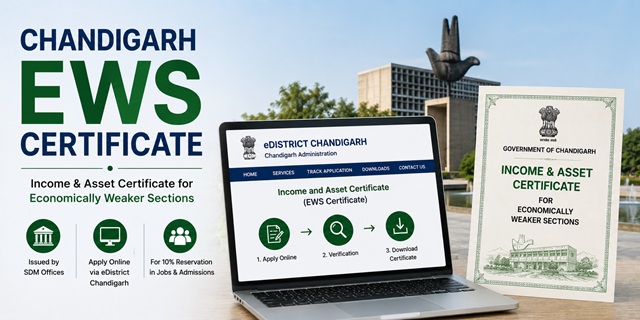
Chandigarh Income and Asset Certificate for Economically Weaker Sections is issued by the Revenue Department, Chandigarh Administration, through the Sub-Divisional Magistrate (SDM) of the sub-division where the applicant resides. Chandigarh is a Union Territory with a single district divided into three sub-divisions, each with its own SDM office.
With this certificate, eligible general category residents of Chandigarh can claim 10% reservation in central and Chandigarh UT government jobs, IITs (including PEC University), NITs, central universities, NEET All India Quota seats, and admissions to Chandigarh's colleges and institutions.
Applications are submitted through the eDistrict Chandigarh portal at chdservices.gov.in, offline at the SDM office of your sub-division, or through authorised CSC centres. The UMANG mobile app also integrates eDistrict Chandigarh services for applying and tracking from a smartphone.
Chandigarh's Three Sub-Divisions and SDM Offices
Chandigarh is divided into three sub-divisions for revenue and administrative purposes, each headed by an SDM. You must apply to the SDM of the sub-division where your residence is located:
- SDM Central: Office at Estate Office Building, First Floor, Sector 17, Chandigarh. Covers central sectors of Chandigarh. Contact: chdsdmcentral.gov.in
- SDM South: Office at Sports Complex, Hockey Stadium, Sector 42, Chandigarh. Covers sectors from Sector 32 to Sector 56 and villages including Maloya, Kajheri, Badheri, Attawa, Buterla, Burail, Faidan, and associated Chandigarh Housing Board flats in Sector 61
- SDM East: Office at CTU Complex, Industrial Area, Phase-I, Chandigarh. Covers Manimajra, Industrial Areas Phase-I and Phase-II, Raipur Khurd, Daria, Makhan Majra, Kishangarh, Bhagwanpura, Mauli Jagran, and associated villages
If you apply at the wrong SDM office, the application will be rejected or transferred, causing delays. Confirm which SDM office covers your sector or village before applying.
Eligibility Criteria
To be eligible for an EWS certificate in Chandigarh, all of the following conditions must be satisfied:
- You must be a permanent resident of Chandigarh and belong to the general (unreserved) category.
- You must not belong to SC, ST, or OBC categories
- Your family's gross annual income from all sources must be below Rs. 8 lakh for the financial year preceding the year of application. Income includes salary, agriculture, business, profession, rent, and any other source
- Your family must not own 5 acres of agricultural land or more
- Your family must not own a residential flat of 1,000 sq ft or more
- Your family must not own a residential plot of 100 sq yards or more in a notified municipality
- Your family must not own a residential plot of 200 sq yards or more outside notified municipalities
All four asset conditions must be satisfied alongside the income condition. Income is always calculated on a gross basis. "Family" includes the applicant, parents, spouse, children below 18 years, and unmarried siblings below 18 years.
Documents Required
Keep the following documents ready. For online applications, files must be in PDF or JPEG format. For offline applications, carry self-attested photocopies and originals:
- Aadhaar Card of the applicant
- Voter ID Card or PAN Card as additional identity proof
- Residence proof: Aadhaar Card showing Chandigarh address, ration card, electricity bill, water bill, or any government-issued document with your Chandigarh address. For residents who have recently moved to Chandigarh, any document showing 6 months or more of continuous residence in Chandigarh is accepted
- Income proof: Salary slips or Form 16 for salaried persons; Income Tax Returns for the previous financial year; self-declaration of income for self-employed and agricultural workers
- Property documents: Property tax receipt or sale deed showing area of any residential property owned by family members. If no property is owned, submit a self-declaration
- Land records: Documents showing agricultural land held by family members if any. If no agricultural land is owned, include this in the self-declaration
- Court fee stamp of Rs. 1.25: An Indian Non-Judicial Court Fee Stamp of Rs. 1.25 affixed on the application form. This is the prescribed court fee for certificate applications in Chandigarh and is a unique requirement specific to this UT
- Self-declaration affidavit stating total family income from all sources is below Rs. 8 lakh and all asset limits are within prescribed thresholds
- Passport-size photograph of the applicant
Method 1: Apply Online Through chdservices.gov.in
- Go to chdservices.gov.in
- Click Register on the homepage if you are a new user. Fill in your name, email ID, mobile number, and other required details. Create a username and password. Submit and verify via OTP. Your account is created
- Click Login and enter your credentials
- After logging in, browse the list of available services on the dashboard
- Under Revenue Department services, find and click on Income and Asset Certificate for EWS or the equivalent EWS certificate service
- The application form opens. Fill in your personal details: name, father's name, address, sub-division (select your correct SDM area), and mobile number
- Fill in income details from all sources for all family members. Enter total annual family income
- Fill in asset details: agricultural land and residential property owned by family members
- Upload all required documents in the accepted format within the portal's file size limits. Upload Aadhaar, income proof, address proof, property documents (if applicable), and passport-size photograph
- Pay the applicable fee online. The court fee of Rs. 1.25 may be integrated as a payment step on the portal or may need to be affixed physically. Confirm at the payment step
- Submit the application. An Application Reference Number is generated. Save this for tracking
- Once the SDM approves the certificate, log in to chdservices.gov.in, go to your application, and download the digitally signed certificate in PDF format
Method 2: Apply Offline at the SDM Office
- Identify the correct SDM office for your area. Central sectors go to SDM Central (Sector 17). Sectors 32 onwards and associated villages go to SDM South (Sector 42). Manimajra and Industrial Area go to SDM East (Industrial Area Phase-I)
- Visit the SDM office on a working day. The revenue counter typically operates from 9:30 AM to 1:00 PM for certificate applications. Arrive early to avoid queues
- Collect the EWS Income and Asset Certificate application form from the revenue counter. The form is also available for download at chdservices.gov.in under the forms section
- Fill in all details in the form: applicant's name, father's name, Chandigarh address, sector or village, sub-division, family income from each source separately, and details of all agricultural land and residential property owned by family members
- Affix a Rs. 1.25 court fee stamp on the application form in the designated space. Court fee stamps are available at the post office or authorised stamp vendors near the SDM office
- Attach self-attested photocopies of all documents: Aadhaar card, residence proof, income proof, property documents (if applicable), and passport-size photograph. Carry originals for on-the-spot cross-verification
- Submit the completed form at the revenue counter of the SDM office. The counter officer issues an acknowledgement receipt with your Application Reference Number. The receipt also shows the expected delivery date
- The SDM office verifies your documents and may initiate a field inquiry to verify residence, income sources, and property details at your address
- Once the SDM approves and signs the certificate, it is made available for download on the chdservices.gov.in portal or for collection at the SDM office. You receive an SMS notification on your registered mobile when the certificate is ready
Method 3: Apply Through CSC (Common Service Centre)
- Locate an authorised CSC centre in Chandigarh. CSC centres are available across various sectors and villages
- Carry your Aadhaar card, residence proof, income proof, property documents (if applicable), and passport-size photograph
- Tell the CSC operator you need the EWS Income and Asset Certificate from the SDM of your sub-division
- The operator fills and submits the application through the chdservices.gov.in portal on your behalf. Documents are scanned and uploaded
- Pay the government fee plus the CSC service charge. Collect the Application Reference Number from the operator
- Track the application status and download the approved certificate using your Application Reference Number on chdservices.gov.in
Method 4: Apply Through UMANG App
The UMANG (Unified Mobile Application for New-age Governance) App integrates eDistrict Chandigarh services. Download the UMANG app from the Google Play Store or Apple App Store. Search for e-District Chandigarh. Log in using your chdservices.gov.in credentials or register on the app. Navigate to the EWS certificate service, fill in the form, upload documents, and submit. Track status and download the approved certificate directly from the UMANG app. For more details visit web.umang.gov.in.
Application Fee
The prescribed fee for revenue certificate applications in Chandigarh is a court fee stamp of Rs. 1.25. This is one of the lowest certificate fees in India and is specific to Chandigarh UT. The court fee stamp is affixed on the application form for offline submissions. For online applications through chdservices.gov.in, confirm the payment method at the payment step. CSC operators charge an additional service fee for their assistance.
Processing Time
The EWS certificate in Chandigarh is typically issued within 7 to 15 working days of application submission. The SDM office processes applications based on a field inquiry which verifies residence, income, and property details. Applications with complete and consistent documents are processed within 7 to 10 working days. Incomplete documents or field inquiry delays extend the processing time. An SMS notification is sent to your registered mobile when the certificate is ready.
Validity of the EWS Certificate in Chandigarh
The EWS Certificate is valid for one financial year (April 1 to March 31). It must be renewed every year by applying fresh with updated income documents for the previous financial year. For PEC University of Technology and other Chandigarh institution admissions under the EWS category, check the specific notification for validity requirements. For NEET All India Quota counselling in June or July, apply for a fresh certificate after April 1 of that year.
How to Track Application Status
- Go to chdservices.gov.in
- Click on Track Application on the homepage. This is available without login
- Enter your Application Reference Number
- Click Search. The current status is displayed
How to Download and Verify the Certificate
- Log in to chdservices.gov.in
- Go to your application history on the dashboard
- Find the approved EWS certificate application and click Download Certificate
- The digitally signed PDF is downloaded
For certificate verification, use the verification option on the portal and enter the application reference number and certificate details to confirm authenticity.
नई टिप्पणी जोड़ें