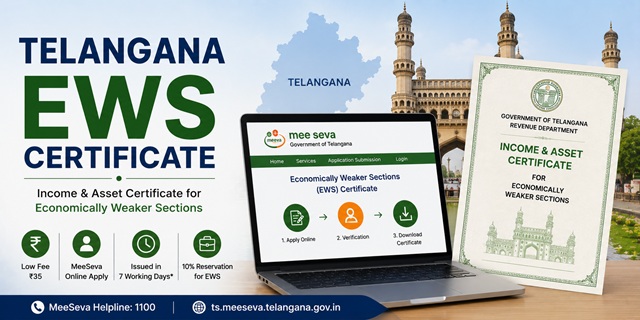
The EWS Certificate in Telangana is officially called the Income and Asset Certificate for Economically Weaker Sections. It is issued by the Revenue Department through the Tahsildar (Mandal Revenue Officer) to general category (OC category) residents of Telangana who do not belong to BC, SC, or ST categories and who meet the prescribed income and asset limits.
With this certificate, eligible residents can claim 10% reservation in central and state government jobs, TSPSC (Telangana State Public Service Commission) exams, IITs, NITs, central universities, NEET All India Quota seats, and state admissions through TGEAPCET, TGPGCET, and other Telangana state entrance exams. The certificate Application Number from MeeSeva is directly used during TGEAPCET counselling on the official counselling portal.
Applications are submitted through the Telangana MeeSeva portal at ts.meeseva.telangana.gov.in, through any of the MeeSeva franchise centres across all 33 districts of Telangana, or offline at the nearest Tahsildar (MRO) office. The MeeSeva helpline is 1100.
Critical Prerequisite: Income Certificate Must Be Obtained First
Telangana has a unique requirement not found in most other states: a valid Income Certificate issued by the Tahsildar showing family income below Rs. 8 lakh per annum is mandatory for the EWS certificate application. You must apply for the Income Certificate first through MeeSeva and receive it before you can apply for the EWS certificate. The Income Certificate is a supporting document for the EWS application. Without it, the EWS application cannot be completed. Factor in this additional step and time when planning your application.
Eligibility Criteria
To be eligible for an EWS certificate in Telangana, all of the following conditions must be satisfied:
- You must be a permanent resident of Telangana and belong to the OC (Open Category or General/Unreserved) category. You must not belong to BC (Backward Class), SC (Scheduled Caste), or ST (Scheduled Tribe) categories. In Telangana, the general category is commonly referred to as OC
- Your family's gross annual income from all sources must be below Rs. 8 lakh for the financial year preceding the year of application. Income includes salary, agriculture, business, profession, rent, and any other source
- Your family must not own 5 acres of agricultural land or more
- Your family must not own a residential flat of 1,000 sq ft or more
- Your family must not own a residential plot of 100 sq yards or more in a notified municipality
- Your family must not own a residential plot of 200 sq yards or more outside notified municipalities
All four asset conditions must be satisfied alongside the income condition. Income is always calculated on a gross basis. "Family" includes the applicant, parents, spouse, children below 18 years, and unmarried siblings below 18 years.
Documents Required
Keep the following documents ready before applying. All documents must be in PDF or JPEG format for upload:
- Income Certificate issued by the Tahsildar showing family income below Rs. 8 lakh. This is a mandatory prerequisite. Apply for it first through MeeSeva if you do not have one
- Aadhaar Card of the applicant
- Ration Card (White card or Pink card) showing family members and Telangana address
- EPIC Card (Voter ID) as identity and residence proof
- Pattadar Passbook and Title Deed for agricultural land, if any. These are Telangana's primary land ownership documents maintained through the Dharani portal. Download your Pattadar Passbook from the Dharani portal at dharani.telangana.gov.in. If no agricultural land is owned, submit a self-declaration
- Property documents showing area of any residential property owned by family members. If no property is owned, include this in the self-declaration
- Residence Certificate or any document showing Telangana address for 10 years or more (required for local candidate benefits in TGEAPCET)
- PAN Card of the applicant and earning family members
- Passport-size photograph of the applicant in JPG or JPEG format
- Signature of the applicant and parent or guardian (required on the application form)
Method 1: Apply Online Through MeeSeva Citizen Portal
The MeeSeva 2.0 citizen portal allows residents to apply for certificates directly from home without visiting a MeeSeva centre.
- Go to ts.meeseva.telangana.gov.in
- Click Citizen Registration on the homepage if you are a new user. Enter your mobile number, name, and email address. An OTP is sent to your mobile number. Enter the OTP. Set a password and click Submit. Registration is complete
- Click Citizen Login on the top right. Enter your registered mobile number or user ID, your password, and the OTP sent to your phone. Click Login
- After logging in, click on Application Submission on the dashboard
- Select Revenue from the department list
- Click on Economically Weaker Sections Certificate from the list of services
- The application form opens. Fill in the applicant's name, father's name, address, mandal, district, and mobile number
- Fill in income details: enter gross income from each source separately for all family members. Enter agricultural land held in acres and residential property details
- Upload all required documents including the mandatory Income Certificate, Aadhaar, ration card, and Pattadar Passbook (if land is owned), within the portal's file size limits
- Upload the applicant's passport-size photograph
- Click Show Payment to see the fee
- Select your payment mode and click to proceed to the Payment Gateway
- Pay the fee of Rs. 35 online. The payment receipt is generated
- Submit the application. An Application Number and Transaction Number are generated. Save both. An SMS with the acknowledgement and expected certificate delivery date is sent to your registered mobile
- Once the Tahsildar approves the certificate, log in, go to Check MeeSeva Certificate, enter your Application Number, and download the digitally signed certificate in PDF format
Method 2: Apply Through MeeSeva Franchise Centre
Telangana has MeeSeva franchise centres across all 33 districts at mandal, town, and city levels. For residents who prefer assisted application or do not have internet access, visiting a franchise centre is the most common route.
- Locate your nearest MeeSeva centre. To find one, go to meeseva.telangana.gov.in, click on MeeSeva Centres, and select your district and mandal from the map or list
- Carry all original documents including your Income Certificate, Aadhaar card, ration card, Pattadar Passbook (if land is owned), and passport-size photograph
- Tell the MeeSeva operator you need the EWS Income and Asset Certificate
- The operator downloads the EWS application form (available under Downloads on the MeeSeva portal at tgmf.in/pages/downloads/applicationFormsDownloads.php) and fills it in based on your documents
- The operator scans and uploads your documents and photograph
- Pay the service charge of Rs. 35 at the counter. This covers the application form, service charge, and certificate issuance. No additional payment is needed for certificate download later
- Collect the printed receipt with your Application Number and Transaction Number. Keep both numbers safely as they are needed to track status and download the certificate
- You receive an SMS on your registered mobile acknowledging the submission and showing the expected certificate delivery date
- Once the certificate is ready, either download it online using your Application Number or collect a printout from the same MeeSeva centre where you applied
Method 3: Apply via WhatsApp (T-App Folio)
Telangana offers government services through a WhatsApp-based service. Save the number 80969 58096 to your contacts. Send the message Hi to this number. Follow the prompts to apply for certificates including the EWS certificate, make payments through the linked wallet, and track your MeeSeva application status. This channel is useful for quick status checks and document requests when you cannot access the portal.
Method 4: Apply Offline at the Tahsildar (MRO) Office
- Visit the Tahsildar office (Mandal Revenue Office) in your mandal headquarters
- Collect the EWS Income and Asset Certificate application form from the counter. The form is also available for download from the MeeSeva federation portal at tgmf.in under Application Forms under the Revenue Department section
- Fill in the form completely including your name, address, income from each source for all family members, and details of all land and property held
- Obtain the signature of the applicant and parent or guardian on the completed form
- Attach photocopies of all required documents: Income Certificate, Aadhaar card, ration card, Pattadar Passbook (if land is owned), property documents (if any), and passport-size photograph
- Submit the completed form with attachments at the receiving counter of the Tahsildar office
- The receiving officer issues an acknowledgement receipt with a reference number. Collect and keep this receipt
- The Tahsildar verifies all documents, checks the Dharani land records database for land ownership, and either approves or rejects the application
- Once approved, collect the digitally signed certificate from the Tahsildar office or download it from the MeeSeva portal using the Transaction Number provided on your receipt
Verification Process in Telangana
After application submission through any channel, the following process takes place:
- The application is received in the Tahsildar's login on the MeeSeva system
- The Tahsildar verifies all submitted documents including the Income Certificate, land records through the Dharani system, and residential property details
- In some cases, a physical verification is initiated where a Revenue Inspector may visit the applicant's address to verify residence, income sources, and property
- After verification, the Tahsildar either approves or rejects the application
- On approval, a digitally signed certificate with a QR code for online verification is issued and made available for download on the MeeSeva portal
Application Fee
The total service charge for the EWS certificate through MeeSeva is Rs. 35. This covers the application form, service charge, and certificate issuance together. The fee is the same whether you apply online through the citizen portal or at a MeeSeva franchise centre. No additional fee is charged for downloading the certificate after approval.
Processing Time
The EWS certificate in Telangana is typically issued within 7 working days of application submission. If the certificate is not issued within 7 working days, you can file a grievance through the MeeSeva portal using your Transaction ID. Go to ts.meeseva.telangana.gov.in, click on Grievance, and submit a complaint with your Transaction Number. The support team follows up with the Tahsildar to resolve delayed applications.
Validity of the EWS Certificate in Telangana
The EWS certificate is valid for one financial year (April 1 to March 31). It must be renewed every year by applying fresh with updated income documents for the previous financial year. For TGEAPCET, TGPGCET, and other Telangana admissions, the certificate must be valid at the time of document verification at counselling. The TGEAPCET official notification for 2025 specifically required the EWS certificate to be valid for the year 2025-26. Always check the specific exam notification for the required validity period.
How to Track Application Status
- Go to ts.meeseva.telangana.gov.in
- Click on Track Your Application or Status Enquiry on the homepage
- Select the service type (Certificate) from the dropdown
- Enter your Transaction ID or Application Number or registered mobile number
- Enter the captcha code and click Submit
- The current status is displayed showing whether the application is Pending, Approved, or Rejected
How to Download the Certificate
- Go to ts.meeseva.telangana.gov.in
- Click on Check MeeSeva Certificate on the homepage
- Enter your Application Number in the field provided
- Click Go
- The certificate is displayed. Download and save the PDF
The issued certificate carries a digital signature and a QR code for online verification. It is legally valid for submission to government offices, recruitment boards, and educational institutions.
వ్యాఖ్యానించండి