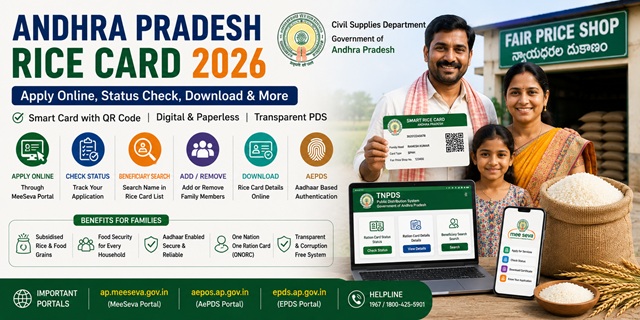
In Andhra Pradesh, a Ration Card is officially called a Rice Card. The state has over 1.46 crore rice cards covering approximately 4.3 crore family members. From August 2026, the AP government started distributing Smart Ration Cards with QR codes across all districts - replacing the old physical cards. Citizens can now collect their Smart Ration Card from their nearest Fair Price Shop. All Ration Card services are managed by the Department of Consumer Affairs, Food and Civil Supplies, Government of Andhra Pradesh through the MeeSeva portal and the EPDS system.
- MeeSeva Portal: ap.meeseva.gov.in - apply for new rice card, member addition, corrections
- AePDS Portal: aepos.ap.gov.in - RC details, beneficiary search, eKYC status
- EPDS Portal: epdsap.ap.gov.in/epdsAP/epds - ration card list and reports
- Civil Supplies Department: civilsupplies.ap.gov.in
Key Details at a Glance
| Detail | Information |
|---|---|
| Issuing Authority | Dept. of Consumer Affairs, Food and Civil Supplies, Govt. of Andhra Pradesh |
| MeeSeva Portal | ap.meeseva.gov.in |
| AePDS Portal | aepos.ap.gov.in |
| EPDS Portal | epdsap.ap.gov.in/epdsAP/epds |
| Total Rice Cards | 1,45,97,486 (August 2025) |
| Card Name in AP | Rice Card (Smart Ration Card from August 2025) |
| Monthly Entitlement (PHH/White) | Rice, wheat, sugar, kerosene and pulses at subsidised rates |
| Monthly Entitlement (AAY) | 35 kg per family per month at highly subsidised rates |
| Processing Time | 15 to 30 days after field verification |
| Helpline | 040-23494808 |
| PDS Helpline | 1967 |
| pds-ap@nic.in |
Types of Rice Card in the State
| Card Type | Card Colour | Who Gets It | Entitlement |
|---|---|---|---|
| PHH / White Card | White | BPL families - annual income below Rs. 10,000 (rural) or Rs. 12,000 (urban) | Subsidised rice, wheat, sugar, kerosene, and pulses from Fair Price Shop |
| AAY Card | White / AAY | Poorest of the poor - no stable income, primitive tribal groups, widows, disabled heads | 35 kg food grains per family per month at highly subsidised rates |
| APL / Pink Card | Pink | APL families above the income limit - no food subsidy but card serves as identity/address proof | No food grains subsidy. Serves as official identity document. |
Who Can Apply
- Must be a permanent resident of Andhra Pradesh
- Family must not already hold a ration card in any other state
- For White Card (BPL/PHH): annual income below Rs. 10,000 in rural areas or Rs. 12,000 in urban areas
- Must not own more than 3 acres of wetland or 10 acres of dryland
- Monthly electricity consumption must be below 300 units
- No government employees or retirees in the household (except sanitary workers)
- Family must not own a four-wheeled vehicle (taxis, autos, and tractors are exempt)
- Family must not be an income tax payer
- Newly married couples can apply for a fresh rice card after member deletion from parents’ card
Documents You Need to Apply
- Aadhaar cards of all family members (mandatory for biometric verification)
- Identity proof - Aadhaar card, Voter ID, Passport, or Driving Licence
- Address proof - electricity bill, telephone bill, Aadhaar card, or rent agreement
- Income certificate issued by Revenue Department (for White Card/BPL category)
- Recent passport-size photographs of the head of household
- MeeSeva application form duly filled and signed
- Residence certificate from Village Secretariat or Ward Secretariat
How to Apply Online via MeeSeva
- Go to ap.meeseva.gov.in.
- Click Citizen Portal on the homepage and log in with your credentials. First-time users click New Registration to create an account with your name, mobile number, date of birth, and Aadhaar number.
- After logging in, navigate to Civil Supplies and select Issue of New Ration Card.
- Fill in the application form with complete family details, address, and Aadhaar numbers of all members.
- Upload scanned copies of all required documents.
- Review your details carefully and click Submit.
- A Reference Number is generated. Save it for status tracking.
How to Apply via Village or Ward Secretariat (Offline)
- Visit your nearest Village Secretariat (rural) or Ward Secretariat (urban).
- Collect and fill the ration card application form with complete details of all family members.
- Submit the form with required documents to the Digital Assistant or VRO (Village Revenue Officer).
- All family members may need to provide biometric fingerprint authentication at the secretariat.
- Collect the acknowledgement number (typically starting with ‘T’) for status tracking.
- Your application goes through a 6-step validation process including field verification by the VRO and Tahsildar.
- After approval, your Smart Rice Card is issued within 15 to 30 days and can be collected from your nearest Fair Price Shop.
How to Check Application Status
Via EPDS Portal
- Go to epdsap.ap.gov.in/epdsAP/epds.
- Click on Dashboard from the top tab.
- From the Ration Card dropdown, select EPDS Application Search.
- Enter your Application ID and captcha. Click Submit.
- Your status is displayed - approved, pending, or rejected.
Via MeeSeva Portal
- Go to ap.meeseva.gov.in.
- Under Check Your Application Status, enter your Application Number or Reference ID.
- Your current application status is displayed.
How to Check Rice Card Details and Beneficiary List
- Go to aepos.ap.gov.in.
- On the left menu, under MIS, click Beneficiary Details.
- Enter your Ration Card Number and click Submit.
- Your complete rice card details are displayed including all family members, their Aadhaar mapping status, and e-KYC status.
For the district-wise NFSA ration card list:
- Go to epdsap.ap.gov.in/epdsAP/epds.
- Under Public Reports, click Ration Card Report (NFSA).
- Click on your District name.
- Click on the Mandal name to open the FP Shop Level Report.
- Click on the numbers under AAY Cards or Priority Household Cards to view the complete beneficiary list.
How to Download AP Rice Card
Via DigiLocker
- Go to digilocker.gov.in or open the DigiLocker app.
- Log in with your Aadhaar-linked mobile number.
- Search for Ration Card and select issuer as Food and Civil Supplies Department, Andhra Pradesh.
- Enter your Ration Card number and select your District.
- Click Get Document. Your AP Rice Card is saved in DigiLocker Issued Documents.
- Download the PDF. This is legally valid for all official purposes.
Via AePDS Portal
- Go to aepos.ap.gov.in.
- Under MIS, click Beneficiary Details.
- Enter your Ration Card Number and submit.
- Your card details are displayed. Print or save as PDF.
How to Add or Remove a Family Member
Adding a Member
- Go to ap.meeseva.gov.in and log in via Citizen Portal.
- Select Member Addition in Ration Card from Civil Supplies services.
- Fill in the new member’s details accurately and upload supporting documents (birth certificate for newborn, marriage certificate for spouse).
- Submit and save the acknowledgement number.
Removing a Member
- Log in to MeeSeva Citizen Portal.
- Select Deletion of Member / Migration of Member in Ration Card.
- Fill out the form, upload required documents, and submit.
For newly married couples: first apply for member deletion from parents’ rice card. After receiving the Deletion Certificate, apply for a new rice card as a separate household.
How to Link Aadhaar and Complete e-KYC
Aadhaar seeding is mandatory for all members to receive ration. Two methods are available:
- Online via MeeSeva or EPDS portal: Log in and enter your Aadhaar number and verify via OTP sent to your Aadhaar-linked mobile
- At Fair Price Shop: Visit your designated FPS with Aadhaar cards of all members. Provide fingerprint biometric or iris scan on the ePoS device for authentication. If fingerprint fails, try iris scan or facial authentication with the Village Volunteer.
Check your Aadhaar linking and e-KYC status on aepos.ap.gov.in under Beneficiary Details. For the complete guide: How to Link Aadhaar with Ration Card.
Using Your Card in Another State (ONORC)
AP NFSA ration card holders can collect their food grain entitlement from any Fair Price Shop anywhere in India under the One Nation One Ration Card (ONORC) scheme. Only your Aadhaar number is needed at the FPS in the other state. No transfer or new card required.
For complete details: One Nation One Ration Card (ONORC) Complete Guide.
How to File a Grievance
- Helpline: 040-23494808
- PDS Helpline: 1967 (toll-free)
- Email: pds-ap@nic.in
- Civil Supplies Department: civilsupplies.ap.gov.in
- Village/Ward Secretariat: Visit your nearest secretariat for complaint registration
- District Supply Officer (DSO): Located at district collectorates. Contacts available on district government portals.
Official Portals and Useful Links
- MeeSeva Portal - ap.meeseva.gov.in (Apply, member addition, corrections)
- AePDS AP - aepos.ap.gov.in (RC details, beneficiary search, e-KYC status)
- EPDS AP - epdsap.ap.gov.in (Ration card list, reports, application status)
- Civil Supplies Department - civilsupplies.ap.gov.in
- Download Rice Card - DigiLocker
- Check Aadhaar Seeding Status - nfsa.gov.in
Helpline: 040-23494808
PDS Helpline: 1967
Email: pds-ap@nic.in
Disclaimer: This article is for informational purposes only. Processes are subject to change by the Andhra Pradesh Government. Always refer to ap.meeseva.gov.in and aepos.ap.gov.in for the latest official information.
नवी प्रतिक्रिया द्या