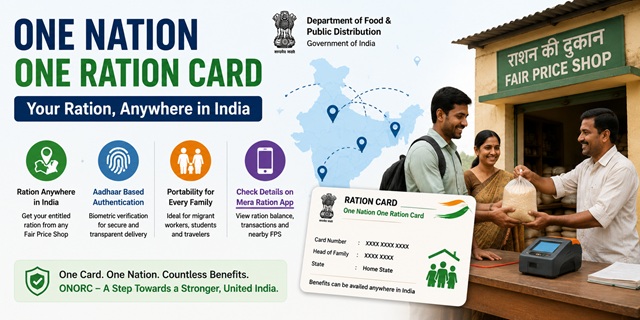
The One Nation One Ration Card (ONORC) scheme allows any eligible ration card holder covered under the National Food Security Act (NFSA) to collect their entitled food grains from any Fair Price Shop (FPS) anywhere in India. You are no longer tied to a specific ration shop in your home district or state. Wherever you go in India, your ration entitlement follows you.
This scheme is particularly important for India’s migrant workers who move to other states for work and previously lost access to their ration benefits when away from home. The scheme is implemented by the Department of Food and Public Distribution and is managed through the Integrated Management of Public Distribution System (IMPDS) at impds.nic.in.
Key Facts About ONORC
| Feature | Details |
|---|---|
| Launched by | Department of Food and Public Distribution, Government of India |
| Launched in | 2019 (pilot in 4 states), expanded nationally by June 2022 |
| States/UTs covered | All 36 States and Union Territories |
| Beneficiaries covered | Approximately 80 crore NFSA beneficiaries |
| Total ration cards | Over 20 crore ration cards |
| Fair Price Shops with ePoS | Over 4.95 lakh ePoS-enabled FPS across India |
| Authentication method | Aadhaar-based biometric (fingerprint or iris) at ePoS machine |
| Technology platform | IMPDS (impds.nic.in) and Annavitran portals by NIC |
| Official app | Mera Ration app (available in 13 languages) |
What Problem Does ONORC Solve?
Before ONORC, every ration card was linked to one specific Fair Price Shop in one specific district. If a family moved to another city or state, they lost access to their ration benefits entirely because:
- They could not collect ration from a shop in their new location
- Getting a new ration card in another state required surrendering the old one
- Migrant workers who left their families behind could not split their entitlement
ONORC solves all three problems. A migrant worker can now collect part of the family ration from a shop near their workplace while the family back home continues to collect from the local shop. There is no transfer, no new card, and no paperwork required.
How ONORC Works - Step by Step
Using ONORC is simple. You do not need to register separately or fill any form. If you are an NFSA beneficiary with Aadhaar linked to your ration card, you can use ONORC at any Fair Price Shop in India.
- Walk into any Fair Price Shop (ration dealer) in your current location, anywhere in India.
- Tell the dealer you want to collect your ration under ONORC (portability).
- The dealer enters your Aadhaar number or Ration Card number into the ePoS (electronic Point of Sale) device.
- Your ration card details and current month’s entitlement are displayed on the ePoS screen automatically from the central database.
- Place your finger on the biometric device for fingerprint authentication. Alternatively, if fingerprint fails, iris authentication can be used.
- Once authenticated, the dealer dispenses your entitled food grains for the month.
- The transaction is recorded in real time on the IMPDS dashboard at impds.nic.in.
- An SMS confirmation is sent to your registered mobile number.
You can collect your full monthly entitlement in one visit or split it across multiple visits within the same month. You can also split collection between your home state and your current state - for example, a migrant worker can collect 3 kg at their work location and the family can collect the remaining entitlement at the home shop.
What You Need to Use ONORC
- A valid Ration Card issued under NFSA (AAY or PHH category)
- Your Aadhaar number or your Ration Card number - carry either one
- Your Aadhaar must be linked (seeded) with your ration card
- Your biometrics (fingerprint or iris) must be active in the Aadhaar database
You do not need to carry the physical ration card or physical Aadhaar card. Just your Aadhaar number is enough for the dealer to pull up your record at the ePoS machine.
Intra-State vs Inter-State Portability
| Type | What It Means | Example |
|---|---|---|
| Intra-State Portability | Collecting ration from any FPS within the same state, in a different district or area | A person from Lucknow collecting ration in Noida (both in UP) |
| Inter-State Portability | Collecting ration from any FPS in a completely different state | A migrant from Bihar working in Mumbai collecting ration in Mumbai |
Both types are fully operational across all 36 states and UTs. Live transaction data for both intra-state and inter-state portability is available on impds.nic.in.
Mera Ration App - Official ONORC Mobile App
The government launched the Mera Ration mobile app specifically to help ONORC beneficiaries. It is available on Android through Google Play Store. The app is developed by NIC under the Department of Food and Public Distribution.
What you can do on the Mera Ration app:
- Find the nearest Fair Price Shop (FPS) in your current location
- Check your monthly ration entitlement
- View your past transaction history
- Check whether your Aadhaar is seeded with your ration card
- Know your eligible food grain quantity for the current month
- Available in 13 languages including Hindi, English, Tamil, Telugu, Bengali, Marathi, Gujarati, Kannada, Malayalam, Odia, Punjabi, Assamese, and Urdu
A second app called Anna Mitra is also available on the IMPDS portal for ration-related services.
Current ONORC Statistics (Live from impds.nic.in)
The following data is from the official IMPDS dashboard at impds.nic.in:
- Total ration cards: 20.58 crore (PHH: 18.28 crore + AAY: 2.29 crore)
- Total beneficiaries: 79.71 crore
- Aadhaar-seeded ration cards: 20.52 crore (99.8% seeding rate)
- Active Fair Price Shops: 4.95 lakh with ePoS devices
- Total monthly e-transactions: 18.08 crore
- Aadhaar-authenticated transactions: 97.91% of all transactions
How to Check Your ONORC Transaction History
You can check your past ration collection transactions including date, location, quantity, and shop name:
- Open the Mera Ration app and log in with your Aadhaar number or ration card number.
- Tap Transaction History to see all past collections including which FPS you visited and what was collected.
Alternatively:
- Go to nfsa.gov.in and enter your ration card number to view member-wise transaction details.
What to Do If ONORC Transaction Fails
If your biometric authentication fails at the FPS or you face any problem collecting ration under ONORC:
- Ask the dealer to try iris authentication if fingerprint fails
- If both fail, the dealer can use an OTP-based authentication in some states as an exception handling mechanism
- If the problem persists, update your Aadhaar biometrics at your nearest Aadhaar Seva Kendra at appointments.uidai.gov.in
- Call the central PDS helpline at 1967 (toll-free) for assistance
- Contact the local District Food Supply Office or register a grievance on your state food department portal
Official Portals and Useful Links
- IMPDS ONORC Dashboard - impds.nic.in (Live transaction data)
- National Food Security Act Portal - nfsa.gov.in
- Check Ration Card Details - nfsa.gov.in
- Department of Food and Public Distribution - dfpd.gov.in
- Locate Aadhaar Seva Kendra - uidai.gov.in
Central PDS Helpline: 1967 (Toll-free)
UIDAI Helpline: 1947 (Toll-free, Monday to Saturday)
Also read:
Ration Card in India - Complete Guide (2026)
How to Link Aadhaar with Ration Card
Disclaimer: This article is for informational purposes only. Statistics are sourced from the live IMPDS dashboard and may change. Always refer to nfsa.gov.in and impds.nic.in for the latest official information.
नवी प्रतिक्रिया द्या