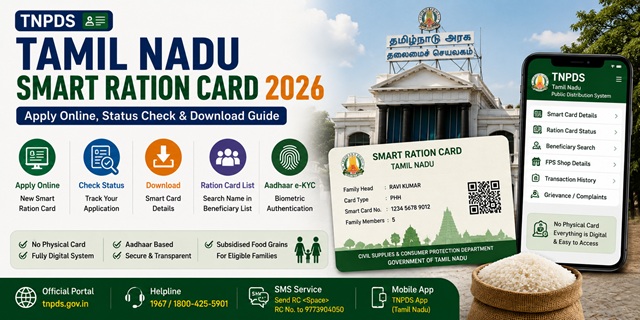
Tamil Nadu was one of the first states in India to fully digitise its ration card system. The state replaced traditional paper ration cards with Smart Ration Cards - digital cards that allow beneficiaries to collect food grains from Fair Price Shops using Aadhaar-based biometric authentication. There is no physical card to carry. Everything is managed digitally through the official TNPDS portal at tnpds.gov.in, managed by the Civil Supplies and Consumer Protection Department, Government of Tamil Nadu.
- TNPDS Portal: tnpds.gov.in - all ration card services
- Apply New Smart Card: tnpds.gov.in/register-a-card
- Check Application Status: tnpds.gov.in/register-a-card-status
Key Details at a Glance
| Detail | Information |
|---|---|
| Issuing Authority | Civil Supplies and Consumer Protection Department, Govt. of Tamil Nadu |
| Official Portal | tnpds.gov.in |
| Card Type | Smart Ration Card (fully digital) |
| Monthly Entitlement (PHH) | Rice, wheat, sugar, kerosene, palm oil, tur dal, urad dal at subsidised rates |
| Monthly Entitlement (PHH-AAY) | 35 kg rice + all commodities at subsidised rates |
| Toll Free Helpline 1 | 1967 |
| Toll Free Helpline 2 | 1800-425-5901 |
| SMS Helpline | Send PDS to 9773904050 |
Types of Smart Ration Card in the State
Tamil Nadu issues six types of Smart Ration Cards based on family income, category, and eligibility:
| Card Type | Card Colour | Who Gets It | Entitlement |
|---|---|---|---|
| PHH Rice Card | Light Green | Priority Household - BPL families identified under NFSA | Rice and all commodities (sugar, wheat, kerosene, palm oil, tur dal, urad dal) at subsidised rates |
| PHH-AAY Card | Light Green | Antyodaya Anna Yojana - poorest of the poor families | 35 kg rice per family per month plus all commodities at subsidised rates |
| NPHH Card | White | Non-Priority Household - APL families above NFSA income limit | Additional 3 kg rice over prescribed amount. Serves as identity/address proof. |
| NPHH-S Card | White | Non-Priority Household (Sugar) - APL families eligible for sugar only | Sugar at subsidised rate only |
| No Commodity Card | - | Families not eligible to draw any commodity from ration shops | No food grains. Card serves as identity proof only. |
| Khaki Card | Khaki | Police personnel up to the rank of Inspector | Subsidised commodities as applicable |
Who Can Apply
- Must be a permanent resident of Tamil Nadu
- Must be at least 18 years old to apply as head of family
- The family must not already hold a valid ration card anywhere in India
- Newly married couples can apply after their names are removed from their parents’ cards
- Families with newborns can add the child to their existing Smart Card
- For PHH (BPL) category: annual family income must be below the poverty line as determined by the Tamil Nadu government
Documents You Need to Apply
- Aadhaar card of all family members (mandatory - mobile number linked to Aadhaar required)
- Address proof - electricity bill, water bill, or rent agreement showing Tamil Nadu address
- PAN card (if available)
- Bank passbook (first page)
- Income certificate (for PHH/BPL and AAY categories)
- Caste or category certificate (if applicable)
- Passport-size photograph of the head of the family
- Old PDS book (if converting from old ration card to Smart Card)
How to Apply for New Smart Card Online
- Go to tnpds.gov.in/register-a-card.
- Select your preferred language - Tamil or English.
- Enter the Aadhaar number of the head of the family and the mobile number linked to that Aadhaar.
- Enter the OTP received on the registered mobile number and the captcha. Click Submit.
- Fill in the complete application form with all family member details, address, and category (PHH or NPHH).
- Upload required documents - Aadhaar, address proof, income certificate, and photograph of the head of family. File formats accepted: PNG, GIF, JPEG, JPG. Photo size: under 10 KB.
- Review all details and click Submit.
- A Reference Number is generated. Save it for status tracking.
After submission, field verification is conducted. On approval, the Smart Ration Card is issued digitally and linked to your nearest Fair Price Shop.
How to Check Application Status
- Go to tnpds.gov.in/register-a-card-status.
- Enter your Smart Card Application Reference Number or your Aadhaar number linked to TNPDS.
- Click Submit. Your current status is displayed.
You can also log in to the TNPDS portal using your registered mobile number and check status from your dashboard.
How to Download Smart Ration Card
- Go to tnpds.gov.in/login.xhtml.
- Enter your registered mobile number and request an OTP.
- Enter the OTP and log in.
- On your dashboard, your Smart Ration Card details are displayed including your ration card number and linked FPS shop number.
- Click Download Smart Card or use the print option to save as PDF.
The downloaded Smart Ration Card can be shown at the Fair Price Shop on your phone. No physical card is required.
How to Check Beneficiary and Transaction Details
After logging in at tnpds.gov.in with your registered mobile number:
- View your ration card number and linked FPS shop number
- Check your monthly entitlement and commodities available
- View your transaction history showing past ration collections
Electronic Card Related Services (Smart Card Services)
Tamil Nadu provides all Smart Card modification services online on the TNPDS portal. Under the Electronic Card Related Services section on tnpds.gov.in, you can:
- Add a family member - for newborn, newly married spouse
- Delete a family member - for deceased or migrated member
- Change family head - change the head of family on the card
- Correction of details - name, age, address, and other corrections
- Change of address - update residential address
- Surrender or cancel card - for families moving permanently out of state
- Change commodity preference - for example, switch from sugar to rice if preferred
For all services: go to tnpds.gov.in, select the service under Electronic Card Related Services, enter your registered mobile number, verify via OTP, and complete the request.
How to Correct Smart Card Details
- Go to tnpds.gov.in and select the language.
- Under Correct Your Smart Card, click Correction of Details.
- Enter your registered mobile number and verify via OTP.
- Make the required changes to name, age, or other fields.
- Upload a passport-size photograph of the head of the family if required (PNG, GIF, JPEG, JPG format, under 10 KB).
- Click Submit. A reference number is generated for tracking.
How to Link Aadhaar
Aadhaar is already integrated into the TNPDS Smart Card system. Aadhaar-based OTP verification is part of the application and all service requests. For biometric seeding at the FPS:
- Visit your designated Fair Price Shop with Aadhaar cards of all family members
- Each member provides fingerprint biometric authentication on the ePoS device
- This completes the Aadhaar seeding for ration collection
For the complete guide: How to Link Aadhaar with Ration Card.
How to File a Grievance
- Toll Free Helpline 1: 1967
- Toll Free Helpline 2: 1800-425-5901
- SMS Helpline: Send PDS to 9773904050
- SMS for FPS Item Specifications: PDS 101 to 9773904050
- SMS for FPS Open/Closed Status: PDS 102 to 9773904050
- Online: Log in at tnpds.gov.in and use the complaint/grievance option on the dashboard
- District Manager: Contact details in the official district manager list at tnpds.gov.in/downloads/district-manager-details.pdf
Official Portals and Useful Links
- TNPDS Portal - tnpds.gov.in
- Apply New Smart Card - tnpds.gov.in
- Check Application Status - tnpds.gov.in
- Login / Download Smart Card - tnpds.gov.in
- District Manager Contact List - tnpds.gov.in
- DigiLocker - digilocker.gov.in
- Check Aadhaar Seeding Status - nfsa.gov.in
Helpline: 1967 / 1800-425-5901 (Toll-free)
SMS: PDS to 9773904050
Also read:
Ration Card in India - Complete Guide (2026)
How to Link Aadhaar with Ration Card
One Nation One Ration Card (ONORC) - Complete Guide
Disclaimer: This article is for informational purposes only. Processes are subject to change by the Tamil Nadu Government. Always refer to tnpds.gov.in for the latest official information.
नवी प्रतिक्रिया द्या