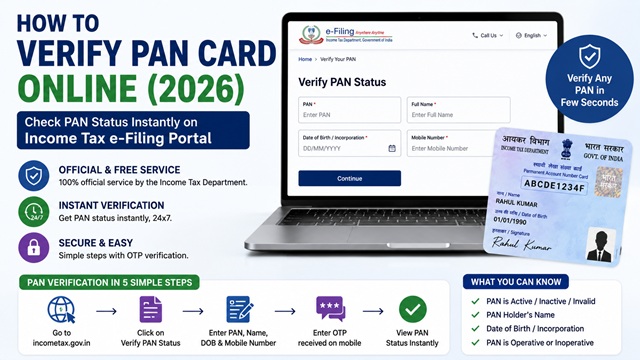
Verifying a PAN Card confirms whether a given 10-digit PAN is valid, active, and registered in the Income Tax Department's official database. This is useful before entering any financial transaction, hiring someone, onboarding a new vendor, or simply confirming that your own PAN is active and correctly registered.
The Income Tax Department provides an official, free, and instant PAN verification service called Verify PAN Status on the e-Filing portal at www.incometax.gov.in. No third-party tool or website is needed. The service works 24x7 and requires no payment.
There are two methods available - pre-login (without logging in) for individuals and general users, and post-login (after logging in) for registered users who need to view additional details. For government agencies and financial institutions that need to verify multiple PANs at once, a Bulk PAN Verification service is also available.
Official Portal for PAN Verification
e-Filing Portal: www.incometax.gov.in
Direct verification URL: eportal.incometax.gov.in - Verify PAN Status
PAN Verification page (incometaxindia.gov.in): incometaxindia.gov.in/pan-verification
As confirmed in the official Verify Your PAN User Manual at incometax.gov.in, the Verify PAN Status service is available to all users - registered or unregistered - without login. External agencies (government departments, banks, RBI-authorised institutions) can additionally use the post-login bulk verification service.
Method 1 - Verify PAN Status Without Login (Pre-Login) - For Everyone
This is the standard method available to anyone - individuals, businesses, and organisations. No account registration is needed.
- Go to www.incometax.gov.in.
- On the homepage, under the Quick Links section, click Verify PAN Status.
- On the Verify PAN Status page, enter the following four details:
- PAN - the 10-digit alphanumeric PAN you want to verify
- Full Name - full name of the PAN holder as per PAN records
- Date of Birth - date of birth of the individual (or date of incorporation for companies and firms)
- Mobile Number - any mobile number accessible to you (does not have to be registered with the PAN)
- Click Continue.
- On the Verification page, enter the 6-digit OTP received on the mobile number you entered in Step 3.
- Click Validate.
- On successful validation, your PAN status is displayed.
OTP Notes (from official manual):
- OTP is valid for 15 minutes only
- You have 3 attempts to enter the correct OTP
- A countdown timer shows when the OTP expires
- Click Resend OTP to generate a new OTP if needed
Important note from the official user manual: This verification is for information purposes only. It does not impact any other functionality on the e-Filing portal. For any discrepancy or issue with PAN details, the user must contact their Jurisdictional Assessing Officer (JAO).
Method 2 - Verify PAN After Login (Post-Login) - For Registered Users
If you are registered on the e-Filing portal, you can verify PAN after logging in to also view the linked details in your profile.
- Go to www.incometax.gov.in and log in with your User ID (PAN) and password.
- Click Services > View PAN Details from the top navigation menu.
- On the Verify Your PAN page, enter the PAN you want to verify, the Full Name, and the Date of Birth or Date of Incorporation.
- Click Continue.
- On successful validation, the PAN status is displayed along with additional details visible only after login.
What the Verification Result Shows
As per the official Verify Your PAN User Manual at incometax.gov.in, the following information is displayed on successful verification:
| Field | Details Shown |
|---|---|
| PAN | The 10-digit PAN verified |
| Full Name | Name of the PAN holder as per Income Tax records |
| Date of Birth / Date of Incorporation | DOB of the individual or date of formation for entities |
| PAN Status | Active, Inactive, Deleted, Fake, or Not Found - see status table below |
| Aadhaar-PAN Link Status | Whether the PAN is linked to Aadhaar (Yes / No / Not Applicable) |
| PAN Operative Status | Whether the PAN is operative or inoperative |
| Jurisdiction | Area code, AO type, Range Code, and AO number of the jurisdictional officer |
PAN Status Messages - What Each One Means
| Status | What It Means | What You Should Do |
|---|---|---|
| PAN is Active | The PAN is valid, registered in the Income Tax database, and operative. | Proceed with the transaction or verification. PAN is genuine. |
| PAN is Inoperative | The PAN exists but has been made inoperative due to non-linking with Aadhaar after the 30 June 2023 deadline. | Link Aadhaar with PAN by paying Rs. 1,000 fee to reactivate. Read: How to Link Aadhaar with PAN Card. |
| PAN is Deleted / Deactivated | The PAN has been deactivated by the Income Tax Department, usually because it was a duplicate PAN that was surrendered. | Do not use this PAN for any transaction. Contact your Jurisdictional AO. |
| PAN Not Found | The PAN entered does not exist in the Income Tax database. It is either fake, incorrectly entered, or never issued. | Re-check the PAN for typos. If correctly entered, the PAN is fake or invalid. Do not proceed with any transaction. |
| Data mismatch | The PAN exists in the database but the name or date of birth entered does not match the records. | Double-check the spelling of the name and the exact date of birth. Use the name exactly as on the PAN card. If mismatch persists, a PAN correction may be needed. |
Method 3 - Bulk PAN Verification (For External Agencies Only)
As per the official Verify Bulk PAN/TAN User Manual at incometax.gov.in, external agencies can verify up to 100 PAN records in a single upload.
This service is available only to registered External Agencies such as Central Government departments, State Government departments or undertakings, and recognised autonomous bodies. Private companies and individuals cannot use the bulk PAN verification service.
Who qualifies as an External Agency:
- Central and State Government Departments
- Approved Government Undertakings and PSUs
- RBI-Approved Banks (registered separately)
- Recognised Autonomous Bodies notified by the Government
How to register as an External Agency:
- Go to www.incometax.gov.in.
- Click Register and select Others > External Agency.
- Submit a requisition letter in the format specified on the portal.
- Once registered and approved, the bulk verification service becomes available under Services after login.
Bulk PAN Verification steps (for registered External Agencies):
- Log in to the e-Filing portal.
- Go to Services > Verify Bulk PAN/TAN.
- Click Download Template for Bulk PAN Query.
- Fill the CSV template with up to 100 entries including: PAN, First Name, Middle Name, Last Name, Date of Birth/Incorporation (DD-MMM-YYYY), Gender, and Name of Organisation.
- Generate the JSON file from the CSV and upload it to the portal.
- A Token Number and Transaction ID are generated. Save these.
- Once processed, go to Previous Token Details and click Download File to get the verified results in CSV format.
How to Verify PAN via the Protean Portal
Protean eGov Technologies (formerly NSDL) also provides a PAN verification facility used primarily by Tax Deductors and Collectors to verify PAN of persons from whom tax has been deducted or collected.
Direct URL: tin-nsdl.com/services/pan/panverification.html
This service is available for authorised entities. For individual or general use, the Income Tax portal's Verify PAN Status is the correct tool.
When Should You Verify a PAN?
You should verify a PAN Card Number in the following situations:
- Before accepting a new vendor or supplier: Verify their PAN before making any payment to confirm the business is legitimately registered with the Income Tax Department.
- Before hiring an employee or contractor: Confirm their PAN is active before collecting it for Form 16 or TDS purposes.
- Before entering a high-value transaction: For property purchase, loans, or investments where PAN is required.
- To check your own PAN is active: Especially to confirm it is not inoperative due to non-linking with Aadhaar.
- When you suspect a fake PAN has been given to you: Any PAN that does not exist in the database will return a Not Found status.
- Before filing TDS returns: To ensure PAN of deductees is valid. Filing returns with invalid PANs results in demand notices from the Tax Department.
What Verification Confirms and What It Does Not
| What Verification Confirms | What Verification Does Not Confirm |
|---|---|
| PAN exists in the Income Tax database | Full address of the PAN holder |
| PAN is Active or Inoperative | Contact number or email of the PAN holder |
| Name of the PAN holder (matched against input) | Bank account details linked to the PAN |
| Date of birth / incorporation (matched against input) | Income or tax history of the PAN holder |
| Whether Aadhaar is linked to the PAN | Whether any return has been filed using this PAN |
| Jurisdiction (AO details) | Photo of the PAN holder |
Common Reasons Verification Fails
- Name mismatch: The name entered does not exactly match the name in the PAN database. Common issues: initials expanded differently, middle name included or excluded, married name vs maiden name. Always use the name exactly as on the PAN card.
- Date of birth mismatch: Entering a wrong date format or incorrect DOB. Use the DOB exactly as registered in PAN records. For companies, use the date of incorporation.
- Typing error in PAN: PAN is 10 characters - double-check each character. The 4th character indicates entity type (P for individual, C for company, etc.).
- PAN is inoperative: The PAN exists but has been made inoperative. Status page will show this clearly.
- Portal temporarily down: The e-Filing portal occasionally has maintenance windows. Try after some time.
Official Portals for PAN Verification
- Income Tax e-Filing Portal - incometax.gov.in (Verify PAN Status - pre-login and post-login)
- PAN Verification - incometaxindia.gov.in
- Official User Manual - Verify Your PAN (incometax.gov.in)
- Official Manual - Verify Bulk PAN/TAN (incometax.gov.in)
- Know Your Assessing Officer - Income Tax Portal
Income Tax Helpline: 1800 103 0025 / 1800 419 0025 (Monday to Friday, 08:00-20:00 hrs)
Disclaimer: This article is for informational purposes only. As confirmed in the official user manual, PAN verification results are for information purposes only. Always refer to incometax.gov.in for the latest official processes and contact your Jurisdictional Assessing Officer for any discrepancies.
Add new comment