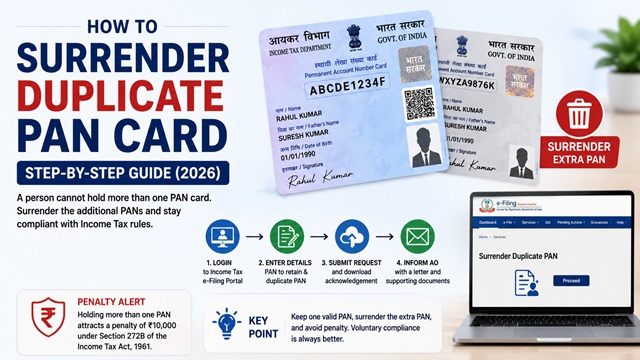
As per the Income Tax Department of India, a person cannot hold more than one PAN Card. If you have been allotted more than one PAN - for any reason - you must immediately surrender the additional PAN(s). Holding multiple PANs attracts a penalty of Rs. 10,000 under Section 272B of the Income Tax Act.
This guide explains exactly how to surrender a duplicate PAN online and offline, what to write to your Assessing Officer, which PAN to keep and which to surrender, and what happens after you surrender it.
Why Do People End Up With Two PAN Cards?
Having two PANs is more common than most people think. It usually happens because:
- A person applied for a new PAN after losing the original, not realising the Income Tax Department had a record of the first PAN
- The same person was allotted PAN twice due to a system or data entry error at the time of application
- A person applied once through Protean and once through UTIITSL and both processed the application independently
- A person applied for Instant e-PAN on the Income Tax portal and also separately applied through Protean or UTIITSL
- After marriage, a woman applied for a fresh PAN in her new name without realising her existing PAN could simply be corrected
- An old PAN from a previous employer's records suddenly surfaced alongside the PAN in current use
Whatever the reason, the legal position is clear. As confirmed on incometaxindia.gov.in: "A person cannot hold more than one PAN. If a person has been allotted more than one PAN, then he should immediately surrender the additional PAN card(s)."
Penalty for Holding Multiple PAN Cards
Under Section 272B of the Income Tax Act, 1961, a penalty of Rs. 10,000 is liable to be imposed for having more than one PAN. This penalty can be levied for each default, meaning each additional PAN held without surrendering can attract a separate penalty.
As per the official Income Tax Department page on Section 272B, penalty may be imposed for:
- Failure to obtain PAN when required
- Quoting a PAN or Aadhaar which is false or which the person does not believe to be true
- Failure to quote PAN in documents pertaining to prescribed financial transactions under Rule 114B
- Holding more than one PAN
The good news: if you voluntarily surrender the duplicate PAN before being noticed by the Income Tax Department, the Assessing Officer may waive the penalty or reduce it, considering your proactive compliance. Voluntary surrender is always better than waiting for a notice.
Which PAN Should You Keep and Which Should You Surrender?
Before initiating the surrender process, decide clearly which PAN to keep and which to surrender. Follow these principles:
- Keep the PAN that is linked to your Aadhaar. If one PAN is Aadhaar-linked and the other is not, keep the Aadhaar-linked one. Aadhaar-PAN linking is mandatory and cannot be done for two different PANs simultaneously.
- Keep the PAN you have used in income tax returns. If you have filed ITRs using one PAN, keep that one. Changing PAN mid-filing history creates complications with the tax department.
- Keep the PAN linked to your bank accounts, demat accounts, and employer TDS records. If one PAN has your TDS (Form 26AS) records, salary slips, and Form 16 linked to it, keep that one.
- Keep the older PAN. If both PANs are unused or new, keep the one allotted earlier (lower chronological number in the alpha-numeric sequence) and surrender the newer one.
- Do not surrender the PAN you currently use unless all transactions are updated to the new PAN. Surrendering an active PAN without updating records can cause serious disruption to tax filing and banking.
Important: Once you decide which PAN to surrender, make sure you do not use the surrendered PAN in any future transaction, document, or filing. Using a surrendered PAN is a violation under Section 272B.
Method 1 - Surrender Duplicate PAN Online via e-Filing Portal
The Income Tax e-Filing portal provides an online facility to surrender a duplicate PAN without visiting any office. This is the fastest method.
Portal: www.incometax.gov.in
- Go to www.incometax.gov.in and log in using your User ID (PAN you want to keep) and password. If you are not registered, register first using the PAN you intend to retain.
- After logging in, go to Services > Surrender Duplicate PAN from the left navigation panel or top menu.
- The Surrender Duplicate PAN page is displayed. Enter the following details:
- Your name as per PAN records
- Date of birth / Date of Incorporation
- The PAN you want to retain (this is your active PAN used for login)
- The duplicate PAN(s) you want to surrender (enter each additional PAN number)
- Reason for holding multiple PANs
- Click Submit.
- An Acknowledgement Number is generated. Download and save the acknowledgement. This is your proof that you have surrendered the duplicate PAN.
Note: After submission, the Income Tax Department flags the surrendered PAN for deactivation in the PAN database. This may take a few days to reflect. You will not receive a separate confirmation from the department - the acknowledgement is sufficient proof of surrender.
Method 2 - Surrender Duplicate PAN via PAN Change Request Form (Online or Offline)
This is the official method confirmed by the Income Tax Department for surrendering a duplicate PAN using the PAN Change Request form. As per incometaxindia.gov.in, this is the prescribed form to use:
Fill in the Request for New PAN Card or Changes or Correction in PAN Data form with the following specific instructions:
- Write the PAN you want to KEEP at the top of the form in the PAN field
- In Item No. 11 of the form, enter the duplicate PAN(s) you want to surrender
- Attach a self-attested copy of the duplicate PAN card(s) you are surrendering
- Fill in all other personal details as applicable
Online submission via Protean
- Go to onlineservices.proteantech.in.
- Select Changes or Correction in existing PAN data / Reprint of PAN Card.
- Fill the form, entering your active PAN at the top and the duplicate PAN to be surrendered in Item 11.
- Pay the applicable fee (Rs. 110 for Indian address) and submit.
- Save the 15-digit Acknowledgement Number.
Online submission via UTIITSL
- Go to www.pan.utiitsl.com.
- Select Apply for Changes or Correction in PAN Card Data.
- Fill the form similarly - active PAN on top, duplicate PAN to surrender in the designated field.
- Pay the fee and submit.
Offline submission
- Download the PAN Change Request form from incometaxindia.gov.in.
- Fill it in BLOCK LETTERS in black ink.
- Write the PAN to keep at the top and the PAN to surrender in Item 11.
- Attach a self-attested copy of the duplicate PAN card and your Proof of Identity.
- Submit at the nearest TIN Facilitation Centre (Protean) or UTIITSL PAN centre along with the fee (Rs. 110 by Demand Draft or cash).
Method 3 - Write a Letter to Your Jurisdictional Assessing Officer (AO)
In addition to the online or form-based surrender, it is strongly advisable to send a formal letter to your Jurisdictional Assessing Officer (JAO). This creates an official record and protects you from any future penalty notices for holding multiple PANs.
How to find your Jurisdictional Assessing Officer: Go to eportal.incometax.gov.in > Know Your AO and enter your PAN and mobile number to find the name and address of your Assessing Officer.
What to include in the letter to the AO
The letter should be typed or written clearly and must include:
- Your full name as per PAN records
- Date of birth (or date of incorporation for non-individuals)
- Address and contact details
- The PAN number you are retaining with reasons why this is the correct PAN (Aadhaar-linked, used in ITR filing, etc.)
- The PAN number(s) you are surrendering
- How the duplicate PAN was allotted (lost card reapplication, system error, etc.)
- Statement that the duplicate PAN has not been used for any income tax or financial transaction (or if it has, briefly mention the transactions)
- Request to deactivate and delete the duplicate PAN from the Income Tax database
- Acknowledgement Number from the online surrender or PAN Change Request form submitted (attach a copy)
Attach a self-attested copy of both PAN cards, a copy of your Aadhaar, and a copy of the Acknowledgement from Method 1 or Method 2 above.
Keep a copy of the signed letter and all attachments for your own records. The AO may or may not respond - the acknowledgement from the online surrender is sufficient proof of compliance.
What Happens After You Surrender a Duplicate PAN?
- The Income Tax Department deactivates the surrendered PAN in the PAN database. It can no longer be used for any transaction or filing.
- Only the PAN you retain remains active.
- If the AO had previously issued a notice for holding duplicate PAN, presenting the surrender acknowledgement and letter typically resolves the matter.
- Penalty under Section 272B may still be levied by the AO if the department initiated action before your surrender. However, voluntary and prompt surrender before receiving any notice generally results in leniency.
- You do not need any confirmation from the Income Tax Department that the duplicate PAN has been cancelled. The acknowledgement you generated is your legal proof of surrender.
What If You Used the Duplicate PAN for Transactions?
If you inadvertently used the duplicate PAN in bank accounts, demat accounts, or any other financial records, follow these additional steps after surrendering:
- Inform your bank, financial institution, or employer about the PAN correction and request them to update their records to show only your active (retained) PAN.
- File a revised or corrected income tax return if you filed any return under the duplicate PAN (consult a tax professional for this).
- Inform the relevant deductors (employer, bank) to correct Form 16 or TDS certificates to reflect only the active PAN.
- Mention all of this proactively in your letter to the Assessing Officer.
Official Portals and Useful Links
- Income Tax e-Filing Portal - incometax.gov.in (Online surrender, login required)
- Know Your Assessing Officer - Income Tax Portal
- Section 272B Penalty - Income Tax Department
- Protean PAN Change Request Portal
- UTIITSL PAN Correction Portal - pan.utiitsl.com
- PAN Change Request Form PDF Download - incometaxindia.gov.in
Income Tax Helpline: 1800 103 0025 / 1800 419 0025 (Monday to Friday, 08:00-20:00 hrs)
Protean / NSDL PAN Helpline: +91-20-27218080 (All days, 07:00-23:00 hrs)
Disclaimer: This article is for informational purposes only. Always refer to incometax.gov.in and consult a qualified tax professional for advice specific to your situation. Procedures are subject to change by the Income Tax Department and CBDT.
Add new comment