A Permanent Account Number (PAN) Card is a 10-digit alphanumeric number issued by the Income Tax Department of India. It is mandatory to file income tax returns, open a bank account, buy or sell property, make investments, and carry out most financial transactions above specified limits. Every Indian individual and entity that earns income or is involved in financial activity needs a PAN Card.
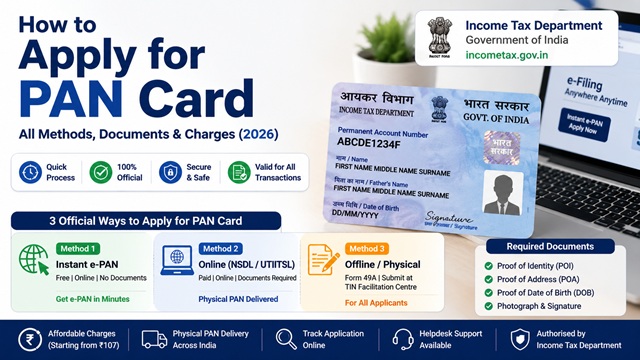
There are three official ways to apply for a PAN card in India in 2026. Each method is clearly explained below with steps, documents, fees, and what to expect.
Three Official Ways to Apply for PAN Card
The Income Tax Department has authorised the following three methods for PAN card application:
- Method 1 - Instant e-PAN via Income Tax e-Filing Portal: Free, completely online, no documents required, PAN allotted within minutes. Only for individuals with an Aadhaar and a mobile number linked to it.
- Method 2 - Online via Protean (NSDL) or UTIITSL: Paid, online form submission, documents required. Physical PAN card delivered by post. Suitable for individuals, companies, trusts, and all other entities.
- Method 3 - Offline / Physical Application: Download Form 49A, fill manually, submit at a TIN facilitation centre with documents and payment. Suitable for those without internet access.
Method 1 - Instant e-PAN (Free, No Documents, Online Only)
The Instant e-PAN service is offered by the Income Tax Department at incometax.gov.in. It allots a digitally signed PAN in PDF format within minutes, completely free of cost, using your Aadhaar and Aadhaar-linked mobile number. No paperwork, no physical documents, no office visit required.
Who Can Use Instant e-PAN?
As per the official Instant e-PAN User Manual at incometax.gov.in, this service is available only if you meet all four conditions:
- You have not been allotted a PAN previously
- You have a valid Aadhaar number with updated KYC details
- Your mobile number is linked to Aadhaar and is active
- You are not a minor on the date of request
- You are not covered under the definition of Representative Assessee under Section 160 of the Income Tax Act
This service is for individuals only. Companies, firms, trusts, and other non-individual entities cannot use Instant e-PAN. They must use Method 2 or Method 3.
Step-by-Step Process for Instant e-PAN
- Go to www.incometax.gov.in.
- On the homepage, click Instant e-PAN under the Quick Links section. No login is required - this is a pre-login service.
- On the e-PAN page, click Get New e-PAN.
- Enter your 12-digit Aadhaar number, select the confirmation checkbox, and click Continue.
- If your Aadhaar is already linked to a valid PAN, the system will display a message: "Entered Aadhaar Number is already linked with a PAN." In that case, you already have a PAN and do not need to apply again.
- On the OTP validation page, read the consent terms, select "I have read the consent terms and agree to proceed further", and click Continue.
- Enter the 6-digit OTP received on your Aadhaar-linked mobile number. Select the checkbox to validate Aadhaar details with UIDAI and click Continue. The OTP is valid for 15 minutes. You have 3 attempts to enter the correct OTP.
- On the Validate Aadhaar Details page, your name, date of birth, gender, and address from Aadhaar are displayed. Select the "I Accept that" checkbox and click Continue.
- A success message is displayed along with an Acknowledgement ID. Note this ID for future reference. A copy is also sent to your Aadhaar-linked mobile number.
- Your e-PAN (digitally signed PDF) is typically generated and available to download within a few minutes to a few hours.
How to Download Your Instant e-PAN
- Go to incometax.gov.in and click Instant e-PAN.
- Click Check Status / Download PAN.
- Enter your 12-digit Aadhaar number and captcha. Click Continue.
- Enter the OTP received on your Aadhaar-linked mobile and click Continue.
- If your PAN is allotted, a Download PDF button will appear. Click it to download your e-PAN.
The e-PAN is a valid PAN as per the Income Tax Act. It is equally accepted as proof of PAN for all purposes.
If you want a physical PAN card after receiving your e-PAN, you can apply for a reprint through UTIITSL by paying Rs. 50 for Indian address delivery.
Method 2 - Online via Protean (NSDL) or UTIITSL
This is the standard online method and works for all categories of applicants - individuals, companies, firms, trusts, HUFs, and others. The Income Tax Department has authorised two agencies to process PAN applications:
- Protean eGov Technologies Limited (formerly NSDL): protean-tinpan.com
- UTI Infrastructure Technology And Services Limited (UTIITSL): pan.utiitsl.com
Both portals accept applications, process them on behalf of the Income Tax Department, and dispatch physical PAN cards.
Fee for Online PAN Application
As per the official guidelines at tin.tin.nsdl.com (Protean/NSDL):
- PAN card dispatched to Indian address: Rs. 110 (inclusive of GST)
- PAN card dispatched to foreign address: Rs. 1,020 (inclusive of GST)
Payment is accepted online via debit card, credit card, or net banking.
Form 49A or Form 49AA - Which Form to Use?
| Form | Who Should Use It |
|---|---|
| Form 49A | Indian citizens, including individuals, HUFs, companies, firms, trusts, and other entities that are Indian |
| Form 49AA | Foreign citizens and entities (non-citizens of India). Qualified Foreign Investors (QFI) must apply through a Depository Participant only. |
Documents Required for PAN Card (Form 49A - Indian Individuals)
As per the official instructions at tin.tin.nsdl.com for Form 49A, individual applicants must submit three types of supporting documents:
Proof of Identity (POI)
- Aadhaar card issued by UIDAI
- Voter ID card issued by the Election Commission of India
- Driving licence
- Passport
- Ration card having photo of the applicant
- Arms licence
- Photo identity card issued by the Central Government, State Government, or Public Sector Undertaking
- Pensioner photo card
- Central Government Health Scheme (CGHS) card or Ex-Servicemen Contributory Health Scheme (ECHS) photo card
- Certificate of identity in original signed by a Gazetted Officer on official letterhead
- Bank certificate in original on letterhead from the branch (with name and stamp of the issuing officer) containing duly attested photograph and bank account number
Proof of Address (POA)
- Aadhaar card issued by UIDAI
- Voter ID card issued by the Election Commission of India
- Driving licence
- Passport
- Passport of the spouse
- Post office passbook having the address of the applicant
- Latest property tax assessment order
- Domicile certificate issued by Government
- Allotment letter of accommodation issued by Central or State Government (not more than 3 years old)
- Property registration document
- Electricity bill (not more than 3 months old)
- Landline telephone or broadband connection bill (not more than 3 months old)
- Water bill (not more than 3 months old)
- Consumer gas connection card, book, or piped gas bill (not more than 3 months old)
- Bank account statement (not more than 3 months old)
- Depository account statement (not more than 3 months old)
- Credit card statement (not more than 3 months old)
- Certificate of address in original signed by a Member of Parliament or Member of Legislative Assembly or Municipal Councillor or a Gazetted Officer on official letterhead
Proof of Date of Birth (PODB) - Applicable for Individuals and Karta of HUF
- Aadhaar card issued by UIDAI
- Voter ID card
- Driving licence
- Passport
- Matriculation certificate or mark sheet of recognised board
- Birth certificate issued by a municipal authority or any office authorised to issue Birth and Death Certificate
- Photo identity card issued by the Central Government, State Government, or PSU that has the date of birth
- Domicile certificate issued by the Government with date of birth
- Central Government Health Scheme (CGHS) / ECHS photo card with date of birth
- Pension payment order issued by the Government that has the date of birth
- Affidavit sworn before a magistrate stating the date of birth
Important: All documents should be in the name of the applicant. The name in the documents must match the name filled in the application form. If only the initial appears in a document (for example, M. Sharma), and the full form appears in another document (Manoj Sharma), both documents together may be submitted.
Photograph Requirements
- One recent colour passport-size photograph of size 3.5 cm × 2.5 cm to be affixed on the acknowledgement receipt
- Photograph must show a clear face of the applicant
- Do not staple or clip the photograph - paste it
- Signature should not be put across or on the photograph
- For minor applicants: a photograph must be affixed, but it will not be printed on the PAN card
Name Guidelines for PAN Application
As per official NSDL/Protean instructions:
- Do not use titles such as Shri, Smt, Kumari, Dr., Major, M/s, Captain, or Late in the name fields
- Only one single character initial is allowed in the middle name field for Individual applicants
- In case of a sole proprietorship, the proprietor must apply for PAN in their own individual name - not the business name
- In case of a mother as a single parent, the mother's name may be mentioned and printed on the PAN card by selecting the appropriate option
Step-by-Step Process for Online PAN Application via Protean
- Go to www.protean-tinpan.com and click Apply under the PAN section, or directly visit the new PAN application page.
- Select New PAN - Indian Citizen (Form 49A) from the Application Type dropdown.
- Select the Category applicable to you (Individual, HUF, Company, etc.).
- Fill in the required details: Title, Last name/Surname, First name, Middle name, Date of Birth, Email, Mobile Number, and the PIN/ZIP code of your area.
- Click Submit. A Token Number is generated and sent to your email. Note this for future reference.
- You can continue the application immediately or resume later using the token number.
- Complete the remaining sections of the form: personal details, contact details, Aadhaar details, and document details.
- Select whether you want to submit documents physically or via e-KYC (for individuals with Aadhaar).
- Proceed to make the payment of Rs. 110 via debit card, credit card, or net banking.
- After payment, a 15-digit Acknowledgement Number is generated. Download and print the acknowledgement receipt.
- Affix a recent passport-size photograph (3.5 cm × 2.5 cm) in the space provided on the acknowledgement.
- Sign in the box provided on the acknowledgement receipt. The signature should not touch the photograph.
- Attach self-attested copies of Proof of Identity, Proof of Address, and Proof of Date of Birth.
- Send the signed acknowledgement with photographs and documents to the Protean PAN processing centre within 15 days of online submission. The address for dispatch is mentioned on the acknowledgement itself.
Step-by-Step Process via UTIITSL
- Go to www.pan.utiitsl.com.
- Click PAN Card for Indian Citizen / NRI and select Apply for New PAN Card (Form 49A).
- Fill in the online application form with your personal details, address, Aadhaar number, and contact information.
- Upload scanned copies of Proof of Identity, Proof of Address, and Proof of Date of Birth (for e-submission). Alternatively, you may opt for physical document submission.
- Pay Rs. 110 online using debit card, credit card, or net banking.
- Print the acknowledgement, affix the photograph, sign, and if physical document submission is chosen, send it to the UTIITSL PAN processing centre within 15 days.
Method 3 - Offline / Physical Application
If you prefer to apply physically or do not have internet access, you can apply for a PAN card offline.
- Download Form 49A from the Income Tax Department website at incometax.gov.in or collect it from any TIN Facilitation Centre (TIN-FC) or PAN centre near you.
- Fill in the form carefully in block letters using black ink. Follow the name guidelines mentioned above.
- Affix one recent passport-size photograph (3.5 cm × 2.5 cm) in the space provided.
- Sign or put your left thumb impression in the space provided. The signature should not touch the photograph.
- Attach self-attested copies of Proof of Identity, Proof of Address, and Proof of Date of Birth.
- Prepare a Demand Draft (DD) or cash payment for Rs. 110 (Indian address) or Rs. 1,020 (foreign address) in favour of "NSDL - PAN" payable at Mumbai.
- Submit the completed form with photograph, documents, and payment at the nearest TIN Facilitation Centre, PAN centre, or directly at a Protean/UTIITSL office.
- Alternatively, send the application by post to: Income Tax PAN Services Unit, Protean eGov Technologies Limited, 5th floor, Mantri Sterling, Plot No. 341, Survey No. 997/8, Model Colony, Near Deep Bungalow Chowk, Pune - 411016.
How to Check PAN Card Application Status
After applying, you can track the status of your PAN card application online using your 15-digit Acknowledgement Number:
- Via Protean: Go to tin.tin.nsdl.com/pantan/StatusTrack.html, select Application Type as PAN, enter the 15-digit Acknowledgement Number, and submit.
- Via UTIITSL: Go to www.pan.utiitsl.com and use the PAN Application Status Tracker.
- Via Instant e-PAN: Go to incometax.gov.in > Instant e-PAN > Check Status / Download PAN and enter your Aadhaar number.
How Long Does It Take to Get a PAN Card?
| Method | e-PAN (PDF) | Physical PAN Card |
|---|---|---|
| Instant e-PAN | Within minutes to a few hours | Not issued automatically - order separately via UTIITSL for Rs. 50 |
| Online via Protean/UTIITSL | Within 48-72 hours of document verification | 15-20 working days after document receipt and verification |
| Offline | Not applicable | 15-20 working days after document receipt |
Important Rules and Key Facts About PAN
- One person, one PAN: No individual or entity can hold more than one PAN. Having multiple PANs is a violation under the Income Tax Act and attracts a penalty of Rs. 10,000 under Section 272B.
- PAN is permanent: PAN does not change even if your address, name (after marriage), or other details change. A correction request can update the details, but the 10-digit number remains the same.
- PAN is mandatory for: Filing income tax returns, opening a bank or demat account, buying or selling immovable property above Rs. 10 lakh, making cash deposits above Rs. 50,000 in a single day, purchasing jewellery above Rs. 2 lakh, and several other high-value financial transactions.
- Aadhaar-PAN linking: If you are allotted a new PAN, Aadhaar-PAN linking is done automatically if you provide your Aadhaar in the application. For existing PAN holders who have not linked, a fee of Rs. 1,000 applies. Read: How to Link Aadhaar with PAN Card.
Official Portals for PAN Card Application
- Income Tax e-Filing Portal - incometax.gov.in (Instant e-PAN)
- Protean eGov Technologies - protean-tinpan.com (Online Form 49A)
- UTIITSL PAN Portal - pan.utiitsl.com (Online Form 49A + Physical PAN reprint)
- Form 49A Instructions - tin.tin.nsdl.com
Income Tax Helpline: 1800 103 0025 / 1800 419 0025 (Monday to Friday, 08:00-20:00 hrs)
Protean / NSDL PAN Helpline: +91-20-27218080 (All days, 07:00-23:00 hrs)
Disclaimer: This article is for informational purposes only. All fees, documents, and procedures are subject to change by the Income Tax Department, Protean, and UTIITSL. Always refer to incometax.gov.in for the latest official information.
Add new comment