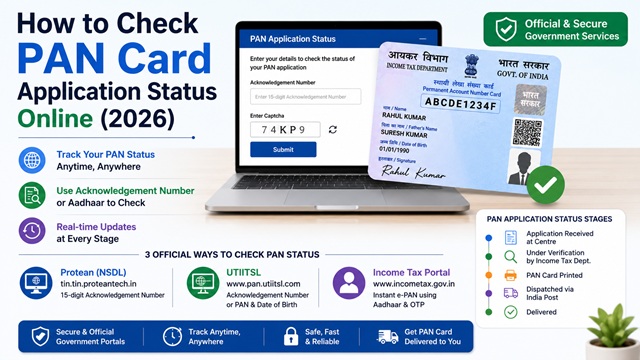
After applying for a PAN card, you can track your application status online at any time using your 15-digit Acknowledgement Number. The method to check status depends on where you applied - through Protean (NSDL), UTIITSL, or the Instant e-PAN service on the Income Tax e-Filing portal.
This guide covers all three official methods to check your PAN card status, what each status message means, and what to do if your application is stuck or delayed.
Which Portal to Use Based on Where You Applied
| Where You Applied | Status Check Portal | What You Need |
|---|---|---|
| Protean eGov (formerly NSDL) - Form 49A online or offline | tin.tin.proteantech.in/pantan/StatusTrack.html | 15-digit Acknowledgement Number |
| UTIITSL - Form 49A online or offline | www.pan.utiitsl.com > PAN Application Status | Acknowledgement Number or PAN / Date of Birth |
| Instant e-PAN on incometax.gov.in (Aadhaar-based) | www.incometax.gov.in > Instant e-PAN > Check Status | Aadhaar number and OTP |
Method 1 - Check Status via Protean (NSDL)
If you applied for PAN through Protean eGov Technologies (formerly NSDL) using Form 49A either online or offline, track your status here.
Direct URL: tin.tin.proteantech.in/pantan/StatusTrack.html
- Go to the Protean PAN status tracker at the URL above.
- In the Application Type dropdown, select PAN - New / Change Request.
- Enter your 15-digit Acknowledgement Number exactly as printed on your acknowledgement receipt.
- Enter the captcha and click Submit.
- Your application status is displayed on screen.
The Protean status tracker is available 24x7 and updates in real time as your application moves through each stage of processing.
Method 2 - Check Status via UTIITSL
If you applied through UTIITSL, track your application on their portal.
Portal: www.pan.utiitsl.com
- Go to www.pan.utiitsl.com.
- Look for the Track PAN Card or Application Status link on the homepage.
- Enter your Acknowledgement Number or alternatively your PAN and Date of Birth.
- Enter the captcha and submit.
- Your current application status is displayed.
Method 3 - Check Instant e-PAN Status via Income Tax Portal
If you applied for Instant e-PAN through the Income Tax e-Filing portal using your Aadhaar, check your status here without any acknowledgement number.
- Go to www.incometax.gov.in.
- Click Instant e-PAN under the Quick Links section.
- On the e-PAN page, click Check Status / Download PAN.
- Enter your 12-digit Aadhaar number and click Continue.
- Enter the 6-digit OTP received on your Aadhaar-linked mobile number and click Continue. OTP is valid for 15 minutes.
- The Current Status of your e-PAN request page is displayed. If PAN has been allotted, a Download e-PAN button appears.
PAN Application Status Messages - What Each One Means
| Status Message | What It Means | What You Should Do |
|---|---|---|
| Your PAN card has been dispatched | The physical PAN card has been printed and sent via India Post. A Speed Post tracking number is provided. | Track delivery on indiapost.gov.in using the consignment number. |
| Your PAN application is under process at TIN Facilitation Centre / PAN Centre | Application has been received and is in the initial processing stage at the PAN centre. | Wait 2-3 working days and check again. |
| Your PAN application is under verification by Income Tax Department | The application has moved from the processing centre to the Income Tax Department for final verification and allotment. | Wait 3-5 working days and check again. No action needed unless you receive a notice. |
| PAN card has been returned due to delivery failure | India Post could not deliver the card to the address - usually because of wrong address, incomplete address, or recipient not available. | Update your address and request redelivery via Protean or UTIITSL. Alternatively, collect from the India Post office where the article is held. |
| Your application is under process at NSDL / UTIITSL. Your documents have not been received | Payment was made online and you chose physical document submission, but your documents have not yet reached the processing centre. | Ensure you sent the signed acknowledgement with documents and photograph via post within 15 days of online payment. Check India Post tracking for your sent parcel. |
| Request for New PAN Card or/and Changes or Correction has been successfully processed and your PAN is XXXXXXXXXX | PAN has been allotted or correction is complete. The 10-digit PAN is displayed. | Download your e-PAN immediately. Read: How to Download e-PAN Card Online. |
| PAN allotment request has failed | The Instant e-PAN request via Aadhaar could not be processed, usually due to a data mismatch in Aadhaar records. | Ensure your Aadhaar KYC details (name, DOB, gender) are updated and correct. Try again or apply via Protean/UTIITSL using Form 49A. Contact incometax helpline if issue persists. |
| No record found | The acknowledgement number entered is incorrect or the application has not yet been entered in the system. | Re-check the acknowledgement number. If correct, wait 24-48 hours after submission before checking status again. |
PAN Card Delivery Tracking via India Post
Once your PAN card is dispatched, a Speed Post consignment number is provided in the status tracker result. Use this to track delivery:
- Note the consignment number shown in the Protean or UTIITSL status tracker.
- Go to indiapost.gov.in - Track Consignment.
- Enter the consignment number and submit.
- The current delivery status is shown.
If the card is returned to the sender (Protean or UTIITSL), you can request a redelivery to a corrected address through their respective portals after updating your address in the application.
How Long Does PAN Card Processing Take?
| Application Method | e-PAN (PDF) Timeline | Physical Card Timeline |
|---|---|---|
| Instant e-PAN (Aadhaar, incometax.gov.in) | Within minutes to a few hours | Not issued automatically. Order separately from UTIITSL for Rs. 50. |
| Online via Protean (e-KYC mode) | 48-72 hours after submission | 15-20 working days after document verification |
| Online via Protean (physical document submission) | 48-72 hours after documents received at centre | 15-20 working days after documents received |
| Online via UTIITSL | 48-72 hours after document verification | 15-20 working days after documents received |
| Offline (physical submission at PAN centre) | Not applicable | 15-20 working days after submission |
What to Do If Your PAN Application Is Delayed Beyond 20 Working Days
If your application status shows it is still under process beyond 20 working days after document receipt:
- Call the Protean/NSDL PAN helpline: +91-20-27218080 (all days, 07:00-23:00 hrs) with your Acknowledgement Number ready.
- Or call the Income Tax helpline: 1800 103 0025 / 1800 419 0025 (Monday to Friday, 08:00-20:00 hrs).
- You can also write to tininfo@protean-tinpan.com (for Protean applications) with your Acknowledgement Number and issue details.
- For UTIITSL applications, email utiitsl.gsd@utiitsl.com.
How to Verify Your PAN After It Is Allotted
After your PAN is allotted, you can verify it is valid and active on the official Income Tax portal:
- Go to www.incometax.gov.in.
- Under Quick Links, click Verify PAN Status or go to the left panel and click Verify Your PAN.
- Enter your PAN, full name, date of birth, and mobile number.
- Click Continue and enter the OTP received.
- The system confirms whether your PAN is valid and active.
Official Portals for PAN Status Check
- Protean (NSDL) PAN Status Tracker
- UTIITSL PAN Portal - pan.utiitsl.com
- Income Tax e-Filing Portal - incometax.gov.in (Instant e-PAN status)
- India Post Consignment Tracker (for dispatched PAN card)
Income Tax Helpline: 1800 103 0025 / 1800 419 0025 (Monday to Friday, 08:00-20:00 hrs)
Protean / NSDL PAN Helpline: +91-20-27218080 (All days, 07:00-23:00 hrs)
Disclaimer: This article is for informational purposes only. Status messages and processes are subject to change by the Income Tax Department, Protean, and UTIITSL. Always refer to incometax.gov.in for the latest official information.
Add new comment