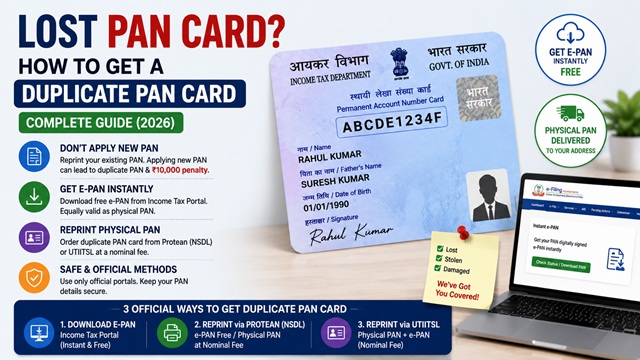
Losing your PAN card is inconvenient but it is not a crisis. Your PAN number remains permanently registered in the Income Tax Department's database even if the physical card is lost, stolen, or damaged. You can get a replacement in three ways — instantly for free as an e-PAN, or as a physical card through Protean or UTIITSL for a nominal fee.
This guide covers all official methods to get a duplicate PAN, what to do if you do not remember your PAN number, and important warnings to avoid accidentally getting two PANs which attracts a penalty of Rs. 10,000.
Important Warning Before You Apply
As confirmed on incometaxindia.gov.in, if your PAN card is lost, do not apply for a fresh new PAN. You already have a PAN allotted to you. Applying for a new PAN creates a duplicate which is illegal under Section 272B of the Income Tax Act and attracts a penalty of Rs. 10,000.
Instead, apply only for a reprint of your existing PAN card. The process is simple and costs less than Rs. 110. Alternatively, download your free e-PAN which is equally valid as the physical card.
Step 1 - Find Your PAN Number (If You Have Forgotten It)
Before applying for a duplicate, you need your 10-digit PAN number. If you remember it, skip this step. If you have forgotten it, here are the official ways to find it:
Option A - Know Your PAN via Income Tax Portal (Pre-Login)
The Income Tax Department provides a Know Your PAN facility that lets you retrieve your PAN number using your name, date of birth, and mobile number.
- Go to www.incometax.gov.in.
- Under Quick Links, click Know Your PAN or go to Services > Know Your PAN Details.
- Enter your Full Name, Date of Birth, and Mobile Number.
- Enter the captcha and click Continue.
- Enter the OTP received on your mobile number and click Validate.
- Your PAN number and basic details are displayed.
Option B - Find PAN via Aadhaar
If your Aadhaar is linked to your PAN, the quickest way is:
- Go to www.incometax.gov.in.
- Click Link Aadhaar Status under Quick Links.
- Enter your Aadhaar number. If a PAN is linked to it, the PAN number will be displayed.
Option C - Check Old Documents
Your PAN number appears on:
- Income tax returns (ITR) filed in previous years
- Form 16 or Form 16A issued by your employer or bank
- Form 26AS (Annual Information Statement) — available after logging in to the e-Filing portal
- Bank account documents where you submitted PAN for KYC
- Insurance policies, mutual fund statements, or demat account statements
- Old salary slips with TDS details
Option D - Contact Protean or UTIITSL
Call Protean/NSDL PAN helpline: +91-20-27218080 (all days, 07:00-23:00 hrs) with your name, date of birth, and address for assistance in retrieving your PAN details.
Step 2 - Choose Your Replacement Method
| Method | What You Get | Fee | Time | Best For |
|---|---|---|---|---|
| Download e-PAN via Income Tax Portal | Digitally signed PDF, equally valid | Free | Instant | Fastest, works for Instant e-PAN holders with Aadhaar-linked mobile |
| Reprint via Protean (NSDL) | e-PAN PDF + option for physical card | Free within 30 days of allotment / Rs. 8.26 after | e-PAN instant; physical card 15-20 working days | PAN issued through NSDL/Protean originally |
| Reprint via UTIITSL | Physical PAN card + e-PAN | Rs. 50 (physical, Indian address) | 15-20 working days | Anyone who needs a physical card quickly |
| PAN Change Request Form (offline or online) | New physical PAN card | Rs. 110 (Indian address) | 15-20 working days after documents received | When you also want to update details like photo or address |
Method 1 - Download e-PAN Instantly for Free (Income Tax Portal)
If your PAN was obtained through the Instant e-PAN service on the Income Tax e-Filing portal using Aadhaar, you can download it again immediately at no cost. As confirmed by the official Instant e-PAN FAQ at incometax.gov.in: "If a PAN has been allotted, you can get a printed physical PAN card by submitting a request through the links below."
- Go to www.incometax.gov.in.
- Click Instant e-PAN under Quick Links.
- Click Check Status / Download PAN.
- Enter your 12-digit Aadhaar number and click Continue.
- Enter the 6-digit OTP received on your Aadhaar-linked mobile. OTP is valid for 15 minutes.
- Click Download e-PAN. The PDF is downloaded instantly.
The e-PAN PDF is your official replacement. It is equally valid as the physical PAN card for all purposes including bank account operations, ITR filing, and KYC verification.
Password to open the e-PAN PDF: Your date of birth in DDMMYYYY format (8 digits, no spaces). Example: 15081990 for 15 August 1990.
For the full guide on all e-PAN download methods: How to Download e-PAN Card Online - All Methods (2026)
Method 2 - Reprint Physical PAN Card via UTIITSL (Recommended for Physical Card)
UTIITSL offers the simplest and most affordable reprint service for a physical PAN card at Rs. 50 for Indian address delivery. This is confirmed on the official UTIITSL PAN portal at pan.utiitsl.com.
- Go to www.pan.utiitsl.com.
- Click Reprint PAN Card or Request for Reprint of PAN Card.
- Enter your PAN number, Aadhaar number, and date of birth.
- Enter the captcha and click Submit.
- Verify your details via OTP sent to your registered mobile or email.
- Confirm your delivery address (must match the address in Aadhaar/PAN records).
- Pay Rs. 50 online via debit card, credit card, UPI, or net banking.
- A confirmation is sent. The physical PAN card is dispatched via India Post Speed Post within 15-20 working days.
Important: No changes to existing PAN details (name, date of birth, address) can be made during a reprint request. The card is printed with the details exactly as registered in the Income Tax Department's database. If you want to update any details along with the reprint, use a PAN Change Request instead. Read: How to Correct Name or Details in PAN Card (2026)
Method 3 - Reprint via Protean (NSDL)
If your PAN was originally issued through NSDL (now Protean), you can reprint it from their portal.
Direct URL: onlineservices.nsdl.com/paam/ReprintEPan.html
- Go to the Protean e-PAN reprint page at the URL above.
- Enter your PAN number, Aadhaar number, and date of birth.
- Select OTP mode (Aadhaar-linked or PAN-registered mobile).
- Enter the captcha and submit.
- Complete OTP verification.
- Download the e-PAN or request a physical PAN card.
As confirmed by the official Instant e-PAN FAQ at incometax.gov.in, Protean provides free e-PAN download within 30 days of PAN allotment. After 30 days, a fee of approximately Rs. 8.26 per download applies. For physical card dispatch, a separate fee applies per Protean's current rate schedule.
Method 4 - Apply via PAN Change Request Form (With or Without Corrections)
As per the Income Tax Department's page on incometaxindia.gov.in: "request for reprint of PAN card (for an existing PAN) may also be made through Internet" using the same change request form.
Use this method if you also want to update any details (photo, address, name spelling) along with getting a new card:
- Go to onlineservices.proteantech.in or www.pan.utiitsl.com.
- Select Reprint of PAN Card or Changes or Correction in existing PAN data.
- Enter your existing PAN number and fill in the form.
- Select the checkbox for Request for New PAN Card if you only want a reprint without changes.
- If you want corrections, select the relevant checkboxes and fill in the corrected details.
- Pay Rs. 110 (Indian address) or Rs. 1,020 (foreign address).
- If using eKYC mode via Aadhaar, no physical documents are needed. If using physical document mode, send signed acknowledgement and documents within 15 days.
For offline: download the form from incometaxindia.gov.in, fill it in BLOCK LETTERS, select the Request for New PAN Card box (top of form), attach self-attested copy of identity proof if required, and submit at the nearest TIN Facilitation Centre.
How to Track Your Duplicate PAN Card Status
After applying for a reprint, track the status using your acknowledgement number:
- Protean: tin.tin.proteantech.in/pantan/StatusTrack.html
- UTIITSL: www.pan.utiitsl.com > Track Application Status
Once dispatched, a Speed Post consignment number is provided. Track delivery on indiapost.gov.in.
For the complete guide on tracking: How to Check PAN Card Application Status (2026)
What to Do If PAN Card is Stolen
If your PAN card was stolen (not just lost), take these additional steps:
- File an FIR (First Information Report) at the nearest police station reporting the theft. Mention the PAN card specifically in the FIR.
- A copy of the FIR may be submitted along with the reprint application form as supporting evidence that the card was stolen and not used fraudulently by you. As confirmed on incometaxindia.gov.in: "If the PAN card is lost then you can apply for duplicate PAN card by submitting the Form for Request for New PAN Card or/and Changes or Correction in PAN Data and a copy of FIR may be submitted along with the form."
- Monitor your financial accounts for any unauthorized activity using the stolen PAN.
- Inform your bank and financial institutions about the theft and request them to flag any suspicious PAN-related activity on your accounts.
Official Portals for Duplicate PAN Card
- Income Tax e-Filing Portal - incometax.gov.in (e-PAN download, Know Your PAN)
- UTIITSL PAN Reprint Portal - pan.utiitsl.com (Rs. 50 physical card)
- Protean (NSDL) e-PAN Reprint
- Protean PAN Change Request Portal
- Protean PAN Status Tracker
- India Post Speed Post Tracker - indiapost.gov.in
Income Tax Helpline: 1800 103 0025 / 1800 419 0025 (Monday to Friday, 08:00-20:00 hrs)
Protean / NSDL PAN Helpline: +91-20-27218080 (All days, 07:00-23:00 hrs)
Disclaimer: This article is for informational purposes only. Fees and processes are subject to change by the Income Tax Department, Protean, and UTIITSL. Always refer to incometax.gov.in for the latest official information.
Add new comment