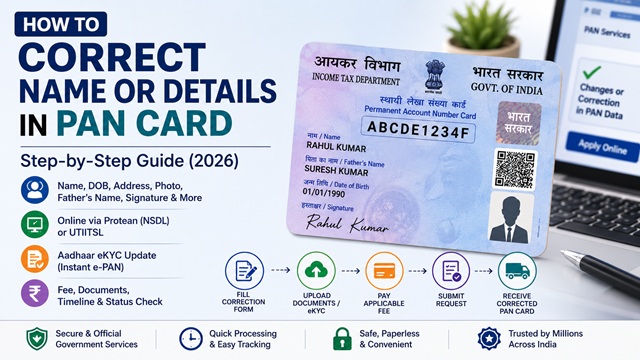
If there is a spelling mistake in your name, incorrect date of birth, wrong father's name, outdated address, or an old photograph on your PAN card, you can apply for a correction or update through the official government channels. The process is called a PAN Change Request and is handled by the same two agencies that issue PAN cards - Protean eGov Technologies (formerly NSDL) and UTIITSL.
Your PAN number (10-digit alphanumeric code) remains the same after a correction. Only the details printed on the card are updated. A new corrected PAN card is dispatched to your address after verification.
What Details Can Be Corrected in a PAN Card?
- Name of the PAN holder (spelling correction, name change after marriage, etc.)
- Father's name or mother's name
- Date of birth
- Photograph
- Signature
- Address (for communication purposes)
- Contact details (mobile number, email)
- Gender
- Aadhaar number (linking or correction)
Important: Your PAN number itself cannot be changed. It is a permanent identifier. Only the details associated with it can be updated through a correction request.
When Should You Apply for PAN Correction?
- Name changed after marriage or legal update
- Incorrect date of birth or spelling mistake
- Outdated photograph or signature
- Address or contact details changed
- Mismatch between Aadhaar and PAN details
Three Official Methods for PAN Correction
| Method | Who Can Use | Documents | Fee |
|---|---|---|---|
| Online via Protean - eKYC mode (Aadhaar-based) | Individuals with Aadhaar and Aadhaar-linked mobile | No physical documents - Aadhaar data used | Rs. 110 (Indian address) / Rs. 1,020 (foreign) |
| Online via Protean - with physical documents | Individuals and non-individuals (companies, trusts, firms) | Physical supporting documents sent by post | Rs. 110 (Indian address) / Rs. 1,020 (foreign) |
| Online via UTIITSL - eKYC or document mode | Individuals with or without Aadhaar | Aadhaar eKYC or physical documents | Rs. 107 for physical + e-PAN / Rs. 72 for e-PAN only |
Method 1 - PAN Correction Online via Protean (NSDL)
Portal: onlineservices.proteantech.in
- Go to the Protean PAN services portal at the URL above.
- Click Changes or Correction in existing PAN data / Reprint of PAN Card.
- Select Application Type: Changes or Correction in existing PAN Data.
- Select your Category (Individual, HUF, Company, Firm, etc.).
- Fill in the required fields: Name, Date of Birth, email, mobile, and PIN code. Click Submit.
- A Token Number is generated and sent to your email. Note it for resuming the application later.
- Continue filling the application. On the next pages:
- Enter your existing 10-digit PAN number
- Select which details you want to change by ticking the relevant checkboxes on the left margin of the form (name, DOB, father's name, address, photograph, etc.)
- Enter the correct details in the fields corresponding to the ticked boxes
- Choose whether to submit via eKYC (Aadhaar-based, no physical documents needed) or via physical documents sent by post.
- Proceed to make the payment of Rs. 110 (for Indian address delivery) via debit card, credit card, or net banking.
- A 15-digit Acknowledgement Number is generated. Download and print the acknowledgement.
- If you chose physical document mode: Affix your photograph on the acknowledgement, sign it, attach self-attested copies of supporting documents, and send to the Protean processing centre within 15 days.
- If you chose eKYC mode: No physical documents needed. The Aadhaar OTP authentication validates your identity electronically.
Method 2 - PAN Correction Online via UTIITSL
Portal: www.pan.utiitsl.com
- Go to www.pan.utiitsl.com.
- Click Apply for Changes or Correction in PAN Card Data.
- Enter your existing PAN and Date of Birth and proceed.
- Fill in the correction form selecting which fields need to be changed.
- Choose eKYC (Aadhaar-based OTP) or physical document submission.
- Pay the applicable fee and download the Acknowledgement.
- If physical documents required, send them within 15 days.
As per UTIITSL, applicants who obtained Instant e-PAN through the Income Tax Department's e-filing portal can also apply for change or correction using the Change Request application through eKYC mode from the UTIITSL Portal.
Documents Required for PAN Correction
The documents depend on what you are correcting. All documents must be self-attested and in the name of the applicant.
Name Correction
- Proof of correct name: Aadhaar card, Passport, Voter ID, Driving Licence, Birth Certificate, School leaving certificate, Marriage Certificate (for name change after marriage), Gazette Notification (for official name change)
- The document must clearly show the correct name you want on the PAN card
Date of Birth Correction
- Aadhaar card (if correct DOB is in Aadhaar)
- Passport
- Matriculation certificate or mark sheet of recognised board
- Birth certificate issued by municipal authority
- Driving licence
- Domicile certificate issued by Government with date of birth
- Affidavit sworn before a magistrate stating date of birth
Father's Name or Mother's Name Correction
- Birth certificate showing parents' names
- Passport of the applicant showing parents' names
- School leaving certificate or mark sheet showing parents' names
- Marriage certificate of parents
Photograph or Signature Update
- No supporting document required for photograph update - your new photograph is affixed on the correction acknowledgement
- For signature update, sign in the signature box on the acknowledgement receipt
Address Update
- Electricity bill (not more than 3 months old)
- Telephone or broadband bill (not more than 3 months old)
- Bank statement (not more than 3 months old)
- Aadhaar card
- Voter ID
- Passport
- Property tax receipt
- Rent agreement plus electricity bill
What Happens After You Submit the Correction Request?
- Your correction application is received and processed at the Protean or UTIITSL processing centre.
- Your documents are verified (for physical submission mode) or Aadhaar data is validated (for eKYC mode).
- The Income Tax Department updates the PAN database with corrected details.
- A new corrected PAN card is printed and dispatched via India Post Speed Post to your registered address.
- An e-PAN (PDF) reflecting the corrected details is also made available for download on the Protean or UTIITSL portal.
Track your correction application status using the same status tracker as for a new application. Read: How to Check PAN Card Application Status (2026).
Aadhaar-Based Update of PAN Details (Instant Update via Income Tax Portal)
For Instant e-PAN holders, the Income Tax e-Filing portal provides an Update PAN feature that allows updating specific PAN details (name, date of birth, gender, and address) directly from your Aadhaar KYC data - without a separate correction application.
As per the official Instant e-PAN User Manual at incometax.gov.in, the following details can be updated via this feature:
- Name (as per Aadhaar)
- Date of Birth (as per Aadhaar - full date must be present in Aadhaar; if only year of birth is in Aadhaar, update it there first)
- Gender (as per Aadhaar)
- Address (as per Aadhaar)
Steps for Aadhaar-based PAN update:
- Go to www.incometax.gov.in.
- Click Instant e-PAN under Quick Links.
- Click Update PAN.
- Enter your 12-digit Aadhaar number and click Continue.
- Enter the OTP received on your Aadhaar-linked mobile. Click Continue.
- Your Aadhaar e-KYC details are displayed alongside the details currently registered with your PAN. Select the checkboxes next to the details you want to update to match Aadhaar.
- Click Confirm. A success message with an Acknowledgement Number is displayed.
- The updated e-PAN reflecting the new details is made available for download.
Limitation: This feature updates your PAN database records to match Aadhaar. If the correct details are in Aadhaar, this is the fastest route. If Aadhaar itself has incorrect details, update Aadhaar first at myaadhaar.uidai.gov.in. Read: Aadhaar Card Name Change Full Process.
Fee Summary for PAN Correction
| Service | Protean Fee | UTIITSL Fee |
|---|---|---|
| Correction with new physical PAN card - Indian address | Rs. 110 (inclusive of GST) | Rs. 107 (inclusive of GST) |
| Correction with e-PAN only (no physical card) | Rs. 72 (via UTIITSL only; Protean does not offer e-PAN only correction) | Rs. 72 (inclusive of GST) |
| Correction with physical card - foreign address | Rs. 1,020 (inclusive of GST) | Rs. 1,017 (inclusive of GST) |
| Aadhaar-based PAN update (via incometax.gov.in Instant e-PAN Update) | Free | Free |
Important Rules for PAN Name Correction
- Do not use titles like Shri, Smt, Dr., Mr., Mrs., Late, or Alias in the name fields
- Only one single character initial is allowed in the middle name field for individuals
- The name on the corrected PAN card must exactly match the supporting document you submit
- In case of name change after marriage: submit marriage certificate along with old name proof document
- In case of name change via Gazette Notification: submit a copy of the Gazette Notification
- The name you want printed on the PAN card (which can be different from the full legal name) should be specified separately in the form - for example, if legal name is Ramesh Kumar Sharma, you may want only "Ramesh Sharma" printed on the card
Official Portals for PAN Correction
- Protean eGov PAN Correction Portal
- UTIITSL PAN Correction Portal - pan.utiitsl.com
- Income Tax e-Filing Portal - incometax.gov.in (for Aadhaar-based Instant PAN update)
- myAadhaar Portal - myaadhaar.uidai.gov.in (to update Aadhaar details first if needed)
Income Tax Helpline: 1800 103 0025 / 1800 419 0025 (Monday to Friday, 08:00-20:00 hrs)
Protean / NSDL PAN Helpline: +91-20-27218080 (All days, 07:00-23:00 hrs)
Disclaimer: This article is for informational purposes only. Fees and processes are subject to change by the Income Tax Department, Protean, and UTIITSL. Always refer to incometax.gov.in for the latest official information.
Add new comment