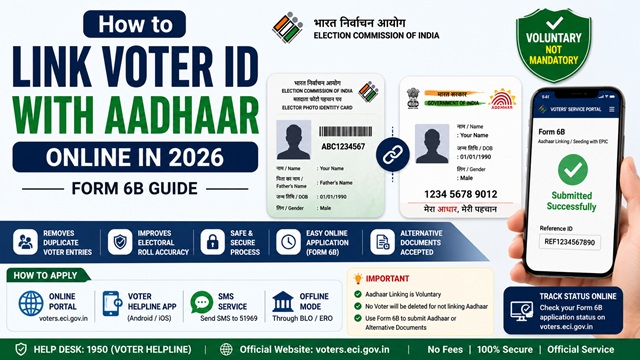
The Election Commission of India launched a drive to link every voter’s Aadhaar Card Number with their Voter ID (EPIC) record. This linkage, done through Form 6B, is used for electoral roll authentication - to remove duplicate entries, identify ghost voters, and ensure every genuine voter has exactly one valid registration.
Linking is voluntary, not mandatory. However, ECI has encouraged all voters to link their Aadhaar to help maintain an accurate and clean electoral roll. The process is completely free and takes just a few minutes online.
Is Aadhaar-Voter ID Linking Mandatory?
No. The Supreme Court of India and the Election Commission have both clarified that linking Aadhaar with your Voter ID is voluntary. No voter can be removed from the electoral roll solely for not linking their Aadhaar. If you do not have an Aadhaar, you can submit an alternative document instead.
However, if you choose to link, it helps the ECI maintain an accurate electoral roll by identifying and removing duplicate registrations across constituencies.
What Happens If You Do Not Have Aadhaar?
If you do not have an Aadhaar Card, you can still submit Form 6B by selecting the option “I am not able to furnish my Aadhaar Number because I don’t have Aadhaar Number” and attaching a copy of any one of the following alternative documents instead:
- MGNREGA Job Card
- Passbook with photograph issued by Bank or Post Office
- Health Insurance Smart Card issued under the scheme of Ministry of Labour
- Driving licence
- PAN card
- Smart Card issued by RGI under NPR
- Indian Passport
- Pension document with photograph
- Service Identity Card with photograph issued by Central/State Government/PSUs/Public Limited Companies
- Official Identity Card issued to MPs/MLAs/MLCs
Method 1 - Link Voter ID with Aadhaar Online (Form 6B on voters.eci.gov.in)
- Go to voters.eci.gov.in and log in with your registered mobile number and password.
- On the dashboard, click Feed/Seed Aadhaar (Form 6B) or look for Link Aadhaar option.
- Your voter details (name, EPIC number, constituency) are auto-filled. Verify them.
- Enter your 12-digit Aadhaar number in the space provided.
- If you do not have Aadhaar, select the declaration box and upload a copy of an alternative document from the list above.
- Verify your Aadhaar via OTP sent to your Aadhaar-linked mobile number.
- Fill the declaration and click Submit.
- An Acknowledgement Number is generated. Save it.
Method 2 - Link via Voter Helpline App
- Open the Voter Helpline app and log in.
- Tap Feed Aadhaar or Link Aadhaar (Form 6B) from the services menu.
- Enter your Aadhaar number or select the no-Aadhaar declaration option.
- Complete OTP verification if linking with Aadhaar.
- Submit. Your Acknowledgement Number is displayed.
Method 3 - Link via SMS
You can also link Aadhaar with your Voter ID by sending a simple SMS without visiting any portal:
SMS Format: ECILINK <space> EPIC Number <space> Aadhaar Number
Send to: 1950
Example: ECILINK MH012345678 123456789012
After sending, you receive a confirmation SMS. This method is particularly useful for voters who do not have easy internet access.
Method 4 - Link Offline via BLO or ERO Office
If you prefer to link in person:
- Download Form 6B from voters.eci.gov.in or collect from your nearest BLO or ERO office.
- Fill in your name, EPIC number, Aadhaar number, mobile number, and email.
- If no Aadhaar, select the declaration box and attach a copy of an alternative document.
- Submit to your BLO directly or at the ERO office.
- Collect the acknowledgement slip.
How to Check If Your Aadhaar is Already Linked to Voter ID
- Go to voters.eci.gov.in and log in.
- On your profile or dashboard, look for the Aadhaar Seeding Status or Feed/Seed Aadhaar section.
- If your Aadhaar is already linked, it will show as Seeded or Linked next to your voter record.
- If not yet linked, the option to submit Form 6B will be available.
You can also check by searching your name on electoralsearch.eci.gov.in - the result shows whether Aadhaar is linked to your voter record.
Official Portals and Useful Links
- Voters’ Services Portal - voters.eci.gov.in (Form 6B submission)
- Download Form 6B PDF - voters.eci.gov.in
- Form 6B Official Page - eci.gov.in
- Electoral Roll Search - electoralsearch.eci.gov.in
- Election Commission of India - eci.gov.in
National Voter Helpline: 1950 (Toll-free, All States)
Disclaimer: This article is for informational purposes only. Linking Aadhaar with voter ID is voluntary. Always refer to voters.eci.gov.in for the latest official information.
Add new comment