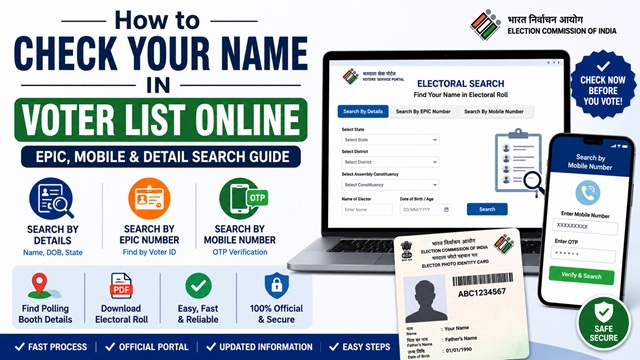
Before every election, crores of Indians search online to confirm their name is in the voter list of their constituency. If your name is missing on polling day, you will not be allowed to vote even if you have a valid Voter ID Card. Checking your name takes less than a minute on the official Electoral Search portal and requires no login.
The official portal for electoral roll search is electoralsearch.eci.gov.in, managed by the Election Commission of India.
Three Ways to Search Your Name in the Voter List
The Electoral Search portal offers three search methods. Use whichever is most convenient for you:
| Method | What You Need | Best For |
|---|---|---|
| Search by Details | Your name, date of birth, state, district, and constituency | If you do not have your EPIC card handy |
| Search by EPIC Number | Your 10-digit EPIC number printed on Voter ID card | Fastest and most accurate method |
| Search by Mobile Number | Your mobile number registered with the Election Commission | If mobile number is linked to voter record |
Method 1 - Search by Details (Name, DOB, State)
- Go to electoralsearch.eci.gov.in.
- Click the Search by Details tab.
- Enter your First Name and Last Name exactly as they appear on your Voter ID card.
- Enter your Date of Birth (DD/MM/YYYY format).
- Select your State from the dropdown.
- Select your District and Assembly/Parliamentary Constituency.
- Enter the captcha and click Search.
- Your voter details are displayed if your name is in the electoral roll. Click View Details to see your complete entry, including your Part Number, Serial Number, Polling Station, and address registered.
Tip: If your search returns no results, try entering just your first name without the last name, or try alternate spellings. Electoral roll entries sometimes have name variations from how they were originally entered.
Method 2 - Search by EPIC Number (Fastest)
- Go to electoralsearch.eci.gov.in.
- Click the Search by EPIC No. tab.
- Enter your 10-digit EPIC number exactly as printed on your Voter ID card.
- Select your State.
- Enter the captcha and click Search.
- Your complete voter details are displayed immediately.
This is the most accurate method since the EPIC number is unique to your voter record. It eliminates any name spelling confusion.
Method 3 - Search by Mobile Number
- Go to electoralsearch.eci.gov.in.
- Click the Search by Mobile No. tab.
- Enter your registered mobile number (the one linked to your voter record).
- Enter the captcha and click Search.
- An OTP is sent to your mobile number. Enter it and click Verify.
- Your voter details are displayed.
This method works only if your mobile number is registered with the Election Commission. If it is not linked, use Method 1 or Method 2. To link your mobile number, submit Form 8 on voters.eci.gov.in.
How to Check via Voter Helpline App
The official Voter Helpline App by ECI-IT also lets you search your name in the voter list directly on your phone:
- Open the Voter Helpline app and log in.
- Tap Search Your Name in Voter List from the home screen.
- Choose your search method (by Details, EPIC, or Mobile).
- Enter the required information and tap Search.
- Your voter record is displayed. Tap View Details for full information.
What Information is Shown in the Search Result?
When your name is found in the electoral roll, the following details are displayed:
- Your full name
- Father’s or husband’s name
- Age and gender
- EPIC number
- Assembly Constituency name and number
- Part Number - the section of the electoral roll where your name appears
- Serial Number - your position in the voter list within your part
- Polling Station - the booth number and name where you must go to vote
- Registered address
The Part Number and Serial Number together uniquely identify your entry in the electoral roll. These are also used when you download the PDF electoral roll for your constituency.
How to Check Your Polling Station and Booth Number
Your polling station details are shown in the voter list search result. Once you find your name:
- Click View Details on your search result.
- Your polling station name, booth number, and address are displayed.
- To get directions, note down the polling station address and search it on any map application.
Knowing your polling station in advance saves time on election day. You cannot vote at any other booth - you must go to the exact booth where your name is registered.
How to Download the Full Electoral Roll PDF
If you want to download the complete voter list for your constituency (for example to check all names in your area), go to voters.eci.gov.in/download-eroll:
- Select your State and Year of Revision.
- Select your Assembly Constituency.
- Click Download SIR Final Roll to download the PDF electoral roll.
The PDF electoral roll is the official voter list published by ECI. Your Part Number and Serial Number from the search result help you locate your exact entry in this PDF quickly.
What to Do If Your Name is Not in the Voter List
If your search returns no results, here is what to check and do:
- Check spelling: Try alternate spellings of your name. The name in the electoral roll may have been recorded differently from your actual spelling.
- Check constituency: You may have searched in the wrong constituency. Try different nearby constituencies if you recently moved or if your address is on a boundary area.
- Check registration status: If you applied recently, check your application status on voters.eci.gov.in using your Reference ID. Your name appears in the electoral roll only after the ERO approves your application.
- Apply fresh if never registered: If you have never applied for voter registration, apply now through Form 6 on voters.eci.gov.in.
- Call 1950: Call the national Voter Helpline at 1950 (toll-free) for assistance in locating your voter registration or to understand why your name may be missing.
- Contact your BLO: Your Booth Level Officer can check your registration status in person and help resolve any issues. Find your BLO details on the Voter Helpline App.
Official Portals and Useful Links
- Electoral Roll Search - electoralsearch.eci.gov.in
- Download Electoral Roll PDF - voters.eci.gov.in
- Voters’ Services Portal - voters.eci.gov.in
- Electoral Roll Information - eci.gov.in
National Voter Helpline: 1950 (Toll-free, All States)
Disclaimer: This article is for informational purposes only. Always refer to voters.eci.gov.in for the latest official information.
Add new comment