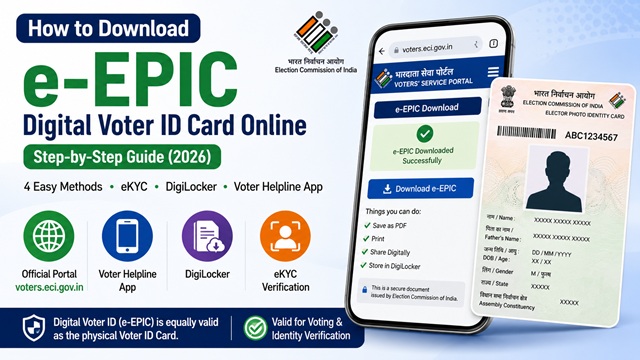
e-EPIC stands for Electronic Electoral Photo Identity Card. It is the official digital version of your Voter ID Card, available as a PDF that you can download on your phone, print at home, or store on DigiLocker. The Election Commission of India launched e-EPIC and it is completely free to download. It is equally valid as the physical Voter ID card for voting, identity verification, KYC, and all other purposes.
You do not need to wait for the physical card to arrive. Once your voter registration is approved, you can download your e-EPIC immediately from voters.eci.gov.in.
Who Can Download e-EPIC?
- Any registered voter who has a valid EPIC number printed on their physical Voter ID card
- Newly registered voters who have received their Reference Number after submitting Form 6 - you can use the Form Reference Number instead of EPIC number
- Voters whose mobile number is registered with the Election Commission can download instantly via OTP
- Voters whose mobile number is not registered can still download after completing an eKYC liveness verification
What You Need Before Downloading
- Your EPIC number (10-digit alphanumeric code printed on the front of your Voter ID card) or your Form Reference Number received after applying
- Your state name
- A registered mobile number or a device with a working camera for eKYC if mobile is not linked
If you do not have your EPIC number, you can retrieve it by searching your name on electoralsearch.eci.gov.in. Your EPIC number is displayed in the search results once your name is found in the electoral roll.
Method 1 - Download e-EPIC with Registered Mobile Number
This is the fastest method. If your mobile number is registered with the Election Commission, you can download your e-EPIC in under 2 minutes.
- Go to voters.eci.gov.in.
- Click Login and enter your registered mobile number and password. If you do not have an account, click Register and create one using your mobile number and email.
- After logging in, click on e-EPIC Download from the dashboard or services menu.
- Enter your EPIC Number or Form Reference Number.
- Select your State and click Search.
- Your voter details are displayed. Click Send OTP.
- Enter the OTP received on your registered mobile number and click Verify.
- Click Download e-EPIC. A PDF file of approximately 250 KB is downloaded to your device.
Save this PDF on your phone or print and self-laminate it. It is your official digital Voter ID card.
Method 2 - Download e-EPIC Without Registered Mobile (via eKYC)
If your mobile number is not linked to your voter record, you can still download e-EPIC by completing an eKYC (liveness check). This requires a device with a working front camera - mobile phone, tablet, or laptop with webcam.
- Go to voters.eci.gov.in and log in or register.
- Click e-EPIC Download.
- Enter your EPIC Number or Form Reference Number and select your state. Click Search.
- Since your mobile is not linked, you will see an option to complete eKYC. Click it.
- eKYC is a liveness check. It captures your live photo in real time using your camera and compares it with the photograph in your EPIC records. Follow the on-screen instructions - you may be asked to blink, smile, or turn your head slightly.
- Once the liveness check passes, your mobile number gets linked to your voter record automatically.
- You can now download your e-EPIC immediately.
If eKYC fails: This usually happens due to poor lighting, camera quality issues, or a mismatch between your current appearance and your EPIC photo. Try in a well-lit environment. If it still fails, visit your nearest Electoral Registration Officer (ERO) office with a photo ID to get your mobile number linked manually.
Important: Each mobile number can be linked to only one voter record through eKYC. After linking, you can download e-EPIC. If you later need to update your mobile number, use Form 8 on voters.eci.gov.in.
Method 3 - Download e-EPIC via Voter Helpline App
The official Voter Helpline App by ECI-IT allows you to download e-EPIC directly on your phone without opening a browser.
- Download the Voter Helpline app from Google Play Store (Android) or Apple App Store (iOS). The publisher is ECI-IT - verify before downloading.
- Register or log in with your mobile number.
- Tap on Download e-EPIC from the home screen.
- Enter your EPIC Number or Form Reference Number and select your state.
- Tap Fetch Details.
- Verify via OTP if your mobile is linked, or complete eKYC if not.
- Tap Download e-EPIC. The PDF is saved on your device.
Method 4 - Download e-EPIC via DigiLocker
Your e-EPIC is also available on DigiLocker - the official government document wallet at digilocker.gov.in. Once fetched, it stays in your DigiLocker permanently and can be accessed anytime, even offline.
- Open the DigiLocker app or go to digilocker.gov.in.
- Sign in or create an account using your Aadhaar-linked mobile number.
- Tap Search Documents and search for Voter ID or e-EPIC.
- Select the issuer as Election Commission of India.
- Enter your EPIC Number and Date of Birth.
- Your e-EPIC is fetched and saved to your DigiLocker Issued Documents.
The e-EPIC stored in DigiLocker is accepted as valid identity proof at banks, government offices, and polling stations.
What to Do If Your EPIC Number is Not Found
If you enter your EPIC number but get an error saying it is not found, try these steps:
- Check your EPIC number carefully - it is a 10-digit alphanumeric code (mix of letters and numbers). Common errors include confusing the letter O with zero, or I with 1.
- Search your electoral roll on electoralsearch.eci.gov.in using your name, date of birth, and state to confirm your correct EPIC number.
- Use your Form Reference Number instead - if you recently registered and your physical card has not arrived yet, use the Reference Number from your Form 6 submission acknowledgement.
- Wait if newly registered - e-EPIC becomes available only after your name is formally added to the electoral roll. Check your application status on voters.eci.gov.in first.
- Contact your ERO - if your registration is confirmed but EPIC number still fails, visit your Electoral Registration Officer’s office or call the Voter Helpline at 1950.
Is e-EPIC Legally Valid?
Yes. The e-EPIC is officially recognised by the Election Commission of India as a valid proof of identity. It is accepted for:
- Casting your vote at the polling station
- Identity verification at banks, post offices, and government offices
- KYC purposes
- Address proof in many institutions
- Anywhere the physical Voter ID card is accepted
You can print the e-EPIC and self-laminate it for use as a physical card. You do not need to get it laminated officially - a printed and self-laminated e-EPIC is valid.
What Information is Printed on Your e-EPIC?
Your downloaded e-EPIC PDF contains the following details:
- Your full name
- Father’s or husband’s name
- Date of birth
- Gender
- Registered address
- EPIC number (10-digit alphanumeric code)
- Your photograph
- Assembly Constituency name and number
- Part number and serial number in the electoral roll
- A QR code that can be scanned to verify your voter details
Official Portals and Useful Links
- Voters’ Services Portal - voters.eci.gov.in (e-EPIC Download)
- e-EPIC Information - eci.gov.in
- Electoral Roll Search - electoralsearch.eci.gov.in (Find your EPIC number)
- DigiLocker - digilocker.gov.in (Store e-EPIC)
- Election Commission of India - eci.gov.in
National Voter Helpline: 1950 (Toll-free, All States)
Disclaimer: This article is for informational purposes only. Processes are governed by the Election Commission of India and are subject to change. Always refer to voters.eci.gov.in for the latest official information.
Add new comment