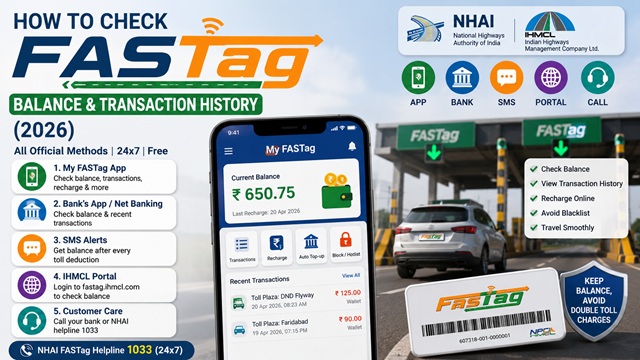
Checking your FASTag balance before travelling on highways is important because low balance or blacklisted FASTags may attract double toll charges at FASTag lanes as per applicable toll rules.
You can check your FASTag balance and transaction history online for free using the official My FASTag app, your bank's mobile app, SMS alerts, missed call service, or the IHMCL FASTag portal.
Many users remain confused about how to check FASTag balance without the app, how long recharges take to update, how to download transaction statements, and how to identify whether their FASTag is active or blacklisted.
To make the process easier, this guide explains all official FASTag balance check methods according to the latest 2026 NHAI, IHMCL, and NPCI guidelines.
In this article, you will learn how to check FASTag balance online, view transaction history, track recharge updates, identify blacklist issues, contact customer care, and download FASTag statements.
| Service | Details |
|---|---|
| Service Name | FASTag Balance Check |
| Application Fee | Free |
| Official App | My FASTag |
| Official Portal | fastag.ihmcl.com |
| Balance Check Methods | App, SMS, Bank App, Portal |
| Transaction History | Available |
| Recharge Required? | Yes |
| Blacklist Risk | Yes |
| NHAI Helpline | 1033 |
Method 1 - Check via My FASTag App (Recommended)
The My FASTag app is the official app by IHMCL (Indian Highways Management Company Limited). It shows your current balance, last recharge, and full transaction history. Available on Android and iOS.
- Download the My FASTag app from Google Play Store (Android) or Apple App Store (iOS). The app is published by IHMCL - verify the publisher before downloading.
- Open the app and log in using your registered mobile number linked to your FASTag. Enter the OTP received on that number.
- Your FASTag dashboard is displayed. The current wallet balance is shown prominently on the home screen.
- To see transaction history, tap on Transactions or Statement from the menu.
- You can filter transactions by date range and download the statement.
What you can do in the My FASTag app:
- Check current FASTag balance
- View complete transaction history with date, time, toll plaza name, and amount deducted
- Recharge your FASTag wallet
- Block or hotlist the tag if lost or stolen
- Download transaction statement
- Link bank account for auto top-up
Method 2 - Check via Your Bank’s App or Net Banking
If your FASTag was issued by a bank (SBI, HDFC, ICICI, Axis, Paytm, etc.), you can check the balance and transactions directly through your bank’s mobile app or net banking portal.
- Open your bank’s mobile app or log in to net banking.
- Navigate to FASTag Services - usually found under Payments, Vehicles, or Value Added Services.
- Select your vehicle.
- Your current FASTag balance and recent transactions are displayed.
As per the official NHAI FASTag Recharge FAQ, customers can check their FASTag balance through their respective bank’s toll-free number or by visiting the bank’s FASTag web portal.
Method 3 - Check via SMS Alert (Automatic After Every Toll Deduction)
As confirmed in the official NHAI FASTag FAQ document: "Customers will receive an SMS alert on their registered phone number each time an amount is deducted from their FASTag wallet."
This SMS is sent automatically by your issuing bank every time a toll is deducted. The SMS shows:
- Amount deducted
- Remaining balance after deduction
- Toll plaza name
- Date and time of transaction
No action is needed from your side. As long as your registered mobile number is active and receiving messages, you will automatically get this alert after every toll transaction.
If you are not getting SMS alerts:
- Check if your registered mobile number is correct with your issuing bank
- Ensure the number is not on DND (Do Not Disturb) for transactional messages
- Contact your bank’s FASTag customer care to verify your registered number
Method 4 - Check via IHMCL FASTag Portal
The official IHMCL FASTag portal at fastag.ihmcl.com allows you to log in and check your balance and transaction history.
- Go to fastag.ihmcl.com.
- Click Login.
- Enter your registered mobile number and OTP to log in.
- Your FASTag wallet balance and transaction history are displayed on the dashboard.
Method 5 - Check via Bank Customer Care (Missed Call or Toll-Free)
As per the official NHAI FASTag Recharge FAQ, you can call your bank’s toll-free FASTag customer care number to check your balance:
- Call the toll-free number printed on the back of your FASTag sticker or welcome kit
- Provide your registered mobile number and vehicle registration number for verification
- The executive will tell you your current FASTag balance
You can also call the NHAI FASTag national helpline 1033 (24x7, free, all networks) for general balance queries if you are not sure which bank issued your FASTag.
How Long Does FASTag Recharge Take to Update?
Most FASTag recharges reflect within a few minutes, but timing may vary depending on the payment method and issuing bank.
| Recharge Method | Typical Update Time |
|---|---|
| UPI Recharge | Instant to 10 minutes |
| Net Banking | 5-30 minutes |
| Debit/Credit Card | 5-30 minutes |
| Bank Branch Recharge | 30 minutes to few hours |
| Blacklist Removal After Recharge | Usually within 10-30 minutes |
If the recharge amount is debited but not reflected after a reasonable time, contact your issuing bank's FASTag customer care with the transaction reference number.
Bank-wise FASTag Customer Care Numbers
Use these numbers to check your balance by calling your issuing bank:
| Bank | FASTag Customer Care |
|---|---|
| State Bank of India (SBI) | 1800-11-0018 |
| HDFC Bank | 1800-120-1243 |
| ICICI Bank | 1800-2100-104 |
| Axis Bank | 1800-419-8585 |
| Paytm Payments Bank | 0120-4456-456 |
| IDFC First Bank | 1800-266-9970 |
| Kotak Mahindra Bank | 18602-666-888 |
| Yes Bank | 1800-3000-1113 |
| Bank of Baroda | 1800-103-4568 |
| Punjab National Bank | 1800-419-6610 |
| IndusInd Bank | 1860-5005004 |
| Federal Bank | 1800-266-9520 |
NHAI FASTag National Helpline: 1033 (24x7, Free, All Networks)
How to Check FASTag Transaction History
Your FASTag transaction history shows every toll deduction made from your account - including date, time, amount, and the toll plaza name.
Quickest way to see transaction history:
- Open the My FASTag app and log in.
- Tap Transactions or Statement.
- Select the date range you want to view.
- All transactions are listed with the plaza name, amount, and balance after deduction.
- You can also download the statement as a PDF or Excel for your records.
Alternatively, log in to your bank's net banking and go to FASTag Services → Transaction History for the same details.
What to Do If Your Balance Is Showing Zero But You Recharged
If you recharged your FASTag but the balance is still showing zero or not updated:
- Wait up to 30 minutes for the recharge to reflect - most transactions settle within this time
- Check if the payment was debited from your bank account using the payment receipt or bank statement
- If debited but not credited after 30 minutes, note the transaction reference number (UTR/transaction ID) and call your bank’s FASTag customer care
- If unresolved, escalate to NHAI grievance portal at nhai.gov.in or call 1033
For more on recharging your FASTag, read: FASTag Recharge Guide: UPI, Bank & App Methods
Minimum Balance to Keep in FASTag
- There is no fixed minimum balance rule as such, but you must have sufficient balance to cover the toll fee at each plaza you pass through
- If balance is insufficient at a toll plaza, the tag may get blacklisted and you will be charged double the applicable toll in cash
- It is advisable to always maintain a balance of at least Rs. 200-500 to cover multiple toll transactions
- You can set up Auto Top-Up through the My FASTag app or your bank’s app to automatically recharge when the balance falls below a threshold you set
If your FASTag has been blacklisted due to low balance, read: FASTag Blacklisted Problem: Reasons, Check Status & How to Fix Quickly
Official Portals
- IHMCL FASTag Portal - fastag.ihmcl.com
- NHAI Official Website - nhai.gov.in
- NPCI NETC FASTag - npci.org.in
NHAI FASTag Helpline: 1033 (24x7, Free, All Networks)
Disclaimer: This article is for informational purposes only. All procedures are subject to change by NHAI, IHMCL, and the respective issuing banks. Always verify the latest information at nhai.gov.in or fastag.ihmcl.com.
Add new comment