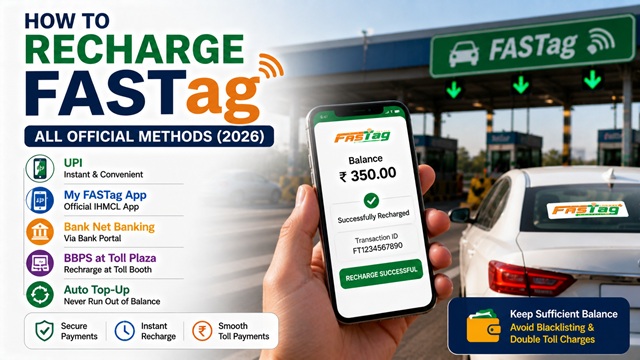
FASTag is a mandatory RFID-based toll payment system for all four-wheelers in India, implemented by NHAI through its subsidiary IHMCL. To use FASTag at toll plazas without stopping, you must always keep a sufficient balance in your FASTag wallet or linked bank account.
If your FASTag balance runs low or reaches zero, the tag gets blacklisted, and you will be charged double the toll at every plaza. This guide covers every official method to recharge your FASTag quickly and correctly.
Things to Know Before You Recharge
Before recharging your FASTag, it helps to understand what type of FASTag you have. As per NHAI, there are two types:
- Bank-issued FASTag: Purchased from a bank (SBI, HDFC, ICICI, Axis, Paytm, etc.). It is linked to a wallet maintained by that bank. You recharge this wallet using your bank's app, net banking, or UPI.
- NHAI FASTag (bank-neutral): Purchased from toll plazas, petrol pumps, or online. It is not linked to any bank at the time of purchase. You can either link it to your bank account via the My FASTag app, or recharge the NHAI prepaid wallet through UPI, net banking, or debit/credit card via the My FASTag app.
The recharge process is slightly different for each type, but UPI and the My FASTag app work for both. The sections below explain each method clearly.
All Official Recharge Methods at a Glance
| Method | Works For | Available | Payment Mode |
|---|---|---|---|
| UPI (Any App) | All FASTag types | 24x7 | UPI |
| My FASTag App (IHMCL) | All FASTag types | 24x7 | UPI, Net Banking, Debit/Credit Card |
| Bank Web Portal / Net Banking | Bank-issued FASTag | 24x7 | Net Banking, UPI, Debit/Credit Card |
| BBPS at Toll Plaza POS | All FASTag types | Toll plaza hours | Cash or Digital |
| Auto Top-Up | NHAI FASTag (bank-linked) | Automatic | Bank Account Debit |
Method 1 - Recharge via UPI (Any UPI App)
This is the fastest and most convenient method. You can use any UPI-enabled app such as BHIM, Google Pay, PhonePe, Paytm, or your bank's UPI app. This method works for all types of FASTag - bank-issued or NHAI.
As per the official NHAI FAQ, recharge via UPI is available on 100+ UPI-enabled apps.
What is my FASTag UPI ID?
Your FASTag UPI ID follows this format:
netc.VehicleRegistrationNumber@BankUPIHandle
For example, if your vehicle number is MH04BB1234 and your FASTag is issued by ICICI Bank, your UPI ID will be:
netc.MH04BB1234@icici
Always verify this UPI ID with your bank before making a payment.
Step-by-step process:
- Open any UPI-enabled app (BHIM, Google Pay, PhonePe, Paytm, or your bank's app).
- Select Send Money or Pay option.
- Enter your FASTag UPI ID in the format: netc.VehicleNumber@BankHandle
- Click Verify UPI ID to confirm it is correct.
- Enter the recharge amount you wish to add.
- Enter your UPI PIN to authenticate the transaction.
- You will receive an SMS on your registered mobile number confirming the credit to your FASTag wallet.
Note: The minimum top-up amount is Re. 1. However, it is advisable to maintain a healthy balance to avoid blacklisting at toll plazas.
Method 2 - Recharge via My FASTag App (IHMCL)
The My FASTag app is the official app by IHMCL, available on Android (Google Play Store) and iOS (Apple App Store). It works for both bank-issued and NHAI FASTag accounts and supports multiple payment modes.
Step-by-step process:
- Download the My FASTag app from Google Play Store or Apple App Store.
- Log in with your registered mobile number. Verify using the OTP sent to that number.
- Select your vehicle from the dashboard.
- Tap Recharge or Add Money.
- Enter the recharge amount.
- Choose your payment mode: UPI, Net Banking, or Debit/Credit Card.
- Complete the payment. Your FASTag wallet will be credited instantly.
Additional features of My FASTag App:
- View transaction history and toll deductions.
- Check current FASTag balance.
- Search nearest FASTag Point-of-Sale (POS) locations.
- Block or hotlist your FASTag if lost or stolen.
- Link NHAI FASTag to your bank account.
Method 3 - Recharge via Bank Web Portal / Net Banking
If your FASTag was issued by a bank, you can recharge it directly through that bank's official website or net banking portal. This is useful if you prefer using a laptop or desktop.
Step-by-step process:
- Visit your bank's official website and log in to your net banking account.
- Go to the FASTag Services section – usually found under Payments, Cards, or Value Added Services.
- Select your vehicle and FASTag account.
- Click Recharge or Add Money.
- Enter the amount and confirm payment via OTP or transaction password.
- The amount is credited to your FASTag wallet immediately.
All major banks, including SBI (https://fastag.sbi.bank.in/) have dedicated FASTag portals where you can log in with your FASTag wallet credentials or bank login and recharge directly.
Method 4 - Recharge via BBPS (Bharat Bill Payment System)
As per NHAI guidelines, FASTag can be recharged via the Bharat Bill Payment System (BBPS) at POS terminals located at all toll plazas. This is especially useful if you are on the road and need to recharge immediately using cash.
How to recharge via BBPS:
- Visit the POS counter at any toll plaza.
- Inform the operator that you want to recharge your FASTag via BBPS.
- Provide your vehicle registration number or FASTag ID.
- Pay the desired amount in cash or digitally.
- The amount is credited to your FASTag wallet. You will receive an SMS confirmation.
BBPS is also available digitally through various banking apps and online portals. Look for Bill Payments → FASTag Recharge within any BBPS-enabled platform.
Method 5 - Auto Top-Up (Bank Account Linked FASTag)
If you have an NHAI FASTag linked to a bank account through the My FASTag app, you can set up an Auto Top-Up facility. Once enabled, your FASTag wallet is automatically recharged from your bank account whenever the balance falls below a set threshold amount.
How to set up Auto Top-Up:
- Open the My FASTag App.
- Go to your FASTag account and select Link Bank Account (if not already linked).
- While linking, set a threshold amount - this is the minimum balance at which auto top-up will trigger.
- Set the top-up amount - the amount to be automatically added each time the balance drops below the threshold.
- Confirm with OTP. The standing instruction is now active.
Once set up, you never need to manually recharge. The bank account is debited automatically whenever the FASTag balance drops below the threshold limit you chose.
Note: The threshold amount may vary from bank to bank. Check with your bank for the minimum threshold allowed.
Method 6 - Check FASTag Balance via Missed Call
While this method does not recharge your FASTag, it helps you quickly check your current balance before you travel so you can top up in time.
As per NHAI: Users who have registered their mobile number with the NHAI Prepaid Wallet can check their balance by giving a missed call at:
+91-8884333331 (Toll-free, available round the clock)
You will receive an SMS with your current FASTag balance on your registered mobile number.
For bank-issued FASTag, you can check the balance through:
- SMS alerts are sent automatically after every toll deduction.
- Your bank's mobile app or net banking portal.
- The My FASTag app.
- Calling NHAI helpline 1033.
UPI Handles of All FASTag Issuing Banks
Use the table below to find your bank's UPI handle and build your FASTag UPI ID in the format: netc.VehicleNumber@BankHandle
| Bank Name | UPI Handle | FASTag UPI ID Example (MH04BB1234) |
|---|---|---|
| Airtel Payments Bank | @mairtel | netc.MH04BB1234@mairtel |
| Axis Bank | @axisbank | netc.MH04BB1234@axisbank |
| Bank of Baroda | @barodampay | netc.MH04BB1234@barodampay |
| City Union Bank | @cub | netc.MH04BB1234@cub |
| Equitas Small Finance Bank | @equitas | netc.MH04BB1234@equitas |
| Federal Bank | @fbl | netc.MH04BB1234@fbl |
| HDFC Bank | @hdfcbank | netc.MH04BB1234@hdfcbank |
| ICICI Bank | @icici | netc.MH04BB1234@icici |
| IDFC First Bank | @Idfcnetc | netc.MH04BB1234@Idfcnetc |
| IndusInd Bank | @Indus | netc.MH04BB1234@Indus |
| Karur Vysya Bank (KVB) | @Kvb | netc.MH04BB1234@Kvb |
| Kotak Mahindra Bank | @Kotak | netc.MH04BB1234@Kotak |
| Paytm Payments Bank | @paytm | netc.MH04BB1234@paytm |
| Punjab National Bank | @pnb | netc.MH04BB1234@pnb |
| South Indian Bank | @sib | netc.MH04BB1234@sib |
| State Bank of India | @sbi | netc.MH04BB1234@sbi |
Important: Always verify the UPI ID with your bank before making the payment. An incorrect UPI ID may result in the amount being credited to the wrong account.
Bank-wise FASTag Customer Care Numbers
If you need help with recharging or face any issue, call your issuing bank's FASTag customer care directly. These numbers are sourced from the official NHAI FAQ document.
| Bank | FASTag Customer Care Number |
|---|---|
| Airtel Payments Bank | 400 / 8800688006 |
| Axis Bank | 18604198585 |
| Bank of Baroda | 18001034568 |
| Canara Bank | 18001033568 |
| City Union Bank | 18002587200 |
| Equitas Small Finance Bank | 18001031222 |
| Federal Bank | 18002669520 |
| FINO Payments Bank | 02268681414 |
| HDFC Bank | 18001201243 |
| ICICI Bank | 18002100104 |
| IDBI Bank | 18002661962 |
| IDFC First Bank | 18002669970 |
| IndusInd Bank | 18602108887 |
| Karur Vysya Bank | 18001021916 |
| Kotak Mahindra Bank | 18602666888 |
| Paytm Payments Bank | 18001204210 |
| Punjab National Bank | 18004196610 |
| Saraswat Bank | 1800229999 |
| South Indian Bank | 18004251809 |
| State Bank of India | 1800110018 |
| Union Bank of India | 18002586400 |
| Yes Bank | 180030001113 |
You can also call the NHAI FASTag National Helpline 1033 (24x7, free, all networks) for general recharge assistance if you are unsure which bank issued your FASTag.
Minimum Recharge Amount and Wallet Limits
As per the official NHAI FAQ document, here are the important limits you should know:
- Minimum top-up amount: Re. 1 for any existing FASTag wallet.
- First recharge at purchase: Normally Rs. 200 (excluding security deposit), which may vary by bank.
- FASTag tag cost: Maximum Rs. 100 including GST, as regulated by the Government.
- Security deposit: Rs. 200, charged by most banks at the time of issuance.
- Minimum KYC FASTag wallet limit: Maximum Rs. 10,000 can be loaded per month, and not more than Rs. 1,00,000 in a financial year.
- Full KYC FASTag wallet limit: Balance can go up to Rs. 1,00,000 at any point in time.
These limits are governed by Reserve Bank of India (RBI) regulations on Pre-Paid Instruments (PPI).
It is advisable to always maintain sufficient balance to avoid blacklisting at toll plazas. If your FASTag gets blacklisted due to low balance, read: FASTag Blacklisted Problem: Reasons, Check Status & How to Fix Quickly
What to Do If Recharge Amount Is Debited but Not Credited
Sometimes the recharge amount gets debited from your bank account or UPI, but does not reflect in your FASTag wallet. This can happen due to network issues or a delay in settlement.
Steps to follow:
- Wait for 30 minutes. Most transactions settle within this time, and you will receive an SMS confirmation.
- Check your FASTag wallet balance on the My FASTag app or your bank's app.
- If the amount is still not credited after 30 minutes, note down the transaction reference number (UTR/transaction ID) from your UPI app or bank statement.
- Call your issuing bank's FASTag customer care with this reference number and raise a reversal request.
- If the bank does not resolve it within 7 working days, escalate to the NHAI Grievance Portal at nhai.gov.in or call 1033.
- For unresolved financial disputes, approach the RBI Banking Ombudsman.
Important: Never attempt to recharge again before confirming the first transaction has failed. Double recharge will result in an excess balance, which is refundable but takes time to resolve.
Add new comment