The West Bengal Domicile Certificate is officially called Local Residence (Domicile) Certificate on the eDistrict portal. Apply at edistrict.wb.gov.in - the WB eDistrict 2.0 portal. If you had an account on the old eDistrict, the same username and password works on eDistrict 2.0. The certificate is issued by DM, SDO, ADM, or BDO depending on the level of application. Verification involves the DIB (District Intelligence Branch) and local police station. For NEET and WBJEE state quota, use Proforma A1 (if born in West Bengal) or Proforma A2 (other eligible categories). The certificate is completely free. Processing time is 7 to 30 working days (varies by district workload). The AIN (Application Identification Number) is generated after submission - use it for all tracking and downloads. Check status via SMS: Send WB EDIST [AIN] to 9612525000. The portal integrates with Banglar Bhumi (land records) and DigiLocker. Tathya-Mitra Kendra is WB's name for CSC Common Service Centres across all 23 districts.
- WB eDistrict Portal: edistrict.wb.gov.in
- Status by SMS: Send WB EDIST [AIN] to 9612525000
- Banglar Bhumi (land records): banglarbhumi.gov.in
- WB Government: wb.gov.in
Official Name and What You Need to Know First
On edistrict.wb.gov.in, navigate to Certificate Services → Local Residence (Domicile) Certificate. This is the exact service name. The portal uses the AIN (Application Identification Number) for all status checks and downloads - note it immediately after submission.
Proforma A1 and A2 - Critical for NEET and WBJEE
West Bengal Domicile Certificate has two formats for educational admissions:
- Proforma A1: For candidates born in West Bengal. Uses birth in WB as the basis of domicile eligibility.
- Proforma A2: For other eligible categories - persons who have resided in WB for 10+ years, or whose parents are permanent WB residents, or women married to WB permanent residents.
Wrong Proforma = rejection at NEET/WBJEE counselling. Apply for the correct format and apply at least 1 month before NEET or WBJEE counselling deadline. Counselling deadlines are strict - do not wait.
Eligibility Criteria
- Any person residing in West Bengal for more than 15 years
- Persons not residing in WB but who own permanent property in the state - documentary evidence of residential land or SDO-issued Residential Certificate required
- Women not originally from WB but married to a permanent WB resident
- Government employees stationed in WB - children also eligible
- Not holding a domicile certificate from another state simultaneously
Issuing Authorities
The certificate is issued by different officers depending on the administrative level selected:
- BDO (Block Development Officer): Block level - for rural applicants, sufficient for most purposes
- SDO (Sub-Divisional Officer): Sub-Division level
- ADM (Additional District Magistrate): ADM level
- DM (District Magistrate): District level - for DM-level requirements like NEET state quota, government job applications requiring DM certificate
Verification Process
After submission, the application undergoes:
- DIB (District Intelligence Branch) verification - intelligence background check
- Local Police Station verification - physical visit to declared address
- Local Administrative Office check - BDO/SDO office verification
This three-level verification explains why processing time is 7 to 30 working days depending on district workload. Kolkata district sometimes shows portal access issues - if you see "You can not process further for Kolkata District," contact the Kolkata DM office directly.
Documents Required
- Identity Proof: Aadhaar Card, Voter ID, PAN Card, or Passport
- Address Proof: Ration Card, Electricity Bill, or Water Bill
- Residence Proof: Land/Property Certificate, Documentary Evidence of Residential Land, SDO-issued Residential Certificate, Rental Contract, or Residential Affidavit
- Age Proof: Birth Certificate or School Leaving Certificate
- Passport-size photograph
- Mobile Number and Email ID
- Marriage Certificate (if applying on marriage basis)
eDistrict 2.0 - What Changed
West Bengal upgraded to eDistrict 2.0. Key things to know:
- The same username and password from the old eDistrict account works on eDistrict 2.0 - no new registration needed for existing users
- The portal is integrated with Banglar Bhumi for land records, Kanyashree Portal for women's welfare, Swasthya Sathi for health insurance, and DigiLocker for document verification
- Two-factor authentication protects all accounts
- All 23 districts are covered under their respective sub-portals accessible from edistrict.wb.gov.in
How to Apply Online at eDistrict 2.0
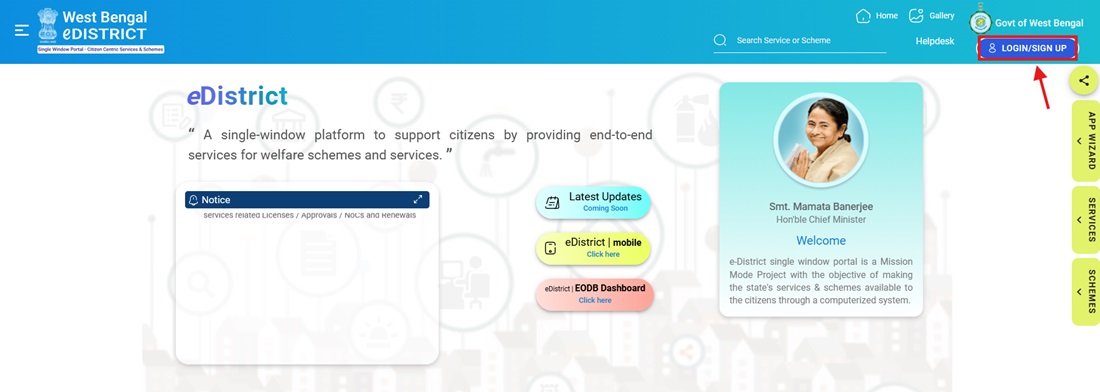
- Go to edistrict.wb.gov.in and click Login/Sign Up → Register.
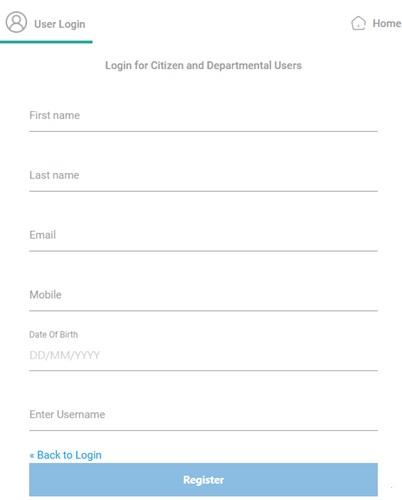
- Enter Name, Mobile Number, Email ID, and Password. Verify with OTP on registered mobile.
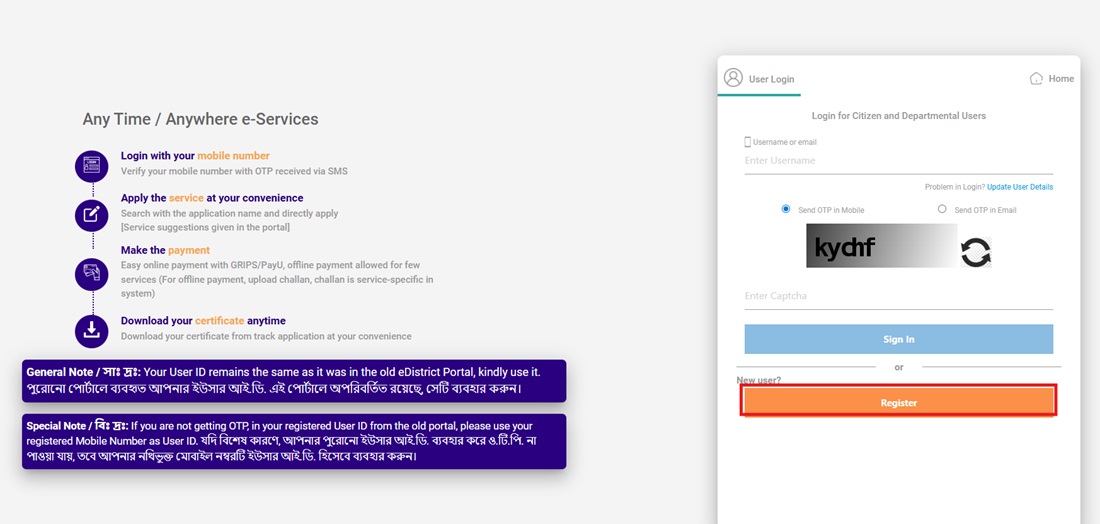
- Log in using credentials. Go to Certificate Services → Local Residence (Domicile) Certificate.
- Select the appropriate Proforma: A1 (born in WB) or A2 (other eligible). Select district and block.
- Fill all personal details: Name, Father/Guardian Name, Gender, Date of Birth, Address, Aadhaar Number, and length of stay in WB.
- Upload scanned documents in PDF/JPEG format. Ensure scans are clear and not cropped. Use CamScanner or Adobe Scan app for best results.
- Submit. An AIN (Application Identification Number) is generated. Note it immediately - needed for all future tracking and downloads.
- Application is forwarded to SDO/DM office for processing through DIB and police verification.
How to Apply via Tathya-Mitra Kendra
- Find your nearest Tathya-Mitra Kendra (CSC) in your Block or Municipality. All 23 districts have Tathya-Mitra Kendras.
- Visit with all original documents.
- The trained operator logs into edistrict.wb.gov.in and fills the Local Residence (Domicile) Certificate application on your behalf.
- Specify which Proforma you need (A1 or A2) and the issuing authority level (BDO/SDO/DM).
- Documents are scanned and uploaded. An AIN is generated and provided on the receipt.
- The application is electronically forwarded to the SDO/DM office.
How to Apply Offline at BDO/SDO/DM Office
- Visit your Block Development Officer (BDO) office, SDO office, or District Magistrate's office.
- Collect the application form for Local Residence (Domicile) Certificate or obtain from nearest Tathya-Mitra Kendra.
- Fill the form and attach all required documents.
- Submit. An Application Identification Number (AIN) / Acknowledgement Number is provided.
- Processing takes 7 to 30 working days after DIB, police station, and local administrative verification.
Check Application Status
- Online: Log in to edistrict.wb.gov.in → View Status → Track Application → Enter AIN and Date of Birth → OTP verification on registered mobile.
- SMS: Send WB EDIST [AIN] to 9612525000. Reply arrives within seconds. No internet needed.
Download Certificate
- Log in to edistrict.wb.gov.in.
- Click Approved Applications on the homepage.
- Select service name: Local Residence (Domicile) Certificate.
- Enter your AIN. Click the Download Certificate icon under Actions.
- Download the PDF of the digitally signed West Bengal Local Residence (Domicile) Certificate.
Fee and Processing Time
| Detail | Information |
|---|---|
| Fee | Free (no charges at any level) |
| Processing Time | 7 to 30 working days (varies by district) |
| Validity | Lifetime (for government jobs and legal use by SDO/DM certificate) |
Important Links
- WB eDistrict Portal - edistrict.wb.gov.in
- Banglar Bhumi (Land Records) - banglarbhumi.gov.in
- West Bengal Government - wb.gov.in
Helpline
- SMS Status: Send WB EDIST [AIN] to 9612525000
মন্তব্যসমূহ
BDO Income Certificate
It is urgent in 3 days
নতুন কমেন্ট যুক্ত করুন