
A Domicile Certificate issued by the Government of Uttarakhand certifies that a person is a permanent resident of the state. The Revenue Department issues it through the Apuni Sarkar eServices Portal at eservices.uk.gov.in. The certificate is needed for government jobs under state quota, admissions to Uttarakhand state educational institutions including HNBGU, Kumaun University, and Doon University, scholarships and welfare schemes, purchase of agricultural land in Uttarakhand, and proof of nativity and residence for central government purposes. The online application goes through SDM Office → Patwari field verification → Tahsildar approval → SDM final issuance. Certificate number format: UK[year]ES[series][number] (example: UK22ES0600079462). Processing time: 7 to 15 working days. Fee: Rs. 40. Validity: Permanent.
Eligibility Criteria
Any one of the following conditions qualifies a person for Uttarakhand Domicile Certificate:
- A person born in Uttarakhand
- A person who has been a continuous resident of Uttarakhand for at least 15 years
- A person who has a permanent home in Uttarakhand but is residing outside the state for employment, business, or other reasons - the permanent home and family connection to Uttarakhand qualifies them
- A person whose parents hold permanent residence or a government job in Uttarakhand
- A woman married to a permanent resident of Uttarakhand
Temporary absence from the state for studies or employment does not break the domicile. An affidavit explaining the period of absence can be submitted alongside the application.
Documents Required
Mandatory Documents |
|
Supporting Documents (any applicable) |
|
Important: All documents must be in PDF format. Each file must be below 2 MB. Upload scanned copies of originals only - not photocopies of photocopies. For offline submission, carry photocopies along with originals for verification.
Application Workflow: SDM → Patwari → Tahsildar → SDM
Understanding this 4-step workflow helps you track your application and know who to contact if delayed:
- Step 1 - SDM Office: Application is submitted to and received by the SDM (Sub-Divisional Magistrate) Office, which assigns it for field verification.
- Step 2 - Patwari Verification: The Patwari of the applicant's area conducts ground-level verification of the declared residence and documents. Meeting the Patwari once during this stage helps resolve any objections quickly.
- Step 3 - Tahsildar Approval: After the Patwari submits the verification report, the Tahsildar reviews and approves.
- Step 4 - SDM Final Issuance: The SDM Office generates the digitally signed Domicile Certificate after final approval. Download it from eservices.uk.gov.in.
How to Apply Online at Apuni Sarkar Portal
Portal: eservices.uk.gov.in
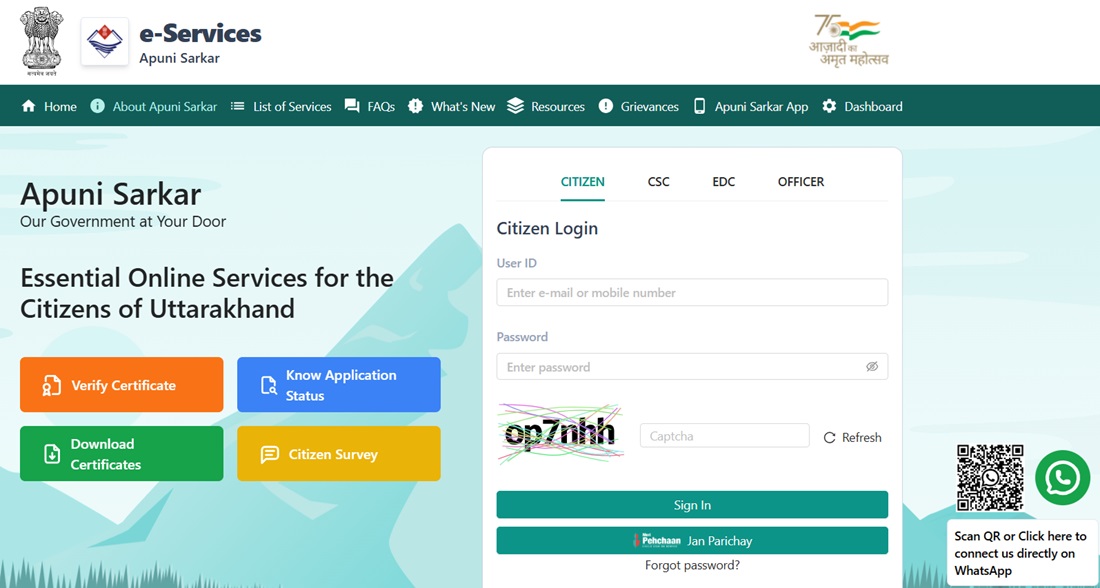
- Visit eservices.uk.gov.in - the Apuni Sarkar eServices Portal of Uttarakhand.
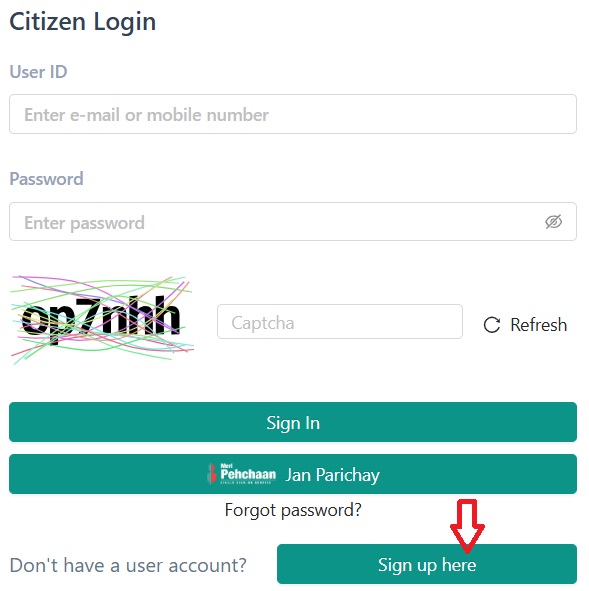
- Click Sign Up to create a new account.
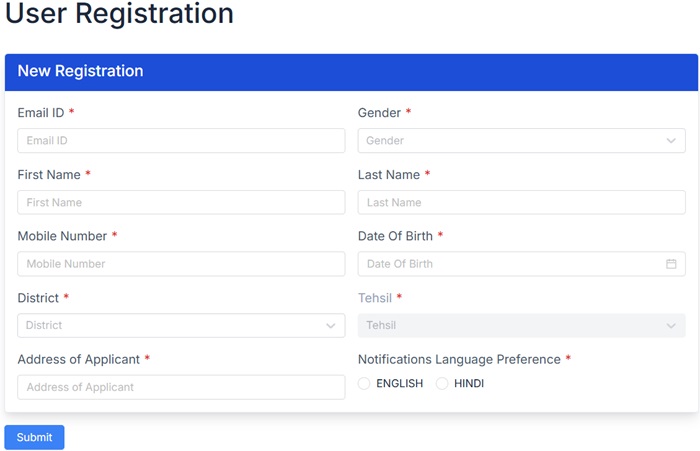
- Fill the User Registration Form - name, email, mobile number, address, and set a password.
- Submit. A PIN is sent to the registered mobile number.
- Log in with your User ID (Email or Mobile Number) and enter the received PIN as password.
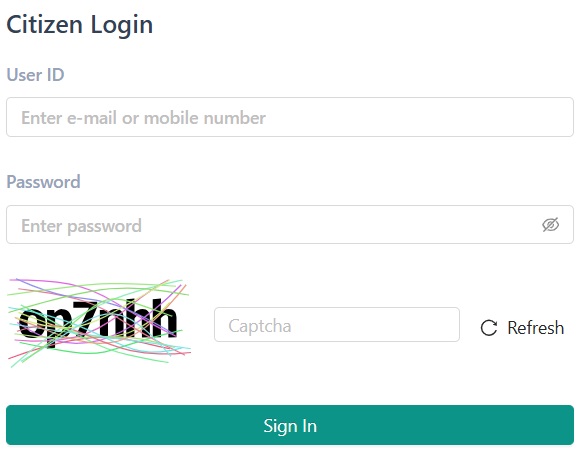
- Click the Services tab and select Revenue Department.
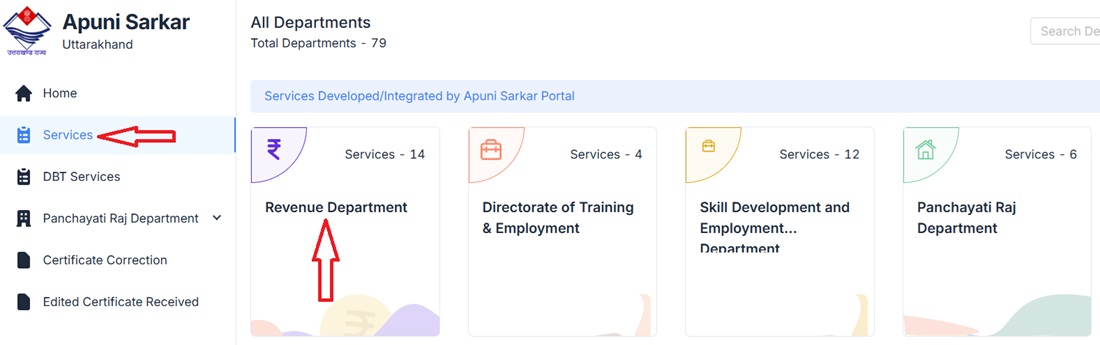
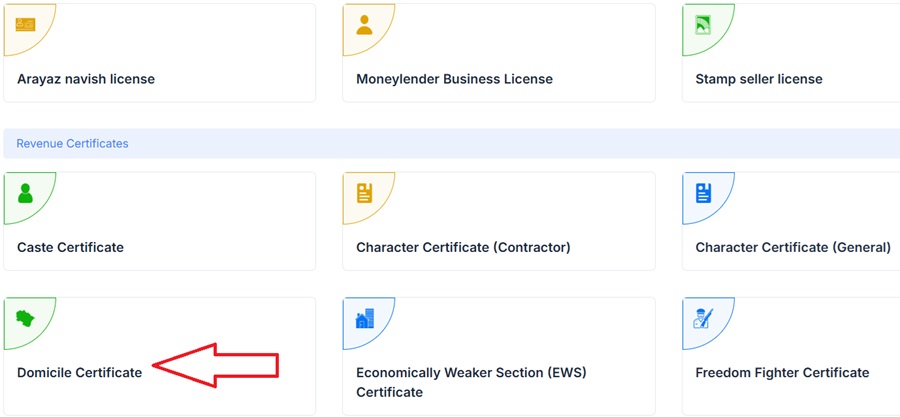
- Select Domicile Certificate from Revenue Department services.
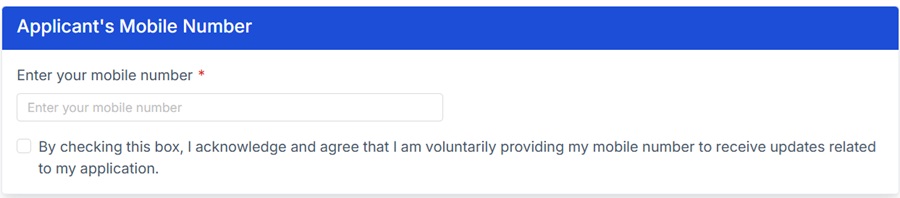
- Enter mobile number and verify through OTP.
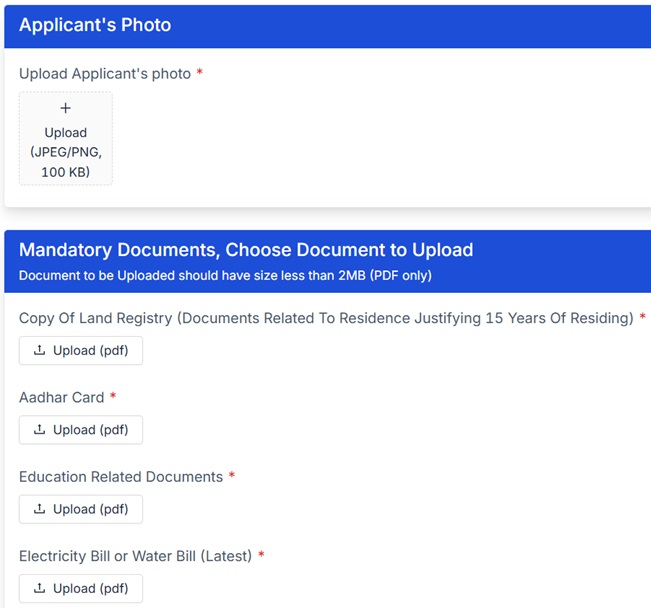
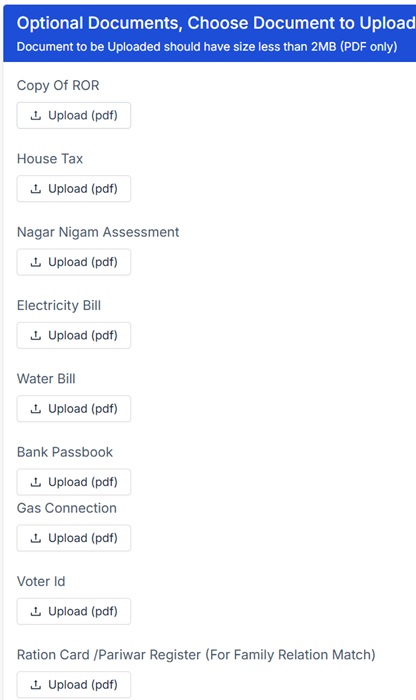
- Upload applicant photo and all mandatory documents.
- Upload any supporting documents available, then click Submit.
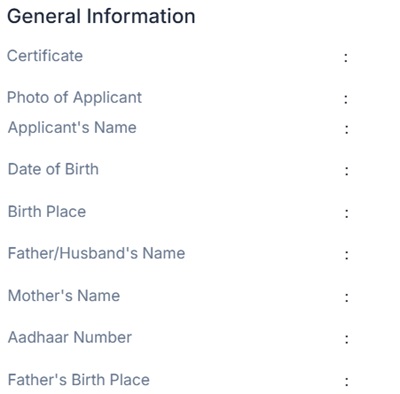
- The detailed application form opens with four sections to fill:
- General Information - personal details
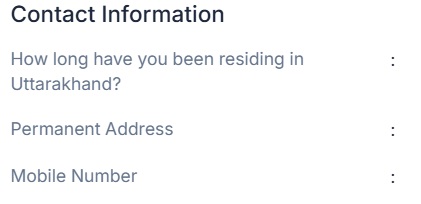
- Contact Information - address and contact details
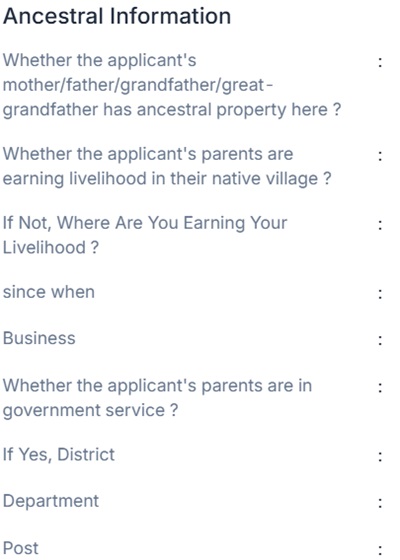
- Ancestral Information - parents' and grandparents' details and their connection to Uttarakhand. This section is critical for establishing domicile eligibility through family roots.
- Other Information - purpose of certificate and additional details
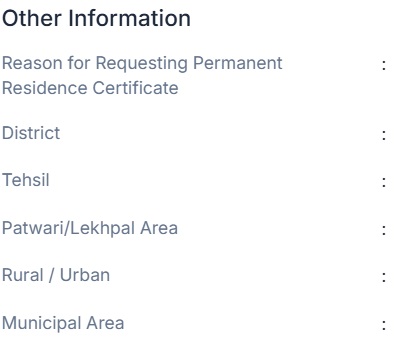
- General Information - personal details
- Review all details carefully and submit the application form.
- Note the Application Number from the acknowledgement. The application now moves through the SDM → Patwari → Tahsildar → SDM workflow described above.
After final approval, download the digitally signed certificate from eservices.uk.gov.in. No physical collection or home delivery - download only.
How to Apply via CSC Centre
- Visit the nearest CSC Centre with all mandatory documents.
- Ask the operator to apply for Uttarakhand Domicile Certificate on your behalf.
- The operator fills the form, scans and uploads documents on eservices.uk.gov.in.
- Collect the Acknowledgement Slip with Application Number after submission.
- CSC service charges vary - always ask before applying. Generally Rs. 100 to Rs. 500.
- Track your application status regularly. If the Patwari raises an objection, visit the Patwari directly to resolve it - this significantly speeds up the process.
- Upload scanned copies of originals only. Never upload photocopies of photocopies.
Check Application Status
- Go to eservices.uk.gov.in - Know Application Status.
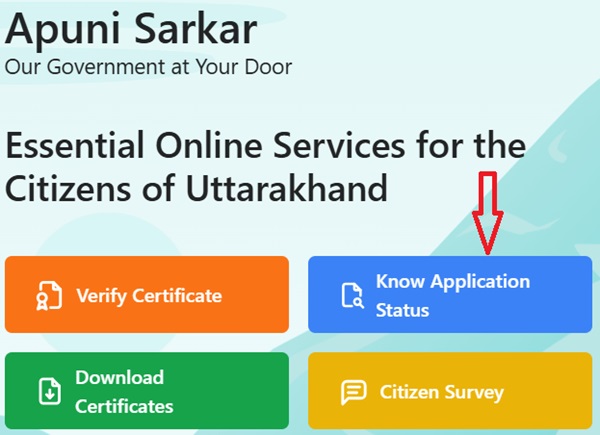
- Enter Application Number and click Search. No login required for status check.
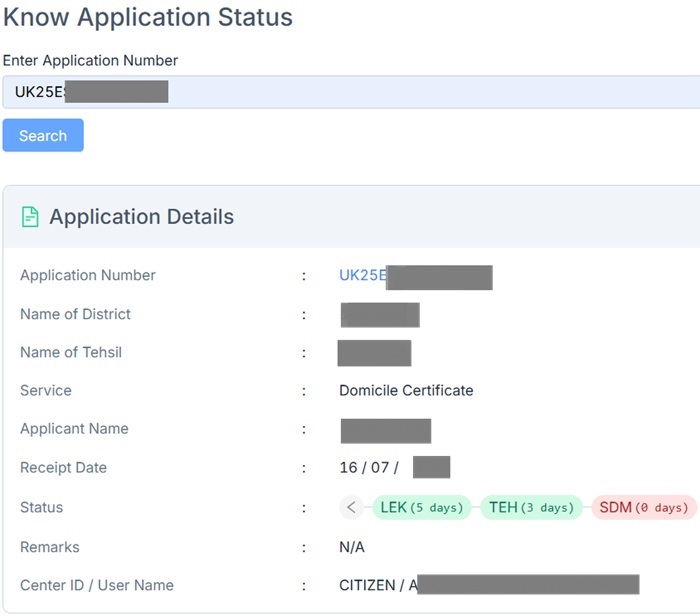
- Status shows the current stage: SDM Office, Patwari, Tahsildar, or Approved.
- Check regularly - if status is stuck at Patwari for more than 7 days, visit the local Patwari office to follow up.
Download Domicile Certificate
- Government of Uttarakhand issues digitally signed Domicile Certificates - no physical collection needed from any office.
- Go to eservices.uk.gov.in - Download Certificates.
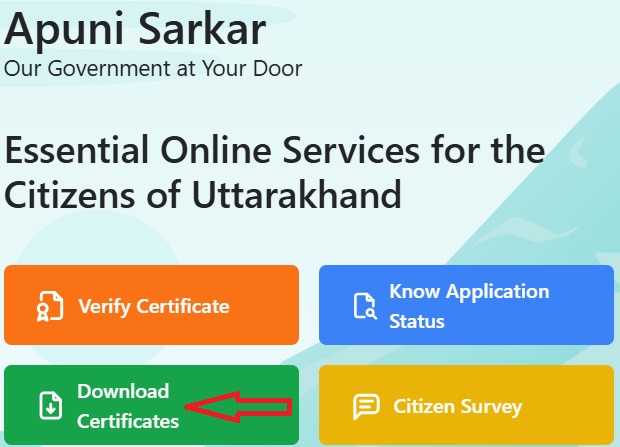
- Select Revenue Department, choose Domicile Certificate, enter registered mobile number.
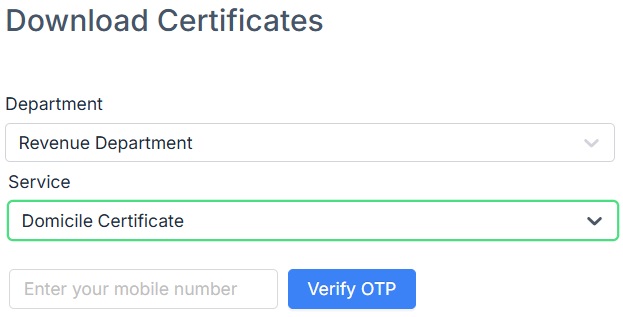
- All issued certificates appear. Select and download your Domicile Certificate in PDF.
- The certificate carries a unique number in the format UK[year]ES[number] - keep this safe for future verification and status checks.
Online Correction in Domicile Certificate
- Mistakes in the issued Domicile Certificate can be corrected online - no need to reapply from scratch.
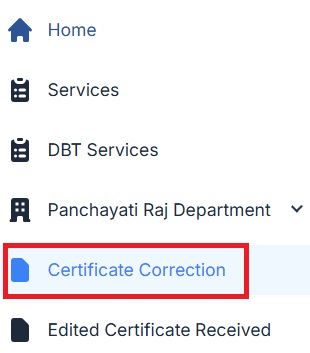
- Log in to eservices.uk.gov.in and select Certificate Correction from the menu.
- Choose Revenue Department and Domicile Certificate. Enter Application Number.
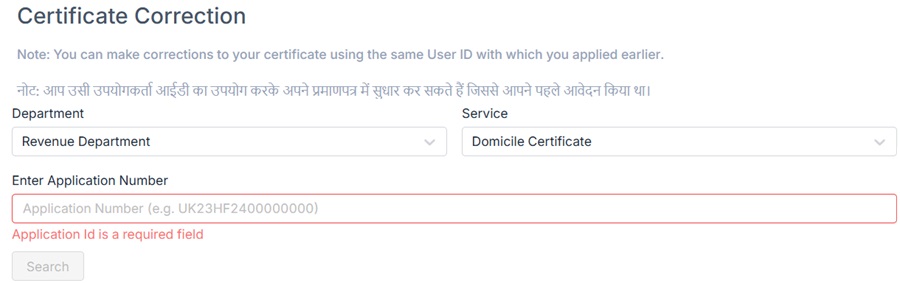
- The issued certificate appears. Select it, enter the correct details, and submit.
- The corrected certificate is processed and available for download after verification.
Fee and Processing Time
| Application Mode | Fee | Processing Time |
|---|---|---|
| Online (Apuni Sarkar Portal) | Rs. 40 | 7 to 15 working days |
| CSC Centre | Rs. 40 govt fee + Rs. 100-500 CSC service charge | 7 to 15 working days |
Validity
- Uttarakhand Domicile Certificate has permanent validity.
- It is not revoked unless misrepresentation or fraud is found in the original application.
- Temporary absence from Uttarakhand for studies, employment, or business does not invalidate the certificate.
- One person can hold a domicile certificate from only one state at a time.
What to Do if Application is Rejected
- The Tehsildar/SDM will issue a rejection notice stating the reason.
- Common reasons: insufficient residence proof, missing ancestral information, incomplete documents.
- Collect additional documents covering the required 15-year residence period - old electricity bills, Pariwar Register, ROR entries, school certificates from Uttarakhand.
- If rejection seems unjustified, file an RTI at rti.uk.gov.in to the Tehsildar/SDM requesting the verification report under Right to Information Act 2005. RTI fee: Rs. 10.
- Reapply with the additional documents after understanding the rejection reason.
Important Links
- Apuni Sarkar Portal - eservices.uk.gov.in
- Check Application Status - eservices.uk.gov.in
- Download Certificate - eservices.uk.gov.in
- Revenue Department - revenue.uk.gov.in
- RTI Portal Uttarakhand - rti.uk.gov.in
Helpline
- Apuni Sarkar Helpdesk: Dial 1905, press 4
- Email: [email protected]
মন্তব্যসমূহ
हमारी ग्राम पंचायत में…
हमारी ग्राम पंचायत में पटवारी द्वारा बिना सूचित दिए स्थायी निवास प्रमाण पत्र खारिज किये जा रहे है
নতুন কমেন্ট যুক্ত করুন