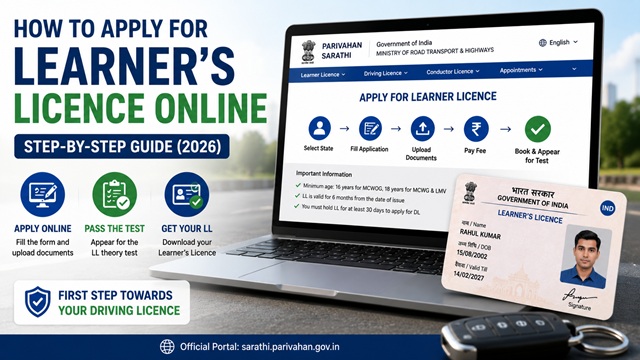
A Learner's Licence (LL) is the first step to getting a driving licence in India. It allows you to legally practice driving on public roads under the supervision of a person who holds a valid permanent driving licence for the same type of vehicle. You must hold a Learner's Licence for at least 30 days before you can apply for a permanent driving licence.
You can apply for a Learner's Licence online through the official Sarathi Parivahan portal at sarathi.parivahan.gov.in, which is managed by NIC under the Ministry of Road Transport and Highways.
Who Can Apply
As per parivahan.gov.in:
- 16 years and above: Can apply for a motorcycle without gear (scooter, moped - MCWOG class). Written consent of parent or guardian is required if below 18.
- 18 years and above: Can apply for a motorcycle with gear (bike - MCWG) and Light Motor Vehicle (car, jeep - LMV class).
- You should not already hold a valid Learner's Licence for the same class of vehicle.
Documents You Need
Keep these documents ready before starting your application. As per the official Form 2 at parivahan.gov.in:
Proof of Age (anyone)
- Aadhaar card (date of birth must be visible)
- Birth certificate from Municipal Authority
- Class 10 mark sheet or school leaving certificate showing date of birth
- Passport
- Voter ID
- PAN card
Proof of Address (any one)
- Aadhaar card
- Passport
- Voter ID
- Ration card
- Electricity bill or water bill (not older than 3 months)
- Bank passbook with address
- Rent agreement
Medical Certificate
- Form 1 (self-declaration of physical fitness) - for applicants below 40 years of age. You declare yourself fit to drive.
- Form 1A (certificate from a registered medical practitioner) - for applicants 40 years and above. A doctor signs it after examination. Source: parivahan.gov.in FAQ.
Other
- Recent passport-size photograph
- Written consent of parent or guardian on plain paper (only if applicant is below 18 years)
Fee for Learner’s Licence
As per the official fee schedule on parivahan.gov.in:
- Rs. 150 per class of vehicle
- If applying for both MCWOG and LMV together: Rs. 150 × 2 = Rs. 300
- States may add a small convenience fee for online payment
Payment is made online at the time of application using debit card, credit card, UPI, or net banking.
Meaning of MCWOG, MCWG, and LMV
- MCWOG: Motorcycle Without Gear (scooter, moped)
- MCWG: Motorcycle With Gear (motorbike)
- LMV: Light Motor Vehicle (car, jeep, small private vehicle)
Step-by-Step Process to Apply for Learner’s Licence Online
As per the official Sarathi portal at sarathi.parivahan.gov.in and the official FAQ at parivahan.gov.in:
- Go to sarathi.parivahan.gov.in.
- Click on your State from the dropdown list. This is important - select the state where you currently live, as your Learner's Licence will be issued from that state's RTO.
- On your state’s Sarathi page, click Apply for Learner Licence under the Learner Licence menu.
- Read the instructions carefully and click Continue.
- Fill in the application form:
- Personal details: Full name, date of birth, gender, father’s/husband’s name
- Address details: Current residential address as per your address proof
- Select the class of vehicle you want to drive: MCWOG (scooter), MCWG (bike), LMV (car), or combination
- Emergency contact details
- Fill in the Medical Certificate details (Form 1 self-declaration if below 40, or Form 1A details if 40 and above).
- Upload scanned copies of your Proof of Age and Proof of Address documents in the required format (PDF or JPEG, typically under 2 MB each).
- Upload your passport-size photograph.
- Pay the fee of Rs. 150 per class online. After payment, a receipt is generated. Save or print it.
- Book an appointment at your nearest RTO for the Learner’s Licence theory test. Select a convenient date and time slot.
- Print or save the Application Acknowledgement Slip, which shows your application number, appointment date, and list of documents to bring.
What Happens at the RTO on Test Day
On your appointment day, carry:
- Application Acknowledgement Slip (printout)
- Fee receipt (printout)
- Original documents of your Proof of Age and Proof of Address
- Original medical certificate (Form 1 or Form 1A)
- One passport-size photograph
- Parental consent letter if below 18
At the RTO, you will:
- Submit your documents for verification by the RTO officer.
- Appear for the Learner's Licence theory test - a short written or computer-based test on traffic rules, road signs, and basic driving knowledge. The test typically has 15-20 questions and you need to score around 60-70% to pass (varies by state).
- If you pass, the Learner’s Licence is issued. In some states, it is printed and given on the spot. In others, it is sent to your address.
- If you fail, you can reappear after 7 days.
Online Theory Test (STALL) - Available in Some States
As per parivahan.gov.in, some states allow you to take the Learner’s Licence theory test online (called STALL - Software Test for All Learner Licence applicants) without visiting the RTO for the test:
- Go to sarathi.parivahan.gov.in.
- Select your state.
- Click Online Learners’ Licence Test (STALL) from the Learner Licence menu.
- Enter your Learner's Licence Application Number and Date of Birth and click Login.
- Complete the online test.
You can also practice for the test using the Tutorial for LL Test available on the Sarathi portal homepage for your state.
Validity and What to Do After Getting Learner’s Licence
- A Learner’s Licence is valid for 6 months from the date of issue.
- You must display an “L” board (red letter L on white background) at the front and rear of the vehicle while practising.
- You must drive only when accompanied by a person who holds a valid permanent driving licence for the same class of vehicle.
- After 30 days from the LL issue date, you can apply for the permanent Driving Licence.
- Apply for permanent DL before the LL expires (within 6 months). If it expires, you will need to apply for a fresh Learner’s Licence.
How to Check Your Learner’s Licence Application Status
- Go to sarathi.parivahan.gov.in.
- Select your state.
- Under Learner Licence menu, click Application Status.
- Enter your Application Number and Date of Birth and click Submit.
Alternatively, check DL and LL status on: parivahan.gov.in/rcdlstatus
How to Print Your Learner’s Licence
As per the official FAQ at parivahan.gov.in:
- Go to sarathi.parivahan.gov.in.
- Select your state.
- Under Learner Licence menu, click Print Learner Licence (Form 3).
- Enter your Application Number and Date of Birth and submit.
- Download and print the Learner’s Licence.
Official Portals
- Sarathi Parivahan Portal - Apply for Learner’s Licence
- Check Learner’s Licence / DL Status
- Download Form 2 (LL/DL Application Form)
- Driving Licence Fee Schedule - parivahan.gov.in
Parivahan Helpdesk: 0120-2459171
Disclaimer: This article is for informational purposes only. Processes and fees vary by state and are subject to change by MoRTH. Always refer to sarathi.parivahan.gov.in for the latest official information.
Add new comment