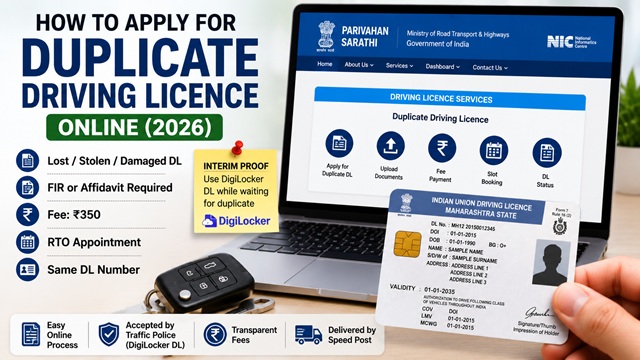
If your Driving Licence (DL) is lost, stolen, damaged, torn, defaced, or completely unreadable, you can apply for a duplicate Driving Licence online through the official Sarathi Parivahan portal. You do not need to apply for a fresh licence or repeat the Learner's Licence process again.
Many applicants remain confused about whether an FIR is required, how to apply online, what documents are needed, whether the DL number changes, and how long it takes to receive the duplicate card.
To make the process easier, this guide explains the complete step-by-step duplicate Driving Licence application process according to the latest 2026 Parivahan and Ministry of Road Transport and Highways (MoRTH) guidelines.
In this article, you will learn about duplicate DL fees, FIR and affidavit rules, required documents, online application process, DigiLocker usage, application status tracking, and serious mistakes to avoid.
| Service | Details |
|---|---|
| Service Name | Duplicate Driving Licence |
| Application Mode | Online |
| Official Portal | sarathi.parivahan.gov.in |
| Duplicate DL Fee | ₹350 |
| FIR Required | For Stolen DL |
| Affidavit Required | For Lost DL |
| RTO Visit | Usually Required |
| DL Number Changes? | No |
| Status Check | Available Online |
When Can You Apply for a Duplicate Driving Licence?
As per parivahan.gov.in, a duplicate driving licence is issued in the following circumstances:
- When the licence is lost or destroyed
- When the licence is defaced, torn, or completely written up
A duplicate DL is not issued for updating your photo, changing your address, or correcting your name. Those are handled as amendments or corrections through the same Services on the Driving Licence section on the Sarathi portal.
What to Do First If Your DL Is Lost or Stolen
Before applying for a duplicate, take these steps:
- File an FIR at the nearest police station if your DL was stolen. Mention the Driving Licence number in the FIR. A copy of the FIR is required for the duplicate application in case of theft.
- For lost DL (not stolen), file a self-declaration or affidavit on plain paper stating that the licence is lost, the DL number, and the circumstances of loss. This is submitted along with your application.
- Use DigiLocker as an interim: If you need to show your DL to traffic police while waiting for the duplicate, download your digital DL from digilocker.gov.in. A digital DL on DigiLocker is accepted by traffic police across all states.
Fee for Duplicate Driving Licence
- Rs. 350 - fee for duplicate driving licence
- States may add a small online convenience fee
Payment is made online at the time of application using debit card, credit card, UPI, or net banking.
Documents Required for Duplicate Driving Licence
Keep the following documents ready before starting your application:
- FIR copy - mandatory if DL was stolen. Get it from the police station where you filed the report.
- Self-declaration or affidavit - for lost DL (not stolen). Written on plain paper or stamp paper stating the DL number, loss details, and a declaration that the original is not misused.
- Damaged DL - if the original card is damaged, carry the damaged card to the RTO as proof.
- Proof of Address - Aadhaar, passport, voter ID, electricity bill (not older than 3 months), ration card, or bank passbook. Required if your address has changed since the original DL was issued.
- Medical Certificate Form 1 or Form 1A - some states or RTOs may ask for medical certificates depending on the applicant's age and licence category
- Passport-size photographs
- Fee receipt (generated at time of online payment)
Step-by-Step: How to Apply for Duplicate Driving Licence Online
- Go to sarathi.parivahan.gov.in.
- Select your State from the dropdown. Select the state where your original DL was issued.
- Click Services on Drivers License (Renewal/Duplicate/AEDL/Others) under the Driving Licence menu.
- Read the instructions on the page and click Continue.
- Enter your Driving Licence Number and Date of Birth and click Get Drivers Licence Details.
- Your DL details are displayed - name, date of birth, vehicle class, validity, issuing RTO. Verify these carefully.
- From the list of services shown, select Duplicate Driving Licence.
- Fill in the application form:
- Select the reason for duplicate application: Lost / Stolen / Damaged / Defaced / Torn
- Enter FIR details if the reason is Stolen (FIR number, police station name, date)
- Enter affidavit details if the reason is Lost
- Confirm or update address details
- Fill in Medical Certificate details (Form 1 or Form 1A)
- Upload required documents: Address proof (if changed), FIR copy or affidavit, damaged DL (if applicable), photograph.
- Click Next to proceed.
- Pay the fee of Rs. 350 online. Save the fee receipt.
- Book an appointment at your RTO for document verification. Select a convenient date and time slot.
- Print or save the Application Acknowledgement Slip.
What Happens at the RTO on Your Appointment Day
On your appointment day, carry:
- Application Acknowledgement Slip (printout)
- Fee receipt (printout)
- FIR copy (if DL was stolen) or signed affidavit (if DL was lost)
- Damaged DL card (if reason is damaged/defaced - the original card is surrendered)
- Medical Certificate (Form 1 or Form 1A)
- Proof of Address originals (if address was updated)
- Passport-size photographs
The RTO officer verifies your documents. Once verified and approved, the duplicate DL is either:
- Issued on the spot as a smart card, or
- Sent to your registered address via India Post Speed Post within 7-30 days, depending on the state
What If You Do Not Remember Your DL Number?
If you have lost your DL and do not remember your DL number, you can find it through these methods before applying:
- DigiLocker app (digilocker.gov.in): If you previously fetched your DL on DigiLocker, the DL number is available there.
- mParivahan app: If you stored your DL on the mParivahan app earlier, the DL number will be shown.
- Old documents: Your DL number may appear on insurance papers, vehicle RC, bank KYC records, or old correspondence.
- Contact your issuing RTO: Visit your RTO with your Aadhaar and they can look up your DL number in the database.
- Parivahan status portal: If you remember your approximate DL number, check at parivahan.gov.in/rcdlstatus to verify details.
Can You Apply for a Duplicate DL in a Different State?
As per parivahan.gov.in, a permanent Driving Licence is valid throughout India. For duplicate DL in a different state, visit the local RTO in the state where you currently reside for guidance on state-specific procedures. The Sarathi portal requires you to select the state where your original DL was issued.
How to Track Your Duplicate DL Application Status
- Go to parivahan.gov.in/rcdlstatus.
- Enter your DL number and date of birth to check current status.
You can also track via Sarathi portal: sarathi.parivahan.gov.in → Select State → Application Status → Enter Application Number and Date of Birth.
Once dispatched, track the India Post delivery at indiapost.gov.in.
Use DigiLocker as Interim Proof While Waiting for Duplicate
While your duplicate DL application is being processed, you do not need to drive without any proof. Download your digital DL from DigiLocker:
- Open the DigiLocker app or go to digilocker.gov.in.
- Log in with your Aadhaar-linked mobile number.
- Search for Driving Licence under Ministry of Road Transport and Highways.
- Enter your DL number and date of birth to fetch your DL.
MoRTH has notified that digital DL on DigiLocker is accepted as a valid document by the traffic police across all states. This serves as a valid interim licence while your duplicate physical card is in process.
Official Portals
- Sarathi Parivahan - Apply for Duplicate DL
- Duplicate Licence Information - parivahan.gov.in
- Check DL Application Status
- Driving Licence Fee Schedule - parivahan.gov.in
- DigiLocker - Digital DL as Interim Proof
- India Post Speed Post Tracker - Track DL Delivery
Parivahan Helpdesk: 0120-2459171
Disclaimer: This article is for informational purposes only. Processes and fees vary by state and are subject to change by MoRTH. Always refer to sarathi.parivahan.gov.in for the latest official information.
Add new comment