The Punjab Government issues a Residence Certificate (also known as a Punjab Domicile Certificate) as official proof that a person is a permanent resident of the state. The certificate is issued by the Revenue Department through the concerned Sub-Divisional Magistrate (SDM) or Tehsildar and is commonly required for admission under state quota, government jobs, scholarships, welfare schemes, and various other state-specific benefits. Applicants can submit their application online through the Connect Punjab Portal or visit any Sewa Kendra (Suwidha Kendra) located across Punjab's 23 districts. Once the application is approved, the certificate can be tracked and downloaded from esewa.punjab.gov.in, the official E-Sewa Punjab platform that provides access to hundreds of government services.
The prescribed fee for a Punjab Residence Certificate is Rs. 85, which includes a processing charge of Rs. 75 and a government fee of Rs. 10. The department generally processes applications within 15 working days. Once issued, the certificate normally remains valid for a lifetime unless any information provided during the application is found to be incorrect. Applicants using the online mode should note that the Connect Punjab Portal requires a live photograph captured through the device camera during the application process, so access to a mobile phone or laptop camera is essential. Citizens who prefer not to visit government offices can also avail of the Punjab Government's Doorstep Service by calling 1076, through which eligible services can be delivered at their residence.
- Connect Punjab Portal (Apply Online): connect.punjab.gov.in
- E-Sewa Punjab (Track Status & Download Certificate): esewa.punjab.gov.in
- eServices Punjab (Certificate Verification): eservices.punjab.gov.in
- Punjab Government Helpline: 1100
- Doorstep Service Helpline: 1076
- Punjab Government WhatsApp Chatbot: 9855501076
Eligibility Criteria
A person may apply for a Punjab Residence Certificate if they can establish a genuine and permanent connection with the state. The Revenue Department considers factors such as place of birth, duration of residence, family background, employment, and property ownership while examining an application.
- Born in Punjab
- Residing in Punjab continuously for the last 5 years
- Parents or guardians are permanent residents of Punjab
- Employed in the Punjab Government or local bodies for a significant period
- Owns immovable property in Punjab
- Married to a permanent resident of Punjab
Documents Required
Applicants must upload supporting documents to establish their identity, address, date of birth, and residence status in Punjab. Depending on individual circumstances, additional documents may also be requested by the competent authority during verification.
- Any one Proof of Identity: Passport, Voter Identity Card, Aadhaar Card, Driving Licence, PAN Card, Government Identity Card, Student Identity Card, Bank Account Passbook, CGHS Card, Ex-Servicemen Contributory Health Scheme Card, Pensioner Card, or MGNREGA Job Card
- Any one Proof of Address: Passport, Bank Account Passbook, Certificate issued by Central/State Government or PSU, Latest Telephone Bill, Electricity Bill, Water Bill, Gas Bill, Registered Rent Deed, Voter Identity Card, Aadhaar Card, or Income Tax Assessment Order
- Any one Proof of Date of Birth: PAN Card, Passport, Class 10th Certificate, Migration Certificate, School Leaving Certificate, Service Record, Pay Pension Order, Voter Identity Card, Aadhaar Card, Birth Certificate, or Driving Licence
- Self Declaration cum Verification attested by any one of the following: Sarpanch, Patwari, Head of Department (HOD), or Municipal Councillor (MC)
- Proof of Place of Birth in Punjab: Birth Certificate, Passport, or any other document establishing birth in Punjab
- Ration Card
- Proof of Immovable Property in Punjab (optional)
- School Certificate Copy (optional)
How to Apply Online at Connect Punjab Portal
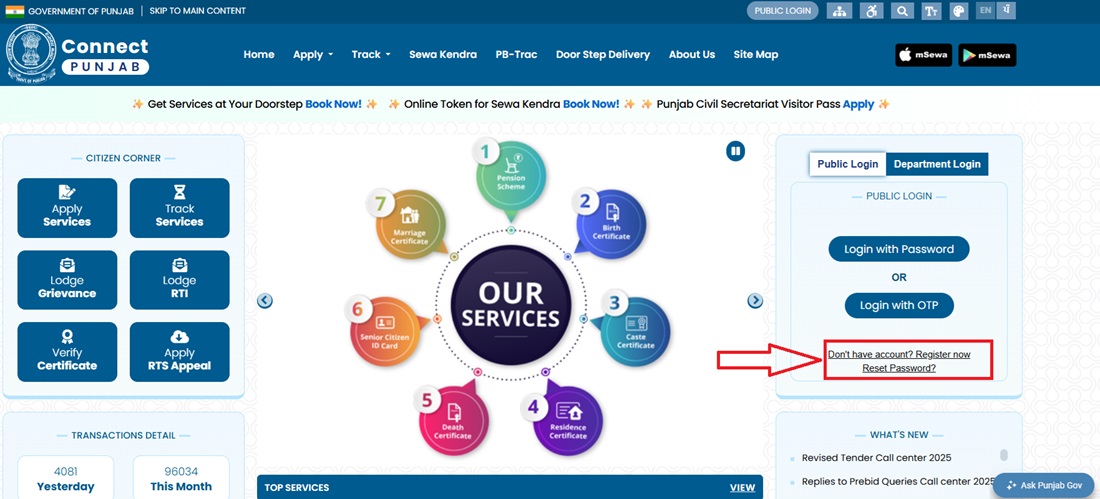
- Applicant will have to visit the connect.punjab.gov.in to apply for Residence Certificate of Punjab Government and click "Don't have Account? Register Now".
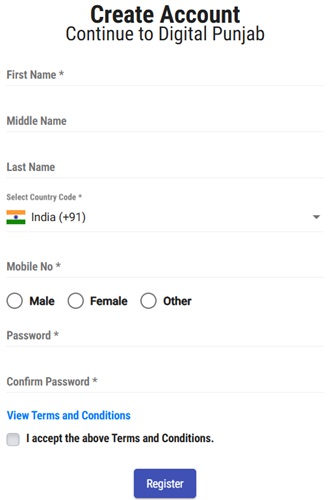
- Fill the Registration Form with your details.
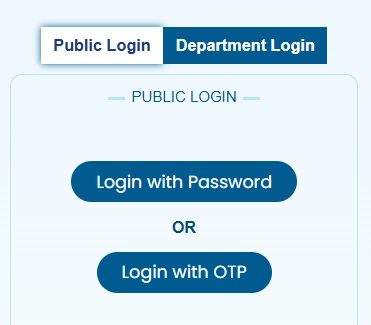
- After registration, log in to the portal. Two login options: Password or OTP.
- After login, complete eKYC with your Aadhaar Number. The portal also requires a live photograph taken through your device camera - keep your laptop or phone camera enabled during this step.
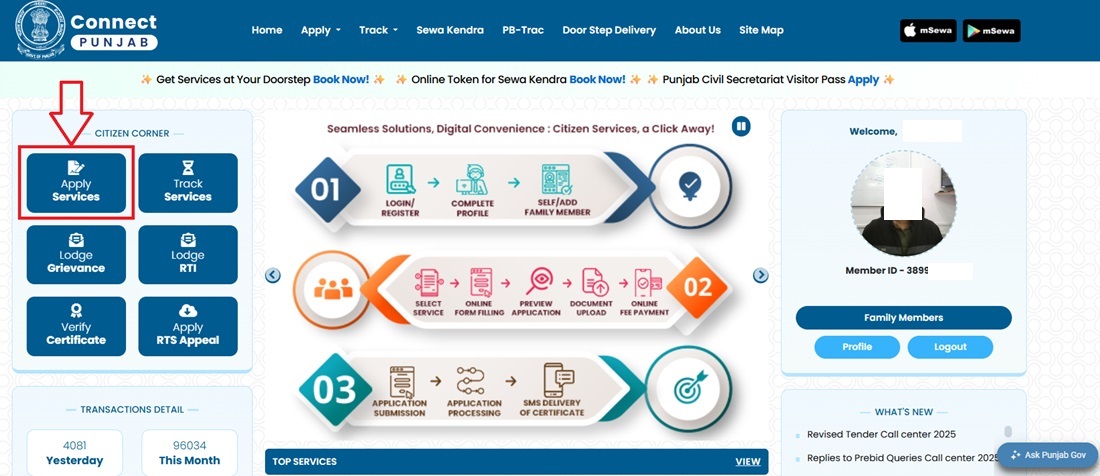
- Click Apply Services after eKYC is completed.
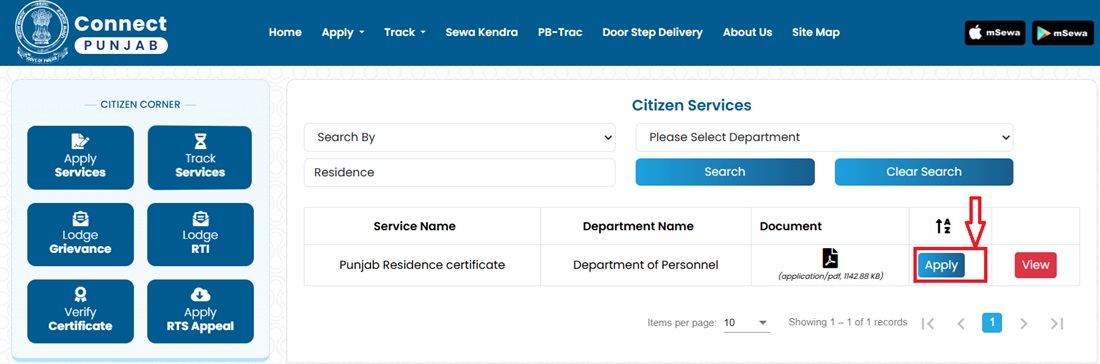
- Search for "Residence" or scroll to select Punjab Residence Certificate under Department of Personnel. Click Apply.
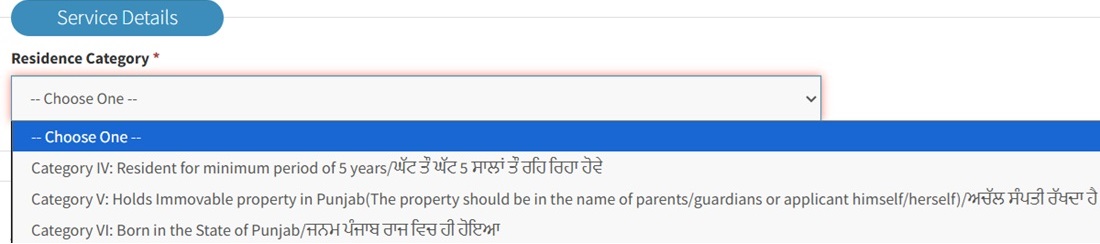
- The application form opens with four sections:
- Beneficiary Details
- Residence Category / Service Details
- Verification Details

- Identification Details

- Fill the form correctly, upload all scanned documents, and click Submit Application.
- Pay Rs. 85 fee online (Rs. 75 processing + Rs. 10 government fee).
- Note the Application Reference Number. Download the acknowledgement receipt.
- After verification and approval, download the certificate from E-Sewa Punjab Portal.
How to Apply at Sewa Kendra (Offline)
Sewa Kendras, also known as Suwidha Kendras, are the Punjab Government's authorized citizen service centres established under the Punjab Right to Services Act, 2011. Applicants who are not comfortable applying online can submit their Residence Certificate application at any Sewa Kendra located across Punjab's 23 districts.
- Visit your nearest Sewa Kendra with all original documents and photocopies required for the application.
- At the centre, collect the Residence Patwari Report Form, which forms an important part of the verification process. This form is generally issued through Sewa Kendras and is not available through the online application process.
- Obtain an appointment token and wait for your turn at the service counter.
- The operator will verify your documents, enter the application details into the system, and capture your live photograph at the Sewa Kendra as part of the application process.
- Once the application is submitted, it moves through the prescribed revenue verification workflow:
- The Patwari of the concerned area verifies the applicant's residence details and records the verification report.
- The Kanungo, who supervises Patwaris at the revenue circle level, reviews the verification and countersigns the report.
- After successful verification, the application is forwarded to the SDM or Tehsildar for final approval and issuance of the Residence Certificate.
- Collect the acknowledgement receipt containing the application/reference number. This number can be used later to track the application status online.
- After approval, the certificate can be collected from the Sewa Kendra or delivered to the applicant's address through Speed Post, subject to applicable postal charges.
Doorstep Delivery - Apply from Home
The Punjab Government also offers a Doorstep Delivery Service that allows citizens to apply for a Residence Certificate without visiting a government office or Sewa Kendra. This service covers all major citizen services, including Residence Certificate issuance.
- Call the Punjab Doorstep Services helpline at 1076 and request a Residence Certificate application service.
- A government-authorized service representative will schedule a visit to your residence at a convenient time.
- During the visit, the representative collects the required documents, captures your photograph, and completes the application formalities on your behalf.
- The application is then processed through the same official verification and approval mechanism used for Sewa Kendra applications.
- Once approved, the Residence Certificate is delivered to your home, eliminating the need for multiple visits to government offices.
- This facility is particularly beneficial for senior citizens, persons with disabilities, working professionals, and applicants living in remote areas.
Check Application Status
- Visit esewa.punjab.gov.in to check the Application Status of Punjab Government's Residence Certificate and click on Track Status.
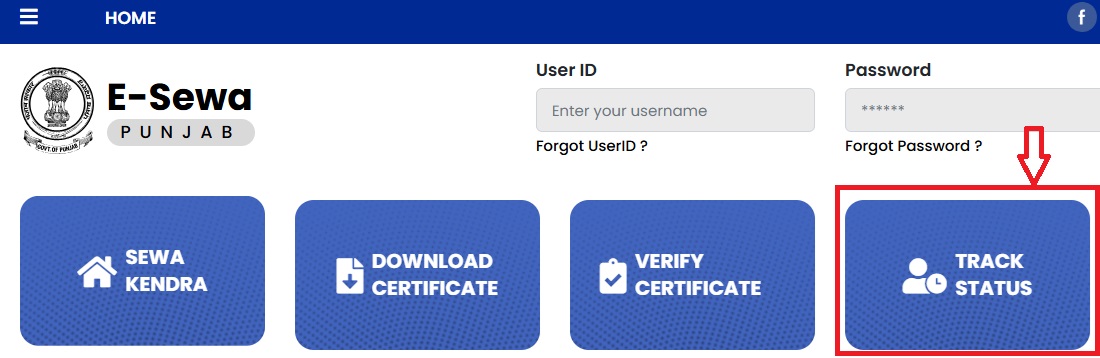
- Enter your Application ID and captcha, then click Submit.
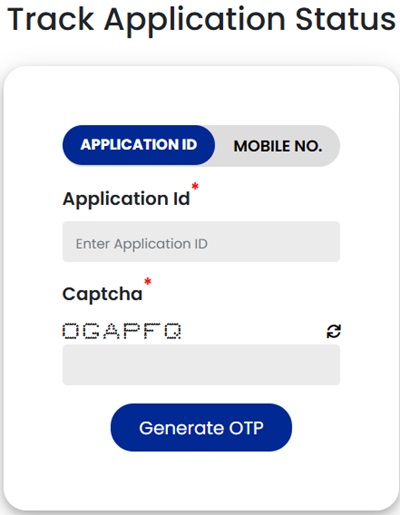
- Alternatively, check status by registered mobile number - the portal verifies via OTP.
- Track regularly to avoid delays from pending verification queries.
How to Download Residence Certificate
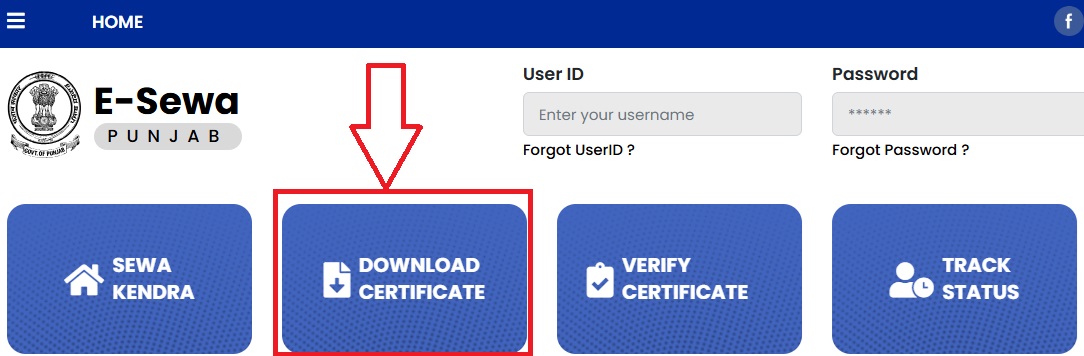
- To download the Residence Certificate of Punjab Government, applicant will have to visit esewa.punjab.gov.in and click Download Certificate.
- Enter Application Number and click Send OTP.
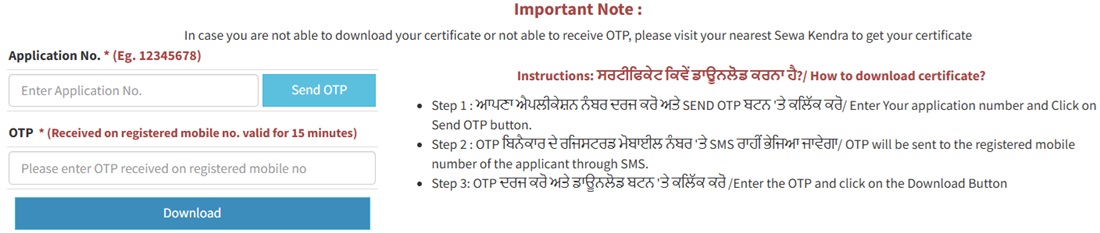
- Enter the OTP received on registered mobile number and click Download. Certificate downloads in PDF.
- Alternatively: Log in → View Status of Application → Track Application Status → click Delivered → Application Form Details → click Output Certificate → certificate displays on screen for printing.
How to Verify the Certificate
Punjab Residence Certificates issued through the government's digital service platforms can be verified online. This facility allows universities, employers, government departments, and certificate holders to confirm the authenticity of the issued certificate directly from the official Punjab Government portal.
- Visit eservices.punjab.gov.in and click on the Verify your Certificate option.
- Enter the Application Reference Number and Token Number printed on the Residence Certificate.
- Click on Download Certificate.
- If the entered details match the records available in the government database, the certificate will be displayed/downloaded and can be used for verification purposes.
Fee and Processing Time
The Punjab Government has prescribed a fixed fee structure for issuing a Residence Certificate. Applicants should also keep in mind that the actual processing time may vary depending on the verification workload at the Patwari, Kanungo, and SDM/Tehsildar levels.
| Fee Component | Amount |
|---|---|
| Application / Processing Fee | Rs. 75 |
| Government Fee | Rs. 10 |
| Total Fee | Rs. 85 |
| Processing Time | 15 days (may vary depending on field verification and application volume) |
| Validity | Lifetime |
Important Links
The following official government portals can be used for applying, tracking, downloading, and verifying a Punjab Residence Certificate:
- Connect Punjab Portal - connect.punjab.gov.in
- E-Sewa Punjab Portal - esewa.punjab.gov.in
- Certificate Verification Portal - eservices.punjab.gov.in
- Punjab Government Portal - punjab.gov.in
Helpline
If you face any difficulty while applying, tracking, downloading, or verifying your Residence Certificate, you can contact the following official Punjab Government support channels:
- Punjab State Helpline: 1100
- Doorstep Services Helpline: 1076
- WhatsApp Chatbot: 9855501076
टिप्पणियाँ
Self Declaration cum Verification
Self Declaration cum Verification attested by :-
Sarpanch
Patwari
Head of Department (HOD)
Municipal Counselor (MC)
From where to obtain Self Declaration cum Verification leaf?
नई टिप्पणी जोड़ें