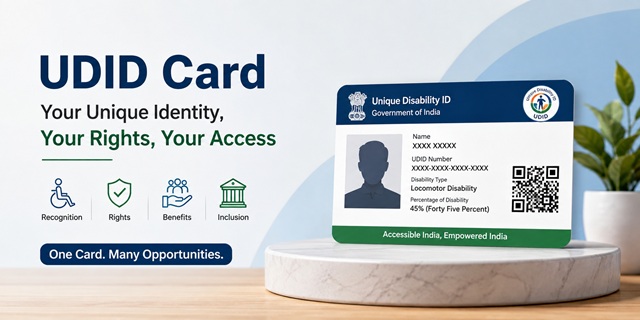
The Unique Disability ID (UDID) Card is an official disability identity card issued by the Government of India for Persons with Disabilities (PwDs). The Department of Empowerment of Persons with Disabilities (DEPwD), Ministry of Social Justice and Empowerment, implements the UDID Project to create a nationwide database of persons with disabilities and provide each eligible individual with a unique identification number that can be used across India.
The UDID system follows a "One Nation, One Disability Identity" approach. Instead of carrying multiple disability-related documents for different purposes, eligible applicants receive a standardized Disability Certificate and UDID Card through a single application process. The Disability Certificate records the type and percentage of disability as assessed by a Medical Board or CMO Office notified by the concerned State Government or Union Territory, while the UDID Card serves as the official identity linked to that assessment.
Many applicants assume that the Disability Certificate and the UDID Card are separate services. In practice, both are issued through the same process. Once approved, the disability details are stored in the national UDID database and linked to the unique disability identification number allotted to the applicant.
The UDID portal operates through swavlambancard.gov.in. Applicants can submit applications online through the portal or submit physical forms at the District Welfare Officer counter or the designated CMO Office in their district. The same portal is also used for application tracking, downloading certificates, updating details, renewing certificates where applicable, and requesting replacement cards.
The UDID Card carries the disability details, assessed percentage of disability, and a unique identification number linked to the national database. This enables government departments, educational institutions, banks, employers, and other authorities to verify disability status digitally without repeatedly asking applicants to submit multiple disability documents.
21 Types of Disabilities Covered Under the RPwD Act, 2016
The Unique Disability ID (UDID) Card is available to persons with disabilities recognized under the Rights of Persons with Disabilities (RPwD) Act, 2016. This law expanded the earlier list of disabilities and currently recognizes 21 specified disabilities across physical, sensory, intellectual, neurological, blood disorder, and multiple-disability categories.
If a person is diagnosed with any of the disabilities listed below and the condition is certified by the competent Medical Authority, they can apply for a Disability Certificate and UDID Card through the UDID portal.
- Blindness
- Low Vision
- Leprosy Cured Persons
- Hearing Impairment (Deaf and Hard of Hearing)
- Locomotor Disability
- Dwarfism
- Intellectual Disability
- Mental Illness
- Autism Spectrum Disorder
- Cerebral Palsy
- Muscular Dystrophy
- Chronic Neurological Conditions
- Specific Learning Disabilities
- Multiple Sclerosis
- Speech and Language Disability
- Thalassemia
- Hemophilia
- Sickle Cell Disease
- Multiple Disabilities including Deafblindness
- Acid Attack Victim
- Parkinson's Disease
The current list contains 21 specified disabilities notified under the RPwD Act, 2016. The Central Government has the authority to notify additional disabilities in the future if required. Any such addition automatically becomes eligible for certification under the disability assessment framework prescribed by the Government of India.
Who Can Apply for a UDID Card?
Any Indian citizen diagnosed with a disability covered under the RPwD Act, 2016 can apply for a UDID Card. The application can be submitted by the person with disability, a parent, legal guardian, or an authorized representative in cases where the applicant is a minor or requires assistance.
There is no minimum or maximum age limit for obtaining a Disability Certificate or UDID Card. Infants, children, students, adults, and senior citizens can all apply once the disability has been assessed by the competent medical authority.
One of the most common misconceptions is that a person must have at least 40% disability to receive a disability certificate. This is not correct.
The RPwD Act defines a "Person with Benchmark Disability" as a person having not less than 40% of a specified disability. The 40% threshold is important for certain reservations, concessions, scholarships, employment benefits, and welfare schemes. However, it is not a requirement for issuance of a Disability Certificate or UDID Card.
An advisory issued by the Department of Empowerment of Persons with Disabilities (DEPwD) on 05 July 2024 clarified that Disability Certificates and UDID Cards should also be issued to persons whose assessed disability is below 40%. Such applicants cannot be denied certification merely because they do not meet the benchmark disability threshold.
In practical terms:
- Below 40% disability: Eligible for a Disability Certificate and UDID Card, but certain benchmark-disability benefits may not apply.
- 40% or more disability: Eligible for a Disability Certificate, UDID Card, and benefits available to Persons with Benchmark Disabilities, subject to scheme-specific conditions.
Your eligibility for reservations, concessions, pensions, scholarships, or other government benefits depends on the disability percentage certified by the Medical Board. However, the UDID Card itself can be issued regardless of whether the assessed disability is below or above the 40% benchmark threshold.
Documents Required to Apply for a UDID Card
Before starting your application on the UDID portal, keep all required documents ready. Uploading clear and accurate documents helps the Medical Authority verify your case quickly and reduces the chances of delays during scrutiny or medical assessment.
You generally need the following documents while applying for a Disability Certificate and UDID Card:
- Aadhaar Card: Aadhaar Card is mandatory for all applicants. As per the notification dated 08 August 2023, Aadhaar is required for adult applicants as well as children applying for a Disability Certificate and UDID Card. If you do not yet have an Aadhaar number, you should first complete Aadhaar enrolment before submitting your UDID application.
- Existing Disability Certificate (if available): If you already possess a disability certificate issued by a Government Hospital, Medical Board, or any competent medical authority, upload a copy while applying. This helps the Medical Board review your case more efficiently.
- Medical Records and Supporting Reports: Medical prescriptions, investigation reports, diagnostic records, treatment summaries, hospital discharge reports, and specialist doctor's certificates related to the disability should be uploaded wherever applicable. These documents assist the Medical Board during disability assessment.
- Passport-Size Photograph: A recent passport-size colour photograph of the applicant must be uploaded. The photograph appears on both the Disability Certificate and the UDID Card.
- Proof of Age: Documents such as a Birth Certificate, School Certificate, Aadhaar Card, or any other government-issued document showing the applicant's date of birth may be used as age proof.
- Proof of Address: Aadhaar Card serves as address proof for most applicants. Where necessary, other valid government-issued address documents may also be accepted as per local requirements.
Important: The Medical Board may ask for additional documents, fresh medical records, or supporting evidence depending on the nature of the disability and the assessment requirements in your State or Union Territory.
Aadhaar Requirement Explained
The Aadhaar requirement is one of the most important changes in the UDID application process. Following the Government notification dated 08 August 2023, Aadhaar has become mandatory for identification and verification purposes under the UDID project.
The Aadhaar number is used to uniquely identify the applicant in the national disability database and helps prevent duplicate records. Since the UDID project aims to create a single nationwide identity for every person with disability, Aadhaar-based verification plays a central role in the application process.
If your Aadhaar details such as name, date of birth, or gender do not match your medical records, it is advisable to correct them before applying to avoid verification issues later.
Documents for Children and Minor Applicants
Children are also eligible to obtain a Disability Certificate and UDID Card. In such cases, the application is submitted by the parent, legal guardian, or caretaker on behalf of the child.
- The child's Aadhaar details are required.
- Parent or guardian details are captured during registration.
- The parent or guardian submits the application and completes the required declarations.
- The parent or guardian may be required to accompany the child during medical assessment.
The parent or guardian's Aadhaar information is also recorded in the UDID system for identification and communication purposes.
Tips Before Uploading Documents
- Upload clear and readable scanned copies.
- Ensure that names and dates are visible in all documents.
- Keep medical reports updated and recent wherever possible.
- Verify that Aadhaar details match the information entered in the application form.
- Retain the original documents, as the Medical Board may request them during physical verification or assessment.
Having all documents ready before starting the application can significantly speed up the UDID registration process and help avoid repeated requests for clarification or re-submission.
How to Apply for a UDID Card Online
Applying online through the UDID portal is the easiest and most commonly used method. The entire process starts online, but you may still need to visit a Government Hospital or Medical Board for disability assessment if you do not already have a valid disability certificate.
Before you begin, keep these items ready:
- Aadhaar Card
- Mobile number linked to Aadhaar (recommended)
- Passport-size photograph
- Medical reports and disability-related documents
- Existing Disability Certificate, if available
- Scanned copies of all supporting documents
Step 1: Open the UDID Portal
Visit the official UDID portal:https://swavlambancard.gov.in/pwd/application
This is the official Government of India portal for Disability Certificates and UDID Cards.
Step 2: Create Your Account
If you are applying for the first time, click on "Apply for Disability Certificate & UDID Card".
You will be asked to enter:
- Your name
- Mobile number
- Email ID (if available)
- Basic personal details
The portal sends an OTP to your registered mobile number.
Enter the OTP and complete the registration process.
Tip: Use a mobile number that remains active because all future updates, medical assessment notifications, and application alerts may be sent to this number.
Step 3: Fill in Your Personal Details
After logging in, the application form will open.
Enter your details carefully exactly as they appear in your Aadhaar record:
- Name
- Date of Birth
- Gender
- Father's Name or Mother's Name
- Address
- State and District
- Contact Details
Avoid spelling mistakes. Even a small mismatch between Aadhaar and application details can lead to verification delays.
Step 4: Enter Aadhaar Details
Enter your Aadhaar number in the prescribed field.
As per the Government notification dated 08 August 2023, Aadhaar is mandatory for applicants applying for a Disability Certificate and UDID Card.
The system uses Aadhaar to create a unique national disability record and prevent duplicate registrations.
Step 5: Select Your Disability Details
Choose the disability category that applies to you.
You will also need to provide information such as:
- Type of disability
- Sub-category of disability (where applicable)
- Whether the disability is permanent or temporary
- Details of previous disability certificates, if any
If you are unsure about the exact disability category, enter the information available in your medical records. The Medical Board will make the final assessment.
Step 6: Choose the Hospital for Assessment
This is one of the most important steps.
Select the Government Hospital, Medical Board, or CMO Office where you want your disability assessment to be conducted.
The system forwards your application to the selected medical authority.
Choose a hospital that is reasonably close to your residence because you may need to visit it for physical examination and verification.
Step 7: Upload Documents
Upload clear scanned copies of all required documents.
Generally, you need:
- Aadhaar Card
- Photograph
- Medical reports
- Existing disability certificate (if available)
- Proof of age
- Proof of address
Make sure the documents are readable. Blurred or incomplete uploads are one of the most common reasons applications get delayed.
Step 8: Review and Submit the Application
Before clicking the submit button, carefully review every field.
Check:
- Name spelling
- Aadhaar number
- Mobile number
- Hospital selection
- Uploaded documents
Once everything is correct, submit the application.
The portal generates an Application Reference Number.
Save this number immediately. You will need it later for status tracking and future correspondence.
Step 9: Wait for Medical Assessment Scheduling
After submission, your application reaches the concerned Medical Authority.
The Medical Board or CMO Office reviews the application and schedules a disability assessment.
You may receive updates through SMS, email, or through your UDID portal account.
The waiting period varies from district to district depending on the number of pending applications.
Step 10: Attend the Medical Examination
Visit the hospital or Medical Board on the date communicated to you.
Carry your original documents.
The Medical Board examines the applicant and determines:
- Whether the disability qualifies under the RPwD Act, 2016
- The type of disability
- The percentage of disability
- Whether the disability is permanent or temporary
This assessment is the most important stage of the entire process. The Disability Certificate and UDID Card are generated based on the findings recorded by the Medical Board.
Step 11: Certificate Approval and UDID Generation
After the medical assessment is completed, the findings are uploaded to the UDID system.
The District Welfare Officer and designated authorities review the case and process the approval.
Once approved:
- The Disability Certificate is generated electronically.
- A unique UDID Number is allotted.
- The UDID Card is generated in the national database.
Step 12: Download the Disability Certificate
Log in to your UDID account and open the application dashboard.
You can download the approved Disability Certificate directly from the portal in PDF format.
The downloaded certificate can be used immediately for government schemes, reservations, scholarships, pensions, concessions, and other disability-related benefits.
Step 13: Receive the Physical UDID Card
After approval, the physical UDID Card is printed and dispatched to your registered address through the postal system.
Delivery timelines may vary depending on your State, district, and postal services.
Until the physical card arrives, the downloaded Disability Certificate and digital UDID record remain valid for official purposes.
Apply Through the UDID Mobile App
The Government of India has also launched the official UDID Mobile App, allowing applicants to access several UDID services directly from their smartphones.
Android users can download the official application from Google Play Store:
Using the mobile app, applicants can:
- Register for a new UDID application
- Track application status
- View disability certificate details
- Access UDID card information
- Receive updates related to their application
- Manage their UDID profile from a mobile device
If you are more comfortable using a smartphone than a computer, the mobile app can be a convenient alternative for accessing UDID services.
How to Apply for a UDID Card Offline
Applicants who are unable to use the online portal can still apply through the offline process. The Government has provided facilities through District Welfare Offices and designated application centres to ensure that persons with disabilities are not excluded because of digital barriers.
Step 1: Visit the District Welfare Office
Visit the office of the District Welfare Officer, Social Welfare Department, or any designated UDID application centre in your district.
In some districts, special registration camps are also organized periodically for disability certification and UDID enrolment.
Step 2: Collect the Application Form
Request the application form for the Disability Certificate and UDID Card.
The staff will provide the prescribed form and explain the basic documentation requirements.
Step 3: Fill the Form Carefully
Enter all required details including:
- Name
- Date of birth
- Address
- Mobile number
- Aadhaar number
- Type of disability
- Preferred hospital for medical assessment
Write clearly and ensure that the information matches your Aadhaar and supporting documents.
Step 4: Attach Supporting Documents
Attach photocopies of all required documents.
This generally includes:
- Aadhaar Card
- Photographs
- Medical reports
- Existing disability certificate, if any
- Proof of age
- Proof of address
Step 5: Submit the Application
Submit the completed application form at the designated counter.
The office staff verifies the documents and accepts the application.
The District Welfare Office then digitizes the application and uploads it to the official UDID portal on your behalf.
Step 6: Attend Medical Assessment
Once the application is entered into the system, the concerned Medical Board schedules your disability assessment.
You will be informed about the date, time, and location of the examination.
Carry all original documents when attending the assessment.
Step 7: Certificate and UDID Card Issuance
After successful assessment and approval, the Disability Certificate is generated electronically and the UDID Card is issued.
The physical UDID Card is subsequently dispatched to your registered address through post, while the digital certificate becomes available in the system.
The offline route ultimately follows the same medical assessment, certification, approval, and card issuance process as the online route. The only difference is that the District Welfare Office enters the application into the system on your behalf.
Medical Assessment Process
The medical assessment is the most important stage of the UDID application process because the Disability Certificate and UDID Card are issued based on the findings recorded by the competent Medical Authority.
Your application is assigned to a CMO Office (Chief Medical Officer Office) or a Medical Board notified by the State Government or Union Territory Administration. The exact authority depends on the arrangements made by your State or UT for disability certification.
The Medical Board generally consists of doctors from relevant specializations depending on the disability being assessed. For example, an applicant claiming hearing impairment may be examined by specialists dealing with hearing disabilities, while an applicant with locomotor disability may be assessed by orthopaedic specialists and other relevant medical experts.
During the assessment, the Medical Board physically examines the applicant and reviews all supporting medical records, prescriptions, investigation reports, and previous disability certificates submitted with the application.
Based on this examination, the Medical Authority determines:
- Whether the applicant has the claimed disability.
- The category of disability under the RPwD Act, 2016.
- The percentage of disability calculated as per prescribed Government guidelines.
- Whether the disability is permanent or temporary in nature.
- Whether reassessment is required after a specified period.
- Whether the applicant qualifies as a Person with Benchmark Disability (PwBD).
Important: The disability percentage recorded by the Medical Board directly affects eligibility for various reservations, scholarships, concessions, pensions, employment benefits, and welfare schemes available under Central and State Government programmes.
Assessment Guidelines Currently Followed
The disability percentage is calculated according to the assessment guidelines notified by the Government of India under the Rights of Persons with Disabilities Act, 2016.
The revised assessment guidelines notified on 14 March 2024 are currently used for evaluating specified disabilities and determining disability percentages.
In addition, the Rights of Persons with Disabilities (Amendment) Rules, 2024, which came into effect on 23 October 2024, provide the framework for various certification-related matters, including reassessment, renewal, rejected applications, and procedural requirements connected with Disability Certificates and UDID Cards.
What Happens After the Assessment?
Once the Medical Board completes the assessment:
- The findings are uploaded to the UDID system.
- The disability category and percentage are recorded electronically.
- The competent authority reviews the assessment report.
- The Disability Certificate is generated after approval.
- A Unique Disability ID (UDID) Number is allotted.
- The UDID Card is generated and prepared for dispatch.
If additional clarification, medical records, or reassessment is required, the applicant may be asked to appear again before the Medical Authority.
How to Track Your UDID Application Status
After submitting your application, you can monitor its progress online without visiting any government office. The UDID portal provides a dedicated tracking facility that allows applicants to check the status of their Disability Certificate and UDID Card application at any stage.
Steps to Track Your Application
- Visit the official tracking page at swavlambancard.gov.in/track-your-application.
- Enter your Application Number or Aadhaar Number.
- Submit the details.
- The portal will display the latest status of your application.
What Status Information Can You See?
The tracking system generally shows the current stage of processing, such as:
- Application submitted successfully
- Application under scrutiny
- Pending medical assessment
- Medical assessment completed
- Certificate approved
- UDID card generated
- Card dispatched
- Application returned for correction, if applicable
Checking the portal periodically helps applicants know whether any action is required from their side and whether the application has moved to the next stage.
Benefits of Having a UDID Card
The UDID Card is more than just an identity document. It serves as the nationally recognized proof of disability and enables persons with disabilities to access numerous benefits, protections, concessions, and welfare programmes provided by the Central and State Governments.
Some of the major benefits include the following:
- Government Job Reservation: The RPwD Act, 2016 provides reservation in government establishments for eligible persons with disabilities. A valid Disability Certificate and UDID record are used for claiming reservation benefits wherever applicable.
- Railway Travel Facilities: Persons with disabilities can avail facilities available for Divyangjan passengers. Indian Railways also provides disability-related travel facilities through its designated systems, where valid disability certification is required for eligibility.
- ADIP Scheme Benefits: Under the Assistance to Disabled Persons for Purchase and Fitting of Aids and Appliances (ADIP) Scheme, eligible beneficiaries may receive assistive devices such as wheelchairs, hearing aids, prosthetic devices, smart canes, and other aids either free of cost or at subsidized rates. A valid UDID record is generally required for availing benefits.
- NHFDC Loan Schemes: The National Handicapped Finance and Development Corporation (NHFDC) provides concessional loans to eligible persons with disabilities for self-employment activities, business ventures, skill development, and higher education.
- Scholarship Schemes: Students with disabilities can apply for various scholarship programmes administered by the Department of Empowerment of Persons with Disabilities (DEPwD), including Pre-Matric, Post-Matric, and higher education scholarship schemes.
- Access to Government Welfare Schemes: Many Central and State Government schemes require proof of disability. The UDID Card serves as a standardized document for verifying disability status.
- Nationally Accepted Proof of Disability: Since the card is linked to a centralized database, it is recognized across India and can be used with different departments, educational institutions, employers, banks, and welfare authorities.
- Reduced Paperwork: The UDID project aims to eliminate the need for repeatedly producing disability certificates issued by different hospitals or authorities. One standardized record can be used for multiple purposes.
- Digital Verification through QR Code: The QR code printed on the card enables quick verification of disability details through the national database.
In the long term, the UDID system is intended to become the single nationwide platform for disability identification and delivery of disability-related services and benefits.
Renewal, Reassessment, and Replacement of UDID Card
The validity of a UDID Card depends on the nature of the disability recorded by the Medical Board at the time of certification.
When Renewal Is Required
If the Medical Authority has certified the disability as permanent, the Disability Certificate and UDID Card generally remain valid without the need for periodic renewal unless there is a change in disability status or personal information.
However, some disabilities may be assessed as temporary, progressive, or requiring future review. In such cases, the Medical Board specifies a reassessment date or validity period.
The cardholder should apply for renewal or reassessment before the validity period expires to avoid interruptions in benefits and services.
The Standard Operating Procedure issued on 16 October 2024 governs the process relating to renewal and reassessment of Disability Certificates and UDID Cards.
How to Apply for Renewal
Renewal requests can be submitted through the official UDID portal after logging into the applicant account.
Depending on the case, the applicant may be required to:
- Submit updated medical records.
- Upload supporting documents.
- Appear before the Medical Board again.
- Undergo reassessment of disability percentage.
Replacement of Lost or Damaged UDID Card
If your UDID Card is lost, stolen, damaged, or becomes unreadable, you can request a replacement through the UDID portal.
The replacement process allows the system to issue another card linked to the same UDID number and disability record.
Updating Personal Details
If there is any change in personal information, such as:
- Residential address
- Mobile number
- Email address
- Name correction
- Other profile details permitted by the system
you can submit an update request through your UDID account and follow the verification process prescribed by the portal.
Cancellation or Deactivation of UDID Card
The Government has also prescribed procedures for deactivation or cancellation of Disability Certificates and UDID records in specific situations.
The Standard Operating Procedure issued on 01 February 2025 covers circumstances such as:
- Recovery from a temporary disability where certification is no longer applicable.
- Death of the cardholder.
- Duplicate or erroneous certification.
- Other valid grounds recognized under applicable rules and procedures.
Any cancellation or deactivation is carried out only through the prescribed administrative process and competent authority.
If Your UDID Application Gets Rejected: What to Do Next
A rejection does not always mean that you are permanently ineligible for a Disability Certificate or UDID card. In many cases, applications are rejected because supporting medical records are incomplete, the disability could not be assessed properly during examination, required documents are missing, or the Medical Board needs additional clarification.
The Rights of Persons with Disabilities (RPwD) Amendment Rules, 2024 and subsequent Standard Operating Procedures issued by the Department of Empowerment of Persons with Disabilities (DEPwD) provide a formal mechanism for review and reassessment of rejected applications.
If your application is rejected, do not submit multiple fresh applications immediately. First check the reason for rejection on the UDID portal and collect all supporting documents related to your disability assessment.
What You Should Do After Rejection
- Log in to the UDID Portal and check the exact reason mentioned against your application.
- Download or note the rejection remarks recorded by the Medical Authority or Medical Board.
- Collect additional medical documents, prescriptions, diagnostic reports, test results, or specialist opinions if required.
- Contact the District Welfare Officer (DWO) for guidance regarding the next step.
- Apply for reassessment or appeal as permitted under Section 59 of the RPwD Act, 2016 and applicable SOPs.
- Attend the reassessment examination if a fresh medical evaluation is scheduled.
Applicants who believe that their disability has not been assessed correctly can seek reassessment through the prescribed process. It is advisable to keep copies of all medical records, previous disability certificates, hospital reports, and application acknowledgements while pursuing an appeal.
Common Reasons for Rejection
- Insufficient medical evidence supporting the claimed disability
- Required documents not uploaded or submitted
- Applicant did not attend the scheduled medical examination
- Medical Board could not establish the claimed disability
- Mismatch between application details and supporting documents
- Duplicate or incorrect application records
If you believe the rejection is incorrect, you may approach the District Welfare Officer, State Commissioner for Persons with Disabilities, or the Chief Commissioner for Persons with Disabilities through the appropriate grievance and appeal channels.
Add new comment