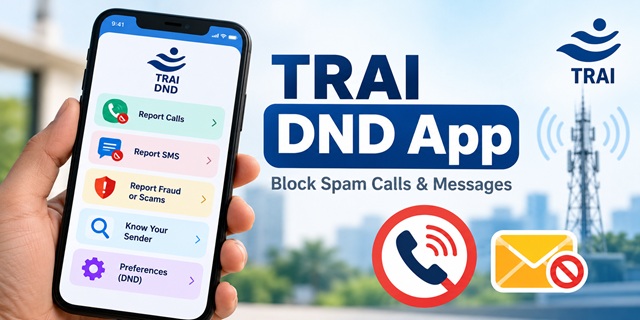
The TRAI DND app helps you take control of unwanted commercial calls and messages on your mobile phone. Developed by the Telecom Regulatory Authority of India (TRAI), the app lets you register your Do Not Disturb (DND) preferences, report spam calls and SMS, check information about registered senders, and access the government's Chakshu facility to report suspected fraud communications. TRAI announced a revamped version of the app on 13 February 2026 and notified further changes to its spam regulations in September 2026. This guide explains how to use the app step by step, what each feature does, how to track complaints, and what you can do if you continue receiving unwanted calls or messages.
What Is the TRAI DND App?
The TRAI DND app is a mobile application that helps you manage unwanted commercial communications. DND stands for Do Not Disturb. When you register your preferences, you tell your telecom service provider which promotional calls and messages you do not want to receive.
Think of DND as a sign on your phone that says, "Please do not disturb me with unwanted advertisements." You can choose whether to block promotional communications broadly or restrict only certain categories of businesses. You can also report unwanted calls and messages that violate the applicable rules.
TRAI lists the application on its official TRAI Apps page as a tool for managing unwanted commercial communications. You can download it from the Google Play Store on an Android phone or the App Store on an iPhone. Search for TRAI DND and select the app published by TRAI. You can also visit the official TRAI website to find its app-related information.
TRAI regulates India's telecommunications sector under the TRAI Act, 1997. It establishes rules for telecom service providers and commercial communications, while your telecom operator handles your DND preferences and complaints through the prescribed systems. The app helps you communicate your preferences and report violations without having to navigate the process entirely on your own.
What Changed in the Revamped TRAI DND App in 2026?
On 13 February 2026, TRAI announced revamped versions of the TRAI DND and TRAI MySpeed mobile applications. The announcements from the Press Information Bureau (PIB) and TRAI's official press release describe several improvements intended to make the apps easier to use.
- Support for more Indian languages: The revamped app offers broader language support, helping more users understand its features and submit complaints.
- A simpler home screen: The updated interface makes key functions, including spam reporting and complaint tracking, easier to find.
- A more convenient complaint process: The app reduces the steps required to report unwanted communications and provides a complaint reference ID for tracking.
- Know Your Sender: Users can look up registered sender information, including details associated with the 1600 series.
- Improved DND preferences: Users can choose the types of promotional communications they want to restrict.
- Dual-SIM support: The app provides improved support for phones that use two SIM cards.
The revamped app connects with telecom service providers' systems so they can receive and process complaints under TRAI's prescribed timelines. According to TRAI's launch information, users submitted more than 17 lakh spam complaints through the app during 2025. These complaints helped authorities and telecom providers take action against unregistered telemarketers and repeat offenders.
You can also read the All India Radio report on the launch of the revamped TRAI apps for additional information about the announcement.
TRAI DND App Features: What Does Each Option Do?
When you open the TRAI DND app, the home screen displays five main options. Each option serves a different purpose, so choosing the right one helps you complete your task more quickly.
- Report Calls: Opens your call list so you can select an unwanted call and submit a spam complaint.
- Report SMS: Opens your message list so you can select an unwanted SMS and report it.
- Report Suspicious Fraud or Scams: Takes you to the government's Chakshu facility, where you can report suspected fraudulent communications.
- Know Your Sender: Lets you check information about a number beginning with 1600 through the app's sender lookup feature.
- Preferences: Lets you register or manage your DND preferences and select the types of communications you want to restrict.
The exact screen layout may vary depending on your phone and the version of the application. If you cannot find a feature in the same place, check the current app interface and the official TRAI Apps page for relevant information.
How to Register for DND Using the TRAI DND App
You can register your DND preferences through the app by verifying your mobile number and selecting the restrictions you want. Keep your phone nearby because the app uses an OTP, or one-time password, to verify your number.
- Download the app: Open the Google Play Store or Apple App Store, search for TRAI DND, and install the application published by TRAI.
- Open the app: Launch it on your phone and follow the initial instructions.
- Enter your mobile number: Provide the number for which you want to manage DND preferences.
- Verify your number: Enter the OTP you receive by SMS to complete mobile number verification.
- Check your SIM selection: If you use a dual-SIM phone, make sure you select the correct number for your preferences.
- Open Preferences: Tap the Preferences option on the app's home screen.
- Select your DND preference: Choose whether you want to stop unwanted calls and SMS broadly, stop only promotional communications, or select specific categories.
- Submit your selection: Follow the on-screen instructions to save your preference and check the confirmation displayed by the app.
The TRAI app's official privacy policy explains the app's handling of mobile number verification and related information. According to the policy, the app does not create a separate user account for this process.
The app may display the screens in a slightly different order depending on the version you use. Follow the instructions on your phone and check the confirmation before assuming that your preference registration is complete.
TRAI describes Preference Registration as a free service on its official page on unsolicited commercial communication. You do not need to pay a separate registration fee to submit your DND preferences through the prescribed facility.
TRAI DND Preference Options: Which One Should You Choose?
The Preferences section offers three main choices. Before selecting one, read the description displayed in the app so you understand which communications the option covers.
- Stop Unwanted Calls and SMS: Choose this option if you want broad restrictions on unwanted commercial communications.
- Stop Only Promotional Calls and SMS: Select this option if your main concern is advertising and marketing calls or messages.
- Choose What to Stop: Use this option if you want to restrict communications from particular business categories rather than apply a broader preference.
Promotional communications include advertisements, such as a business informing you about a sale or a new product. Transactional and service communications serve different purposes, such as providing information about a service or a transaction. Do not assume that every message from a business falls under the same category.
Which Business Categories Can You Restrict?
TRAI's Preference Registration page lists eight business categories that users can select when registering their preferences.
- Banking, insurance, financial products and credit cards
- Real estate
- Education
- Health
- Consumer goods and automobiles
- Communication, broadcasting, entertainment and information technology
- Tourism and leisure
- Food and beverages
Depending on the available registration interface, you can also specify the types of communications you want to restrict. These may include:
- Voice calls
- SMS messages
- Auto-dialer calls that play a recorded message
- Auto-dialer calls connected to a live agent
- Robo calls
The preference registration facility also describes options for selecting permitted contact times and days, including public holidays. The options visible in the app may differ from those on the web-based registration page, so use the choices currently displayed in your app.
For example, if you want to restrict promotional calls from real estate businesses but still receive other types of communications, check whether the relevant category and contact-type options are available for your number. Review the summary before submitting your selection.
How to Report a Spam Call Through the TRAI DND App
If a business makes an unwanted promotional call, you can use the Report Calls feature to submit a complaint. The complaint process helps your telecom provider review the communication under TRAI's rules.
- Open TRAI DND: Launch the app on the phone that received the call.
- Tap Report Calls: Open the call list displayed by the app.
- Select the unwanted call: Find the relevant number and select the call you want to report.
- Enter the requested information: Provide the details requested by the app, including information about the call and its nature.
- Submit the complaint: Review your entries and send the report through the app.
- Save the reference ID: Keep the complaint reference number so you can track its status later.
TRAI's official complaint and reporting page explains the information required to report unsolicited commercial communication. This includes the type of communication, the sender's details, the date and time, the business category and a description of what happened.
Your telecom provider uses the submitted information to process the complaint and provides a complaint reference ID. Keep that ID until the provider completes its review or you finish any necessary follow-up.
If you receive an ordinary call from someone you do not know, that fact alone does not necessarily establish a violation. Describe the communication accurately and submit a report when it falls within the applicable complaint process.
How to Report a Spam SMS Through the TRAI DND App
The Report SMS feature lets you report unwanted promotional messages directly from your phone's message list. You can follow a process similar to the one used for spam calls.
- Open the TRAI DND app.
- Tap Report SMS to open the available message list.
- Select the message you believe is unwanted commercial communication.
- Enter the details requested by the app.
- Review the information and submit the complaint.
- Save the complaint reference ID for future tracking.
According to the TRAI app privacy policy, the app reports a message to your telecom provider only when you choose to submit it. This allows you to select the message you want to report instead of automatically reporting every message on your phone.
Before submitting a complaint, make sure you select the correct message. Keep any relevant information that may help you explain why the communication is unwanted or violates your registered preferences.
How Many Days Do You Have to Report Spam to TRAI?
You have seven days to submit a complaint about unsolicited commercial communication under the applicable complaint timeline described in TRAI's February 2025 amendment. TRAI announced the change from three days to seven days in its official press release on the February 2025 amendment.
The September 2026 regulatory update also uses a seven-day period. However, some older TRAI web pages may still display the previous three-day timeline. Check the latest applicable regulation and the instructions provided by your telecom operator if you need to confirm a particular deadline.
The safest approach is to report an unwanted call or message as soon as possible. Do not wait until the last day if you already have the information needed to submit your complaint.
If you report a communication after the permitted complaint period, the report may still help your telecom provider identify suspicious senders and recurring spam activity. TRAI's complaint guidance distinguishes a complaint submitted within the permitted period from a later report, which may not result in action against that individual communication.
Keep your complaint reference ID even if you submit a report late. It may help you follow up on the information you provided.
How to Report Suspicious Fraud or Scams Through Chakshu
Not every unwanted communication is simply an advertisement. Some callers and messages try to trick people into sharing sensitive information, transferring money or following dangerous links. The TRAI DND app provides a separate Report Suspicious Fraud or Scams option that takes you to Chakshu.
Chakshu is a fraud-reporting facility available through the Department of Telecommunications' Sanchar Saathi portal. It accepts reports of suspected fraudulent communications received through voice calls, SMS and WhatsApp messages or calls, where the relevant sender information is available.
The Sanchar Saathi portal identifies several examples of suspected fraud communications that people can report.
- Fake KYC messages: Messages that falsely claim you must update your bank, electricity, gas or insurance KYC.
- Impersonation: Communications from people pretending to be government officers, relatives or other trusted individuals.
- Fake customer care numbers: Contact details designed to make people believe they are speaking to an authorised support representative.
- Fake offers: Fraudulent job opportunities, lottery winnings, gifts or loan offers.
- Sextortion: Threats or attempts to obtain money through sexual exploitation or intimidation.
- Robocalls: Automated calls used for suspected fraudulent activity.
- Dangerous links and websites: Messages that direct people to suspicious websites or links.
Steps to Submit a Chakshu Report
- Open Chakshu: Tap the suspicious fraud reporting option in the TRAI DND app, or visit the Sanchar Saathi portal directly.
- Open Citizen Centric Services: Find the citizen services section on the portal.
- Select the fraud reporting facility: Choose Chakshu - Report Suspected Fraud Communication.
- Choose the communication type: Specify whether you received the suspected fraud through a call, SMS or WhatsApp.
- Select the fraud category: Choose the option that best describes the communication.
- Provide the details: Enter the information requested by the form. Attach a screenshot if you have one and the form allows it.
- Verify your mobile number: Complete OTP verification and enter your name as requested.
- Submit the report: Review the information before sending it.
A PIB release dated 16 March 2026 advises users to report suspected fraudulent communications within seven days. The Department of Telecommunications may examine the reported information, take action against a number or refer a matter to law enforcement where appropriate. However, submitting a report does not guarantee a particular outcome in every case.
The reporting process also provides for the confidentiality of the reporter's identity. Follow the instructions on the official portal and provide accurate details to help the authorities assess the report.
What If You Have Already Lost Money to a Scam?
Chakshu is intended for reporting suspected fraudulent communications, not for handling financial losses that have already occurred. If someone has tricked you into transferring money or you have become a victim of cybercrime, take action immediately.
- Call 1930, the national cybercrime helpline, as soon as possible.
- Visit the National Cyber Crime Reporting Portal to report the incident online.
- Keep transaction details, messages, phone numbers and other evidence related to the incident.
Reporting quickly may help the authorities respond sooner. Do not wait for a Chakshu report to be processed if you have already suffered a financial loss.
Know Your Sender: How to Check 1600 Series Numbers
Sometimes a call or message appears to come from a legitimate business, but you are unsure whether the sender is genuine. The Know Your Sender feature helps you look up information about registered senders associated with the 1600 series.
- Open the TRAI DND app.
- Tap Know Your Sender.
- Enter the 1600-series number you want to check.
- Review the information displayed by the app.
TRAI uses different numbering series for different types of commercial communication. Its February 2025 amendment announcement describes the 140 series for promotional calls and the 1600 series for service and transactional calls.
In general, a 140-series number is associated with promotional calls, while the 1600 series is used for service and transactional calls under the relevant framework. The number series helps you understand the type of communication, but you should still consider the actual message or call before deciding whether it is genuine.
For SMS sender information, you can also use TRAI's Header Information Portal. It helps users look up information about message headers and identify registered senders.
If a message asks you to share an OTP, disclose a password, transfer money or open a suspicious link, do not rely on the number series alone. Verify the request through the organisation's official website or customer support channel.
TRAI DND App Permissions and Privacy
During setup, the TRAI DND app may request access to contacts, call logs, phone information and SMS. TRAI explains the purpose of these permissions in its official app privacy policy.
- Contacts: The app uses contact information to distinguish saved contacts from other numbers while identifying communications that may require attention.
- Call logs: This permission allows the app to access call information so you can identify and select calls to report.
- Phone information: The app uses relevant SIM and operator information, including details needed to support phones with multiple SIM cards.
- SMS: This permission allows the app to access messages so you can identify and select suspected spam SMS for reporting.
These permissions support the app's call and message reporting features. Review the permission request on your own phone and read the privacy policy if you want to understand how the app handles your information.
According to the policy, the app sends your DND preference or complaint to your telecom provider when you initiate the relevant action. You can log out or uninstall the app if you no longer want to use it.
The privacy policy reviewed for this guide does not specify a clear data-retention period for every category of information. If you need details about storage, processing or any policy changes, consult the latest version of the TRAI app privacy policy rather than assuming a retention period.
New TRAI Spam Rules in September 2026
On 18 September 2026, TRAI notified the Telecom Commercial Communication Customer Preference (Third Amendment) Regulations, 2026. The Press Information Bureau announcement and the official regulation text describe changes to complaint appeals, spam detection and the handling of certain phone number series.
1. Appeal Against a Complaint Outcome
If you are dissatisfied with the outcome of a complaint, the amendment provides an appeal route to the Appellate Authority within 15 days. The stated channels include the TRAI DND app, your telecom provider's app or portal, and the prescribed calling or SMS facility at 1909.
Keep your complaint reference ID and relevant details ready when submitting an appeal. Follow the applicable instructions and time limit provided by your telecom provider.
2. Changes to the Complaint Threshold for Action
The amendment changes the complaint threshold described in the regulation for action against suspected spam senders. The updated framework refers to three or more unique complaints within 10 days, together with a flag from the AI-based system. The earlier threshold was five complaints.
This is a regulatory mechanism for identifying and acting against suspected spammers. It does not mean that an individual must collect three complaints before reporting an unwanted communication. Submit your own complaint promptly whenever the applicable reporting rules allow it.
3. AI-Based Identification of Suspected Spammers
The updated framework requires telecom providers to identify numbers that are likely to be used for spam and share relevant information with one another. Where five or more numbers associated with a sender are flagged within 10 days, the provider may conduct further checks and take action under the prescribed rules.
Depending on the findings and the applicable provisions, the provider may restrict services and take stronger action against repeat offenders, including disconnection. These measures aim to identify patterns of spam activity rather than rely only on individual complaints.
4. Protection for Designated Number Series
The amendment addresses how calling applications handle numbers in the 140xx, 1600xx and 1601xx series. Under the stated provisions, call apps cannot label these series as spam or block them in bulk. Users can still block individual numbers on their own phones.
This distinction helps separate regulatory restrictions on bulk blocking from the personal blocking choices available on a user's device.
5. Messages After a Customer Inquiry
The regulation also describes circumstances in which a business may contact a person for seven days after receiving an inquiry. The inquiry must be made in writing or through a digital channel, and the business must be able to establish that the inquiry took place.
The provision concerns communications connected with a genuine inquiry. It should not be treated as general permission for businesses to send unrelated promotional messages.
What Is the BLOCK PROMO Preference?
The regulation text describes a preference called BLOCK PROMO. This preference is intended to stop promotional calls and messages while allowing transactional, service and government communications to continue under the applicable rules.
The regulation provides for implementation in phases following publication in the Gazette. Therefore, check the latest updates on the TRAI website and the options currently available in your app before assuming that every new feature or provision is already operational.
How to Register for DND or Report Spam Without the App
You do not have to install the TRAI DND app to register your preferences or use the prescribed complaint channels. TRAI's Preference Registration page lists other ways to access the service.
- Call 1909: Use the prescribed telecom service for DND registration or complaint-related assistance.
- Send an SMS to 1909: Follow the format specified by TRAI for the relevant registration or complaint service.
- Use your operator's IVRS: Access the Interactive Voice Response System provided by your telecom company.
- Use your operator's website: Visit the official website of your telecom provider and use its DND or complaint facility, including OTP verification where required.
How to Report Spam Through SMS to 1909
TRAI's official UCC FAQ page explains the SMS-based complaint method. It specifies the following format for forwarding an unwanted commercial communication:
The UCC, sender number, dd/mm/yy
Replace the sender number with the number associated with the unwanted communication and use the date format specified in the instructions. Check the latest guidance from TRAI or your telecom provider before sending the complaint, as the prescribed format and service instructions should take priority.
You can also review TRAI's official measures to avoid unsolicited commercial communication. The page points users towards consent-management facilities, which can help them withdraw consent previously given to businesses where the relevant option is available.
Add new comment