
DND Registration
DND stands for Do Not Disturb - it is a free service by TRAI (Telecom Regulatory Authority of India) that allows you to protect your mobile number from telemarketing calls and promotional SMS messages.
Ways to Register for DND
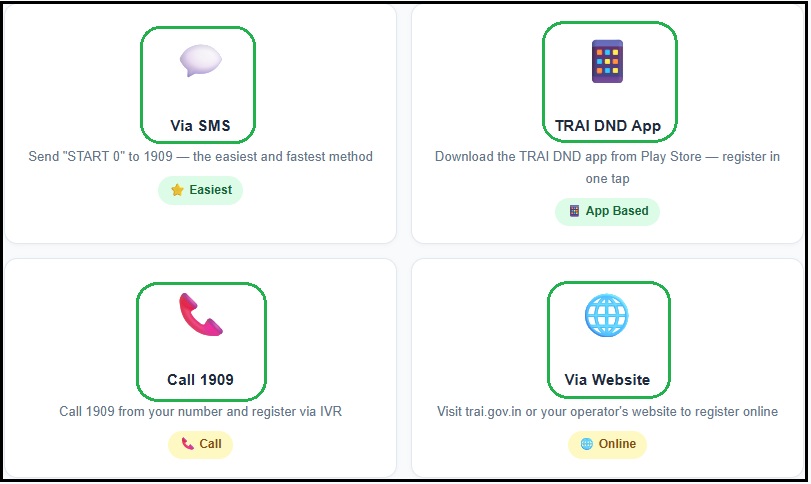
Through SMS
- Open your phone's Messages / SMS app
- Compose a new message: In the "To" field, type: 1909
- Type the message Type exactly this (in capital letters): START 0
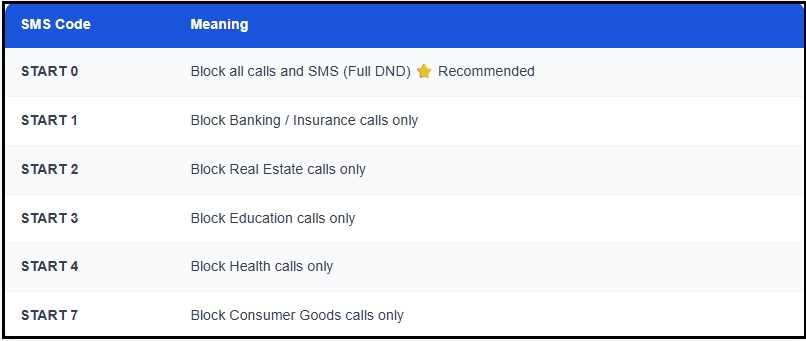
- START 0 = Block all promotional calls and SMS (Full DND)
- Send the SMS:
- You will receive a confirmation SMS within seconds. DND will be active within 7 working days.
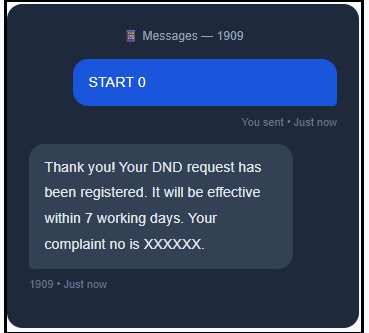
- You will receive a confirmation SMS within seconds. DND will be active within 7 working days.
- Received Confirmation SMS
- You will receive a confirmation SMS for registration

SMS Codes
- Check the given SMS code
Through Call: 1909
- Dial 1909 from your phone
- This number is free - no charges will be applied
- Select your language
- Press 1 for Hindi, Press 2 for English
- Select the DND Registration option
- In the IVR menu, select the "DND Registration" option - usually 1 or 2
- Listen for confirmation
- The IVR will confirm your registration - you will also receive a confirmation SMS
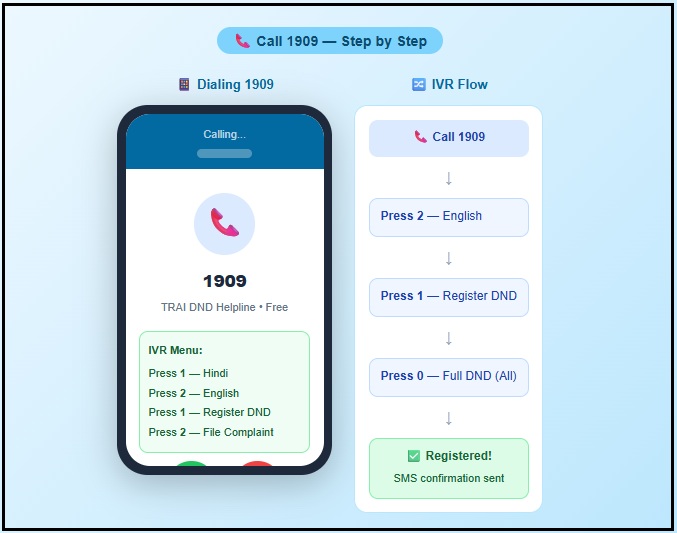
- The IVR will confirm your registration - you will also receive a confirmation SMS
Through TRAI DND App
- Open Google Play Store or App Store
- Search for "TRAI DND" — download the official TRAI app (it's free)
- Open the app and verify your number
- Enter your mobile number - an OTP will be sent, verify it
- Click on"Register for DND"
- Choose a category or select "All" for full DND
- File complaints directly from the app
- The app also has a "File Complaint" option - if you receive spam calls after DND, report them instantly
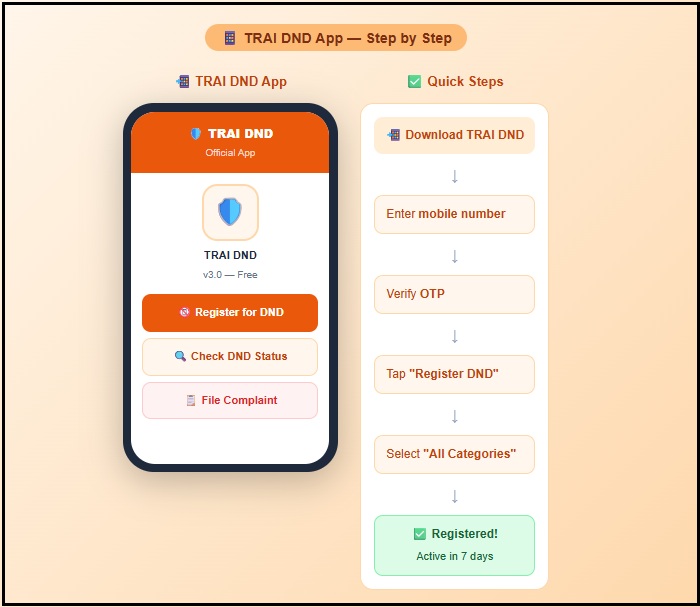
- The app also has a "File Complaint" option - if you receive spam calls after DND, report them instantly
Extra Benefit of the App
- You can file complaints directly through the TRAI DND app.

Through Website
- Open your browser
- Go to trai.gov.in or your operator's website (airtel.in, jio.com, etc.)
- Find the "DND" or "Do Not Disturb" section
- Usually found under Consumer Services or My Account
- Enter your mobile number and verify via OTP
- Enter the number on which you want to activate DND
- Submit
- A confirmation email or SMS will be sent - DND will be active within 7 working days
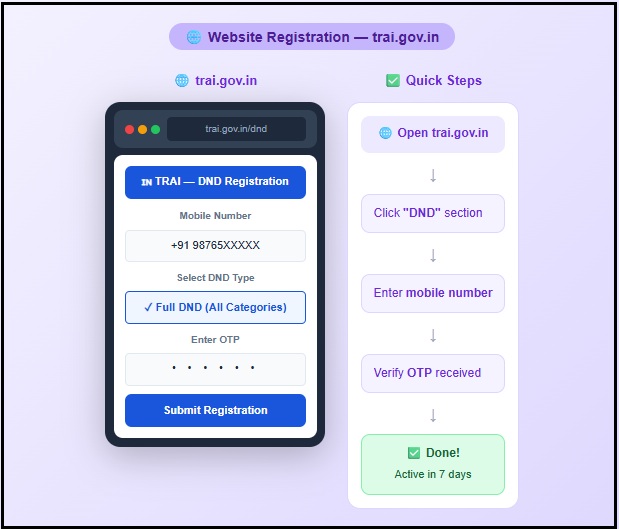
- A confirmation email or SMS will be sent - DND will be active within 7 working days
How DND Activation Works ?
- From Request to Activation
- You Submit Request → Operator Sends to TRAI → Added to NDNC Registry → Active in 7 Days
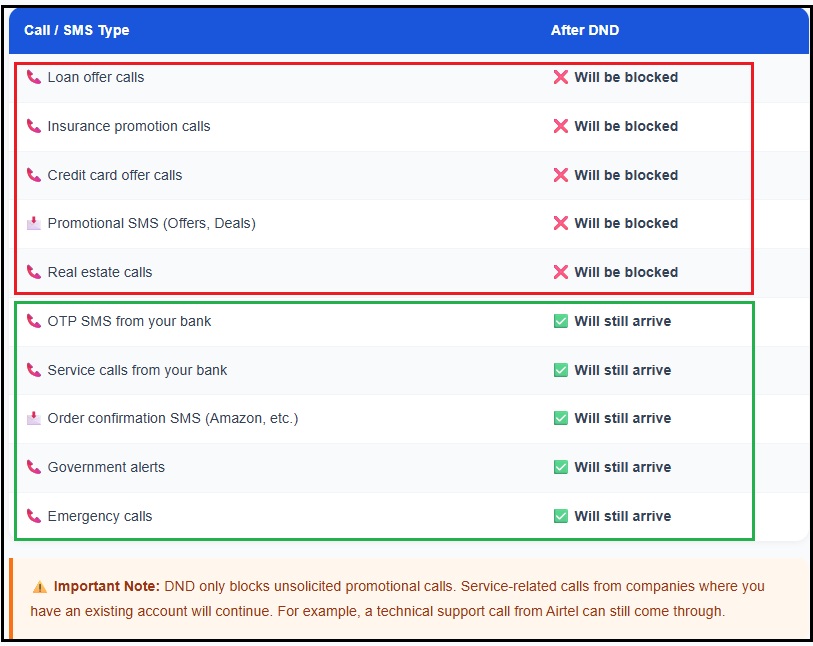
Which Calls Will Be Blocked After DND ?
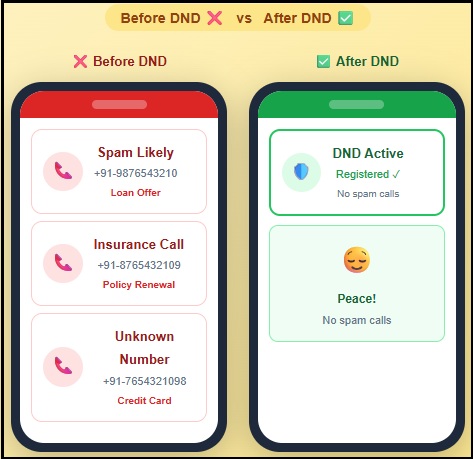
Before DND vs After DND
Frequently Asked Questions ?
- I still receive calls after DND registration - what should I do?
- Wait for 7 working days - that is the time required for activation. If calls continue after 7 days, file a complaint via the TRAI DND app or by calling 1909. Note your complaint number - if it is not resolved within 45 days, you can escalate it on the TRAI portal.
- Does DND ever expire?
- No! DND is permanent - register once and it stays active forever. It will only be deactivated if you choose to deregister it yourself.
- Can I register more than one number for DND?
- Yes! Each number must be registered separately. Send "START 0" to 1909 from each number - DND will be activated on all of them.
- If I change my SIM, will DND transfer automatically?
- No. DND is registered to the number, not the SIM. If you keep the same number, DND remains. If you get a new number, you will need to register again.
- I still receive international spam calls after DND - what can I do?
- International numbers are outside TRAI's jurisdiction, so they cannot be blocked via DND. Block them manually or use a spam filter app. Truecaller is very helpful for this.
- How do I deregister from DND?
- Send an SMS to 1909 with the message: STOP 0 — your DND will be deregistered and promotional calls will start again.
Add new comment