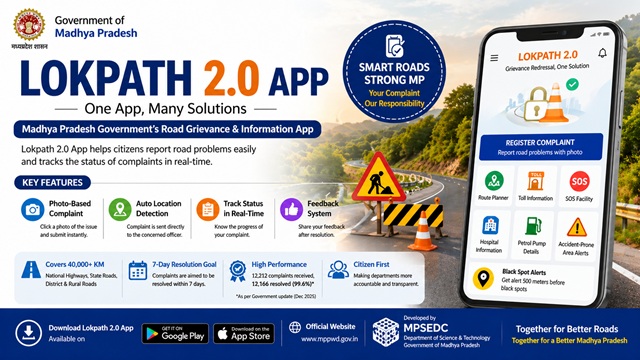
If you live in Madhya Pradesh and have noticed a pothole, damaged road, or unsafe road condition near you, the Lokpath App is the official government tool to report it. You open the app, take a photo of the problem, and submit it. The complaint is directed to the concerned PWD officer, and the issue is mandated to be fixed within 7 days.
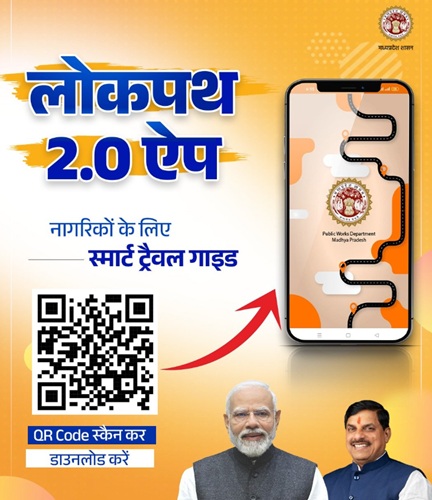
Lokpath started as a road complaint app when it was launched on 2 July 2024. It has now been upgraded to Lokpath 2.0 with seven additional features, including a Route Planner, SOS emergency button, hospital and petrol pump locator, toll information, and most importantly, black spot alerts that warn you 500 metres before you reach a dangerous stretch of road.
The app is free, works on both Android and iOS, and is built by the Madhya Pradesh State Electronics Development Corporation (MPSEDC) under the Department of Science and Technology, Government of Madhya Pradesh.
What is the Lokpath App?
Lokpath is the official mobile application of the Public Works Department (PWD), Government of Madhya Pradesh. It was built specifically to let citizens report road problems directly to the department and track whether those problems are being fixed.
Before Lokpath, a citizen who noticed a pothole had very limited options. They could call an official, write a letter, or go to a government office, none of which guaranteed a timely response. Lokpath changed this by creating a direct digital channel. You take a photo of the road problem, the app captures your GPS location automatically, and the complaint is routed immediately to the officer responsible for that road.
The officer is then accountable to fix the issue within 7 days and must record the fix in the app. Once done, the complainant receives a notification on their mobile that the issue has been resolved.
The app has two login modes: one for Citizens and one for Department officials. Citizens use it to file and track complaints. PWD officers use it to receive, manage, and close complaints.
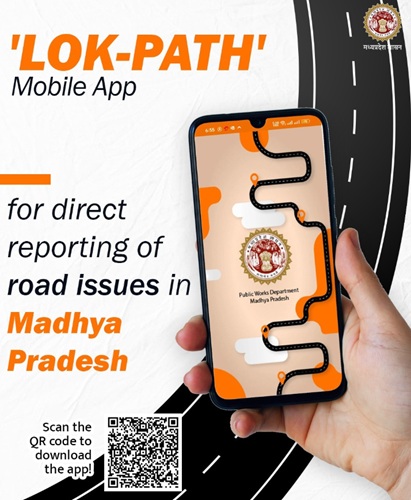
Launch Details
| Detail | Information |
|---|---|
| App Name | Lokpath (लोकपथ) | Upgraded to Lokpath 2.0 |
| Launch Date | 2 July 2024 |
| Launched By | Chief Minister Dr. Mohan Yadav |
| Launch Location | Media Centre, State Assembly Building, Bhopal |
| Also Present | Public Works Minister Rakesh Singh |
| Developed By | MPSEDC (Madhya Pradesh State Electronics Development Corporation), Department of Science and Technology, Govt of MP |
| Department | Public Works Department (PWD), Madhya Pradesh |
| Download | Android (Google Play Store), iOS (Apple App Store) |
| Cost | Free |
| Login Modes | Citizen and Department (two separate modes) |
What CM Mohan Yadav Said at the Launch
At the launch on 2 July 2024, Chief Minister Dr Mohan Yadav said the government aims to make all departments more and more accountable to the public. He stated that the Lokpath mobile app is being launched to continue working for public welfare by adopting a more transparent and accountable working system.
The CM also noted that while it is natural for roads to get damaged due to excessive rainfall, waterlogging, and heavy traffic of large vehicles, the department should make efforts to ensure there are no potholes on the roads. He called the app an important step towards strengthening the Road Information and Management System of Madhya Pradesh.
The CM stated that the app would make it possible to improve the 40,000-kilometre-long road network of the state more effectively.
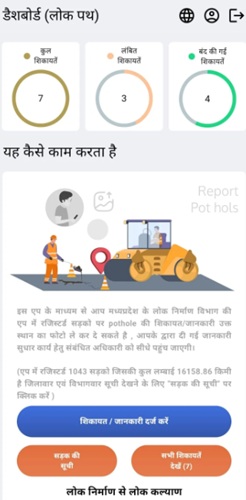
How Lokpath App Works - Step by Step
Step 1: Download and Install the App
Download the Lokpath app from Google Play Store (Android) or Apple App Store (iOS). Search for "Lok Path" and look for the app published by MPSeDC, Dept of Science and Technology, Govt of MP. The app is free to download.
Step 2: Open the App and Log In
Open the app after installation. You will see two options on the home screen: Department and Citizen. Select Citizen. Enter your mobile number with the +91 country code and verify using the OTP sent to your number. OTP-based login ensures that only verified citizens can file complaints.
Step 3: Locate the Damaged Road on the Map
The app uses GPS and a map-based interface to help you identify the exact road and location where you have noticed the problem. Select the road from the map. The road must be a PWD-registered road to be eligible for the complaint. National highways, state highways, main district roads, other district roads, and rural roads registered under PWD are all covered.
Step 4: Click and Upload a Photo of the Problem
Take a clear, well-lit photo of the pothole, damaged road surface, or unsafe condition directly through the app. The photo is automatically tagged with the GPS coordinates of the location. This geo-tagged photo is the core of your complaint and helps the officer identify the exact spot.
Step 5: Submit the Complaint
Confirm the location details and submit the complaint. You receive an acknowledgement on your mobile once the complaint is successfully submitted. The complaint is now in the system and has been forwarded to the officer responsible for that road section.
Step 6: Officer Receives and Acts on the Complaint
The concerned PWD officer receives the complaint directly on their Department login. They are required to inspect the road, carry out the repair, and record the resolution in the app within 7 days. This accountability mechanism is built into the system.
Step 7: You Receive Resolution Notification
Once the officer marks the complaint as resolved and uploads the post-repair photo in the app, you receive a notification on your mobile. You can then view the resolution details and provide feedback if needed.
7-Day Resolution Commitment
The most important commitment in the Lokpath system is the 7-day resolution mandate. Every complaint filed through the app must be addressed and resolved by the concerned PWD officer within 7 days. The officer must record the action taken in the app and the complainant is notified automatically once this is done.
This creates direct accountability. If a complaint is not resolved in 7 days, it is visible in the department's monitoring system, creating pressure on the officer to act. CM Yadav himself acknowledged at the launch that it is challenging for the department to make improvements in 7 days, calling it an act of courage, but stated that the department would be successful in implementing this innovation using the latest technology.
Roads Covered Under Lokpath App
The app covers all repairable roads under the Public Works Department of Madhya Pradesh. These include:
- National Highways under PWD scope in Madhya Pradesh
- State Highways connecting major towns and cities
- Main District Roads connecting district headquarters
- Other District Roads serving tehsil and block level areas
- Rural Roads connecting villages and gram panchayats
This network of approximately 40,000 kilometres covers roads in all 52 districts of Madhya Pradesh. If the road you want to report is a PWD road, it will appear on the app's map and you can file a complaint for it.
Lokpath 2.0 - The Upgraded Version
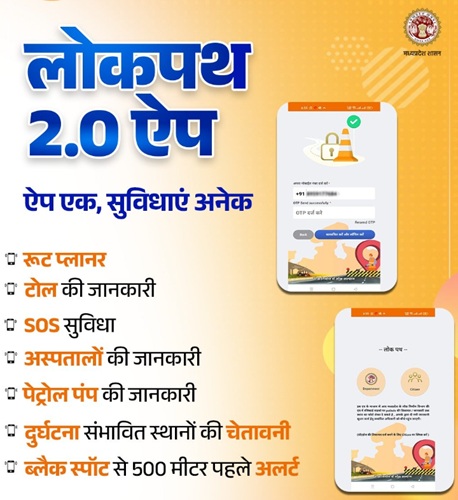
In December 2025, Chief Minister Mohan Yadav reviewed the PWD's performance over two years and directed the department to upgrade the Lokpath App with more features. The result is Lokpath 2.0, which transforms the app from a road complaint tool into a comprehensive road travel companion.
The official Madhya Pradesh Government communication for Lokpath 2.0 carries the tagline: ऐप एक, सुविधाएं अनेक, which means One App, Many Facilities.
Here are all seven new features added in Lokpath 2.0:
1. Route Planner (रूट प्लानर)
The Route Planner helps you plan your travel route before you start your journey. It shows you the best path to take and integrates with the app's road condition data. This means when you plan a route, you are also getting information about the road quality along the way, helping you avoid stretches with known issues.
2. Toll Information (टोल की जानकारी)
Lokpath 2.0 provides information about toll booths on your route, including toll rates. Before you travel on a highway or state road, you can check how many toll plazas fall on your path and what the charges are. This helps travellers plan trips better and avoid surprises.
3. SOS Facility (SOS सुविधा)
The SOS button is a critical safety feature. If you are in an emergency on the road, whether due to an accident, breakdown, or any dangerous situation, pressing SOS sends an emergency alert with your GPS location to the relevant authorities. This is especially valuable on isolated highways or rural roads where help may not be immediately visible.
4. Hospital Information (अस्पतालों की जानकारी)
Lokpath 2.0 shows you the nearest hospitals and medical facilities along your route. During a road trip or in an emergency, knowing where the closest hospital is can save precious time. This feature is particularly useful on long-distance highway routes through Madhya Pradesh, where medical facilities can be far apart.
5. Petrol Pump Information (पेट्रोल पंप की जानकारी)
The app shows nearby petrol pumps and fuel stations along your route. This is a practical feature for long-distance travellers who need to plan fuel stops, especially on less-populated stretches of roads in Madhya Pradesh, where fuel stations are not frequent.
6. Accident-Prone Area Warning (दुर्घटना संभावित स्थानों की चेतावनी)
Lokpath 2.0 displays warnings about accident-prone locations on your route. These are stretches of road that have historically seen a high number of accidents due to sharp curves, poor visibility, blind spots, or other structural reasons. Knowing in advance helps drivers slow down, stay alert, and take extra precautions on these stretches.
7. Black Spot Alert 500 Metres Before (ब्लैक स्पॉट से 500 मीटर पहले अलर्ट)
A black spot is a specific location on a road that has recorded multiple fatal or serious accidents. Lokpath 2.0 triggers an automatic alert on your phone when you are 500 metres away from a black spot. This warning of 500 metres gives drivers enough time to reduce speed, become more alert, and cross the dangerous zone safely. This is one of the most significant road safety features added to the app and directly addresses the problem of repeat accidents at the same locations.
Performance Data - What Lokpath Has Achieved So Far
As per an official Madhya Pradesh Government statement from December 2025, the Lokpath App has delivered strong results since its launch in July 2024:
| Metric | Data |
|---|---|
| Total complaints received through the app | 12,212 |
| Total complaints resolved | 12,166 |
| Resolution rate | 99.6 percent |
| Complaints still pending | 46 |
A 99.6 per cent resolution rate within roughly 18 months of launch is a significant achievement for any government grievance system. It demonstrates that the 7-day resolution mandate is being taken seriously by PWD officers across the state.
Developer: MPSEDC and the Technology Behind the App
The Lokpath app is built and maintained by the Madhya Pradesh State Electronics Development Corporation (MPSEDC), which functions under the Department of Science and Technology, Government of Madhya Pradesh. MPSEDC is the state's primary technology arm for e-governance applications.
The app uses GIS (Geographic Information System) technology through MPSSDI (Madhya Pradesh State Spatial Data Infrastructure) to power its map-based complaint system. The GPS-based geo-tagging of complaints, the road mapping system, and the black spot location data are all powered by this GIS infrastructure. The privacy policy of the Lokpath app is hosted at gisservices.mp.gov.in, confirming the GIS services backbone.
The connection to the Road Information and Management System (RIMS) means that complaints and resolutions logged through the app feed into a broader statewide road condition database, giving the PWD a continuously updated picture of road quality across Madhya Pradesh.
How to Download Lokpath App
The Lokpath app is available on the following official platforms:
- Android: Visit Google Play Store and search for "Lok Path" or go directly to https://play.google.com/store/apps/details?id=in.mpsedc.road&hl=en_IN Install the app published by MPSeDC, Dept of Science and Technology Govt of MP.
- iOS: Visit Apple App Store and search for "Lok Path MP" or go to https://apps.apple.com/in/app/lok-path-mp/id6505020143.
- PWD Website: You can also find the download link on the official Public Works Department website at mppwd.gov.in.
The app is completely free to download and use. No registration fee, no subscription, no charges of any kind.
Two Modes in the App: Citizen and Department
When you open the Lokpath app, you see two login options on the home screen:
- Citizen (नागरिक): This is the mode for general public users. You log in using your mobile number and OTP. You can file road complaints, track their status, and use all the Lokpath 2.0 travel features like Route Planner, SOS, hospital locator, and black spot alerts.
- Department (विभाग): This is the mode for PWD officers. Department officials log in to view complaints assigned to their area, update the status of repairs, and record resolution with post-repair photographs. The 7-day resolution clock is visible to them in this mode.
This two-mode design ensures that the same app works both as a citizen grievance tool and as an officer accountability system.
Lokpath 1.0 vs Lokpath 2.0 - What Changed
| Feature | Lokpath 1.0 (July 2024) |
Lokpath 2.0 (2025 Upgrade) |
|---|---|---|
| Road complaint filing | Yes | Yes |
| Photo upload with GPS | Yes | Yes |
| Complaint tracking | Yes | Yes |
| 7-day resolution mandate | Yes | Yes |
| Route Planner | No | Yes |
| Toll Information | No | Yes |
| SOS Emergency Button | No | Yes |
| Hospital Locator | No | Yes |
| Petrol Pump Locator | No | Yes |
| Accident-Prone Area Warning | No | Yes |
| Black Spot Alert (500m) | No | Yes |
Things to Keep in Mind When Using the App
- Download the app only from the official Google Play Store or Apple App Store. Verify the developer name as MPSeDC, Dept of Science and Technology, Govt of MP, before installing.
- The road you want to report must be a PWD-registered road. Private roads, society roads, and municipal corporation roads are not covered under this app.
- Upload a clear, well-lit photograph. A blurry or dark photo makes it harder for the officer to assess the complaint and may delay resolution.
- Make sure your GPS and location services are turned on before opening the app. The app relies on GPS to tag the exact location of your complaint on the map.
- Do not file false complaints. The system is designed for genuine road issues and misuse can affect how quickly real complaints are resolved.
- After the officer marks your complaint as resolved, you can verify by revisiting the road. If the issue persists, you can re-report it.
- The 7-day resolution applies to repairable issues. In cases where the damage requires large-scale construction or weather conditions prevent immediate repair, the department may take longer.
- For the black spot and accident-prone area alerts to work properly in Lokpath 2.0, keep your location services active while travelling.
Conclusion
Lokpath 2.0 is one of the most practical digital governance apps built by any Indian state government. It started with a single clear purpose: let citizens report bad roads and hold PWD officers accountable to fix them in 7 days. The 99.6 percent resolution rate in its first 18 months shows that the system is working.
The upgrade to Lokpath 2.0 adds meaningful travel safety features on top of the complaint system. The black spot alert at 500 metres, the SOS button, the accident-prone area warnings, hospital locator, petrol pump finder, toll information, and route planner make this app genuinely useful for any trip on Madhya Pradesh roads, not just for filing complaints.
The official government tagline for Lokpath 2.0 captures it well: ऐप एक, सुविधाएं अनेक. One app. Many facilities. Download it free from the Play Store or App Store and use it to make roads in Madhya Pradesh safer and better maintained.
Add new comment