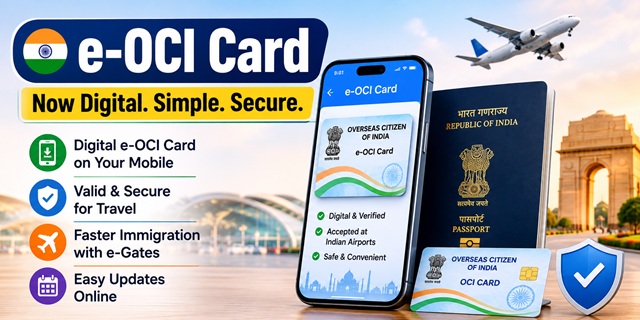
India has introduced the electronic Overseas Citizen of India (e-OCI) Card, bringing OCI services into a fully digital format. From 8 July 2026, all new OCI applicants receive only a digital e-OCI card instead of the traditional physical OCI booklet.
However, what this change means for you depends entirely on one question: Are you applying for an OCI card for the first time, or do you already have a physical OCI booklet?
The rules are different for both groups, and many articles mix them together. This guide clearly explains who receives an e-OCI card, whether your existing OCI booklet remains valid, how to download your e-OCI, the passport update requirement after obtaining a new passport, and every major change introduced under the latest OCI rules.
First: Which Category Do You Fall Under?
| Your situation | What applies to you |
|---|---|
| Applying for an OCI card for the first time on or after 8 July 2026 | You will receive only a digital e-OCI card. Physical OCI booklets are no longer issued to new applicants. |
| You already hold a physical OCI booklet | Your physical OCI booklet continues to remain valid. You may also generate and use an e-OCI card as a digital version through the OCI portal or the official Indian Visa Su-Swagatam mobile app. |
Important: The Government of India has not cancelled existing physical OCI booklets. They continue to be accepted for immigration clearance and all OCI-related services. The e-OCI card is an additional digital facility for existing cardholders and the only format issued to new applicants. :contentReference[oaicite:0]{index=0}
Quick Facts
| Detail | Information |
|---|---|
| Official OCI portal | ociservices.gov.in |
| Governing rules | Citizenship (Amendment) Rules, 2026 |
| Rules notified | 30 April 2026 |
| Rules effective from | 1 May 2026 |
| e-OCI launched | 30 June 2026 |
| Digital-only issuance starts | 8 July 2026 |
| New applicants receive | Digital e-OCI card only |
| Existing physical OCI booklet | Continues to remain valid |
| Processing time | Generally around 15 working days (may vary by Mission/FRRO) |
| Passport particulars update | Within 3 months after obtaining a new passport |
| Fee for passport particulars update | No fee |
| Integrated e-Gates available | Selected international airports including Delhi, Mumbai and Bengaluru |
What the e-OCI Card Actually Is
The e-OCI Card is the official digital version of the Overseas Citizen of India (OCI) Card introduced by the Government of India. It has the same legal validity as the OCI document issued under the latest rules and is designed to make travel and identity verification easier.
According to the Bureau of Immigration, OCI cardholders can store the e-OCI on their mobile phone and present it, along with a valid passport, at Immigration Check Posts and to participating airlines whenever required.
Remember one important point. The e-OCI Card does not replace your passport. You must continue travelling with the passport linked to your OCI record because immigration authorities verify both documents together.
If you already have a physical OCI booklet, keep it safely. Existing physical OCI booklets remain valid, and the e-OCI Card serves as an additional digital version for convenience.
How to Download Your e-OCI Card
If you already hold a valid OCI Card, you can generate and download your e-OCI Card using the Government of India's official digital services.
- Visit the official OCI Services portal at ociservices.gov.in and ensure that your OCI details and passport particulars are up to date.
- Download the official "Indian Visa Su-Swagatam" mobile application from the Google Play Store or Apple App Store.
- Open the app and choose the e-OCI Card option.
- Enter the required details exactly as they appear on your OCI record, such as your passport number, OCI registration details and other requested information.
- Complete the verification process. After successful verification, the system generates your digital e-OCI Card.
- Download and save the e-OCI Card on your mobile phone. You may also keep a copy in your secure cloud storage or email for future access.
Before travelling abroad, open the e-OCI Card once to ensure it is available even if your internet connection is unavailable at the airport.
If your passport has changed, update your passport particulars first through the official OCI portal wherever required before relying on the e-OCI Card for travel.
Existing OCI booklet holders should continue carrying both documents for the time being. Although the Government has introduced the e-OCI Card for digital convenience, carrying the physical OCI booklet during international travel can help avoid delays where airline staff or foreign immigration officials are still adapting to the new digital system.
The Three-Month Passport Update Rule
If you obtain a new passport after becoming an OCI cardholder, there is one important deadline you should not miss.
Under the Citizenship (Amendment) Rules, 2026, OCI cardholders must update their new passport particulars on the official OCI portal within three months of the passport being issued.
The process is much simpler than it used to be.
- No physical OCI booklet re-issuance is required only for updating passport particulars.
- The passport details can be updated online through the official OCI Services portal.
- No separate fee is charged for updating passport particulars.
- The updated information becomes part of your OCI record for future travel and verification.
Do not wait until your next international trip. Complete the passport update soon after receiving your new passport so your OCI records remain current.
How to Apply for an OCI Card for the First Time
All new OCI applications are submitted online through the official OCI Services portal.
- Visit ociservices.gov.in and select the option to apply for a new OCI Card.
- Complete the online application form carefully with your personal, passport and eligibility details.
- Upload your recent photograph and signature in the prescribed format.
- Upload all required supporting documents as instructed on the portal. The amended rules have simplified document submission compared with the earlier process.
- Review the application carefully before final submission.
- Provide consent for Fast Track Immigration, if you wish to use that facility. The consent allows biometric authentication for immigration processing where the facility is available.
- Pay the applicable OCI fee through the prescribed payment method.
- Save your acknowledgement number. You can use it later to track your application status online.
In many straightforward cases, applications are processed in around 15 working days. However, the actual processing time may vary depending on document verification and the Indian Mission, FRRO or other competent authority handling your application.
Photograph Requirements
Incorrect photographs are one of the most common reasons for application delays. Before uploading your photograph, ensure that it meets the official requirements.
- Recent, high-quality colour photograph.
- Plain light-coloured background.
- Full front view of the face looking directly at the camera.
- Neutral facial expression with both eyes clearly visible.
- Head and shoulders fully visible within the frame.
Avoid cropped selfies or holiday photographs. A properly taken passport-style photograph greatly reduces the chances of your application being returned for correction.
Faster Immigration: e-Gates and Fast Track
One of the biggest practical benefits of the e-OCI Card is its integration with India's Fast Track Immigration Programme (FTI-TTP).
Eligible e-OCI holders can use automated facial recognition e-Gates at participating international airports, including Delhi, Mumbai and Bengaluru, instead of waiting at a staffed immigration counter.
If you choose to enrol for Fast Track Immigration, the e-OCI process allows you to provide the required consent and biometric information digitally. In most cases, you do not need to visit an FRRO office separately for enrolment.
The Government of India has also announced plans to expand e-Gate facilities to additional international airports in phases as the Fast Track Immigration Programme is rolled out further.
Everything Else That Changed
| Feature | Earlier system | Current system |
|---|---|---|
| Application documents | Multiple paper documents and manual submission | Single online submission with electronic declarations |
| Processing time | Generally 6 to 8 weeks | Normally around 15 working days (subject to verification) |
| Passport update | Physical OCI re-issuance in many cases | Online passport particulars update within three months |
| OCI document | Physical booklet only | Digital e-OCI for new applicants; existing booklets remain valid |
| Application tracking | Limited online status information | Online acknowledgement and application status tracking |
| Fast Track Immigration enrolment | Separate enrolment process | Integrated with the e-OCI ecosystem where applicable |
Giving Up Your OCI Card
If you decide to surrender your OCI Card voluntarily, the process now begins online.
- Submit the OCI renunciation application through the official OCI Services portal.
- Submit the required documents and surrender the physical OCI booklet, wherever applicable, to the concerned Indian Mission, Post or FRRO.
- Receive an acknowledgement confirming submission.
- Once approved, your name is removed from the official OCI register.
Keep the acknowledgement safely. It serves as proof that the OCI Card was surrendered in accordance with the prescribed procedure.
Electronic Cancellation and Appeals
The amended Citizenship Rules also modernise the way OCI records are managed.
OCI status is now maintained through the Government's electronic register, allowing approvals, updates and cancellations to be recorded digitally.
For OCI cardholders, this means:
- Your official OCI record is the primary source of verification.
- Keep your passport particulars and other information updated whenever required.
- Verify your OCI status before international travel if any recent change has been made to your record.
The amended Rules also provide a statutory right to appeal against specified decisions, including refusal of an OCI application or cancellation of OCI registration, in accordance with the prescribed procedure.
The Rule for Minor Children
The amended Citizenship Rules contain an important provision for families applying for an OCI Card for a child.
A minor child cannot simultaneously hold an Indian passport and the passport of another country.
If your child has acquired foreign nationality while still holding an Indian passport, complete the necessary nationality and passport formalities before applying for an OCI Card.
Common Problems and How to Solve Them
- Your photograph is rejected. Upload a recent passport-style photograph with a plain light background, neutral expression and full front view of the face.
- You received a new passport. Update your passport particulars on the OCI Services portal within three months of receiving the new passport.
- You are a new applicant but expect a physical OCI booklet. New OCI applicants now receive only the digital e-OCI Card. Existing physical OCI booklets remain valid.
- You cannot access your OCI account. Use the account recovery option instead of creating a new application, which may result in duplicate records.
- Your OCI information has changed. Update your passport particulars and other required details through the official OCI portal before travelling.
- An airline is unfamiliar with the e-OCI Card. Keep the e-OCI Card downloaded on your phone and, if you already possess a physical OCI booklet, carry it as an additional supporting document during the transition period.
Add new comment