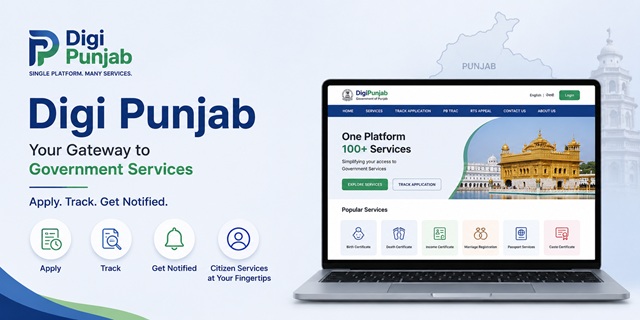
Digi Punjab is the Government of Punjab's unified digital platform for accessing citizen services online. With a single account, residents can apply for a wide range of government services, track applications, and access service information through one portal instead of visiting multiple department websites.
However, two features on the portal deserve far more attention than the service application forms themselves, and most citizens never use them.
PB Trac is the Punjab Transparency and Accountability Commission's public monitoring platform. It displays department-wise service delivery performance, disposal rates and pendency for notified services under the Punjab Transparency and Accountability in Delivery of Public Service Act, allowing citizens to understand how departments are performing even before submitting an application.
RTS Appeal, available from the Digi Punjab portal, enables citizens to file appeals when notified public services are not delivered within the prescribed timelines under the Punjab Transparency and Accountability in Delivery of Public Service Act, 2018. The Act also empowers the competent authority to impose penalties on the responsible designated officer in eligible cases, making the system an important accountability mechanism rather than just another complaint portal.
Most online guides simply list the available services. This guide goes much further. It explains the complete Digi Punjab portal, the available citizen services, registration process, application tracking, PB Trac, RTS Appeal, official helplines, and the features that help citizens hold government departments accountable for service delivery.
Quick Facts
| Detail | Information |
|---|---|
| Official Portal | digi.punjab.gov.in |
| Platform | Unified Digital Platform for Government of Punjab Citizen Services |
| Managed by | Department of Good Governance and Information Technology (DGG&IT), Government of Punjab |
| Head Office | Plot No. D-241, Industrial Area, Phase VIII-B, Sector 74, SAS Nagar (Mohali), Punjab 140308 |
| Portal Support Email | [email protected] |
| State Helpline | 1100 |
| Doorstep Services Helpline | 1076 |
| Doorstep Services WhatsApp | 98555-01076 |
| Available Languages | English and Punjabi |
| Accessibility Features | Screen Reader Support and Text Size Controls (A+, A, A-) |
| Accountability Dashboard | PB Trac |
| Appeal Facility | RTS Appeal |
| Governing Law for Service Timelines | Punjab Transparency and Accountability in Delivery of Public Service Act, 2018 |
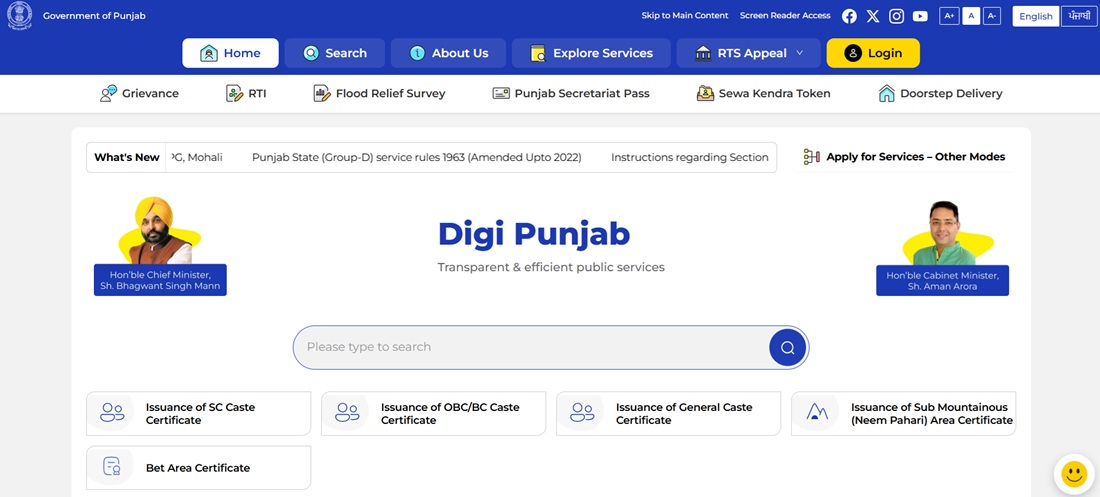
The Four Ideas Behind the Portal
Digi Punjab is built on four stated principles. Each one solves a specific problem citizens used to face.
- Unified Citizen Identity. Seamless access to services across departments. One identity instead of separate registrations everywhere.
- Assisted Service Delivery. Access to digital services through Sewa Kendras, for anyone who cannot or does not want to apply online.
- End-to-End Online. Complete digital processing from application to issuance. No office visit in the middle.
- AI-enabled Discovery. Intelligent assistance to guide citizens to the right service.
The tagline sums up the intent: Apply. Track. Get Notified.
Three Ways to Find a Service
The portal offers three routes to the same catalogue. Use whichever matches how you are thinking.
1. By life event
Best when you know what has happened but not which department handles it.
- Birth
- Death
- Certificates
- Property and Civic Administration
- License and Permits
- Education
2. By department
Best when you already know the department. Open Explore Services and filter by department or category.
3. By search
Type the service name directly. The AI-enabled discovery feature is designed to point you to the right service even when you do not know its official name.
Complete Service Directory
Here is the full catalogue, grouped by department. Find yours below.
Revenue, Rehabilitation and Disaster Management
| Service |
|---|
| Issuance of Income Certificate |
| Backward Area Certificate |
| Border Area Certificate |
| Kandi Area Certificate |
| Issuance of Sub Mountainous (Neem Pahari) Area Certificate |
| Bet Area Certificate |
| Issuance of Dogra Certificate |
| Certified Copies of all kinds of previously registered documents |
| Certified Copies of Unregistered Documents |
Health and Family Welfare
The largest set on the portal, covering birth and death registration in full.
| Service |
|---|
| Issuance of First copy of Birth Certificate, Urban and Rural |
| Issuance of First copy of Death Certificate, Urban and Rural |
| Issuance of Birth or Non-Availability Certificate, Urban and Rural |
| Issuance of Death or Non-Availability Certificate, Urban and Rural |
| Issuance of First copy Still Birth Certificate, Urban and Rural |
| Issuance of Multiple Copies of Birth Certificate |
| Issuance of Multiple Copies of Death Certificate |
| Addition of Name of child in Birth Certificate, Urban and Rural |
| Inclusion of Adoptive Parents Names in Birth Certificate, Urban and Rural |
| Correction in Birth Certificate |
| Correction in Death Certificate |
| Delayed Registration of Birth and Death, Urban and Rural |
| Issuance of Medical Certificate for First Entry into Government Jobs |
| Medical Certificate for Driving Licence Fitness Certificate |
| Issuance of Medical Certificate for Arms Licence |
| Online Registration System for OPD Appointment |
| Patient Registration and Child Registration |
| Pregnant women assistance, including benefit transfers |
| NOC for New Establishments |
| Registration and Renewal for Genetic Counselling Centre or Genetic Laboratory |
Home Affairs and Justice
| Service |
|---|
| Marriage registration under the Punjab Compulsory Registration of Marriages Act, 2012 |
| Marriage registration under the Punjab Anand Marriage Act |
| Correction in Marriage Certificate |
| Fresh Passport or Re-Issue of Passport, 36 or 60 pages |
| Passport Additional Booklet, 36 or 60 pages |
| Replacement of Passport for deletion of ECR or change in personal particulars |
| Police Clearance Certificate |
| Request for FIR copy |
| Online Complaint Registration |
| Missing Person Registration |
Housing and Urban Development
Mostly property transfer and construction related.
| Service |
|---|
| Change of Ownership |
| Change of Ownership, death case with all legal heirs |
| Change of Ownership, death case with registered will |
| Change of Ownership, death case with unregistered will |
| Permission for Sale, Gift or Transfer |
| Permission to Mortgage |
| Transfer Permission before Conveyance Deed |
| Transfer of Letter of Intent |
| Issuance of Conveyance Deed |
| Issue of Re-allotment Letter |
| Issue of No Due Certificate |
| Demarcation of Plot |
| Issue of Completion Certificate or Occupation Certificate |
| Issue of DPC Certificate |
| Permitting of Professional Consultancy Services |
| Sanction of Water Supply and Water Supply Connection |
| Regularisation of Water Connection |
| Sanction of Sewerage Connection |
Local Government
| Service |
|---|
| Transfer of property in case of sale |
| Transfer of property in case of death, uncontested |
| Issue of Permission for mortgage |
| Issue of No Due Certificate |
| Issue of No Objection Certificate |
| Issue of Conveyance Deed |
| Property tax online payment |
| Building or Development Permit |
| Occupancy Certificate |
| Permission for Water Connections |
| Road Cutting Permission and Inspections |
Social Justice, Empowerment and Minorities
| Service |
|---|
| Issuance of SC Caste Certificate |
| Issuance of OBC or BC Caste Certificate |
| Issuance of General Caste Certificate |
| Issuance of Income and Assets Certificate |
Social Security and Development of Women and Children
| Service |
|---|
| Sanction of Old Age Pension Scheme |
| Sanction of Widow or Destitute Pension Scheme |
| Sanction of Dependent Children Pension Scheme |
| Sanction of Disabled Person Pension Scheme |
| Senior Citizen Identity Card |
Other departments
| Department | Services |
|---|---|
| Personnel | Issuance of Residence Certificate |
| Rural Development and Panchayats | Rural Area Certificate |
| Water Supply and Sanitation | Sanction of Water Supply Connection |
| Industries and Commerce | Licence for Sale of Crackers, NOC under Gas Cylinder Rules 2016, Registration of societies, Registration of partnership firms |
| Labour | Registration and Licensing under Motor Transport Workers Act, Licence for contractors recruiting migrant workmen, Registration of Shops and Establishment |
| Good Governance and IT | Public Grievance Redressal |
| Secretariat | Secretariat Visitor Pass |
Punjab's Area Certificates: What They Are
Punjab issues several certificates you will not find in most states. They exist because different regions face different geographic disadvantages, and reservations and benefits are tied to them.
If you are eligible for one and do not have it, you may be missing out on a quota you qualify for.
- Bet Area Certificate. For residents of the low-lying riverine belt along Punjab's rivers, land prone to flooding.
- Kandi Area Certificate. For residents of the Kandi belt, the semi-hilly foothill region along the Shivaliks.
- Sub Mountainous (Neem Pahari) Area Certificate. For the sub-mountainous tract, distinct from the Kandi belt.
- Border Area Certificate. For residents of villages along the international border.
- Backward Area Certificate. For notified backward areas.
- Rural Area Certificate. Issued by the Department of Rural Development and Panchayats.
- Dogra Certificate. Issued by the Revenue Department for the Dogra community.
Where they matter: educational admissions, government recruitment quotas, and specific scheme benefits often reserve seats or relax criteria for these categories.
Before applying, confirm your village or ward actually falls in the notified list for that category. Eligibility depends on notification, not on how the terrain looks.
PB Trac: Check the Department Before You Apply
This is the most underused tool on the portal, and the most useful.
PB Trac is described as Punjab's Official Service Performance and Accountability Platform. It lets you track:
- Notified services
- Timelines for each service
- Pendency
- Department-wise performance
All of this is mandated under the Punjab Transparency and Accountability Act, 2018. It is a legal obligation, not a courtesy feature.
Why this changes how you apply
Most people apply, wait, and only then discover the department is running months behind. PB Trac reverses that. You can look up the position first.
Three practical uses:
- Check the official timeline for your service before applying, so you know what counts as late.
- Check pendency for that department. Heavy pendency tells you to apply earlier than you planned.
- Build evidence. If your application crosses the notified timeline, PB Trac is where the timeline is officially published. That is what makes an RTS appeal concrete rather than a complaint about feeling ignored.
Open it at PB Trac.
RTS Appeal: The Right Most Citizens Never Use
RTS Appeal sits in the main navigation of Digi Punjab. Very few people click it, because very few know what it is.
Here is the principle. Under Punjab's Right to Service framework, notified services are not favours. They carry legally binding time limits. If an officer fails to deliver within that time without sufficient cause, you can appeal, and that officer can be fined personally.
How the framework came about
- 14 July 2011: Punjab notified the Right to Service Ordinance.
- 28 July 2011: The Ordinance came into force with 67 services.
- 20 October 2011: The Punjab Right to Service Act, 2011 came into effect, passed on the recommendations of the Punjab Governance Reforms Commission.
- Expansion: 67 services grew to 206, then to 351, and the notified list has continued to widen.
- 2014: The Amendment Act strengthened penalty powers.
The four levels
| Level | What happens | Time limit |
|---|---|---|
| Designated Officer | You apply. The officer must accept or reject within the notified time. A rejection must record reasons in writing. | As notified for that service |
| First Appellate Authority | Appeal if the service was refused or not delivered in time | Within 30 days |
| Second Appellate Authority | Appeal further. This level can impose a penalty. | Within 30 days |
| Right to Service Commission | Revision, and can impose a higher penalty | As per the Act |
The penalties, and who pays them
This is the part that gives the appeal its force.
- Second Appellate Authority: can impose Rs 250 per day of delay, up to Rs 5,000, on the designated officer.
- Right to Service Commission: can impose a penalty of up to Rs 10,000 on a designated officer or any other official involved, where it finds they failed without sufficient cause. The minimum fine is Rs 500.
- Suo motu power: the Commission can take notice of a failure to deliver within the fixed timeline on its own, without waiting for you to complain.
The penalty falls on the officer, not the department. That is the entire design. A departmental fine changes nothing for the person sitting on your file. A personal fine does.
How to actually use it
- Note your application date and reference number when you apply.
- Check the notified timeline for that service on PB Trac.
- Wait for the timeline to expire. An appeal before that is premature.
- Open RTS Appeal from the main menu of Digi Punjab.
- File the First Appeal within 30 days of the refusal or of the timeline expiring.
- State facts, not feelings. The service, the date applied, the notified timeline, the days elapsed, and what you want done.
- If the First Appeal fails, go to the Second Appellate Authority within 30 days. That is the level with penalty powers.
Using PB Trac and RTS Appeal Together
Separately, each is useful. Together they are a system.
PB Trac publishes the timeline. RTS Appeal enforces it.
An appeal that says the office is being slow is weak. An appeal that says the notified timeline for this service is X days, the application was filed on this date, Y days have elapsed, and no decision has been recorded, is a different document entirely. It cites the government's own published standard against itself.
That is the combination almost nobody uses, and it is sitting in plain sight on the portal.
Grievance, RTS Appeal or RTI: Which One?
Three different tools for three different problems. Picking the wrong one wastes weeks.
| Your situation | Use | What it gets you |
|---|---|---|
| A service is late or was refused, and it is a notified service with a timeline | RTS Appeal | An order to deliver, and a possible penalty on the officer |
| Something is wrong that is not a notified service, such as poor conduct or a civic problem | Grievance | Departmental action on the complaint |
| You want a document, a file noting, or a record showing what happened | RTI | The record itself, with officer names and dates |
A combination that works well. File the RTS Appeal to get the service delivered. File an RTI alongside asking for the file movement, naming each officer who held it and for how many days. The RTI answer becomes evidence for the appeal.
The two grievance links
The portal carries grievance links in two places. The top bar points to Digi Punjab's own grievance page. The footer points to the older Connect Punjab grievance service. Both are official. If one does not load, try the other.
Applying Without the Internet: Three Options
The portal is not the only way in.
Sewa Kendra
Walk in with your documents and an operator completes the application for you. Find your nearest one at Sewa Kendra locator.
Check Sewa Kendra Token status before travelling, so you are not waiting at a counter.
Doorstep Delivery, 1076
Call 1076 and a government representative visits your home to complete the application there. This is the option for elderly applicants, people with disabilities, and anyone who cannot travel.
Keep your documents ready before the visit so it finishes in one sitting. Details at Doorstep Delivery.
WhatsApp Chatbot, 98555-01076
Punjab runs a Citizen Service WhatsApp Chatbot on 98555-01076. Save the number and message it.
This is the least publicised channel on the portal and the easiest to use on a basic smartphone. If you find the website heavy or you are on a slow connection, try WhatsApp first.
Certificate Verification
Anyone can verify whether a certificate issued through the system is genuine, using Certificate Verification.
Who should use it:
- Employers checking a candidate's caste, residence or income certificate
- Educational institutions verifying documents at admission
- Property buyers checking a no-due or completion certificate
- You, confirming your own certificate is properly recorded before submitting it somewhere important
It takes a minute and it catches forgeries that look convincing on paper.
Cyber Assistance
The portal carries a Cyber Assistance section for cyber related help.
If money has already left your account, do not start here. Call the national cybercrime helpline 1930 immediately and file at cybercrime.gov.in. The first hour matters more than anything else. Use Cyber Assistance for guidance and state level support, not as your first call in an active fraud.
Other Services on the Portal
| Service | What it does |
|---|---|
| Track Application | Check the status of any application you have submitted |
| Punjab Secretariat Pass | Apply for a visitor pass to the Secretariat before you travel there |
| Flood Relief Survey | Published flood relief lists |
| Acts and Notifications | Government acts and notifications, including service notifications |
| Citizen Guide Information | Guidance material for citizens |
| FAQs | Portal FAQs |
| RTI | File an RTI application, handled through Connect Punjab |
Acts and Notifications is worth a look before an RTS appeal. Service notifications published there are what fix the timelines you are relying on.
The Testing Notice on the Portal
Digi Punjab displays a banner stating that it is a testing environment and not the official site, and that services applied through the platform will not be processed or considered valid.
At the same time the portal is publicly accessible, carries live service links, and shows a visitor count in the hundreds of thousands.
The sensible approach:
- Save every acknowledgement and reference number immediately, and screenshot the confirmation.
- Confirm a few days later that your application actually registered, rather than assuming it did.
- If nothing acknowledges, treat the submission as incomplete and apply again through a Sewa Kendra or by calling 1076.
- If your matter is urgent, use the offline route from the start. It is equally valid and gives you a paper receipt.
The same platform also serves Punjab's ration card application. For that specific service and how the ERCMS address relates to Digi Punjab, see our guide: ERCMS Punjab (Digi Punjab): Login, Services and Portal Guide.
Contact and Help
| Channel | Details |
|---|---|
| State Helpline | 1100 |
| Doorstep Services Enquiry | 1076 |
| WhatsApp Chatbot | 98555-01076 |
| [email protected] | |
| Contact person | Prabhakar Singh, DGM (Tech) |
| Address | Plot No. D-241, Industrial Area, Phase 8B, Sector 74, Mohali 160071 |
| Department | Department of Good Governance and Information Technology, Punjab |
Keep your application reference number ready before you call or write.
Mistakes That Cost You Time
- Applying without checking the timeline. Look it up on PB Trac first, so you know when late becomes actionable.
- Waiting instead of appealing. Once the notified timeline has passed, the RTS Appeal window is open. Waiting longer does not strengthen your case.
- Missing the 30 day appeal window. Both the First and Second Appeal carry a 30 day limit.
- Filing a grievance when you need an RTS appeal. A grievance asks the department to act. An RTS appeal enforces a legal deadline and can penalise the officer.
- Not checking whether you qualify for an area certificate. Bet, Kandi, Neem Pahari, Border and Backward Area certificates carry real benefits.
- Not saving the acknowledgement. Given the testing notice, your reference number and screenshot are your only proof.
- Ignoring WhatsApp. 98555-01076 is often faster than the website on a slow connection.
- Travelling to a Sewa Kendra without checking token status. Check first, then go.
Add new comment