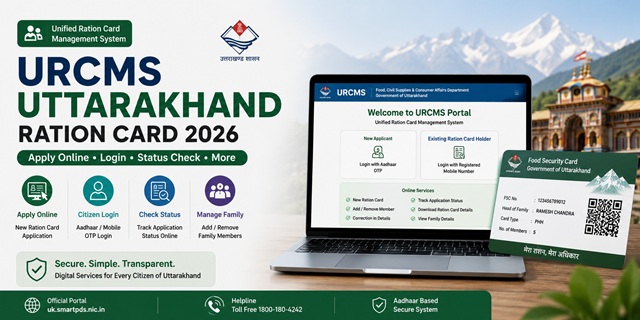
The Government of Uttarakhand has introduced a new digital platform called the Unified Ration Card Management System (URCMS) at uk.smartpds.nic.in, making ration card services more accessible and citizen-friendly. Through this portal, residents can now apply for a new Ration Card, add or remove family members, update personal details, and submit requests online from the comfort of their homes. This marks a significant shift from the earlier system, where applicants often had to visit the District Supply Office (DSO), Tehsil Office, or Block-level offices multiple times for even minor ration card-related changes.
The launch of the portal was announced by Dehradun District Supply Officer (DSO) KK Aggarwal. The system has been developed and is hosted by the National Informatics Centre (NIC) for the Department of Food, Civil Supplies and Consumer Affairs, Government of Uttarakhand. By digitizing the entire process, the department aims to improve transparency, reduce paperwork, and provide faster service delivery to ration card holders across the state.
What is URCMS and What Can You Do on uk.smartpds.nic.in?
URCMS (Unified Ration Card Management System) is the official online platform developed for managing ration card services in Uttarakhand. It serves as a single-window system where citizens can submit applications, update household information, upload documents, and track requests without visiting government offices for routine services.
The portal replaces the older, largely manual workflow and introduces a streamlined digital process that allows applicants to complete most ration card-related tasks online. This not only saves time but also enables citizens to monitor the progress of their applications directly through the portal.
Through the URCMS portal at uk.smartpds.nic.in, you can:
- Apply for a new Ration Card online without visiting a government office
- Add a new family member to an existing ration card, such as a newborn child or newly married spouse
- Remove a family member from a ration card due to marriage, death, migration, or other eligible reasons
- Request corrections in ration card details, including name, address, date of birth, and other personal information
- Upload supporting documents digitally for verification and processing
- Track the status of submitted applications and service requests online
- Submit grievances and complaints related to ration card services through the portal
While most services can now be completed online, applicants who require assistance can still visit their nearest Tehsil Office or District Supply Office (DSO). These offices continue to provide support for citizens who face difficulties with online applications, document uploads, or verification-related issues.
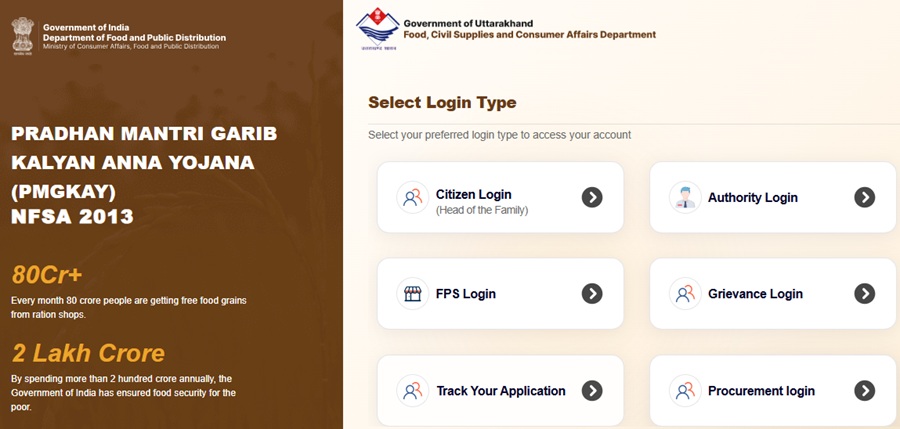
How to Login to uk.smartpds.nic.in
The URCMS portal provides different login options for new applicants and existing ration card holders. The correct login method depends on whether you already have a ration card or are applying for one for the first time.
Before logging in, make sure your mobile number is active and accessible, as the portal uses OTP-based verification for security and identity confirmation.
| Who You Are | Login Method |
|---|---|
| New applicant (no ration card yet) | Use Citizen Login with your Aadhaar number. An OTP will be sent to the mobile number linked with your Aadhaar. |
| Existing ration card holder (making changes) | Log in using the registered mobile number of the family head and verify through OTP. |
How to Apply for New Ration Card Online via URCMS
Applying for a new ration card through the URCMS portal is a completely online process. If you have never applied before, follow the steps below carefully. Keeping all documents ready beforehand will make the process much easier and help you complete the application without interruption.
- Visit the official URCMS portal at uk.smartpds.nic.in.
- On the homepage, click on the Citizen Login option.
- Enter your Aadhaar number and request an OTP. The OTP will be sent to the mobile number linked with your Aadhaar. Enter the OTP to complete verification and log in.
- After successful login, open the dashboard and select New Ration Card Application.
- Fill in your personal details carefully, including your full name as per Aadhaar, complete residential address, district, block, village, gram panchayat, municipality, or ward details, wherever applicable.
- Add all family members one by one. For each member, enter the required details along with their Aadhaar number. Make sure the information matches the Aadhaar records to avoid verification issues later.
- Upload clear scanned copies or photographs of all required documents. Blurred or incomplete documents may delay the approval process.
- Aadhaar cards of all family members
- Address proof such as electricity bill, water bill, or telephone bill
- Rent receipt or rent agreement, if the family is living in a rented accommodation
- Recent passport-size photograph of the head of the household
- Before submitting the form, review every detail carefully. Check names, Aadhaar numbers, addresses, and uploaded documents to ensure there are no mistakes.
- Once everything is correct, submit the application online.
- After successful submission, the portal generates an Acknowledgement Number. Save this number carefully or take a screenshot, as it will be required to track your application status and for future correspondence with the department.
After the application is submitted, the Food and Civil Supplies Department may assign a Supply Inspector or other designated official to verify the information provided in the application. In some cases, a field visit may also be conducted to confirm the family's residence and eligibility details.
Once the verification process is completed and the application is approved, the ration card is issued and linked to the applicant's nearest Fair Price Shop (FPS), allowing the family to receive food grains and other eligible benefits under the Public Distribution System (PDS).
As per the information available on fcs.uk.gov.in, the prescribed fee for issuing a new ration card in Uttarakhand is Rs. 5.
How to Add a Family Member Online via URCMS
If a new member has joined your family, such as a newborn child or a spouse after marriage, you no longer need to visit the Tehsil Office or District Supply Office for updating your ration card. The URCMS portal allows existing ration card holders to add eligible family members online from home.
Before starting the process, keep the new member's Aadhaar details and supporting documents ready. This will help you complete the application smoothly without delays.
- Visit the official URCMS portal at uk.smartpds.nic.in and click on Citizen Login.
- Enter the registered mobile number of the family head and complete OTP verification.
- After logging in, your existing ration card details and family member list will appear on the dashboard.
- Click on the Add Member option.
- Enter the new member's details exactly as they appear in Aadhaar:
- Aadhaar number
- Full name
- Date of birth
- Relationship with the head of the family
- Upload the required supporting document based on the type of addition:
- For a newborn child: Birth Certificate
- For a newly married spouse: Marriage Certificate
- For any other eligible member: Appropriate proof of relationship
- Review all information carefully and submit the request.
- After successful submission, an Acknowledgement Number will be generated. Save this number carefully, as it will be required to track the status of your request.
The department may verify the submitted information before approving the addition. Once approved, the new member's name will be added to the ration card and will become part of the household record.
How to Remove a Family Member Online via URCMS
If a family member is no longer part of the household due to marriage, death, or migration, their name should be removed from the ration card to keep family records accurate. The URCMS portal allows this process to be completed online.
- Visit uk.smartpds.nic.in and log in using the family head's registered mobile number and OTP.
- After logging in, open the dashboard and select the Remove Member option.
- Choose the family member whose name needs to be removed from the ration card.
- Select the appropriate reason for removal and upload the required document:
- Deceased - upload the death certificate
- Migrated to another state - upload migration-related proof, if available
- Married and shifted to another family - upload the marriage certificate
- Verify the details and submit the application.
- Save the generated Acknowledgement Number for future tracking.
After verification by the department, the selected member's name will be removed from the ration card records. Applicants should ensure that the correct member is selected before submitting the request.
How to Make Corrections in Ration Card Online via URCMS
Mistakes in names, dates of birth, addresses, or other personal details can create problems while availing benefits under the Public Distribution System (PDS). The URCMS portal allows ration card holders to request corrections online without visiting government offices for routine modifications.
- Visit uk.smartpds.nic.in and log in using the family head's registered mobile number and OTP.
- From the dashboard, select the Correction / Modification service.
- Choose the particular detail that needs correction, such as:
- Name
- Date of Birth
- Address
- Other personal or family details
- Enter the correct information exactly as it appears in the supporting document.
- Upload the relevant proof for the correction request. For example:
- Aadhaar Card for name or date of birth correction
- Electricity Bill, Water Bill, or other valid address proof for address correction
- Any other document requested by the department for specific corrections
- Carefully review the updated information before submission.
- Submit the request and note down the generated Acknowledgement Number.
Once the request is submitted, the department reviews the correction along with the uploaded documents. If everything is found correct during verification, the updated details are reflected in the ration card records.
How to Complete e-KYC Before the Deadline
The Uttarakhand Government has directed all existing ration card holders to complete their e-KYC before May 30. This process helps the department verify genuine beneficiaries and ensure that ration benefits continue without interruption. If e-KYC is not completed within the prescribed timeline, ration distribution may be affected until verification is successfully completed.
You can complete e-KYC using any of the following methods:
- Through the Mera e-KYC App: Download the Mera e-KYC App, log in using your ration card and Aadhaar details, and complete the required biometric or facial authentication process as instructed in the app.
- At Your Fair Price Shop (FPS): Visit your nearest ration shop along with the Aadhaar cards of all family members. Each member will need to complete biometric verification using the ePoS device available with the FPS dealer.
- Through the IMPDS e-KYC System: Eligible beneficiaries can also use the online e-KYC facility available at epos.uk.gov.in/IMPDS_eKYC.jsp.
To avoid any disruption in receiving monthly ration benefits, beneficiaries are advised to complete e-KYC as early as possible rather than waiting until the last date.
What If You Need Help with the Online Process?
The URCMS portal has been designed to make ration card services easier and more accessible. However, if you are not comfortable using online services or need assistance while submitting an application, the government has provided multiple support options.
- Tehsil Offices: Citizens can visit their nearest Tehsil Office with Aadhaar cards and supporting documents. Officials can guide applicants through the online process and help with document submission.
- District Supply Office (DSO): Residents of urban areas may contact or visit the District Supply Office for assistance related to ration card applications, corrections, member addition, or status-related issues.
- Block Development Office (BDO): Applicants living in rural areas can seek support from their respective BDO office for ration card-related services and guidance.
If you are unsure about any step, it is always better to seek assistance from the nearest government office rather than submitting incorrect information or documents.
Documents Required for URCMS Portal Services
The documents required depend on the service you are applying for. Keeping the necessary documents ready beforehand will make the application process faster and smoother.
| Service | Documents Needed |
|---|---|
| New Ration Card Application | Aadhaar cards of all family members, electricity bill, water bill or telephone bill for address proof, rent receipt (if residing in a rented house), and passport-size photograph of the head of the household |
| Add Newborn | Birth certificate of the child and existing ration card details |
| Add Newly Married Spouse | Marriage certificate and Aadhaar card of the spouse |
| Remove Deceased Member | Death certificate of the deceased family member |
| Name Correction | Aadhaar card, school certificate, or any government-issued document showing the correct name |
| Address Change | Latest electricity bill, water bill, telephone bill, or any other valid proof of the new address |
Official Portals and Useful Links
The following official portals can be used for ration card applications, e-KYC, status checks, and other related services in Uttarakhand:
- URCMS Portal - uk.smartpds.nic.in (Apply online, add/remove family members, correction requests, and other ration card services)
- Food Department Uttarakhand - fcs.uk.gov.in
- New Ration Card Procedure - fcs.uk.gov.in
- RCMS Portal - rcmspds.uk.gov.in (Ration card status and beneficiary information)
- IMPDS e-KYC - epos.uk.gov.in
- AePDS Portal - epos.uk.gov.in
- Locate Aadhaar Seva Kendra - uidai.gov.in
Commissioner, Food and Civil Supplies: 0135-2780765
Email: [email protected]
PDS Toll Free Helpline: 1967
Also read:
Uttarakhand Ration Card - Complete Guide (2026)
Ration Card in India - Complete Guide (2026)
How to Link Aadhaar with Ration Card
One Nation One Ration Card (ONORC) - Complete Guide
Disclaimer: This article is provided for informational purposes only. The URCMS portal (uk.smartpds.nic.in) is a recently launched digital platform and certain procedures or portal features may be updated by the Government of Uttarakhand from time to time. Applicants should always verify the latest instructions, eligibility conditions, and application requirements through the official URCMS portal and the Department of Food, Civil Supplies and Consumer Affairs website at fcs.uk.gov.in before submitting any application.
মন্তব্যসমূহ
Ration card
Ration card mein naye Naam jodne Hain
নতুন কমেন্ট যুক্ত করুন