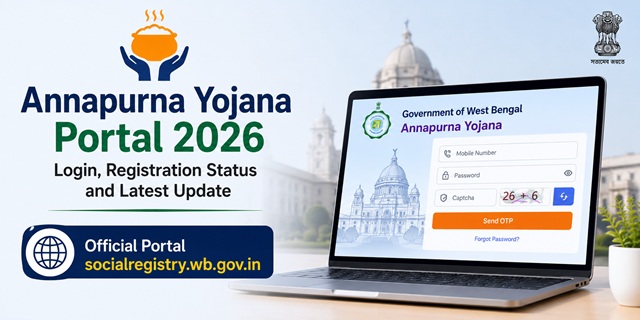
The Government of West Bengal officially launched the Annapurna Yojana on 1 June 2026 and invited eligible women across the state to apply for the scheme. Soon after the launch, many beneficiaries faced difficulties in completing their registration because the online application facility was not available on the portal that applicants were initially attempting to access.
To streamline the registration process and create a dedicated platform for beneficiary enrolment, the Government of West Bengal launched the Annapurna Yojana Family Level Data Collection Portal on 3 June 2026 at socialregistry.wb.gov.in. Through this portal, eligible women can complete their online registration, submit family-level information, and provide the details required for government verification under the scheme.
The earlier Social Security Portal has now been redirected to the newly introduced Social Registry Portal, eliminating confusion regarding which website should be used for registration. As a result, applicants no longer need to search for multiple portals or application links. Women who wish to apply for Annapurna Yojana should now use the Annapurna Yojana Family Level Data Collection Portal to complete the registration process and submit their details for verification.
After registration, the information provided by applicants is verified by the concerned authorities of the Government of West Bengal. Beneficiaries whose details are found to be correct and successfully verified will be considered for inclusion under the scheme and may become eligible to receive the benefits provided through Annapurna Yojana.
What is socialregistry.wb.gov.in?
socialregistry.wb.gov.in is the official Annapurna Yojana Portal launched by the Government of West Bengal for beneficiary registration and family-level data collection. The portal serves as the primary platform through which eligible applicants can register, update their family information, and submit details required for verification under Annapurna Yojana and other welfare initiatives integrated with the state's social registry framework.
The portal operates on a .gov.in domain, which is the official domain used by Government of India and state government websites. The footer of the portal carries the following statement:
"This site is architected and designed by National Informatics Centre (NIC). Content, DATA, Process and Operation owned and maintained by Government of West Bengal."
This makes it clear that:
- The portal is developed and maintained by the National Informatics Centre (NIC), the Government of India's premier technology organization responsible for building and supporting numerous central and state government digital platforms.
- The Government of West Bengal owns and manages the portal's content, data, processes, and day-to-day operations, ensuring that applicant information is handled through an official government system.
- The portal prominently displays Annapurna Yojana branding, helping beneficiaries identify the correct platform for registration and data submission.
- User authentication is based on a mobile number and OTP verification system, allowing applicants to securely access their accounts and complete the registration process online.
- A dedicated Forgot Password facility is available at socialregistry.wb.gov.in/forget-password, enabling registered users to recover account access whenever required.
The portal also provides access to several important policy and compliance documents that help users understand how their information is collected, stored, and used. These include the Legal Disclaimer, Copyright Policy, Privacy Policy, Hyperlink Policy, and Terms and Conditions, all of which are publicly accessible on the portal.
Since the portal is operated through an official government domain and supported by NIC infrastructure, applicants should use only socialregistry.wb.gov.in for Annapurna Yojana registration and avoid unofficial websites, social media links, or third-party portals claiming to offer registration services.
What Features Are Currently Visible on the Portal?
As of now, several important features and services are visible and accessible on socialregistry.wb.gov.in. The portal provides secure login facilities, beneficiary account management options, and online registration services for Annapurna Yojana applicants. Based on the features currently available on the portal, the status of each component is as follows:
| Feature | Status |
|---|---|
| Mobile Number Login | Visible |
| Send OTP Button | Visible |
| Forgot Password Option | Visible |
| Government of West Bengal Branding | Visible |
| NIC Footer Credit | Visible |
| Annapurna Yojana Branding | Visible |
| Policy Pages (Privacy, Disclaimer, T&C) | Live and Accessible |
| Online Application/Registration Form | Live and Accessible |
| Public Registration Confirmation | Visible |
The availability of these features indicates that the portal is functioning as the primary digital platform for beneficiary registration, account access, and family-level data submission under Annapurna Yojana. Applicants should always verify that they are using the official government website before entering personal information or uploading documents.
Difference Between socialsecurity.wb.gov.in and socialregistry.wb.gov.in
When Annapurna Yojana was launched, beneficiaries noticed two different government portals associated with the scheme, socialsecurity.wb.gov.in and socialregistry.wb.gov.in. This led to confusion among applicants regarding which portal should be used for registration, beneficiary verification, and scheme-related services.
The key difference is that the earlier Social Security Portal was previously used for various welfare-related services, while the newly introduced Annapurna Yojana Family Level Data Collection Portal (Social Registry Portal) has been designated as the primary platform for Annapurna Yojana registration and beneficiary data collection.
Following the launch of the Social Registry Portal, the Government of West Bengal shifted Annapurna Yojana-related services to the new platform. As a result, the earlier portal now redirects users to the Social Registry Portal, helping beneficiaries access the correct website without having to search across multiple government portals.
Today, socialregistry.wb.gov.in serves as the official portal for Annapurna Yojana registration, family-level data submission, beneficiary verification, and related online services. Applicants who wish to register under the scheme or update their details should use this portal exclusively.
In short, if you are an existing Lakshmir Bhandar beneficiary or an eligible woman seeking benefits under Annapurna Yojana, you should use socialregistry.wb.gov.in to complete registration, check migration status, verify beneficiary information, and monitor payment-related updates.
Has Annapurna Yojana Online Registration Started?
Yes. The Government of West Bengal has now activated the online registration facility for Annapurna Yojana through the Annapurna Yojana Family Level Data Collection Portal. Annapurna Yojana Online Registration Official Website is socialregistry.wb.gov.in. Eligible women can submit their family details online through the portal and complete the registration process for consideration under the scheme.
The online registration facility became available after the launch of the new Social Registry Portal on 3 June 2026. Applicants can now create an account, log in, fill in the required family information, and submit their details for verification by the concerned authorities.
Meanwhile, offline application forms have been available since 27 May 2026 in Bengali, English, and Hindi. The offline submission window is open for 90 days from 1 June 2026 - approximately until 29 August 2026. Offline forms can be submitted at BDO offices, SDO offices, municipality offices, and special registration camps.
How to Access the Annapurna Portal
When the online application module opens on socialregistry.wb.gov.in, the process based on the currently visible interface will likely be:
- Go to socialregistry.wb.gov.in
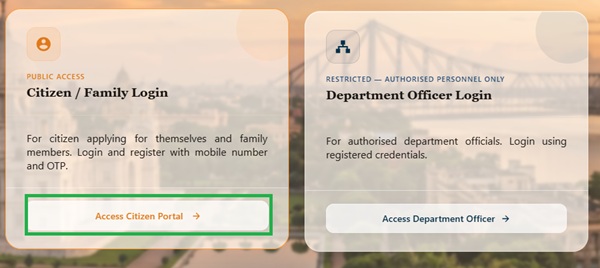
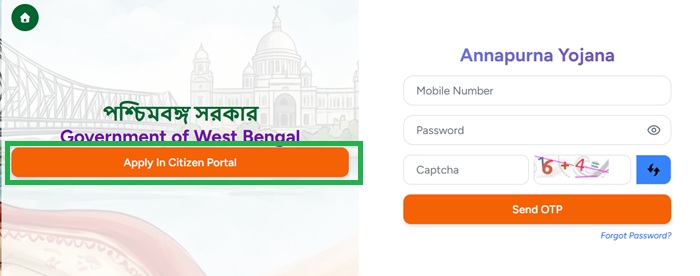
- Click on the "Access in Citizen Portal"
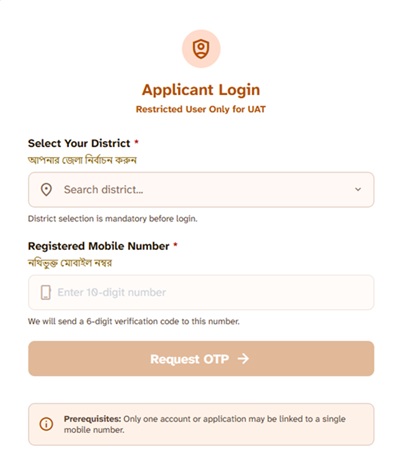
- Select district and enter your registered mobile number.
- Click Send OTP
- Enter the OTP received on your mobile number
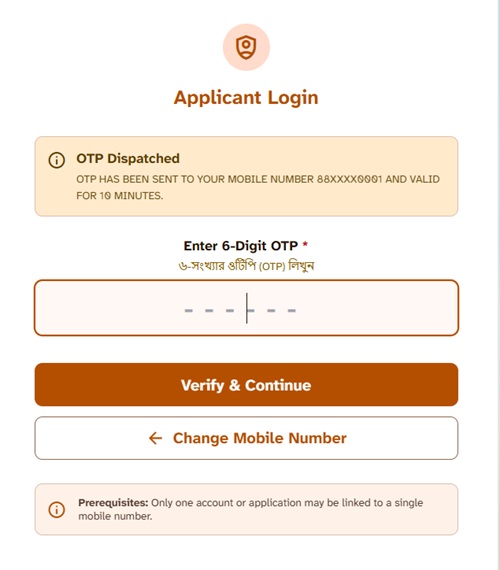
- The online application form will appear on your screen.
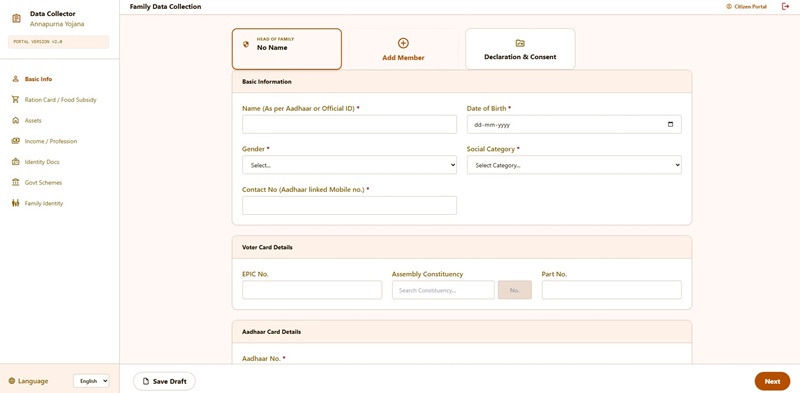
- You can fill out the application form and submit it.
How to Check Annapurna Yojana Application Status Online?
The Government of West Bengal has introduced an online application tracking facility through the official Social Registry Portal, allowing applicants to check the status of their Annapurna Yojana application from anywhere without visiting government offices or enquiry counters. Beneficiaries who have already submitted their Family Level Data Collection Form can use this facility to monitor the progress of verification and approval in real time.
To check the status of an Annapurna Yojana application, applicants must first access the portal through the Citizen / Family Login option and sign in using their registered mobile number. After successful authentication, the applicant dashboard becomes available, where a dedicated Track Status section displays the latest progress of the submitted application.
The status shown on the portal may change as the application moves through different stages of scrutiny and verification. Depending on the current stage, applicants may see one of the following status messages:
- Submitted - The application has been successfully submitted on the portal and is awaiting processing by the concerned authorities.
- Under Enquiry - The application is currently undergoing field-level enquiry or verification by the designated officials.
- For Further Verification - Additional verification, document review, or scrutiny is required before a final decision can be taken on the application.
- Approved - The applicant has successfully cleared the verification process and has been found eligible under the scheme.
- Rejected - The application has been rejected due to verification findings, incorrect information, document-related issues, or failure to satisfy eligibility requirements.
One of the most significant improvements introduced through the Social Registry Portal is the availability of detailed rejection remarks. Earlier, beneficiaries often remained unaware of why their applications were not approved. The new system allows applicants to view the specific reason for rejection directly on their dashboard, helping them understand the issue and take corrective action wherever possible.
If an applicant feels that the rejection was based on incorrect information, incomplete verification, or any other discrepancy, the portal provides a dedicated Objection & Claim facility. Through this module, beneficiaries can submit objections, provide additional information, upload supporting documents where required, and request a review of their application by the concerned authorities.
The online tracking system also improves transparency by allowing applicants to regularly monitor their application without depending on intermediaries. Instead of waiting for physical communication or visiting offices repeatedly, beneficiaries can log in to the portal at any time to check whether their application is under enquiry, pending verification, approved, or rejected.
Overall, the introduction of the Track Status and Objection & Claim modules has made the Annapurna Yojana application process more transparent, accountable, and applicant-friendly. These features enable beneficiaries to follow every stage of their application journey, view verification outcomes, understand rejection reasons, and seek reconsideration of disputed cases directly through the Social Registry Portal.
What Should Applicants Do If Annapurna Yojana Application Status Shows "Under Enquiry" or "For Further Verification"?
If the Social Registry Portal displays "Under Enquiry" or "For Further Verification" against your application, it indicates that the verification process is still in progress and the concerned authorities are examining the information submitted by the applicant before taking a final decision.
These statuses should not be treated as rejection notices. Instead, they signify that the application has moved into the verification stage, where officials are validating the details provided during registration to ensure that the applicant satisfies the eligibility conditions of the scheme.
During this stage, the Government may assign a Block Level Officer (BLO), Anganwadi Worker, or any other designated Enquiry Officer to verify the information submitted in the application. The verification process is carried out to confirm the applicant's identity, family composition, residential status, income details, and other eligibility-related information recorded on the portal.
Applicants may experience any of the following during the verification process:
- The designated Enquiry Officer may visit the applicant's residence to conduct physical verification and confirm the information provided in the application.
- The officer may examine family details, identity documents, residence-related information, and supporting documents submitted during registration.
- Additional clarification, supporting records, or further information may be requested if any discrepancy, mismatch, or incomplete detail is identified during scrutiny.
- The applicant may receive calls or verification-related communication on the registered mobile number provided during application submission.
Applicants are advised to cooperate fully with the verification team and ensure that all relevant documents are readily available whenever requested. Keeping documents organized and responding promptly to any verification-related communication can help prevent unnecessary delays in processing.
Any incorrect, incomplete, inconsistent, or unverifiable information may result in additional scrutiny and could delay the final disposal of the application. Therefore, applicants should ensure that the details submitted on the portal accurately reflect their current circumstances.
If no field visit has taken place for an extended period, or if the applicant wishes to follow up on the status of verification, they may contact or visit the concerned BLO, Anganwadi Worker, Enquiry Officer, Block Development Office (BDO), or Sub-Divisional Office (SDO) and provide their application details for necessary assistance and follow-up.
Once the enquiry and verification process is completed, the application status may be updated to Approved, Rejected, or another final status on the Social Registry Portal. Applicants are advised to log in periodically and monitor their dashboard for the latest updates regarding their application.
Can Applicants Edit Submitted Details on the Annapurna Yojana Portal?
Unlike some government scheme portals that allow post-submission corrections, the Annapurna Yojana Social Registry Portal does not currently provide a self-service facility for applicants to edit, modify, or update their application after final submission. Once the application form has been successfully submitted, the information entered by the applicant generally cannot be changed through the Citizen / Family Login.
For this reason, applicants should carefully review every detail before submitting the application. Particular attention should be given to the applicant's name, family information, mobile number, address details, identity-related information, and any other data entered during registration.
Checking the application thoroughly before final submission can help avoid delays, verification issues, and the need for subsequent correction requests. Many application-related problems arise due to simple data entry mistakes that could have been identified during the review stage.
If an applicant discovers an error after submission, a correction request may be made through the concerned government office. Wherever corrections are permitted under departmental procedures, authorized officials may update the information through their departmental login after verifying the applicant's identity, supporting documents, and the nature of the requested correction.
Applicants who wish to request a correction in their submitted application can follow the steps below:
- Visit the concerned Block Development Office (BDO) or Sub-Divisional Office (SDO).
- Carry the Temporary Application ID generated after successful submission of the application.
- Inform the concerned official about the specific information that requires correction or modification.
- Submit supporting documents, wherever required, to establish the correctness of the revised information.
- After verification, the authorized official may update the details through the departmental login, subject to applicable rules, verification requirements, and departmental approval.
Applicants should preserve their Temporary Application ID carefully, as it serves as an important reference number for status tracking, verification enquiries, correction requests, and future communication related to the Annapurna Yojana application.
Since correction facilities and departmental procedures may change from time to time, applicants are advised to follow the instructions provided by the concerned authorities and regularly check the Social Registry Portal for any updates regarding application management and correction services.
Can Beneficiaries Check Payment Status on the Annapurna Yojana Portal?
One of the most common questions among beneficiaries is whether the Annapurna Yojana benefit amount has been credited to their bank account. At present, the Annapurna Yojana Social Registry Portal does not provide a dedicated online facility that allows beneficiaries to directly view payment status, transaction history, or installment credit details through their login dashboard.
Beneficiaries can verify the payment status by checking the bank account linked to their Annapurna Yojana application. Once the Government of West Bengal releases the benefit amount, it is transferred directly into the beneficiary's bank account through the Direct Benefit Transfer (DBT) system, eliminating the need for intermediaries and ensuring direct payment to eligible recipients.
Beneficiaries can check their payment status by following the steps below:
- Update your bank passbook at the concerned bank branch or passbook printing kiosk and review recent credit entries.
- Check the latest transactions in the bank account that was provided during the Annapurna Yojana application process.
- Alternatively, use ATM services, mobile banking applications, internet banking portals, UPI-linked banking apps, or SMS banking facilities to view recent account transactions.
- If the application has already been approved but the payment has not been received, contact the concerned BDO Office, SDO Office, municipality office, or other designated authorities for assistance and verification.
Beneficiaries should ensure that the bank account details submitted during registration are accurate, the account remains operational, and Aadhaar seeding and DBT-related services are active wherever required. Incorrect bank account information or inactive accounts may result in payment delays or transaction failures.
What Does the OTP-Based Login System Suggest?
The Social Registry Portal uses an OTP-based mobile login system for beneficiary access. While the government has not publicly detailed every technical feature linked to this login mechanism, the presence of OTP authentication provides useful indications regarding how the portal is designed to manage beneficiary accounts and online services.
Based on the features currently visible on socialregistry.wb.gov.in, the OTP-based login system suggests the following:
- Beneficiary authentication: OTP verification through a registered mobile number helps ensure that the individual accessing the portal is the actual beneficiary associated with the application and registered records.
- Profile verification: After login, beneficiaries may be able to access information related to their application, family details, verification status, and other records maintained within the Social Registry framework.
- Secure application submission: OTP-based authentication provides an additional layer of security compared to traditional password-only systems, particularly where personal, family, and banking information is involved.
- Aadhaar-mobile linkage: Since many government welfare schemes rely on mobile-based authentication and beneficiary verification, maintaining an active mobile number linked with Aadhaar and other government records can help ensure smooth communication and access to services.
The presence of a dedicated Forgot Password option alongside OTP-based authentication further suggests that the portal supports multiple account recovery and login mechanisms, enabling users to regain access to their accounts when required.
Applicants should always keep their registered mobile number active, as important communications regarding login authentication, verification updates, status tracking, and other beneficiary-related services may be delivered through the mobile number associated with the portal account.
Latest Update on the Annapurna Yojana Portal
- 19 May 2026: The Government of West Bengal issued the official notification for the implementation of Annapurna Yojana, formally outlining the framework for providing benefits to eligible women across the state.
- 27 May 2026: Offline application forms were released in Bengali, English, and Hindi, enabling eligible women to begin preparing and submitting their applications through designated channels.
- 1 June 2026: Annapurna Yojana was officially launched throughout West Bengal. Existing Lakshmir Bhandar beneficiaries who were migrated to the scheme became eligible for benefits subject to verification, approval, and fulfillment of applicable conditions.
- 3 June 2026: The Government of West Bengal activated the Annapurna Yojana Family Level Data Collection Portal, allowing eligible women to complete online registration, submit family-level information, and participate in the verification process through the Social Registry Portal at socialregistry.wb.gov.in.
- 3 June 2026: The government released the first installment of ₹3,000 through Direct Benefit Transfer (DBT) and credited the amount directly into the Aadhaar-linked bank accounts of more than 28 lakh eligible beneficiaries.
- 1 July 2026: The Government of West Bengal credited the second installment of ₹3,000 directly into the Aadhaar-linked bank accounts of more than 1.1 crore eligible women. The payment was formally announced during a programme held at Netaji Indoor Stadium, Kolkata. Out of approximately 1.6 crore total applicants, around 26 lakh applications were rejected, primarily because the applicants were identified as non-Indian citizens or their names had been removed from electoral rolls during the Systematic Intensive Revision (SIR) 2026 process without applying under the Citizenship Amendment Act (CAA). Approximately 24 lakh applications remained under verification and were expected to be considered in future payment cycles. Beneficiaries who have not received payment are advised to verify Aadhaar-bank account seeding and ensure that DBT services remain active.
- Current Status: Both online and offline application facilities remain available. Eligible applicants can register through the Social Registry Portal at socialregistry.wb.gov.in or submit the prescribed application form through BDO offices, SDO offices, municipality offices, and government-authorized registration camps.
- Application Window: As notified by the government, offline applications can be submitted within 90 days from 1 June 2026, which is expected to remain open approximately until 29 August 2026, subject to any further government notification or extension.
Applicants and beneficiaries are advised to regularly monitor official government announcements and the Social Registry Portal for the latest updates regarding registration, verification, payment releases, objection handling, beneficiary lists, and future installments under Annapurna Yojana.
Important Warning About Fake Websites
With Annapurna Yojana being one of the most searched government schemes right now, fake websites and WhatsApp links are circulating. Protect yourself:
- Use only .gov.in websites: The only official and authenticated website which deliver useful and updated information about Annapurna Yojana is socialregistry.wb.gov.in.
- Never share your OTP with anyone - no government officer will ask for your OTP over phone or WhatsApp
- Avoid unofficial WhatsApp links claiming to have the Annapurna application form or registration link
- No agent fee: There is no fee to apply for Annapurna Yojana at any stage - if someone asks you to pay to register, it is a scam
- Report scams: Call 1930 (Cyber Crime Helpline) or visit cybercrime.gov.in
Official Links
- Annapurna Yojana New Portal - socialregistry.wb.gov.in
- Privacy Policy - socialregistry.wb.gov.in
- Legal Disclaimer - socialregistry.wb.gov.in
- Copyright Policy - socialregistry.wb.gov.in
- Hyperlink Policy - socialregistry.wb.gov.in
- Terms and Conditions - socialregistry.wb.gov.in
The new Annapurna Yojana portal at socialregistry.wb.gov.in is now live and includes a login interface with OTP verification - but citizens should rely only on official government announcements from the Government of West Bengal before assuming online registration has started. For now, offline applications remain the confirmed channel for new applicants.
Comments
Annapurna bhander
Good
In reply to Annapurna bhander by Mayaranidas (not verified)
Anupuran
Bank account
Annapurna
Amar bharir lok pabe
Arnopurna bhandar
Tatas check
HOW TO CHECK ANNAPURNA STATUS
HOW TO CHECK ANNAPURNA STATUS
Sithalluchi
Coochbehair
Ornoporna jojoma
Ami 7থারিক abandon kora chilam akono taka payni
Anapurna bhandar
Anapurna bhandar register did not show the account
Annapurna from verify
From verify
Annapurna jojona
Amar G.P number palsunda ii er poriborte palsunda i hoe geche
Annapurna bhandar
321108800143 আমার একাউন্টে এখনো কোন টাকা ঢোকেনি।
ANNAPURNA VANDAR
My status is payment failed, so what can I do for this?? Please reply 🙏
Annapurna yojana
আমার স্ত্রীর একাউন্টে এখনও অন্নপূর্ণা প্রকল্পের টাকা ঢোকেনি । Application no 317201541430 , কারণ জানতে পারছি না ।
Apply kasan no 304209314736
Ai apply kasan no te ta ami kee annapurna bhandar taka pabo naa
Das
Na
Family Level Data Collection Portal
Family Level Data Collection Portal
Request for Release of Pending Annapurna Yojana Payment
Confirm Submission
📋 Please confirm your details:
1. Name: Sunati Barman
2. Age: 46
3. Gender: Female
4. District: Dakshin Dinajpur
5. Area: Rural
6. Block: TAPAN
7. Cantact: 89716*****
8. Address: Dakshin Dinajpur West Bengal 733127
9. Grievance Category: WCD-Annapurna Yojana Individual Benefit Scheme
10. Grievance: আমি সুনতি বর্মন। আমার অন্নপূর্ণা যোজনার আবেদনের রেফারেন্স নম্বর হলো। পোর্টাল চেক করে দেখা যাচ্ছে যে আমার আবেদনটি দীর্ঘদিন ধরে 'Under Process' বা প্রক্রিয়াকরণ অবস্থায় আটকে রয়েছে। এই কারণে আমি এই প্রকল্পের প্রাপ্য টাকা সময়মতো পাচ্ছি না। অনুগ্রহ করে আমার এই সমস্যাটি খতিয়ে দেখে দ্রুত সমাধান করার ব্যবস্থা করুন যাতে আমি বকেয়া টাকা পেতে পারি। ধন্যবাদ
West Bengal
4masher onopuno taka dukar nai
Annapurna bhandar
Applied but not yet received any communication
TAKA DHUKCHEE NA
AKHONO OBDI KONO BENEFIT TAKA DHUKE NAI
Annapurna yojana
এখনো পাইনি
Annapurna jujana
Under process
for furthar verification
আমি জুলাই মাসে টাকা ঢুকেছে তারপর আর ঢুকছেনা
Annapurna
আমি এক বার টাকা পাইনি
Add new comment