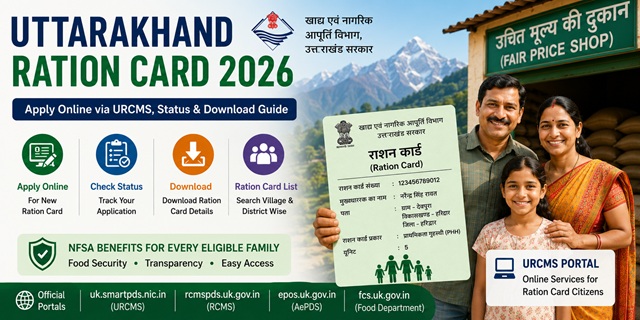
Uttarakhand has made ration card services much easier with the launch of the URCMS (Unified Ration Card Management System) portal at uk.smartpds.nic.in. Earlier, people usually had to visit the DSO (District Supply Office) or BDO (Block Development Office) for a new Ration Card, adding family members, removing names, or making corrections. Now, most of these services can be completed online from home through a simple citizen login process.
One of the biggest advantages of the new system is its affordability. The application fee for a new ration card is only Rs. 5, making it one of the lowest-cost ration card services in India. Uttarakhand also provides a special facility for students, government employees, and certain other categories who are living away from their permanent residence. Such applicants may be able to apply using a certificate issued by the head of their institution or office, subject to departmental rules.
To help citizens access every ration card-related service from one place, the Government of Uttarakhand operates multiple official portals. Each portal serves a specific purpose, such as online applications, ration card records, biometric authentication, or fair price shop monitoring.
All official portals for Uttarakhand ration card services:
- URCMS Portal (New): uk.smartpds.nic.in - Apply for a new ration card, add or remove family members, update details, and manage applications online.
- Food Department Portal: fcs.uk.gov.in - Official website of the Food, Civil Supplies and Consumer Affairs Department with notifications, guidelines, and service information.
- RCMS Portal: rcmspds.uk.gov.in - Check ration card details, beneficiary records, and related information.
- AePDS Portal: epos.uk.gov.in - Used for Aadhaar authentication, e-KYC, and biometric ration distribution services.
- FPS Automation Status: uk.dhaanyapurti.nic.in - Monitor fair price shop automation and public distribution system activities.
Key Details at a Glance
| Detail | Information |
|---|---|
| Issuing Authority | Directorate of Food, Civil Supplies and Consumer Affairs, Government of Uttarakhand |
| New Online Portal (URCMS) | uk.smartpds.nic.in |
| Food Department Portal | fcs.uk.gov.in |
| RCMS Portal | rcmspds.uk.gov.in |
| AePDS Portal | epos.uk.gov.in |
| Application Fee | Rs. 5 for a new ration card application |
| Monthly Entitlement (PHH) | 5 kg food grains per eligible person per month |
| Monthly Entitlement (AAY) | 35 kg food grains per eligible family per month |
| Commissioner Office Phone | 0135-2780765 |
| Commissioner Email | [email protected] |
| PDS Toll Free Helpline | 1967 |
What is the URCMS Portal (uk.smartpds.nic.in)?
The Unified Ration Card Management System (URCMS) is Uttarakhand's latest online platform for ration card services. Developed by NIC (National Informatics Centre), the portal has been designed to reduce paperwork, save time, and allow citizens to access services without repeatedly visiting government offices.
In simple terms, URCMS works as a single digital window where families can manage almost every ration card-related task from their computer or mobile phone. Once you log in, the portal guides you through each service step-by-step, making the process easier even for first-time users.
Through URCMS, citizens can:
- Apply for a new ration card online from home
- Add a newborn child, spouse, or any eligible family member to an existing ration card
- Remove family members due to marriage, migration, death, or other valid reasons
- Correct details such as name, address, date of birth, and other information recorded on the ration card
- Upload required documents digitally without submitting physical copies initially
- Track the status of applications and modification requests online
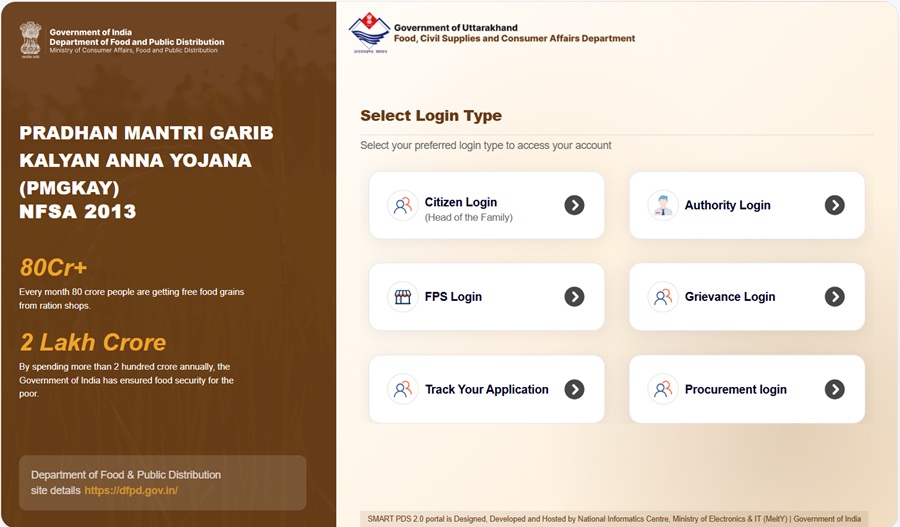
How to login:
- New applicants: Use Citizen Login with Aadhaar-based OTP verification
- Existing ration card holders: Login using the registered mobile number of the head of the family
Offline help is still available at your nearest Tehsil Office or District Supply Office (DSO) for those who need assistance with the online process.
Types of Ration Card in the State
Uttarakhand issues different types of ration cards based on a family's economic condition and eligibility under the National Food Security Act (NFSA). The type of ration card determines how much subsidised food grain a family can receive every month through the Public Distribution System (PDS).
| Type | Full Name | Who Gets It | Monthly Entitlement |
|---|---|---|---|
| AAY | Antyodaya Anna Yojana | The poorest and most vulnerable families, including landless labourers, rural artisans, widows, elderly persons without regular income, and other highly disadvantaged households identified by the government | 35 kg per family per month |
| PHH | Priority Household | Eligible low-income families covered under the National Food Security Act (NFSA) as per the criteria prescribed by the Government of Uttarakhand | 5 kg per person per month |
| APL/ SFY | Above Poverty Line / State Food Yojana | Families that are not covered under NFSA but require a ration card for identification, address proof, or benefits available under state-specific food schemes | Limited or no food subsidy |
Who Can Apply
If you want to apply for a new ration card in Uttarakhand, your family must satisfy the eligibility conditions prescribed by the Food and Civil Supplies Department. Before starting the application, make sure the following requirements are met:
- Must be a permanent resident of Uttarakhand and have valid proof of residence within the state
- Must be at least 18 years of age to apply as the head of the family
- The family should not already possess a valid ration card anywhere else in India
- Families holding expired, cancelled, or temporary ration cards may apply for a fresh ration card, subject to eligibility
- Newly married couples who do not have a separate ration card can apply for a new family ration card
- Students studying in urban areas may apply by submitting a certificate issued by the head of their educational institution confirming both their institution and residential address
- Government and semi-government employees residing away from their permanent home may apply by providing a certificate from the head of their office mentioning their residential address and family details
Documents You Need to Apply
Whether you apply online through the URCMS Portal or submit an application through the traditional process, keep the following documents ready before starting the application. Having all documents prepared in advance will help avoid delays during verification.
- Aadhaar cards of all family members - mandatory for Aadhaar-based OTP verification and identity validation on the URCMS portal
- Address proof such as an electricity bill, water bill, or telephone bill showing the current residential address
- Rent receipt or rent agreement if the family is residing in a rented accommodation
- Surrender Certificate issued by the previous Fair Price Shop (FPS), if the family is shifting from another town, village, or Gram Panchayat
- Previous ration card, if applying due to transfer from another location within or outside the state
- Certificate from the Institutional Head for government or semi-government employees confirming the residential address and number of family members residing with the applicant
- Certificate from the Institutional Head for students residing in urban areas confirming the name of the educational institution and current residential address
- Recent passport-size photograph of the head of the household
- Mobile number linked with Aadhaar, as OTP verification is required for various online services on the URCMS portal
Download application forms and related documents from fcs.uk.gov.in/downloads.
How to Apply Online via URCMS (uk.smartpds.nic.in)
The URCMS Portal is now the easiest and fastest way to apply for a new ration card in Uttarakhand. You can complete the entire application process from your home using a mobile phone or computer. In most cases, there is no need to visit any government office unless additional verification is required.
- Open the official URCMS portal at uk.smartpds.nic.in.
- On the homepage, click on Citizen Login.
- If you are applying for a new ration card, enter your Aadhaar number. An OTP will be sent to the mobile number linked with your Aadhaar. Enter the OTP to verify your identity and log in.
- After successful login, select New Ration Card Application from the available services.
- Fill in all required details carefully, including your name, complete address, district, block, village, Gram Panchayat, ward, and other information requested in the application form.
- Add every family member who should be included in the ration card. Enter their Aadhaar number, name, age, and other required details exactly as recorded in their Aadhaar.
- Upload clear scanned copies or photographs of all required documents. Make sure the documents are readable and not blurred.
- Before submitting, review every detail carefully. Even a small mistake in name, Aadhaar number, or address may delay the approval process.
- Click Submit. Once the application is successfully submitted, an Acknowledgement Number will be generated. Save this number carefully because it will be required later to track your application status.
After submission, the department may conduct a field verification through a Supply Inspector to confirm the details provided in the application. Once verification is completed and the application is approved, your ration card is issued and linked to the nearest Fair Price Shop (FPS) where you can receive your monthly ration entitlement.
How to Apply Offline (DSO/BDO Office)
If you are not comfortable using online services, do not have internet access, or need assistance with the application process, you can still apply through the traditional offline method.
- For Urban Areas: Visit your nearest District Supply Office (DSO) with the completed application form and all supporting documents.
- For Rural Areas: Visit your Block Development Office (BDO) and submit the application through the concerned Gram Panchayat Officer (GPO).
- Many Tehsil Offices also assist citizens in completing URCMS-related applications and resolving ration card issues.
- You can download the application form free of cost from fcs.uk.gov.in/downloads or collect a printed copy from the DSO or BDO office.
Once your application and documents are submitted, the department carries out verification and processes the request according to the applicable rules.
Application Fee: Rs. 5
How to Add or Remove a Family Member Online
The URCMS portal also allows existing ration card holders to update family details online. Whether you want to add a newborn child, include a newly married spouse, or remove a member who has shifted elsewhere, the entire process can now be completed online.
- Visit uk.smartpds.nic.in.
- Click on Citizen Login and enter the registered mobile number of the family head. Complete OTP verification to access your ration card dashboard.
- After login, your existing ration card details will be displayed automatically.
- To Add a Family Member: Click on Add Member. Enter the new member's Aadhaar number, full name, date of birth, gender, and relationship with the head of the family.
- Upload the required supporting document:
- Birth Certificate for a newborn child
- Marriage Certificate for a newly married spouse
- Other valid relationship documents wherever applicable
- To Remove a Family Member: Select the member's name from the list and choose the appropriate reason for removal, such as death, marriage, migration, or any other valid reason.
- Upload the relevant supporting document, such as a death certificate, marriage certificate, or migration-related proof.
- Submit the request and save the generated Acknowledgement Number for future reference.
Once verified by the department, the member details on your ration card will be updated accordingly.
How to Make Corrections in Ration Card Online
If there is any mistake in your ration card, such as an incorrect name, wrong date of birth, spelling error, or outdated address, you can request a correction online through the URCMS portal.
- Go to uk.smartpds.nic.in and log in using the family head's registered mobile number and OTP.
- From the dashboard, select the Correction / Modification service.
- Choose the particular detail that needs correction, such as name, address, age, date of birth, or any other available field.
- Enter the correct information exactly as it appears on the supporting document.
- Upload the relevant proof document, such as Aadhaar Card, address proof, birth certificate, or any other document required for the requested correction.
- Verify all information and submit the correction request.
- After successful submission, note down the Acknowledgement Number for tracking purposes.
The correction request will be reviewed by the department, and the updated details will be reflected after approval.
How to Check Application Status
After submitting a new application or any modification request, you can easily track its progress online without visiting any office.
- Visit the official RCMS portal at rcmspds.uk.gov.in.
- Look for options such as Know Your Ration Card or Application Status on the homepage or dashboard.
- Enter your Acknowledgement Number or Ration Card Number, depending on the search option available.
- Complete the captcha verification and click on Verify or Search.
- The current status of your application will appear on the screen. It may show stages such as:
- Application Submitted
- Under Verification
- Field Verification Pending
- Approved
- Rejected
- Ration Card Issued
Checking the status regularly helps you know whether any additional action or document is required from your side.
How to Check the Ration Card List
If you want to see whether your family's name is included in the Uttarakhand ration card list, you can check it online from home. The list is available village-wise, ward-wise, and Fair Price Shop (FPS) wise on the official RCMS portal.
- Go to rcmspds.uk.gov.in.
- Click on Ration Card Details or PDS Stake Holders from the homepage menu.
- Select your District from the list of Uttarakhand's 13 districts.
- Choose your Block (for rural areas) or Town (for urban areas).
- Select your Gram Panchayat or Ward.
- Choose your designated Fair Price Shop (FPS).
- The complete ration card list linked to that FPS will appear on the screen. You can view ration card numbers, beneficiary details, and family member information.
If you want to monitor ration distribution and FPS performance in your area, you can also visit uk.dhaanyapurti.nic.in, where FPS-wise automation and distribution details are available.
How to Download e-Ration Card
If your ration card has already been issued, you do not always need to carry the physical card. You can download a digital copy (e-Ration Card) and keep it safely on your phone or computer.
Via RCMS Portal
This is the easiest method for most ration card holders.
- Go to rcmspds.uk.gov.in.
- Click on Know Your Ration Card.
- Enter your Ration Card Number (SRC ID) and the captcha code shown on the screen.
- Click View Report.
- Your complete ration card details will open.
- Click Print or Download PDF to save a copy of your e-Ration Card.
Via DigiLocker
If you already use DigiLocker, you can store your ration card permanently in your government-issued digital document wallet.
- Visit digilocker.gov.in or open the DigiLocker mobile app.
- Log in using your Aadhaar-linked mobile number.
- Search for Ration Card.
- Select Food and Civil Supplies Department, Uttarakhand from the issuer list.
- Enter your ration card number and district details.
- Click Get Document.
- Your e-Ration Card will automatically appear in the Issued Documents section and can be downloaded anytime.
The DigiLocker copy is digitally verified and is considered valid just like the physical ration card.
How to Link Aadhaar and Complete e-KYC
The Uttarakhand Government has made Aadhaar seeding and e-KYC extremely important for all eligible ration card beneficiaries. Completing e-KYC helps ensure that ration benefits reach the correct family members without interruption.
If e-KYC remains pending for a long time, beneficiaries may face issues while receiving subsidised food grains. Therefore, it is advisable to complete the process as soon as possible.
- Visit your nearest Fair Price Shop (FPS) along with Aadhaar cards of all family members.
- Request the FPS dealer to complete Aadhaar Seeding through the ePoS device.
- Each family member must provide fingerprint authentication for biometric verification.
- Once verification is completed, the Aadhaar details are linked with the ration card record.
- e-KYC can also be completed through the IMPDS portal at epos.uk.gov.in.
- Citizens can additionally use the Mera e-KYC App to complete the process from home where applicable.
For a detailed step-by-step guide, read: How to Link Ration Card with Aadhaar Card.
Using Your Card in Another State (ONORC)
If you are working, studying, or living outside Uttarakhand, you do not need to transfer your ration card to another state just to receive ration benefits.
Under the One Nation One Ration Card (ONORC) scheme, eligible NFSA beneficiaries can collect their ration from any Fair Price Shop across India using Aadhaar-based authentication.
For example, if your ration card was issued in Uttarakhand but you are currently working in Delhi, Mumbai, Bengaluru, or any other city, you can still receive your entitled food grains from a nearby FPS without obtaining a new ration card.
You only need your Aadhaar-linked ration card details for authentication at the shop.
For complete details, read: One Nation One Ration Card (ONORC) Complete Guide.
How to File a Grievance
If your ration card application is delayed, your name is missing from the beneficiary list, ration is not being distributed correctly, or you face any other PDS-related issue, you can contact the department through the following channels:
- Online Grievance Portal: fcs.uk.gov.in/grievance-redressal/
- Commissioner Office: 0135-2780765
- Office Address: Khadya Bhawan, Mussoorie Bypass Ring Road (Ladpur), Dehradun
- Commissioner Email: [email protected]
- Secretary Email: [email protected]
- PDS Toll Free Helpline: 1967
- State Consumer Disputes Redressal Commission: 0135-2669719
Official Portals and Useful Links
Save the following official links. They cover almost every ration card service available in Uttarakhand.
- URCMS Portal - uk.smartpds.nic.in (Apply online, add/remove members, corrections)
- Food Department Uttarakhand - fcs.uk.gov.in
- New Ration Card Procedure - fcs.uk.gov.in
- Download Application Form - fcs.uk.gov.in
- RCMS Portal - rcmspds.uk.gov.in (Status, list, ration card details)
- AePDS Portal - epos.uk.gov.in
- IMPDS e-KYC - epos.uk.gov.in
- FPS Automation Status - uk.dhaanyapurti.nic.in
- Download e-Ration Card - DigiLocker
- Modification in Ration Card - fcs.uk.gov.in
- Transfer or Surrender - fcs.uk.gov.in
- Grievance Redressal - fcs.uk.gov.in
- Check Aadhaar Seeding Status - nfsa.gov.in
Commissioner Food and Civil Supply: 0135-2780765
Email: [email protected]
PDS Toll Free: 1967
Also read:
Ration Card in India - Complete Guide (2026)
How to Link Ration Card with Aadhaar Card
One Nation One Ration Card (ONORC) - Complete Guide
Disclaimer: This article is for informational purposes only. The URCMS portal (uk.smartpds.nic.in) was recently launched and processes may evolve over time. Before submitting any application or document, always verify the latest instructions on fcs.uk.gov.in and uk.smartpds.nic.in.
వ్యాఖ్యలు
uk.smartpds.nic.in
uk.smartpds.nic.in
వ్యాఖ్యానించండి