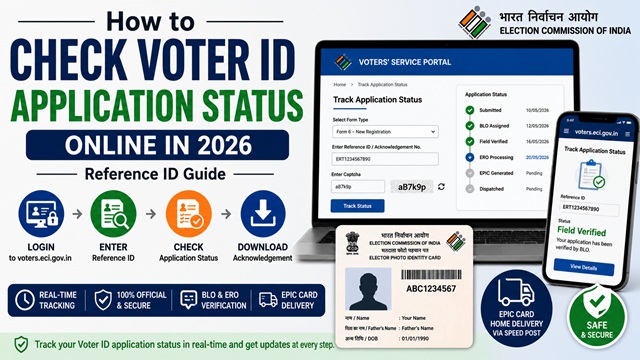
After submitting your voter registration application (Form 6), correction request (Form 8), or address update, you can track the exact status of your application online using the Acknowledgement Number (Reference ID) you received at the time of submission. The status updates in real time as your application moves through each stage of processing.
All status tracking is done on voters.eci.gov.in. It is free and requires only your Reference ID.
What You Need to Check Status
- Your Acknowledgement Number (Reference ID) - provided immediately after submitting any form online. It is also printed on the acknowledgement slip if you applied offline. If you lost your Reference ID, check your registered email or SMS inbox for the confirmation sent at the time of submission.
How to Check Status Online - Step by Step
- Go to voters.eci.gov.in.
- Log in with your registered mobile number and password. Enter the OTP received on your mobile.
- On the dashboard, click Track Application Status.
- Enter your Reference ID / Acknowledgement Number.
- Click Submit.
- Your current application status is displayed on screen.
You can also track via the Voter Helpline App: Open the app → tap Track Application Status → enter your Reference ID → tap Submit.
All Application Status Messages - What Each One Means
| Status Message | What It Means | What You Should Do |
|---|---|---|
| Submitted | Your application has been received by the system. Not yet processed. | Wait. No action needed. |
| BLO Assigned | A Booth Level Officer has been assigned to verify your address through a field visit. | Be available at home or ensure a family member is present for the BLO visit. |
| Field Verified | BLO has completed the field verification and submitted their report to the ERO. | Wait for ERO review. No action needed. |
| Under Process at ERO | The Electoral Registration Officer is reviewing your application and BLO report. | Wait. Processing typically takes 1-2 weeks after field verification. |
| Accepted / Approved | Your application has been approved. Your name has been added to or updated in the electoral roll. | You can now download your e-EPIC from voters.eci.gov.in. Physical EPIC card will be dispatched by Speed Post. |
| EPIC Generated | Your Voter ID card (EPIC) has been printed and is ready for dispatch. | Expect delivery via Speed Post to your registered address within 1-2 weeks. |
| Dispatched | Your EPIC card has been sent via India Post Speed Post. | Track delivery on indiapost.gov.in using the consignment number shown in the status page. |
| Rejected | Your application has been rejected by the ERO. The rejection reason is shown on screen and sent via SMS. | See the rejection reason, correct the issue, and resubmit. See below for what to do. |
How Long Does It Take After Each Status?
| Stage | Typical Time |
|---|---|
| Submitted to BLO Assigned | 1-7 days |
| BLO Assigned to Field Verified | 1-4 weeks |
| Field Verified to Approved | 1-2 weeks |
| Approved to EPIC Dispatched | 1-2 weeks |
| Dispatched to Delivered | 3-10 days via Speed Post |
| Total from Submission to Delivery | 15 days to 3 months depending on state |
Which Applications Can Be Tracked?
You can track the status of all voter-related applications using the same Track Application Status page:
- Form 6 - New voter registration application
- Form 6A - Overseas Indian voter registration
- Form 8 - Address update, name correction, or detail correction applications
- Duplicate EPIC request - Replacement card application
What to Do If Your Application is Rejected
Rejection is not permanent. You can always reapply after correcting the issue. The rejection reason is displayed on the status page and also sent by SMS to your registered mobile. Common rejection reasons include:
- BLO could not find you at the given address during field verification - you were not present
- Uploaded documents are blurred, unclear, or incomplete
- Name or date of birth in documents does not match what was entered in the form
- Your name is already registered in another constituency - you need Form 8 (address shift) instead of Form 6
- Address proof document shows a different address from what was entered in the form
Steps after rejection:
- Note the rejection reason shown on the status page.
- Correct the specific issue - update your documents, ensure your name and address match exactly, or arrange to be present for the next BLO visit.
- Resubmit the same form (Form 6 or Form 8) on voters.eci.gov.in. There is no penalty or waiting period for resubmission.
- If unclear about the rejection reason, call 1950 or visit your nearest ERO office.
How to Check Status Offline
If you do not have internet access, you can check your application status by:
- Visiting your nearest Electoral Registration Officer (ERO) office with your Reference ID and photo ID. The ERO can check the status on their system.
- Contacting your Booth Level Officer (BLO) directly. Find BLO contact details through the Voter Helpline App or by calling 1950.
- Calling the national Voter Helpline at 1950 with your Reference ID for a verbal status update.
Official Portals and Useful Links
- Voters’ Services Portal - voters.eci.gov.in (Track Application Status)
- India Post Speed Post Tracker - indiapost.gov.in
- Electoral Roll Search - electoralsearch.eci.gov.in
- Election Commission of India - eci.gov.in
National Voter Helpline: 1950 (Toll-free, All States)
Disclaimer: This article is for informational purposes only. Always refer to voters.eci.gov.in for the latest official information.
नवी प्रतिक्रिया द्या